


Family Sharing bundles digital content and simplifies managing purchases within a group. It allows apps, music, books, and other media to be purchased once and used by multiple people. This feature provides clarity, saves money, and enables easy management of shared payments. Purchase approval is the central element that determines how purchases are shared and billed.
Family Sharing was developed to centrally provide digital content. It brings structure to a family's media consumption and allows for transparent management of purchases. Purchase approval plays a key role in this. It determines which content is shared, who pays, and how purchases are visible on different devices. A clear overview of all steps is important to ensure the feature works reliably and no details are overlooked.
This is how purchase approval works
Purchase sharing can only be enabled by the Family Sharing organizer. Other members decide for themselves whether they want to share their purchases. Once purchase sharing is active for both the organizer and members, shared content such as apps, music, movies, or books is available, provided it's shareable. Purchases that can't be shared won't appear in the list. The organizer is responsible for paying for all purchases as long as purchase sharing remains active.
Shared content can be found in the App Store, iTunes Store, Apple Books, or the Apple TV app. It appears in the Purchases or Purchased section. In-app purchases are generally not displayed on this page, although some of them are shareable.
Activate purchase approval on iPhone or iPad
Family Sharing must be set up before Purchase Sharing can be used.
- Open settings and select the Family section.
- Open purchase release
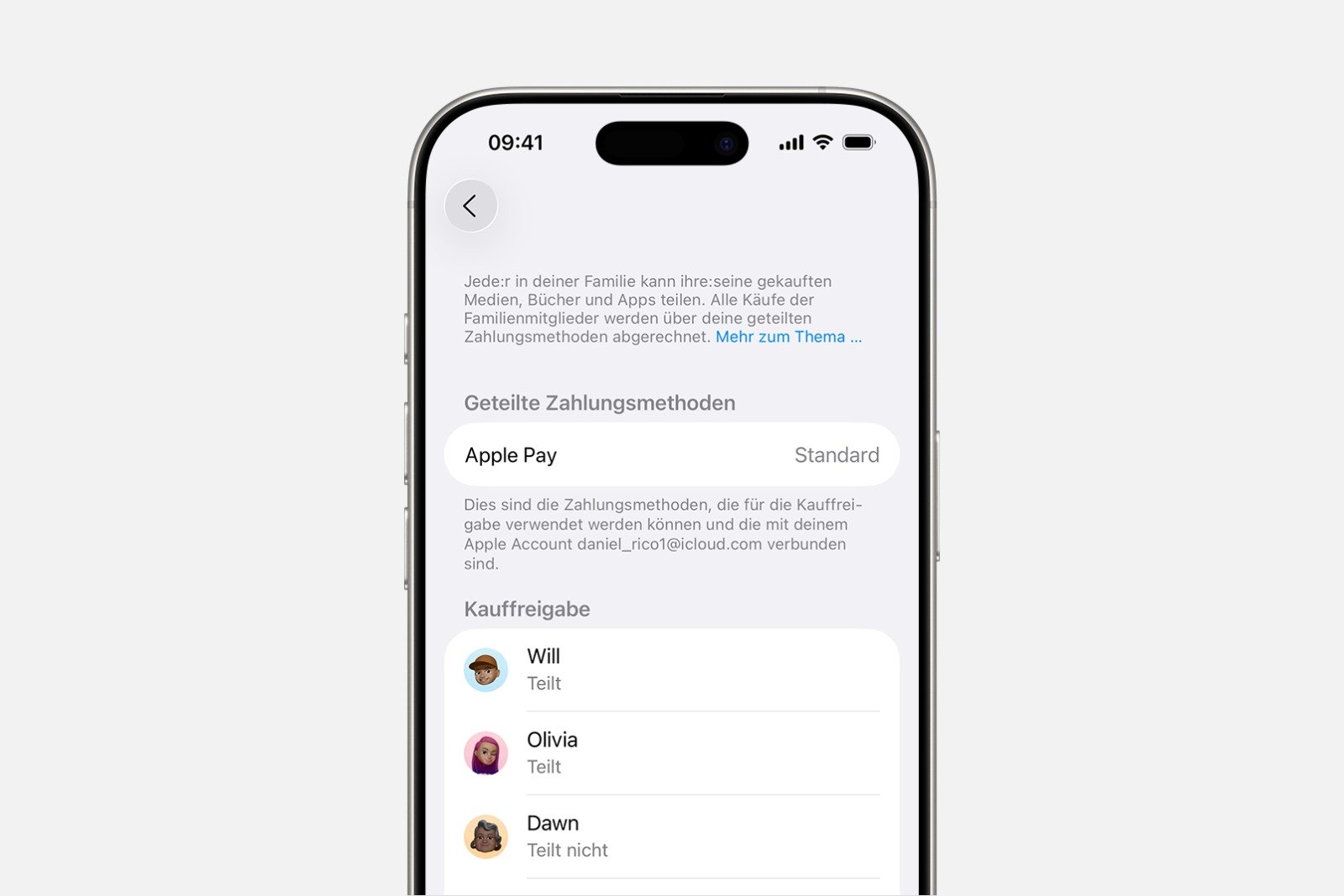
- Choose your own name and turn on "Share my purchases".
- Follow the instructions on the screen
- Under "Common payment method," check that the correct method is selected. This serves as the organizer's default payment method.
Enable purchase approval on Mac
Here too, a set-up Family Sharing option is required.
- Open the Apple menu and select System Preferences.
- Open family
- Select Share purchases
- Click on your own name and turn on "Share my purchases".
- Under "Shared payment methods," check that the information is correct.

How purchases are billed
Once purchase approval is activated, all purchases will be processed using the payment method saved by the family organizer. The organizer can update the payment method, add a new one, view purchase history, or check which payment methods are available in their country. The first time a family member makes a purchase, a brief confirmation may be required, such as entering the card's security code.
Members using their personal Apple Account balance will initially pay for their purchases using that balance. If the balance is insufficient, the remaining amount will be automatically charged to the organizer's payment method, provided purchase approval is enabled.
Disable purchase approval
If the organizer wants each family member to pay for their own purchases again, the purchase authorization can be quickly deactivated.
On iPhone and iPad
- Open settings and select Family.
- Open purchase release
- Select "End Purchase Release" and confirm "End Release".
On the Mac
- Open the Apple menu and select System Preferences.
- Select family
- Open purchase release
- Click "Cancel purchase approval" and confirm again.
After deactivation, purchases can no longer be shared. Access to shared content from other members is lost. Subscriptions like iCloud Plus or Apple TV can still be shared, but all purchases will again be paid for individually.
Approve a child's purchases
For children, the "Purchase Request" feature can be activated. This requires approval for all purchases or downloads before they can be executed. The organizer receives a notification on their device and can accept or decline the purchase. This feature provides control and prevents unwanted spending.
Purchase approval: Clarity and control with Family Sharing
Family Sharing creates a clear structure for sharing digital content. Purchase sharing combines convenience and transparency, as all content can be managed and shared centrally. With the ability to check payment methods, view purchases, and monitor children's purchases, the system remains transparent. Those who fully utilize Family Sharing benefit from easy administration, a shared media library, and a clear overview of costs. The best products for you: Our Amazon Storefront offers a wide selection of accessories, including those compatible with HomeKit. (Image: Shutterstock / FOTO Eak)
- Adjust family sharing and expand access to subscriptions
- Use Apple's Family Sharing to share content together
- iPhone tip: How alternative app distribution channels work
- iPhone tip: Access flight information directly in the system
- Family Sharing explained: Easily share and manage iCloud+
- Quickly set up Family Sharing on iPhone, iPad, and Mac
- iOS 26.2 explained: How the new AirDrop codes work
- iOS 26.2 enhances the Reminders app with alarm functionality
- Here's how to properly create a backup for iPhone and iPad
- Setting up and using Apple Car Key: All functions explained
- New iOS 26.2 feature: Screen flashes for notifications
- Longer battery life with iOS 26 – Adaptive Power explained
- Live translation with AirPods: Here's how the feature works
- iOS 26: The new focus mode „Reduce interruptions“
- iOS 26.1: Reactivate the classic stop button on the alarm clock
- iOS 26.1 brings a new lock screen setting for the iPhone
- iOS 26.1: Liquid Glass effects can be toned down
- watchOS 26 brings hints about the Apple Watch dial
- macOS 26 Update: Hidden Tools and Improvements
- New call history in iOS 26: All conversations at a glance
- iOS 26: iMessage not working? Apple announces the solution
- iOS 26 Tricks: 26 small innovations with a big impact
- iOS 26 solves the Bluetooth problem with AirPods in the car
- iPhone: How the new call waiting feature works in iOS 26
- iPhone gets new feature against spam and advertising calls
FAQ about Family Sharing and Purchase Sharing
Family Sharing allows you to share apps, music, movies, books, and other content within a group. All shared content appears in the Purchases or Bought section.
Purchase approval is only activated by the organizer. Members can share their purchases and gain access to the shared content of others. Payment is processed via the organizer's registered payment method.
Some content, such as certain in-app purchases, cannot be shared. Individual media or apps may also be excluded by the provider.
Setup is done via Settings and the Family section. There you can activate purchase sharing, select your own name, and turn on Share My Purchases.
In the system settings under Family, you can select Share purchases. Selecting your own name activates "Share my purchases" and verifies the payment method.
First, a member's personal Apple balance is used. If this is insufficient, the remaining amount is paid via the organizer's payment method.
Yes. You can stop shared purchases at any time on iPhone, iPad, or Mac. After that, shared purchases will no longer be available, but subscriptions can still be shared.
Children's purchases submitted via "purchase request" must first be approved by the organizer. The organizer receives a notification and can then approve or reject the request.
Yes. Subscriptions can still be shared, even if purchase sharing has been disabled.
Only the organizer of a family group can share. Members can only decide whether they want to share their purchases.





