


apple patient
  • Home
  • News
  • Rumors
  • Tips & Tricks
  • Reviews
  • Insights
No Result
View All Result
  • iPhone 18
  • iPhone 18 Pro
  • iPhone Duo
  • Apple Watch Series 12
  • Apple Watch Ultra 4
  • AirPods 5
  • iOS 27
  • iPadOS 27
  • macOS
  • MacBook Neo
  • iPhone 17e
  • AirTags
  • iOS 26
  • iPhone 17
  • MacBook Pro
  • iPadOS
  • iMac
  • Mac mini
  • HomePod
  • Apple TV
  • iPad Pro
  • iPhone Air
  • Apple Vision Pro
  • iPhone 16
  • AirPods 4
  • Apple Watch Ultra
  • HomePod Mini
  • MacBook Air
  • iPad
  • AirPods Max
  • AirPods Pro 3
  • Apple Watch Series 3
  • Mac Studio
  • Studio Display
  • iPad Air
  • iPad mini
  • watchOS 27
  • Apple CarPlay
  • Apple Pay
  • watchOS 26
  • Home
  • News
  • Rumors
  • Tips & Tricks
  • Reviews
  • Insights
No Result
View All Result
apple patient
No Result
View All Result
  • iPhone 18
  • iPhone 18 Pro
  • iPhone Duo
  • Apple Watch Series 12
  • Apple Watch Ultra 4
  • AirPods 5
  • iOS 27
  • iPadOS 27
  • macOS
  • MacBook Neo
  • iPhone 17e
  • AirTags
  • iOS 26
  • iPhone 17
  • MacBook Pro
  • iPadOS
  • iMac
  • Mac mini
  • HomePod
  • Apple TV
  • iPad Pro
  • iPhone Air
  • Apple Vision Pro
  • iPhone 16
  • AirPods 4
  • Apple Watch Ultra
  • HomePod Mini
  • MacBook Air
  • iPad
  • AirPods Max
  • AirPods Pro 3
  • Apple Watch Series 3
  • Mac Studio
  • Studio Display
  • iPad Air
  • iPad mini
  • watchOS 27
  • Apple CarPlay
  • Apple Pay
  • watchOS 26

iOS 26.2 explained: How the new AirDrop codes work

Milan Jovicic by Milan Jovicic
December 12, 2025 - 10:53 PM CET
in Apple Tips & Tricks
0
iOS 26.2 AirDrop

Image: Apple

WhatsAppFacebookEmail
Threads

With iOS 26.2, Apple released an update that specifically enhances AirDrop. The centerpiece is a new feature called AirDrop Codes. It's designed to simplify file sharing with people who aren't in your contacts, while maintaining a strong focus on security. iOS 26.2 thus complements AirDrop with a solution that strikes a balance between convenience and control.

AirDrop has been one of the most frequently used features on the iPhone for years. Photos, videos, and documents can be quickly transferred between devices without an app, cable, or cloud service. In practice, however, there have been recurring situations where the existing AirDrop settings were impractical. AirDrop was either too restricted or deliberately set to be very permissive. iOS 26.2 addresses this issue by introducing AirDrop codes as an additional option to complement the existing features.

AirDrop in iOS 26.2: An Overview

Previously, AirDrop offered three known receiving modes:

  • reception
  • Contacts only
  • Everyone for 10 minutes

These options remain available in iOS 26.2. The new AirDrop codes effectively add a fourth option. This is used automatically when an AirDrop transfer is made to a person who is not in your contacts.

What are AirDrop codes?

AirDrop codes are an additional layer of verification for AirDrop in iOS 26.2. When sending a file to an unknown recipient, the recipient's device displays a one-time code. This code must be entered by the sender to complete the transfer. Apple describes the feature in the official release notes as follows:

AirDrop codes provide an additional layer of verification when using AirDrop with unknown contacts by providing a code on the recipient's device that the sender must enter to complete the transfer.

Temporary AirDrop authorization for 30 days

A key feature of AirDrop codes in iOS 26.2 is the time-limited sharing option. After entering the one-time code, the sender and recipient can see each other as AirDrop options for 30 days. During this period, files can be exchanged without having to enter a code again. Apple treats these users as temporary AirDrop contacts. This can be managed via Settings → General → AirDrop.
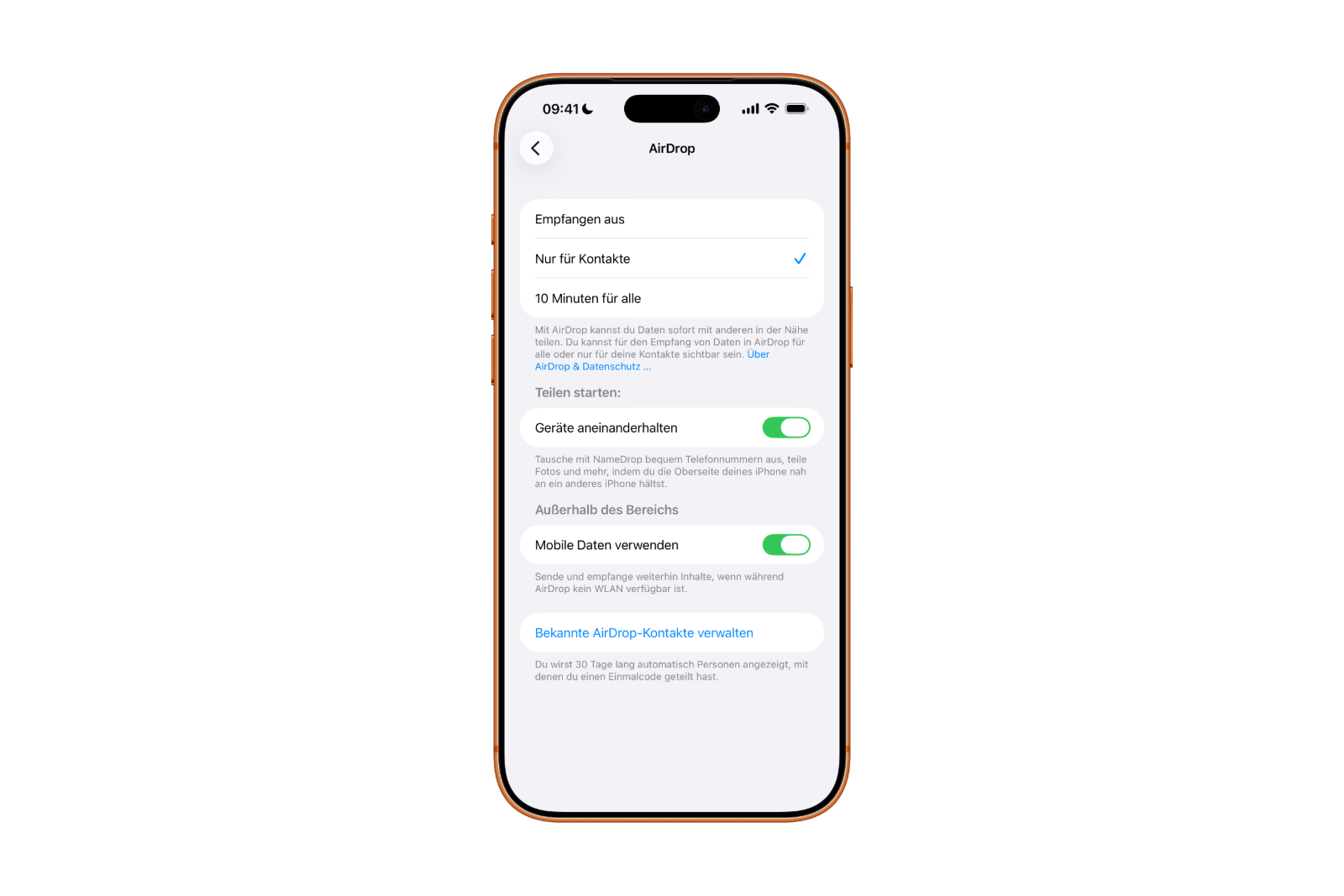
iOS 26.2 AirDrop Codes
Image: Apfelpatient

It indicates that people with whom a one-time code has been shared will automatically remain visible for 30 days.

Why Apple introduced AirDrop codes

In many everyday situations, there's a desire to share files with the same person multiple times without saving them directly as a contact. This is precisely where iOS 26.2 comes in.

The "Everyone for 10 minutes" mode significantly weakens security and is intended for exceptional cases. While "Contacts Only" is secure, it's cumbersome, as adding a new contact takes time and is often unnecessary. AirDrop codes fill this gap. They are quick, targeted, and offer significantly more control than open sharing.

iOS 26.2 makes AirDrop more flexible without compromising security

iOS 26.2 expands AirDrop with a well-designed feature that combines security and everyday usability. AirDrop codes allow for easy sharing with strangers without having to constantly create new contacts or fully open AirDrop. The one-time code entry and 30-day authorization period make the feature particularly convenient. iOS 26.2 demonstrates how a relatively small change can significantly improve the daily use of AirDrop. The best products for you: Our Amazon storefront offers a wide selection of accessories, including those for HomeKit. (Image: Apple)

  • iOS 26.2 enhances the Reminders app with alarm functionality
  • Here's how to properly create a backup for iPhone and iPad
  • Setting up and using Apple Car Key: All functions explained
  • New iOS 26.2 feature: Screen flashes for notifications
  • Longer battery life with iOS 26 – Adaptive Power explained
  • Live translation with AirPods: Here's how the feature works
  • iOS 26: The new focus mode „Reduce interruptions“
  • iOS 26.1: Reactivate the classic stop button on the alarm clock
  • iOS 26.1 brings a new lock screen setting for the iPhone
  • iOS 26.1: Liquid Glass effects can be toned down
  • watchOS 26 brings hints about the Apple Watch dial
  • macOS 26 Update: Hidden Tools and Improvements
  • New call history in iOS 26: All conversations at a glance
  • iOS 26: iMessage not working? Apple announces the solution
  • iOS 26 Tricks: 26 small innovations with a big impact
  • iOS 26 solves the Bluetooth problem with AirPods in the car
  • iPhone: How the new call waiting feature works in iOS 26
  • iPhone gets new feature against spam and advertising calls
  • iOS 26: New option saves time and data when sending photos
  • iOS 26: Over 10 hidden features everyone needs to know
  • iOS 26: Visual intelligence now also for screen content
  • iPhone 17: How iOS 26 colors your app icons
  • iOS 26: Use polls directly in the Messages app
  • Discover and manage games with the Apple Games app
  • iPhone 17: Tips for using the Center Stage front camera

Frequently asked questions about iOS 26.2 and AirDrop codes

What are AirDrop codes in iOS 26.2?

AirDrop codes are a new security feature in iOS 26.2. They allow you to share files with people who are not in your contacts using a one-time verification code.

When will AirDrop codes be used?

AirDrop codes are used when initiating an AirDrop transfer with an unknown recipient. The code appears on the recipient's device and must be entered by the sender.

Do AirDrop codes replace the existing AirDrop settings?

No. The familiar options "Receive off," "Contacts only," and "Everyone for 10 minutes" remain in iOS 26.2. AirDrop codes add an additional option to these settings.

How long does the sharing remain valid after entering an AirDrop code?

After entering the one-time code, both devices can see each other via AirDrop for 30 days. No further code is required during this period.

Where can temporary AirDrop contacts be managed?

The management is done under Settings, General, AirDrop. There, iOS 26.2 displays people with whom a one-time code has been shared and who remain visible for 30 days.

Do unknown people need to be saved as contacts?

No. That's precisely what AirDrop codes are designed to prevent. iOS 26.2 allows repeated sharing without having to create new contacts.

Is AirDrop with codes more secure than "Everyone for 10 minutes"?

Yes. AirDrop codes offer targeted sharing for individuals and avoid a completely open AirDrop setting.

Can the 30-day release period be ended early?

iOS 26.2 allows you to manually manage and remove temporary AirDrop contacts if needed.

Do AirDrop codes work automatically or do they need to be activated?

AirDrop codes are used automatically whenever files are shared with an unknown person. No separate activation is necessary.

Why did Apple introduce AirDrop codes with iOS 26.2?

Apple is responding to everyday usage scenarios in which AirDrop is used multiple times with the same people without sacrificing security or convenience.


Make Apfelpatient a preferred source One click – and you'll see us more often on Google
Was this article helpful?
YesNo
Tags: Apple ServicesiOSiOS 26.2
SendShareSend
Share

Our Amazon Storefront

A handpicked selection of products for iPhone, Mac and more – sorted by topic and updated regularly.

Shop Now

This post contains affiliate links (including Amazon). We earn a small commission on qualifying purchases – at no extra cost to you. Learn more on our Partner Program page.

Previous Post

iOS 26.2 enhances the Reminders app with alarm functionality

Next Post

Pluribus dominates Apple TV as the most-watched series

Milan Jovicic

Milan Jovicic

Milan founded Apfelpatient in 2016 and has been responsible for all editorial content since 2018 — news, rumors, guides, and product reviews. Apple devices here are not test units on loan for two weeks but everyday tools: from the iPhone through MacBook Pro, MacBook Air, and iMac to the Apple Vision Pro, at least one device from nearly every product category is in daily use, many of them replaced annually. Every menu path in a guide is verified on the device before it is published.

Related posts

Setting up iPhone Handoff: Here's how it works in iOS 27

by Milan Jovicic
September 24, 2026 - 5:50 p.m. CEST
iPhone showing the Set Up eSIM screen with the option to use the number on two iPhones selected, the first step to set up iPhone Handoff

Setting up iPhone Handoff under iOS 27: Requirements, costs at Telekom and why logging out only works via the provider.

Read moreDetails

How to Turn On Advanced Data Protection for iCloud

by Milan Jovicic
September 20, 2026 - 03:27 CEST
Advanced Data Protection for iCloud: iPhone showing the Advanced Data Protection settings page with the list of protected data and the Turn On option, next to a padlock

Advanced Data Protection for iCloud: 25 categories with end-to-end encryption. How to turn it on and secure your recovery options.

Read moreDetails

Selling Your iPhone Safely: How to Prepare Your Device the Right Way

by Milan Jovicic
September 19, 2026 - 9:04 p.m. CEST
Selling an iPhone safely: two iPhones lying face down on a grey surface, one orange and one black

Sell your iPhone safely: Backup, deregistration, activation lock and reset in the correct order – plus shipping step for the 18 Pro Max.

Read moreDetails

iPhone 18 Pro: Setting up Pro video storage for ProRes

by Milan Jovicic
September 19, 2026 - 7:56 p.m. CEST
Pro Video Storage on iPhone 18 Pro: iPhone showing the Configure Pro Video Storage dial at 150 GB and about 26 minutes of ProRes 4K 30 fps, next to a drive with a checkmark

No Pro Video storage, no ProRes: Here's how to reserve storage for video recordings on the iPhone 18 Pro and free it up again when needed.

Read moreDetails

Preparing your iPhone 18 Pro Max for shipping: Here's how

by Milan Jovicic
September 19, 2026 - 03:15 CEST
Preparing iPhone 18 Pro Max for shipping: iPhone showing the shipping reason screen with Repair, Trade-in or Return and Other, next to a battery with a downward arrow

iPhone 18 Pro Max before shipping: Batteries larger than 20 Wh must be discharged using the "Prepare for Shipping" function. Here's how to do it for repairs and sales.

Read moreDetails
Load More

Categories

  • Apple Insights
  • Apple Rumors
  • Apple News
  • Apple Tips & Tricks
  • iPhone news, rumors and tips
  • Mac and MacBook News
  • Reviews

About APFELPATIENT

APFELPATIENT brings you the latest Apple news, product updates, guides, reviews and tips across the entire Apple ecosystem — from the iPhone to the Mac to the Apple Vision Pro. From the first rumors to confirmed news: researched responsibly.

Follow Apfelpatient

Facebook Instagram YouTube Threads Threads

Company

  • About Apfelpatient
  • Contact
  • Author Profiles

Community

  • Netiquette
  • Push Notifications
  • RSS feed

Legal

  • Legal Notice
  • Privacy Policy
  • Terms of Use
  • Cookie Settings
  • Affiliate Program

Resources

  • Sitemap

© 2026 Apfelpatient. All rights reserved.

No Result
View All Result
  • Home
  • News
  • Rumors
  • Tips & Tricks
  • Reviews
  • Insights

© 2026 Apfelpatient. All rights reserved. Page Directory

Change language to Deutsch


