

With the update to iOS 26, Apple is introducing a new feature that significantly improves the iPhone's power management. Battery life is one of the most important aspects of a smartphone, and this is precisely where Apple comes in with an intelligent solution. The Adaptive Power feature is designed to ensure the battery lasts longer without sacrificing performance or convenience.
Battery performance has always played a central role in iPhone satisfaction. Whether it's a super-thin iPhone Air, a powerful iPhone 17 Pro Max, or another model, a dead battery is always frustrating. Until now, Low Power Mode was the only sensible way to reduce energy consumption. Some users leave it permanently enabled, but this has a noticeable impact on performance and the user experience.
With iOS 26, Apple is taking a different approach. Instead of drastically throttling performance, Adaptive Power relies on intelligent, dynamic adjustment. The goal is to achieve small improvements in battery life without slowing down the iPhone or limiting features.
Adaptive Power – the new battery feature in iOS 26
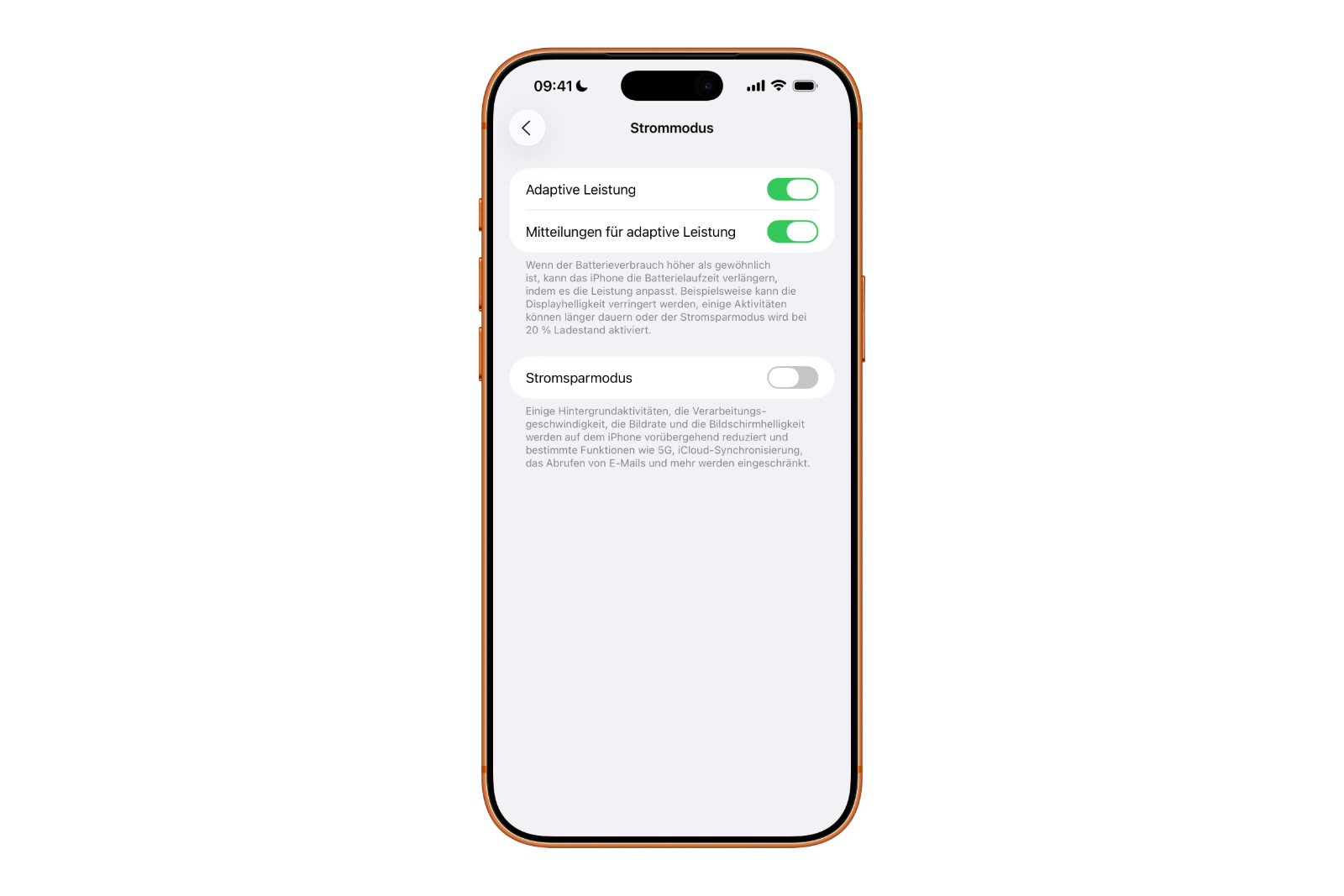
Adaptive Power is a new setting found under Settings → Battery → Power Mode → Adaptive Power. It's designed to extend battery life when the iPhone is under greater than usual use.
Unlike the classic power-saving mode, which activates when the battery level is low and stops numerous background processes, Adaptive Power intervenes only discreetly. The system analyzes current usage behavior and makes small adjustments as soon as energy consumption exceeds average. These adjustments include:
- a slightly reduced display brightness when the iPhone is used more intensively
- minimal performance adjustments that are barely noticeable
- a slightly extended duration of certain background activities to distribute energy more efficiently
Apple describes the function as follows:
When battery usage is higher than usual, iPhone can extend battery life by adjusting performance. For example, it can reduce the display brightness, allow some activities to take longer, or activate Low Power Mode when the battery level is below 20%.
In everyday use, the iPhone runs without any noticeable changes. Only when usage increases does Adaptive Power automatically intervene, ensuring the battery lasts longer.
Difference to energy saving mode
While Energy Saver Mode is a straightforward intervention that shuts down many background processes, Adaptive Power relies on fine-tuning. The difference lies in the intensity of the interventions.
Battery Saver Mode turns off features like email updates, background app activity, and visual effects to save power. Adaptive Power, on the other hand, only changes details in the background. The goal is to increase efficiency without compromising the user experience.
This approach makes the new feature significantly more suitable for everyday use. Instead of sacrificing performance, iOS 26 attempts to intelligently optimize battery consumption based on the situation. This makes the iPhone noticeably more durable, especially on days with high activity.
Technical requirements
Adaptive Power isn't available on all devices. Although Apple doesn't officially label it as an AI feature, it uses the same technical foundation as Apple Intelligence. This means it only supports iPhones with the appropriate hardware. It requires a device with a modern processor architecture, as found in the following models:
- iPhone 17 series
- iPhone Air
- iPhone 16 series
- iPhone 15 Pro and iPhone 15 Pro Max
Older models are left out because they do not have the necessary hardware components to efficiently perform dynamic power adjustment.
How Adaptive Power is changing everyday life
Adaptive Power intervenes discreetly and operates entirely in the background. The goal is to keep the battery at an optimal level for as long as possible, without user intervention.
Especially on days when the iPhone is under heavy use—for example, during long navigation sessions, video streaming, or gaming—this feature ensures that the battery doesn't drain too quickly. On days with normal use, the iPhone's behavior remains unchanged.
With iOS 26, Apple is introducing a sensible advancement in energy management that balances maximum performance with energy efficiency. The system automatically detects when adjustments are necessary and optimizes energy consumption accordingly.
Smart energy management with iOS 26
With iOS 26, Apple is improving iPhone battery life in a subtle yet effective way. Adaptive Power is a smart addition to Low Power Mode and ensures the battery lasts longer without compromising the user experience.
The feature leverages the iPhone's behavior to make small, barely noticeable adjustments that add up over time and extend battery life. Apple once again demonstrates that software optimization plays a crucial role in improving the user experience.
iOS 26 makes it clear: Energy efficiency can be achieved while maintaining performance and convenience. Adaptive Power is an example of how Apple is taking battery usage on its latest iPhones to a new level through clever system intelligence. The best products for you: Our Amazon storefront offers a wide selection of accessories, including those for HomeKit. (Image: Shutterstock / Kaspars Grinvalds)
- Live translation with AirPods: Here's how the feature works
- iOS 26: The new focus mode „Reduce interruptions“
- iOS 26.1: Reactivate the classic stop button on the alarm clock
- iOS 26.1 brings a new lock screen setting for the iPhone
- iOS 26.1: Liquid Glass effects can be toned down
- watchOS 26 brings hints about the Apple Watch dial
- macOS 26 Update: Hidden Tools and Improvements
- New call history in iOS 26: All conversations at a glance
- iOS 26: iMessage not working? Apple announces the solution
- iOS 26 Tricks: 26 small innovations with a big impact
- iOS 26 solves the Bluetooth problem with AirPods in the car
- iPhone: How the new call waiting feature works in iOS 26
- iPhone gets new feature against spam and advertising calls
- iOS 26: New option saves time and data when sending photos
- iOS 26: Over 10 hidden features everyone needs to know
- iOS 26: Visual intelligence now also for screen content
- iPhone 17: How iOS 26 colors your app icons
- iOS 26: Use polls directly in the Messages app
- Discover and manage games with the Apple Games app
- iPhone 17: Tips for using the Center Stage front camera
- iPhone 17 Dual Capture explained: Using the front and rear cameras
- iOS 26 Screenshot Disable full screen and enable old view
- iPhone 17: Disable or customize the camera control button
- iOS 26: Filter messages, block spam & keep track
- Setting up your iPhone correctly: Check, block, and filter calls
FAQ about iOS 26 and Adaptive Power
Adaptive Power is a new power setting in iOS 26 that extends iPhone battery life. It analyzes usage and automatically adjusts performance and power consumption without noticeably impacting performance.
The feature is located under Settings → Battery → Power Mode → Adaptive Power. There, you can enable or disable Adaptive Power.
Power Saving Mode significantly reduces performance and background activity. Adaptive Power, on the other hand, works subtly, adjusting only small parameters to save energy without compromising comfort or speed.
Adaptive Power requires modern hardware. Supported models include the iPhone 17, iPhone 17 Pro, iPhone 17 Pro Max, iPhone Air, the iPhone 16 series, and the iPhone 15 Pro and iPhone 15 Pro Max.
Adaptive Power automatically kicks in when battery consumption is higher than usual. However, the feature must first be manually enabled in the settings.
No, Adaptive Power is designed to keep performance and user experience virtually unchanged. Adjustments are made discreetly and only when truly necessary.
The feature is based on the same technical principles as Apple Intelligence. Older iPhones don't have the necessary processor architecture for this type of dynamic performance control.
We recommend keeping Adaptive Power permanently activated. Since the function only intervenes when needed, there are no disadvantages in everyday driving.
The exact improvement depends on individual usage patterns. Typically, however, you can achieve noticeably longer battery life—especially on days with high iPhone usage.
Yes, Adaptive Power complements the traditional Low Power mode. Both features can be used together to maximize the iPhone's battery life.





