

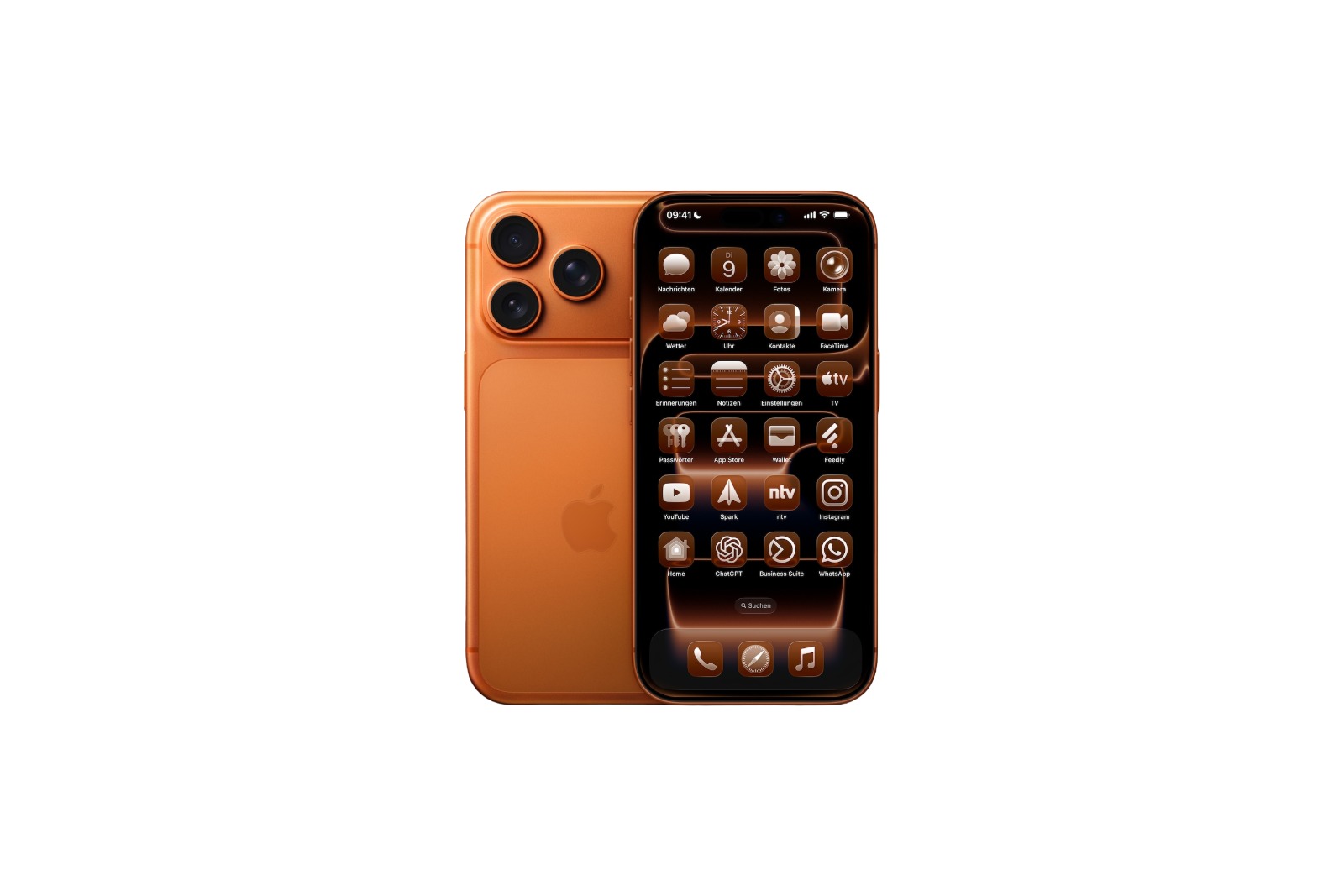
The iPhone 17, along with iOS 26, introduces a feature that makes the home screen more customizable than ever before. For the first time, app icons, widgets, and system elements can be colored to match the color of the device or even the color of the protective case.
Apple already introduced a feature with iOS 18 that displayed app icons in tinted versions. This was a kind of color filter that was applied to icons, widgets, and certain controls. With iOS 26, Apple is developing this concept further. Now, the iPhone 17's device color is recognized and applied directly to the system interface.
App icons in the color of the iPhone 17
In iOS 26, color customization is closely linked to the hardware. Every iPhone 17 has a unique device SKU stored at the firmware level. This SKU tells the system the exact color variant—for example, Deep Blue, Sage, or Lavender. Using this information, iOS creates a color profile that serves as the basis for icon customization. The base color is adopted, and then iOS automatically adjusts brightness, saturation, and contrast. This keeps app icons easy to read while reflecting the device's color tone. On an iPhone 17 Pro in Cosmic Orange, the home screen appears seamlessly integrated: hardware, software, and interface all visually match.
How the adjustment works
The setting can be activated directly from the home screen:
- Tap and hold on an empty space between the app icons.
- Select “Edit” and open “Customize” from the pop-up menu.
- Select “Tinted” and tap the iPhone button to the left below the color sliders.
- Set to “Bright”, “Dark” or “Auto” depending on your preference.
Once these steps are completed, app icons, widgets, and system UI will adapt to the device color.
Restrictions on older iPhones
The new feature doesn't work smoothly on every device. Some users are reporting issues on older iPhone models updated with iOS 26. The color adjustment doesn't always work as intended. This is likely a software bug that Apple is expected to fix with an update.
Colors also via the iPhone case
iOS 26 goes one step further. With an official Apple MagSafe case, you can also customize the colors. The cases have a small NFC chip integrated into them that transmits the color variant. As soon as the iPhone 17 detects such a case, it automatically colors the app icons accordingly.
Differences to iOS 18
The appearance of the tinted icons differs from previous versions. In iOS 18, icons often had a black background and colored graphics. With iOS 26, they appear clearer:
- In light mode they appear in full color with white icon graphics.
- In dark mode, the backgrounds are significantly darker, but not completely black.
This makes the appearance more harmonious and more closely tailored to the respective device.
iOS 26: Small details with a big impact on the iPhone 17
The iPhone 17 combines iOS 26 with a simple yet effective innovation. App icons and widgets adapt not only to the device color but also to the MagSafe case. What began as a color filter with iOS 18 has now become a feature that visibly connects hardware and software. Small details like these demonstrate that Apple is increasingly prioritizing customization without losing sight of readability and usability. Looking for accessories? Our Amazon Storefront is your destination for high-quality products, including those for HomeKit! (Image: Apfelpatient)
- iOS 26: Use polls directly in the Messages app
- New iOS 26 feature: Use live translation with AirPods
- Discover and manage games with the Apple Games app
- iPhone 17: Tips for using the Center Stage front camera
- iPhone 17 Dual Capture explained: Using the front and rear cameras
- iOS 26 Screenshot Disable full screen and enable old view
- iPhone 17: Disable or customize the camera control button
- iPhone Tip: Live Translation in Messages, Phone & FaceTime
- iOS 26: Filter messages, block spam & keep track
- Setting up your iPhone correctly: Check, block, and filter calls
- Keep an eye on your blood pressure: How the iPhone Health app helps
- Apple explains Apple Watch high blood pressure warnings
- Setting up Apple Music transitions: AutoMix or Crossfade
- macOS 26: Automatically connect iPhone hotspot
- watchOS 26: Why the Apple Watch sometimes charges slowly
- iOS 26: Reduce transparency for more clarity
- Find and adjust the camera flash in iOS 26 – here's how
- iOS 26 makes Adaptive Power the norm on the iPhone 17 series
- iOS 26 Tip: Unlock iPhone with Apple Vision Pro
Frequently Asked Questions about iPhone 17 and iOS 26
With iOS 26, the iPhone 17 gets the ability to automatically adapt app icons and widgets to the device or case color.
iOS 26 detects the iPhone 17's device color via a firmware SKU and adjusts icons using brightness, saturation, and contrast.
On older models with iOS 26, the customization sometimes doesn't work. This is likely a software bug that Apple is fixing.
Yes, with official Apple MagSafe cases, iOS 26 colors app icons to match the case color. This is done using an integrated NFC chip.
iOS 18 featured colored filters with a black background. In iOS 26, icons appear clearer: in light mode, they have white graphics and in dark mode, they appear darker.





