

With iOS 26, Apple introduced a major design change. The new look is called "Liquid Glass" and appears more modern and streamlined than previous versions. In addition to visual adjustments, practical functions have also been redesigned. The Camera app, in particular, has been redesigned, and one of the most noticeable changes concerns the camera flash. Those who were quick to find it in the top left corner of the screen in previous iOS versions will now have to get used to a new location and operation.
The camera is one of the most-used apps on any iPhone. Apple tweaks it with almost every update, often moving controls around. In iOS 26, this particularly affects the flash. The feature is still there, but is no longer located where it has been for years. To ensure that photos continue to turn out the way you want them, it's helpful to know the new controls. The camera flash can be quickly turned on and off, both via direct icons and via advanced menus.
The new location of the lightning symbol
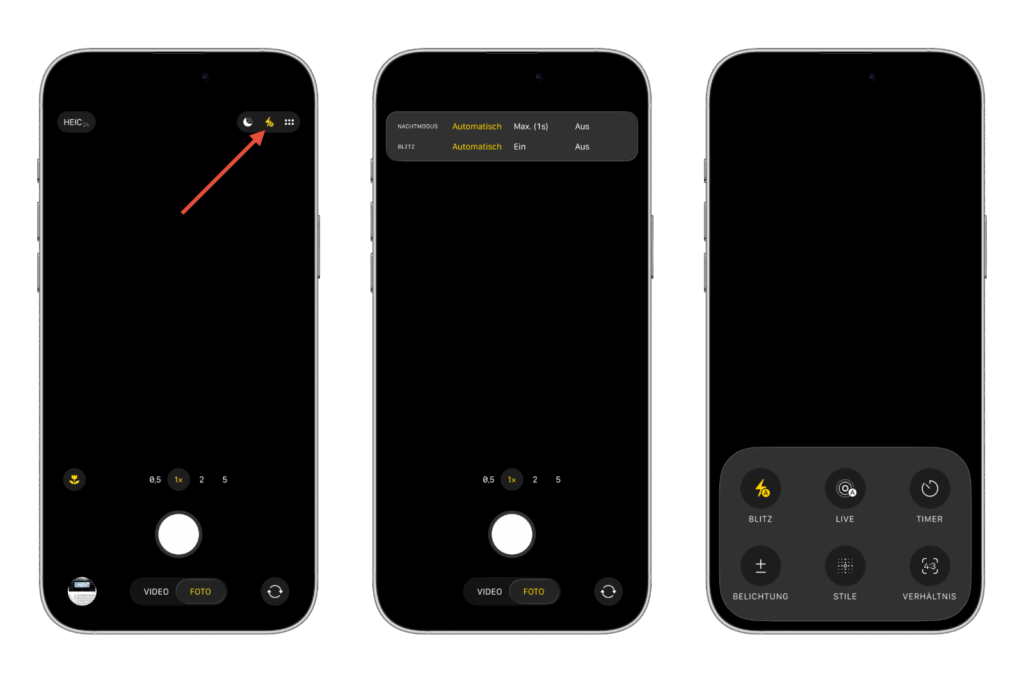
In iOS 18, the lightning bolt icon was located at the top center of the Camera app. With iOS 26, Apple changed the layout. Now, the icon is in the top right corner when the iPhone is held in portrait mode. In landscape mode, it is in the top left corner. The position is mirrored, depending on how the device is held. Tapping the icon toggles between "Off" and "Auto." If you want the flash to remain on permanently, you must hold the icon. Only then will the additional "On" option appear. This setting remains active until manually changed again.
Which flash setting makes sense
The three available options offer flexibility.
- Auto: The iPhone decides whether to fire the flash depending on the lighting conditions.
- On: The flash remains active at all times, even in daylight. This can be useful when additional lighting is desired.
- Off: The flash is never used. This is especially useful if you prefer night mode or want to preserve the natural lighting.
The choice depends on the desired image effect.
Two ways to complete flash control
Apple has integrated two methods to selectively turn the flash on or off.
- Long press: Holding down the lightning bolt icon opens a menu with three options: Auto, On, and Off. Once selected, simply tap anywhere on the screen to close the menu.
- Via the options menu: Alternatively, you can use the menu button. It's located in the top right corner of the camera app in portrait mode or top left corner in landscape mode and displays two rows of three dots each. Tapping it opens an overview with additional camera settings. In addition to the flash, you can also control functions like Live Photos, timers, and exposure adjustments.
Both methods lead to the same result. If you don't like holding down the button for a long time, you can use the menu instead.
Further changes in iOS 26
The adjustments to the Camera app are just one part of the update. iOS 26 also brings improvements to the Control Center, which can now be customized more flexibly. The Photos app has also been redesigned and offers refined editing features. The new Liquid Glass design language provides an overall more modern appearance and a more consistent user experience.
Camera flash in iOS 26: New position, easy control
With iOS 26, Apple streamlined the appearance of the Camera app and relocated the camera flash. Operation remains straightforward once you're familiar with the changes. Whether using a short tap, a long press, or the menu, the controls are flexible and adapt to different habits. This means that the iPhone camera remains a reliable tool for photos in any lighting situation, even under iOS 26. The best products for you: Our Amazon Storefront offers a wide selection of accessories, including those for HomeKit. (Image: Shutterstock / Cesare Andrea Ferrari)
- iOS 26 makes Adaptive Power the norm on the iPhone 17 series
- iOS 26 Tip: Unlock iPhone with Apple Vision Pro
- iOS 26: The most important tips for setup and use
- iOS 26: Impact on battery life after the update
- iOS 26: Use spatial scenes directly in the Photos app
- iOS 26 Update: Markdown Import and Export in Notes Explained
- iOS 26: Easily change backgrounds in iMessage
- iOS 26: Trigger iPhone camera with AirPods – here's how
- How to enable transparent iPhone app icons with iOS 26
- iOS 26: Apple Music finally gets folders for playlists
- iOS 26: Capture reminders faster and easier
- Apple Music in iOS 26: Music Pins make access easier
Frequently asked questions about iOS 26 and the camera flash
The flash can be turned on by tapping the flash icon in the camera app. A long press displays the options Auto, On, and Off.
In iOS 26, the icon is located at the top right in portrait mode and at the top left in landscape mode. Apple has changed the position from previous versions.
Three modes are available: Auto, On, and Off. The selected setting remains active until adjusted again.
Yes, by long-pressing the flash icon, you can select the "On" option. This will keep the flash permanently on.
In Auto mode, the iPhone decides whether the flash is necessary. This allows for better photos in low light without having to manually adjust the settings each time.
Yes, you can use Night Mode instead of the flash. This brightens photos in low-light conditions without creating artificial light.





