

This article may contain affiliate links. Learn more on our Partner Program page.
With iOS 26, Apple has released the biggest update to CarPlay in years. While recent versions have brought few real innovations, the introduction of CarPlay Ultra and numerous improvements to standard CarPlay fundamentally changes things. iOS 26 brings a fresh design, more customization options, and practical features that make everyday life in the car easier.
CarPlay has long been an integral part of modern vehicles, but in recent years it has remained a rather quiet companion. While minor adjustments have ensured stability, innovations have been scarce. With iOS 26, this trajectory is changing. Apple is focusing on a significantly expanded feature set that is visually and technically impressive. The update demonstrates how closely iPhone and cars now interact and the role CarPlay will play in the Apple ecosystem in the future.
New “Liquid Glass” design and wallpapers
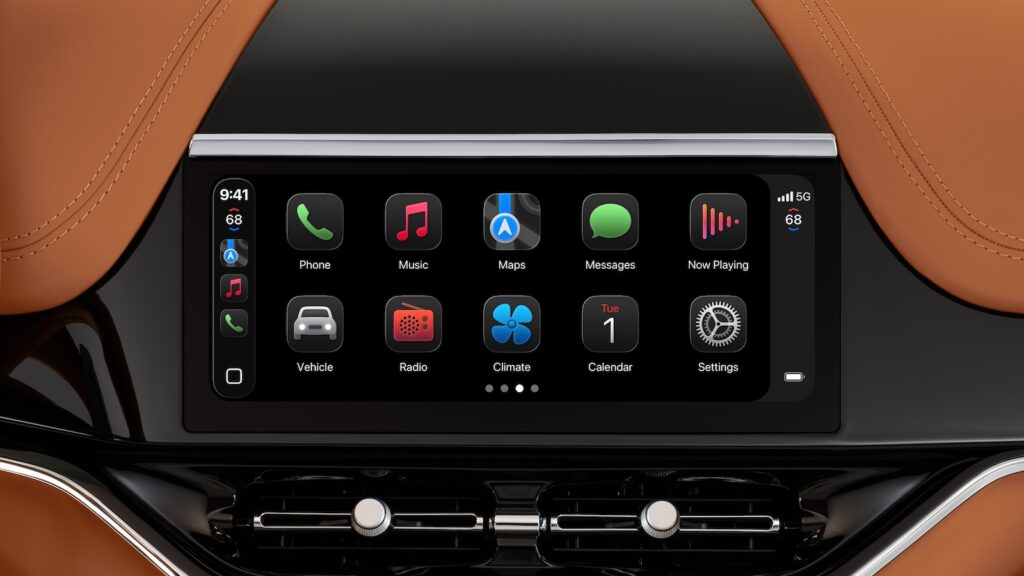
A central element of iOS 26 is the new look. The "Liquid Glass" design now extends to CarPlay. App icons and interface elements appear more modern, transparent, and can be customized. Three display modes are available: Standard, Dark, and Transparent, with the transparent version offering several of its own options. CarPlay also includes new wallpapers based on the iPhone design. This not only makes the interface look cleaner but also more flexible in terms of customization.
Widgets for CarPlay
Widgets were previously only available in CarPlay Ultra. With iOS 26, they're finally coming to standard CarPlay. All widgets installed on the iPhone can be displayed directly in the car—regardless of whether an app has CarPlay support or not. This significantly expands the range of information available: from weather and calendar to sports scores and music controls.
Videos in the car via AirPlay
A practical new feature for parking is AirPlay support for videos. When the car is parked, content can be played on the vehicle display. Whether while charging an electric car, waiting for friends, or taking a break on a trip – CarPlay makes in-car entertainment more versatile. Third-party apps can also integrate this feature, so the content selection is likely to continue to grow.
Live activities directly in the vehicle
Live activities have been a highlight on iPhone and Apple Watch for some time now. With iOS 26, they're now also coming to CarPlay. This allows you to track real-time information about flights, sporting events, deliveries, or other events. Everything displayed as a live activity on the iPhone now appears simultaneously on the car display.

Improvements to messages, phone and maps
The default apps have also been adapted for CarPlay. The Messages app now supports Tapbacks, allowing you to use reactions like thumbs up or a heart directly in the car. Pinned conversations are also available, improving clarity. The Phone app now displays incoming calls in a compact view. This keeps you in view of the navigation without a call taking up the entire screen.
- Apple Maps also benefits: Vehicles with multi-touch displays can now control the map directly with finger movements and zoom in or pan just like on an iPhone.
Customization tools for more control
With iOS 26, Apple introduces Smart Display Zoom. This feature allows for more flexible use of the available screen space. Content can be displayed smaller to show more information at once, or larger for easier navigation. This is complemented by customizable text sizes. Additionally, there's a new option to enable or block screenshots in CarPlay. This provides greater control over privacy while also allowing you to quickly save specific views.
- New features in macOS 26: 10+ highlights at a glance
- iOS 26: Apple Home app gets new automation options
- AirPods Pro 3: Improved tracking only possible with iPhone 17
CarPlay in iOS 26: The most comprehensive update in years
iOS 26 brings more innovations to CarPlay than ever before. The redesigned design with "Liquid Glass," widget integration, video via AirPlay, Live Activity, and improvements to the default apps make CarPlay more versatile and user-friendly. Added to that are smart customization options like Smart Display Zoom and text size adjustments. With this update, Apple demonstrates that CarPlay isn't just an extension of the iPhone, but a standalone part of the ecosystem that can sustainably improve the driving experience. The best products for you: Our Amazon Storefront offers a wide selection of accessories, including those for HomeKit. (Image: Apple)
- iOS 26 makes Siri better – five new features at a glance
- iOS 26 brings five improvements for battery performance
- iOS 26: All new features in the Shortcuts app at a glance
- iOS 26: All new camera features at a glance
- iOS 26 at a glance: What's new in the Messages app
- Apple redesigns TV app: What's new in iOS 26
- iOS 26: All the new features and highlights of the Podcasts app
- iOS 26: How Apple fundamentally changes the phone app
- iOS 26: Everything about the new home screen with Liquid Glass
- iOS 26: All the new features around the Liquid Glass design
- iOS 26: 7 exciting AirPods features at a glance
- iOS 26: Everything you need to know about the new FaceTime features
- Genmoji in iOS 26: Apple gives the feature a major update
- iOS 26: Everything about the new games app for iPhone, iPad, and Mac
- iOS 26: The most important new features in the Photos app
- iOS 26: Beats and AirPods automatically pause when you sleep
- iOS 26: All Apple Music innovations at a glance
- iOS 26 expands the functionality of the HomePod
- Image Playground gets significantly better with iOS 26
- iOS 26 brings new screenshot features to the iPhone
- iOS 26: Five new lock screen features at a glance
- iOS 26 design change: Reduce transparency easily
- iOS 26: Create your own ringtones – without GarageBand
- iOS 26: All the new features for Notes and Reminders
Frequently Asked Questions about iOS 26 and CarPlay
iOS 26 brings a fresh “Liquid Glass” design, widgets, AirPlay video, Live Activities, new customization options, and updates to Messages, Phone, and Maps.
Yes, CarPlay supports video playback via AirPlay with iOS 26. However, playback is only possible when the car is parked.
Yes, for the first time with iOS 26, all iPhone widgets can also be used in CarPlay – regardless of whether the app supports CarPlay.
The new design in iOS 26 modernizes CarPlay with transparent UI elements, new wallpapers, and different display modes.
System apps like Messages, Phone, and Maps receive significant improvements in iOS 26. Additionally, there are widgets and live activity for many third-party apps.
Yes, CarPlay in iOS 26 offers Smart Display Zoom, flexible text sizes, and the option to enable or block screenshots.