Apfelpatient
  • Home
  • News
  • Rumors
  • Tips & Tricks
  • Reviews
  • Insights
No result
View All Results
  • iPhone 18
  • iPhone 18 Pro
  • iPhone Duo
  • Apple Home
  • Siri AI
  • HomePod
  • HomePod mini
  • HomePod mini 2
  • MacBook Pro
  • Apple TV 4K
  • Apple Watch Series 12
  • Apple Watch Ultra 4
  • AirPods 5
  • iOS 27
  • iPadOS 27
  • macOS
  • MacBook Neo
  • iPhone 17e
  • AirTags
  • iOS 26
  • iPhone 17
  • iPadOS
  • iMac
  • Mac mini
  • Apple TV
  • iPad Pro
  • iPhone Air
  • Apple Vision Pro
  • iPhone 16
  • AirPods 4
  • Apple Watch Ultra
  • MacBook Air
  • iPad
  • AirPods Max
  • AirPods Pro 3
  • Mac Studio
  • Studio Display
  • iPad Air
  • iPad mini
  • watchOS 27
  • Apple CarPlay
  • Apple Pay
  • watchOS 26
  • Home
  • News
  • Rumors
  • Tips & Tricks
  • Reviews
  • Insights
No result
View All Results
Apfelpatient
No result
View All Results
  • iPhone 18
  • iPhone 18 Pro
  • iPhone Duo
  • Apple Home
  • Siri AI
  • HomePod
  • HomePod mini
  • HomePod mini 2
  • MacBook Pro
  • Apple TV 4K
  • Apple Watch Series 12
  • Apple Watch Ultra 4
  • AirPods 5
  • iOS 27
  • iPadOS 27
  • macOS
  • MacBook Neo
  • iPhone 17e
  • AirTags
  • iOS 26
  • iPhone 17
  • iPadOS
  • iMac
  • Mac mini
  • Apple TV
  • iPad Pro
  • iPhone Air
  • Apple Vision Pro
  • iPhone 16
  • AirPods 4
  • Apple Watch Ultra
  • MacBook Air
  • iPad
  • AirPods Max
  • AirPods Pro 3
  • Mac Studio
  • Studio Display
  • iPad Air
  • iPad mini
  • watchOS 27
  • Apple CarPlay
  • Apple Pay
  • watchOS 26

Apple redesigns TV app: What's new in iOS 26

Milan Jovicic by Milan Jovicic
August 30, 2025 - 16:04 CEST
in Apple Insights
0
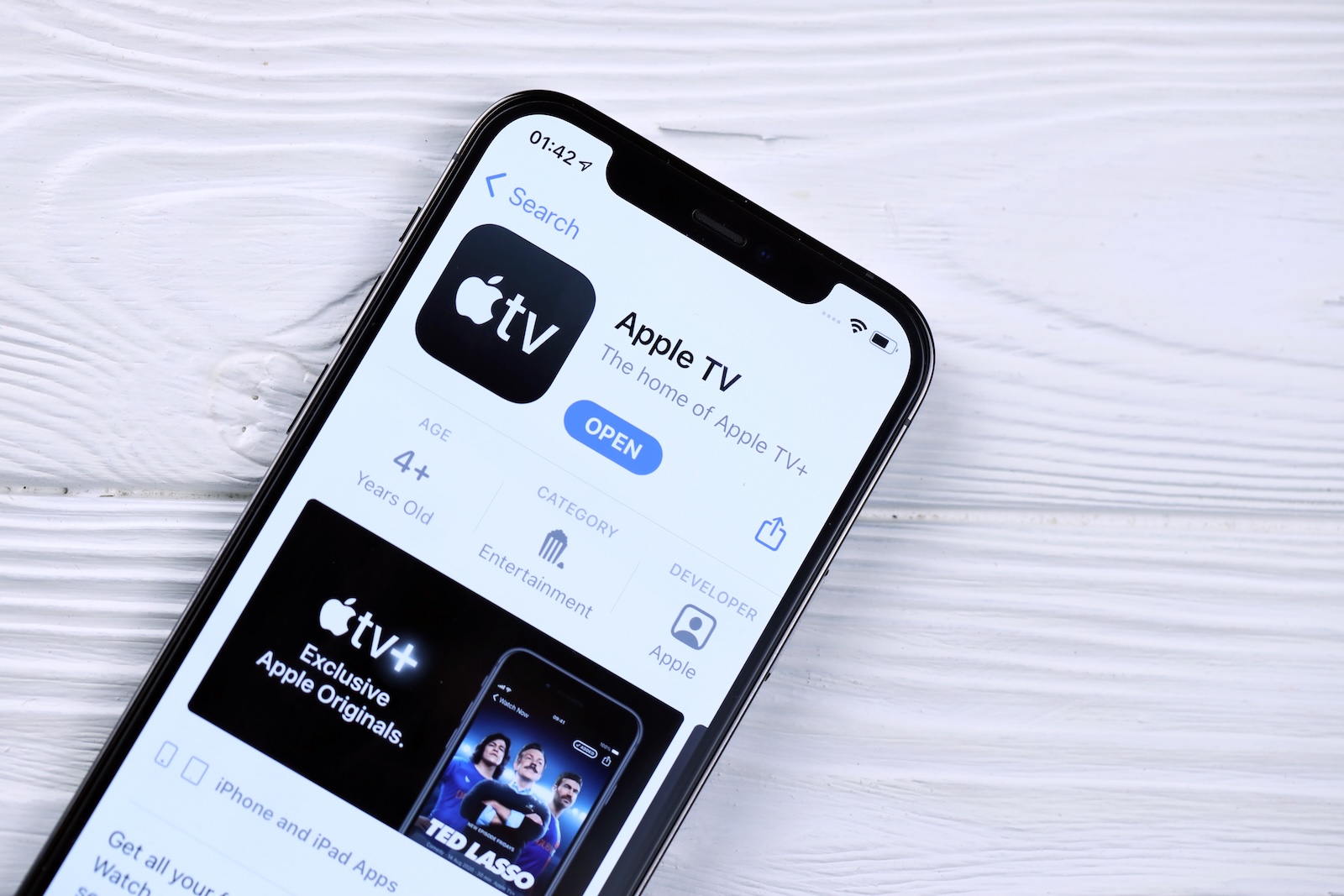
Apple TV app iOS 26

Image: Shutterstock / Mehaniq

WhatsAppFacebookEmail
Threads

This article may contain affiliate links. Learn more on our Partner Program page.

Make Apfelpatient a preferred source One click – and you'll see us more often on Google

With the launch of iOS 26 and tvOS 26, Apple is bringing a new design to the TV app. The visual and functional changes are based on the new cross-platform design style called "Liquid Glass." The app has been redesigned in several areas – from the posters to the player controls. The focus is on greater clarity, a modern look, and a more dense content display.

The Apple TV app has grown significantly over the past year, not least due to the success of Apple TV+ productions like Slow Horses and The Morning Show. The new design update for iOS 26 and tvOS 26 comes at just the right time. The app is designed to not only look more modern but also be more efficient to use. Apple's goal here is to make content easier to access while simultaneously improving the visual experience.

Liquid Glass as a new UI concept

Liquid Glass is the central design element of the update. These transparent user interfaces float above the actual content. This display is used, for example, in the iOS tab bar and in the video player controls. The advantage is that content is no longer obscured by UI elements when navigating or during playback. The controls remain visible but do not distract from the actual content.

Vertical posters replace previous artwork

A large part of the visual redesign concerns the presentation of content. The previously used horizontal artwork has been replaced with vertical posters. This layout not only looks more modern, but also offers practical advantages. More series and films can be displayed on the screen simultaneously. This increases content density and improves navigation within the app.

New app icon and redesigned interface

The Apple TV app icon has also been updated. It now better aligns with the new iOS 26 design. The entire app interface has been redesigned to better integrate with the system design. All UI elements follow the new design language, with smoother transitions, more transparency, and a clearer structure.

New controls in the video player

A concrete example of the Liquid Glass aesthetic is the redesigned video player elements. When playing series or movies, the controls no longer appear as a fixed bar, but as floating buttons above the screen. This allows the content to remain visible even when the controls are displayed. This makes operation more intuitive and less disruptive to the viewing experience.

Better use of screen space

The new layout makes better use of the available screen space. The new design appears cleaner and more structured, especially on large displays, such as the Apple TV itself. The update also ensures that content is displayed more efficiently and navigation feels smoother on iPhones and iPads.

Apple TV app becomes more modern and efficient

With the update to iOS 26 and tvOS 26, the Apple TV app receives a sophisticated and functional redesign. Liquid Glass provides a modern look and clearer user interface. The switch to vertical posters and the revised app layout bring more content onto the screen at once. The new player controls improve the viewing experience without obscuring content. In summary, the update isn't a radical redesign, but rather a logical step toward aligning the TV app visually and functionally with the current standards in the Apple ecosystem. The best products for you: Our Amazon Storefront offers a wide selection of accessories, including those for HomeKit. (Image: Shutterstock / Mehaniq)

  • iOS 26: All the new features and highlights of the Podcasts app
  • iOS 26: How Apple fundamentally changes the phone app
  • iOS 26: Everything about the new home screen with Liquid Glass
  • iOS 26: All the new features around the Liquid Glass design
  • iOS 26: 7 exciting AirPods features at a glance
  • iOS 26: Everything you need to know about the new FaceTime features
  • Genmoji in iOS 26: Apple gives the feature a major update
  • iOS 26: Everything about the new games app for iPhone, iPad, and Mac
  • iOS 26: The most important new features in the Photos app
  • iOS 26: Beats and AirPods automatically pause when you sleep
  • iOS 26: All Apple Music innovations at a glance
  • iOS 26 expands the functionality of the HomePod
  • Image Playground gets significantly better with iOS 26
  • iOS 26 brings new screenshot features to the iPhone
  • iOS 26: Five new lock screen features at a glance
  • iOS 26 design change: Reduce transparency easily
  • iOS 26: Create your own ringtones – without GarageBand
  • iOS 26: All the new features for Notes and Reminders
  • Apple's new Siri could be worth the wait

FAQs about the Apple TV app update in iOS 26 and tvOS 26

What's new in the Apple TV app in iOS 26?

Apple has comprehensively redesigned the TV app in iOS 26. New features include a fresh app icon, vertical movie posters, Liquid Glass design, and redesigned player controls.

What does Apple's Liquid Glass design mean?

Liquid Glass is a new, transparent UI design from Apple. It ensures that menus and controls no longer distract from the actual content, but float above it.

What are the benefits of the new Apple TV app design?

The new layout displays more content simultaneously. Navigation is clearer, controls more intuitive, and the viewing experience is less interrupted.

Will the new Apple TV app design also be available on the Apple TV itself?

Yes, the new design of the Apple TV app is part of tvOS 26 and will therefore also be visible directly on Apple TV devices.

Are the new features only available on Apple devices?

The changes apply exclusively to devices running iOS 26 and tvOS 26—iPhones, iPads, and Apple TV. Other platforms are not affected.

What has changed with the Apple TV app icon?

Apple has modernized the TV app icon. It visually aligns with the new iOS 26 design and appears cleaner and more minimalist.

Why is Apple now focusing on vertical posters?

Vertical posters are replacing the previous horizontal artwork because they display more content in a smaller space and are closer to the style of movie series.

How does the update affect the user experience?

With this update, Apple significantly improves the viewing experience: less distraction from UI elements, clearer structure, and faster access to content.

When will the Apple TV app update be released?

The new design of the Apple TV app will be rolled out with the official release of iOS 26 and tvOS 26 in September.

Do you need an Apple TV+ subscription for the new features?

No, the new design applies to the TV app in general. It's independent of whether you have an Apple TV+ subscription or not.

Was this article helpful?
YesNo
Tags: Apple ServicesiOSiOS 26iPadOSiPadOS 26macOSmacOS 26tvOStvOS 26
SendShareSend
Share

Our Amazon Storefront

A handpicked selection of products for iPhone, Mac and more – sorted by topic and updated regularly.

Shop Now

This post contains affiliate links (including Amazon). We earn a small commission on qualifying purchases – at no extra cost to you. Learn more on our Partner Program page.

Previous Post

Apple vs. Epic Games: Appeal in App Store dispute underway

Next Post

iPhone 17: TechWoven cases with a striking number of holes

Milan Jovicic

Milan Jovicic

Milan founded Apfelpatient in 2016 and has been responsible for all editorial content since 2018 – news, rumors, how-to guides and product reviews. Here, Apple devices aren't review units kept for two weeks, they're everyday tools: from iPhone to MacBook Pro, MacBook Air and iMac all the way to Apple Vision Pro, at least one device from every product category is in daily use, many of them replaced every year. Every menu path in a guide is checked on the device before it goes live.

Related posts

iPhone 18e: All the rumors at a glance

by Milan Jovicic
November 9, 2026 - 17:03 CET
Symbolic image for the iPhone 18e rumors: two entry-level iPhones stacked flat, the pink back with a single camera on top and a black housing with a glowing display below

iPhone 18e: Spring 2027, A20 chip, 6.3-inch display, larger battery, and Dynamic Island for the first time. All the rumors about the display, camera, and price.

Read moreDetails

Apfelpatient Weekly #31: Ternus Presents His First Results

by Milan Jovicic
November 8, 2026 - 4:18 PM CET
Cover image of the Apfelpatient Weekly showing illustrated stacked cards above the wordmark on a blue-to-cyan gradient

Record quarter under Ternus, iPhone Duo shortages, spyware warning in the Bundestag, and a Health app without German.

Read moreDetails

MacBook Neo 2: All the rumors at a glance

by Milan Jovicic
November 7, 2026 - 3:02 PM CET
MacBook Neo 2: the current MacBook Neo in Citrus seen from behind, opened on a grey table in front of a light wall

MacBook Neo 2: All the rumors about the A19 Pro, 12 GB RAM, colors, price and market launch – and why the touchscreen is off the table.

Read moreDetails

iPhone 18: All models, prices and release dates at a glance

by Milan Jovicic
November 7, 2026 - 13:17 CET
Five iPhone models side by side, one facing forward with visible Dynamic Island – the iPhone 18 generation launches in two waves

iPhone 18: Pro, Pro Max and Duo are available in stores, the base model will follow in spring 2027. All prices, dates and specifications of the series.

Read moreDetails

MacBook Pro vs. Studio Display XDR: OLED vs. Mini-LED

by Milan Jovicic
November 5, 2026 - 18:56 CET
MacBook Pro vs. Studio Display XDR: person using the touchscreen of a MacBook Pro at a desk, with large monitors in the background

MacBook Pro vs. Studio Display XDR: OLED vs. Mini-LED compared. Contrast, brightness, size, prices, and which is right for whom.

Read moreDetails
Load More

Categories

  • Apple Insights
  • Apple Rumors
  • Apple News
  • Apple Tips & Tricks
  • iPhone news, rumors and tips
  • Mac and MacBook News
  • Reviews
Make Apfelpatient a preferred source One click – and you'll see us more often on Google

About APFELPATIENT

APFELPATIENT brings you the latest Apple news, product updates, guides, reviews and tips across the entire Apple ecosystem — from the iPhone to the Mac to the Apple Vision Pro. From the first rumors to confirmed news: researched responsibly.

Follow Apfelpatient

Facebook Instagram YouTube Threads Threads

Company

  • About Apfelpatient
  • Contact
  • Author Profiles

Community

  • Netiquette
  • Push notifications
  • RSS feed

Legal

  • Legal Notice
  • Privacy Policy
  • Terms of Use
  • Cookie settings
  • Affiliate Program

Resources

  • Sitemap

© 2026 Apfelpatient. All rights reserved.

No result
View All Results
  • Home
  • News
  • Rumors
  • Tips & Tricks
  • Reviews
  • Insights

© 2026 Apfelpatient. All rights reserved. Site map

Change language to Deutsch