

Apfelpatient
  • Home
  • News
  • Rumors
  • Tips & Tricks
  • Reviews
  • Insights
No result
View All Results
  • iPhone 18
  • iPhone 18 Pro
  • iPhone Duo
  • Apple Watch Series 12
  • Apple Watch Ultra 4
  • AirPods 5
  • iOS 27
  • iPadOS 27
  • macOS
  • MacBook Neo
  • iPhone 17e
  • AirTags
  • iOS 26
  • iPhone 17
  • MacBook Pro
  • iPadOS
  • iMac
  • Mac mini
  • HomePod
  • Apple TV
  • iPad Pro
  • iPhone Air
  • Apple Vision Pro
  • iPhone 16
  • AirPods 4
  • Apple Watch Ultra
  • HomePod mini
  • MacBook Air
  • iPad
  • AirPods Max
  • AirPods Pro 3
  • Apple Watch Series 3
  • Mac Studio
  • Studio Display
  • iPad Air
  • iPad mini
  • watchOS 27
  • Apple CarPlay
  • Apple Pay
  • watchOS 26
  • Home
  • News
  • Rumors
  • Tips & Tricks
  • Reviews
  • Insights
No result
View All Results
Apfelpatient
No result
View All Results
  • iPhone 18
  • iPhone 18 Pro
  • iPhone Duo
  • Apple Watch Series 12
  • Apple Watch Ultra 4
  • AirPods 5
  • iOS 27
  • iPadOS 27
  • macOS
  • MacBook Neo
  • iPhone 17e
  • AirTags
  • iOS 26
  • iPhone 17
  • MacBook Pro
  • iPadOS
  • iMac
  • Mac mini
  • HomePod
  • Apple TV
  • iPad Pro
  • iPhone Air
  • Apple Vision Pro
  • iPhone 16
  • AirPods 4
  • Apple Watch Ultra
  • HomePod mini
  • MacBook Air
  • iPad
  • AirPods Max
  • AirPods Pro 3
  • Apple Watch Series 3
  • Mac Studio
  • Studio Display
  • iPad Air
  • iPad mini
  • watchOS 27
  • Apple CarPlay
  • Apple Pay
  • watchOS 26

iOS 26: All the new features for Notes and Reminders

Milan Jovicic by Milan Jovicic
July 27, 2025 - 16:42 CEST
in Apple Insights
0
iOS 26 Notes and Reminders

Image: Shutterstock / Yalcin Sonat

WhatsAppFacebookEmail
Threads

This article may contain affiliate links. Learn more on our Partner Program page.

Make Apfelpatient a preferred source One click – and you'll see us more often on Google

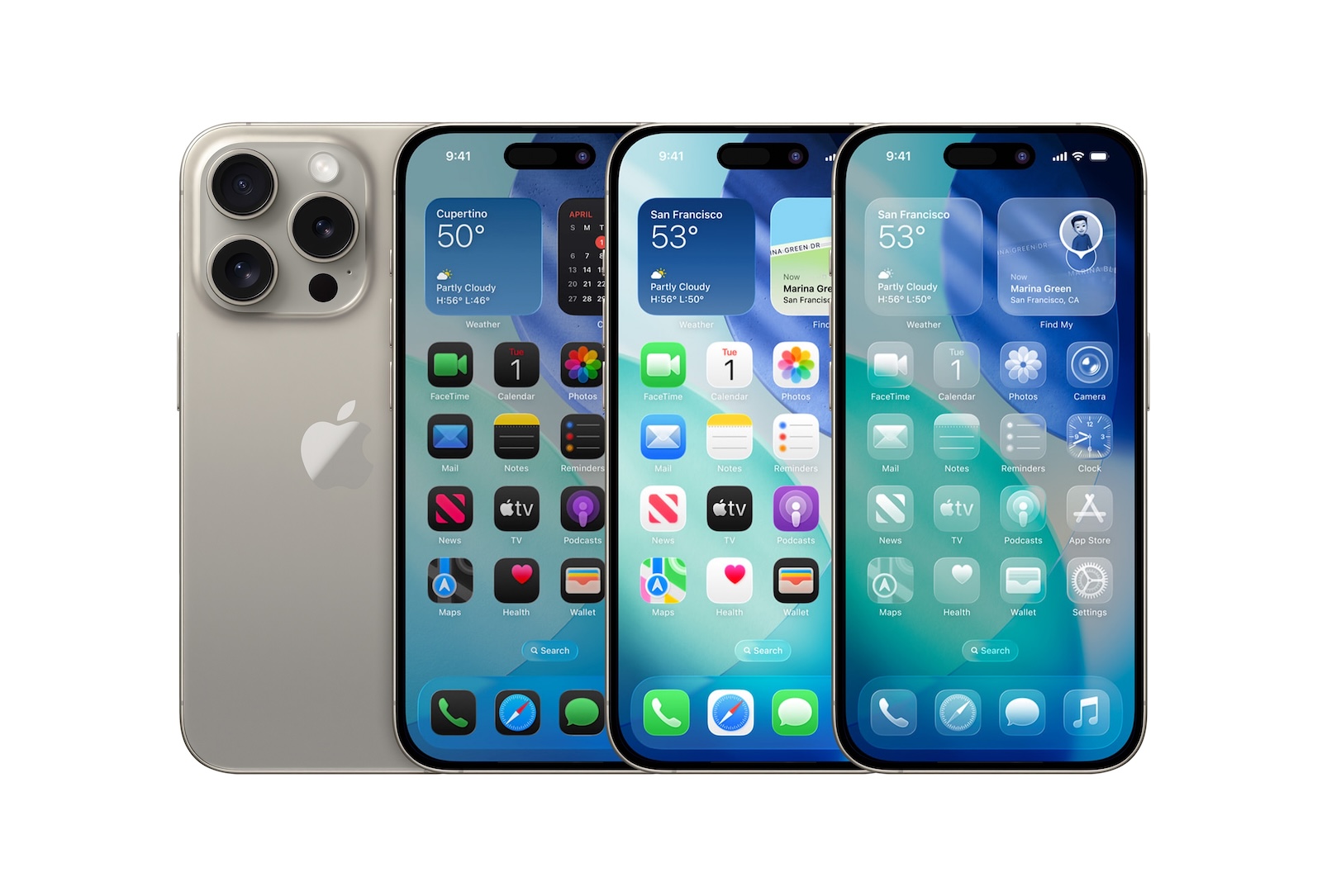
With iOS 26, Apple is delivering a major system update that revamps many standard apps. The Notes and Reminders apps also receive new features and a new design. In addition to visual changes, the update brings practical additions, especially for users who regularly organize their tasks and thoughts digitally. Some features require Apple Intelligence and are only available on supported devices.

iOS 26 introduces a new design language with the so-called Liquid Glass look and enhances existing features with machine learning and direct access. Notes and Reminders benefit in different ways: Reminders becomes significantly smarter, while Notes primarily receives small but meaningful improvements.

Design: Liquid Glass in Notes and Reminders

Both apps have been updated to the new Liquid Glass design. It features rounded edges, a more compact display, and slightly transparent elements. In the Notes app, this affects the toolbar, which is now smaller and has a matte glass look. Buttons appear as circles or pills with a transparent effect. The keyboard also features rounded corners. In the Reminders app, the input fields and areas are now colored instead of white. Everything is rounder and appears more translucent. Here, too, the user interface has been adapted to the new system design.

Reminders: More features through Apple Intelligence

With iOS 26, the Reminders app not only gets a new look, but also new features based on Apple Intelligence. Siri suggestions are now visible directly in the app. They display tasks recognized from messages, emails, or notes. These suggestions also appear in other apps like Mail and can be added directly to a to-do list without opening the Reminders app. The suggestions are context-sensitive and individually tailored to the user. They show tasks, purchases, or follow-up actions recognized from text in the system. Also new is automatic categorization. The app recognizes similar tasks and groups them automatically. For example, several shopping items are summarized in a common area. There is now also a new way to create a reminder directly from the Control Center. This function can also be accessed via the Action button or the lock screen if it has been assigned there.

Notes: Fewer changes, but useful additions

The basic structure of the Notes app remains unchanged, but it has a few additions that should be of interest to technically minded users. With iOS 26, mathematical equations can now be displayed as 3D diagrams. Equations with three variables are supported, such as z = sin(x² + y²), which then create a wave pattern. The 3D graphics can be enlarged, reduced, and moved using gestures. Handwritten equations on the iPad are also recognized. A new scroll function in the toolbar allows you to swipe horizontally through the tools. Previously, you had to tap the tool area to see all the options. Swiping now makes more tools accessible more quickly. The submenus for formatting, images, lists, and tables can still be accessed by tapping.

More features: search bar, file export and call integration

Also new is support for exporting in Markdown format. Note content can be saved as an .md file and imported into third-party apps. However, writing in Markdown within the app is not supported. The search function has been redesigned. The search bar is now permanently located at the bottom of the folder view. Previously, it had to be opened by swiping from the top. Another new feature is the integration of call recordings. Phone calls made with the new Phone app on iPad or Mac can be saved in the Notes app. There is also automatic transcription if Apple Intelligence is available. This feature was already included on the iPhone in iOS 18 and has now been expanded to other devices.

Design meets function: iOS 26 plays to its strengths

iOS 26 brings significant improvements to the Notes and Reminders apps. The visual changes thanks to the Liquid Glass design create a modern look, while the new features make everyday work noticeably easier. Reminders is significantly more intelligent and flexible thanks to AI support. Notes remains more functional but receives useful additions such as 3D graphics, Markdown export, and a better user interface. The new access via the Control Center and the cross-system integration of suggestions are particularly useful. Anyone who regularly works with to-do lists and notes will quickly appreciate the new features. The best products for you: Our Amazon Storefront offers a wide selection of accessories, including those for HomeKit. (Image: Shutterstock / Yalcin Sonat)

  • iOS 26: All Apple Music innovations at a glance
  • iOS 26 expands the functionality of the HomePod
  • Image Playground gets significantly better with iOS 26
  • iOS 26 brings new screenshot features to the iPhone
  • iOS 26: Five new lock screen features at a glance
  • iOS 26 design change: Reduce transparency easily
  • iOS 26: Create your own ringtones – without GarageBand
  • iOS 26 brings event detection directly to the Photos app

Was this article helpful?
YesNo
Tags: Apple ServicesApple IntelligenceiOSiOS 26iPadOSiPadOS 26macOSmacOS 26
SendShareSend
Share

Our Amazon Storefront

A handpicked selection of products for iPhone, Mac and more – sorted by topic and updated regularly.

Shop Now

This post contains affiliate links (including Amazon). We earn a small commission on qualifying purchases – at no extra cost to you. Learn more on our Partner Program page.

Previous Post

iOS 26 Screenshots: Change the preview and work faster

Next Post

iCloud Private Relay: Simple data protection for Safari

Milan Jovicic

Milan Jovicic

Milan founded Apfelpatient in 2016 and has been responsible for all editorial content since 2018 — news, rumors, guides, and product reviews. Apple devices here are not test units on loan for two weeks but everyday tools: from the iPhone through MacBook Pro, MacBook Air, and iMac to the Apple Vision Pro, at least one device from nearly every product category is in daily use, many of them replaced annually. Every menu path in a guide is verified on the device before it is published.

Related posts

iPhone Air 2: All the rumors at a glance

by Milan Jovicic
October 10, 2026 - 13:14 CEST
The current iPhone Air in Space Black lies face down on a grey stone surface – the predecessor of the iPhone Air 2 with a single rear camera

The iPhone Air 2 is expected to arrive in spring 2027: A20 Pro chip, second camera, vapor chamber, and approximately 5.2 mm thickness. All the rumors at a glance.

Read moreDetails

Apple in October 2026: These are the new products expected

by Milan Jovicic
October 9, 2026 - 02:52 CEST
Symbolic image for Apple October 2026: Apple Calendar icon on an autumn gradient from rust to gold

HomePad, new HomePod mini, Apple TV 4K, then MacBook Pro with touchscreen and iPad mini with OLED: What Apple is expected to show in October 2026.

Read moreDetails

Apfelpatient Weekly #26: Apple's October takes shape

by Milan Jovicic
October 4, 2026 - 3:26 PM CEST
Cover image of the Apfelpatient Weekly showing illustrated stacked cards above the wordmark on a blue-to-cyan gradient

October 13 takes shape: HomePad date, boxes under embargo, a billion-dollar Taptic Engine verdict and a crackling iPhone 18 Pro.

Read moreDetails

Apple HomePad: All the rumors at a glance

by Milan Jovicic
October 1, 2026 - 03:15 CEST
Apple HomePad: Home app icon on an orange gradient background

Apple HomePad: Codename, design, person recognition without Face ID, iPhone as a requirement, price and the expected launch on October 13th.

Read moreDetails

Apple TV in October 2026: All the highlights at a glance

by Milan Jovicic
October 1, 2026 - 00:40 CEST
Apple TV October 2026: iPhone on a grey stone surface showing the Matchbox The Movie page in the Apple TV app with the note available from October 9

Seven new releases on Apple TV in October 2026: the German series "Where is Wanda?", Small Prophets, Tenzing, and more. All dates.

Read moreDetails
Load More

Categories

  • Apple Insights
  • Apple Rumors
  • Apple News
  • Apple Tips & Tricks
  • iPhone news, rumors and tips
  • Mac and MacBook News
  • Reviews
Make Apfelpatient a preferred source One click – and you'll see us more often on Google

About APPLE PATIENT

APFELPATIENT brings you the latest Apple news, product updates, guides, reviews and tips across the entire Apple ecosystem — from the iPhone to the Mac to the Apple Vision Pro. From the first rumors to confirmed news: researched responsibly.

Follow Apfelpatient

Facebook Instagram YouTube Threads Threads

Company

  • About Apfelpatient
  • Contact
  • Author Profiles

Community

  • Netiquette
  • Push notifications
  • RSS feed

Legal

  • Legal Notice
  • Privacy Policy
  • Terms of Use
  • Cookie settings
  • Affiliate Program

Resources

  • Sitemap

© 2026 Apfelpatient. All rights reserved.

No result
View All Results
  • Home
  • News
  • Rumors
  • Tips & Tricks
  • Reviews
  • Insights

© 2026 Apfelpatient. All rights reserved. Site map

Change language to Deutsch



