
This article may contain affiliate links. Learn more on our Partner Program page.
On September 15, Apple released macOS 26 Tahoe. The update is available for all supported Macs and brings not only a fresh design but also many new features. Anyone who has been hesitant about installing the upgrade should familiarize themselves with the most important new features in detail.
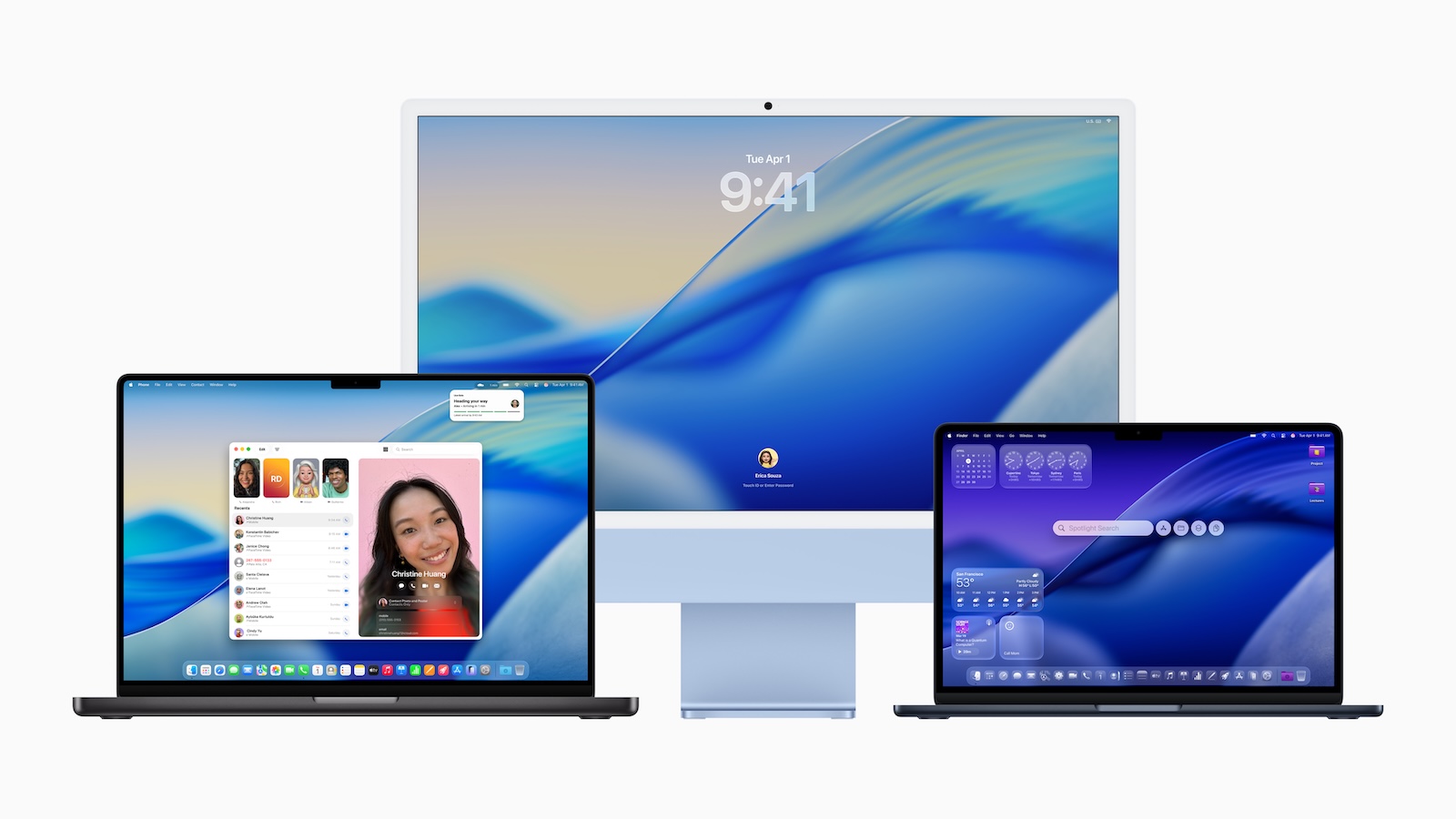
With macOS 26, Apple is pursuing a clear path: more flexibility, more customization options, and a modern look that works perfectly with iOS 26. The new Liquid Glass design concept, the radical overhaul of Spotlight, and new apps like Phone, Journal, and Games make this update one of the most comprehensive in years.
Liquid Glass: a new design
The visual appearance of macOS 26 has noticeably changed. With Liquid Glass, buttons, navigation bars, menus, the Dock, and widgets have a more transparent look. Elements reflect the background and refract light, creating a modern, lighter design. Icons can also be customized—from tinted to completely transparent.
Control center with more freedom
The Control Center is now customizable. Items can be reordered, spread across multiple pages, and enhanced with controls from third-party apps.
Menu bar with new functions
The menu bar also gains flexibility. Controls from the Control Center can be integrated and placed as desired. Also new is the display of live iPhone activity – made possible by iPhone mirroring.
- Note: iPhone mirroring is still not available in EU member states!
Spotlight replaces Launchpad
The Launchpad is gone, replaced by a redesigned Spotlight. It focuses on four main options: accessing apps and files, performing actions, viewing the clipboard, and controlling features.
Clipboard with history
The expanded clipboard is new. Copied content is now saved and can be accessed throughout the day. However, the history is limited to 24 hours.
Spotlight actions and shortcuts
Spotlight is more than just a search function. Using so-called actions, you can write messages, send emails, start timers, create calendar entries, or set reminders – all without opening an app. Combined with the Shortcuts app, it creates a powerful system that allows for complex automation. You can even define your own quick access phrases, for example, to launch certain processes using an abbreviation like "CH" for ChatGPT.
Folder with colors and emojis
Folders are easier to organize in macOS 26. Colors, emojis, or characters can be assigned, making files more clearly structured and visually easier to find.
Widgets directly on the desktop
Widgets aren't limited to the Notification Center. They can be moved directly to the desktop, making them more accessible. Widgets from both Apple apps and third-party providers are supported.
Shortcuts app on Mac
The popular Shortcuts app from iOS 26 is now an integral part of macOS. Automations can be set up in a variety of ways, such as at specific times of day, when connecting accessories, or when activating a Focus mode. When used in conjunction with Spotlight actions, this creates a particularly efficient combination.
Phone app for macOS
For the first time, Apple is bringing the Phone app to the Mac. Calls can be made and answered as long as an iPhone is connected and Wi-Fi Assist is enabled. New features like Hold Assist and Call Screening expand the possibilities.
Journal app for personal entries
The Journal app makes even more sense with a physical keyboard than on iOS. Multiple journals can be created and managed, plus the familiar features of the iOS version.
Games app with overlay
The new Games app bundles games from the Mac App Store, Apple Arcade, and the app's own collection. A game overlay lets you adjust settings or interact with friends while playing without leaving the app. For mobile use, there's a power-saving mode that extends battery life while playing.
macOS 26: a clear signal for the future of the Mac
macOS 26 Tahoe demonstrates that Apple is consistently evolving its desktop operating system. The new design has a modern feel, Spotlight becomes a powerful tool, and the integration of the Phone, Journal, and Games apps makes the Mac more versatile than ever. Users of the latest devices benefit from greater convenience, better organizational options, and a stronger connection between Mac and iPhone. The best products for you: Our Amazon Storefront offers a wide selection of accessories, including HomeKit accessories. (Image: Apple)
- iOS 26: Apple Home app gets new automation options
- AirPods Pro 3: Improved tracking only possible with iPhone 17
- iOS 26 makes Siri better – five new features at a glance
- iOS 26 brings five improvements for battery performance
- iOS 26: All new features in the Shortcuts app at a glance
- iOS 26: All new camera features at a glance
- iOS 26 at a glance: What's new in the Messages app
- Apple redesigns TV app: What's new in iOS 26
- iOS 26: All the new features and highlights of the Podcasts app
- iOS 26: How Apple fundamentally changes the phone app
- iOS 26: Everything about the new home screen with Liquid Glass
- iOS 26: All the new features around the Liquid Glass design
- iOS 26: 7 exciting AirPods features at a glance
- iOS 26: Everything you need to know about the new FaceTime features
- Genmoji in iOS 26: Apple gives the feature a major update
- iOS 26: Everything about the new games app for iPhone, iPad, and Mac
- iOS 26: The most important new features in the Photos app
- iOS 26: Beats and AirPods automatically pause when you sleep
- iOS 26: All Apple Music innovations at a glance
- iOS 26 expands the functionality of the HomePod
- Image Playground gets significantly better with iOS 26
- iOS 26 brings new screenshot features to the iPhone
- iOS 26: Five new lock screen features at a glance
- iOS 26 design change: Reduce transparency easily
- iOS 26: Create your own ringtones – without GarageBand
- iOS 26: All the new features for Notes and Reminders
Frequently Asked Questions (FAQ) about macOS 26
macOS 26 brings a new design called Liquid Glass, a completely redesigned Spotlight search, customizable widgets and menu bars, and new apps like Phone, Journal, and Games.
Apple released macOS 26 on September 15. The update is available for free download for all supported Macs.
macOS 26 Tahoe clearly distinguishes between older Intel Macs and the newer Apple Silicon models. Many Intel Macs that still received macOS Sequoia are no longer compatible. The following devices are supported:
• MacBook Air with Apple Silicon (from 2020)
• MacBook Pro with Apple Silicon (from 2020)
• MacBook Pro 16 inch (2019)
• MacBook Pro 13-inch (2020, with four Thunderbolt 3 ports)
• iMac (from 2020)
• Mac mini (from 2020)
• Mac Studio (from 2022)
• Mac Pro (from 2019)
Liquid Glass is the new design of macOS 26. It brings transparent surfaces, reflective elements, and new icon options for a more modern look.
Yes, Launchpad has been replaced by an enhanced Spotlight. Spotlight provides access to apps, files, clipboard history, and actions.
Yes, for the first time, a phone app is included. With a connected iPhone, you can make and receive calls and use features like call screening.
The Journal app allows for personal entries and supports multiple journals. On Macs, it benefits from keyboard usage.
The new Games app combines games from Apple Arcade, the Mac App Store, and the app's own collection. A game overlay makes it easier to control the game while playing.
Yes, folders can be assigned colors, icons, or emojis. This makes files easier to organize and find quickly.
The upgrade offers more convenience, new apps, improved productivity, and a stronger connection between Mac and iPhone. It's highly recommended for current Macs.