


apple patient
  • Home
  • News
  • Rumors
  • Tips & Tricks
  • Reviews
  • Insights
No Result
View All Result
  • iPhone 18
  • iOS 27
  • iPadOS 27
  • macOS
  • MacBook Neo
  • iPhone 17e
  • AirTags
  • iOS 26
  • iPhone 17
  • MacBook Pro
  • iPadOS
  • iMac
  • Mac mini
  • HomePod
  • Apple TV
  • iPad Pro
  • iPhone Air
  • Apple Vision Pro
  • iPhone 16
  • AirPods 4
  • Apple Watch Ultra
  • HomePod Mini
  • MacBook Air
  • iPad
  • AirPods Max
  • AirPods Pro 3
  • Apple Watch Series 3
  • Mac Studio
  • Studio Display
  • iPad Air
  • iPad mini
  • watchOS 27
  • Apple CarPlay
  • Apple Pay
  • watchOS 26
  • Home
  • News
  • Rumors
  • Tips & Tricks
  • Reviews
  • Insights
No Result
View All Result
apple patient
No Result
View All Result
  • iPhone 18
  • iOS 27
  • iPadOS 27
  • macOS
  • MacBook Neo
  • iPhone 17e
  • AirTags
  • iOS 26
  • iPhone 17
  • MacBook Pro
  • iPadOS
  • iMac
  • Mac mini
  • HomePod
  • Apple TV
  • iPad Pro
  • iPhone Air
  • Apple Vision Pro
  • iPhone 16
  • AirPods 4
  • Apple Watch Ultra
  • HomePod Mini
  • MacBook Air
  • iPad
  • AirPods Max
  • AirPods Pro 3
  • Apple Watch Series 3
  • Mac Studio
  • Studio Display
  • iPad Air
  • iPad mini
  • watchOS 27
  • Apple CarPlay
  • Apple Pay
  • watchOS 26

iOS 26 Tip: Unlock iPhone with Apple Vision Pro

Milan Jovicic by Milan Jovicic
September 15, 2025 - 11:58 p.m. CEST
in Apple Tips & Tricks
0
Apple Vision Pro iPhone unlock

Image: Shutterstock / pio3

WhatsAppFacebookEmail
Threads

With iOS 26, Apple is introducing a feature that significantly simplifies everyday life with the iPhone and Apple Vision Pro. In combination with visionOS 26, the iPhone can now be unlocked while wearing the Vision Pro—even when a fully immersive experience such as an environment is active.

Many Vision Pro users are familiar with the problem: A message appears on the iPhone, a quick glance at the device, but it remains locked. Face ID doesn't work because the Vision Pro blocks the direct view. Then comes the cumbersome procedure: wait until Face ID fails and then enter the passcode. With iOS 26 and visionOS 26, this odyssey is over. From now on, the iPhone can be unlocked directly with the Vision Pro – whether in the menu or in the middle of an immersive environment. This makes the interaction between the two devices more seamless and more suitable for everyday use.

Requirements for unlocking

In order to use the new function, several conditions must be met:

  • iOS 26 must be installed on the iPhone
  • The Apple Vision Pro must run visionOS 26
  • Both devices must be connected to the same Apple account
  • Bluetooth and Wi-Fi must be enabled
  • The Vision Pro must be worn and unlocked

Only if these requirements are met can the iPhone be unlocked with the Vision Pro.

Activation in the settings

The setup is done directly on the iPhone:

  • Open Settings
  • Select Face ID & Passcode
  • Select “Unlock with nearby devices”

Please note: Activation is only possible when the Vision Pro is currently being worn and unlocked. This prevents accidental activation and ensures the necessary security.
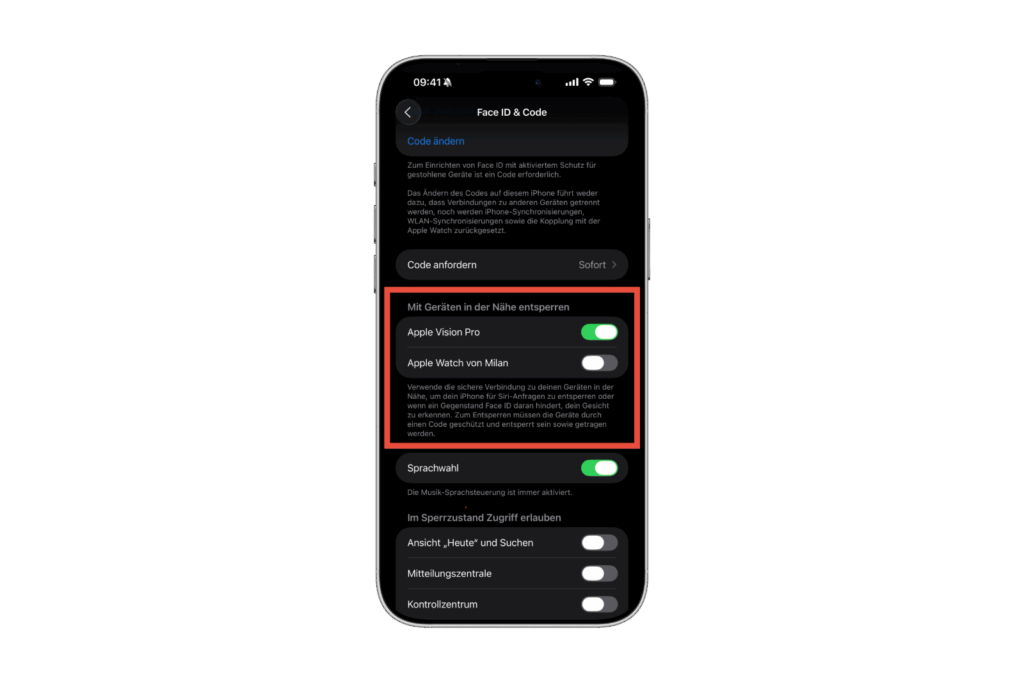
Unlock iPhone with Apple Vision Pro
Image: Apfelpatient

How to unlock with Vision Pro

Apple describes how it works like this:

Use the secure connection to your nearby devices to unlock your iPhone for Siri requests or when an object is blocking Face ID from recognizing your face. To unlock, the devices must be protected by a passcode, unlocked, and worn.

Apple is adding a practical alternative to Face ID. The iPhone remains securely protected, but can still be unlocked if Face ID isn't working. What's particularly exciting is that unlocking is even possible in a fully immersive experience. Whether in a virtual environment or while working in visionOS, the iPhone can be unlocked at any time, without restrictions.

Unlock iPhone with Apple Vision Pro
Image: Apfelpatient

iOS 26 makes using iPhone and Apple Vision Pro easier

With iOS 26 and visionOS 26, Apple is consistently expanding the integration of iPhone and Vision Pro. Unlocking the iPhone with Vision Pro is a solution to a common problem and saves time and hassle. The tedious entry of a passcode after a Face ID failure is a thing of the past. Even in immersive environments, the iPhone remains accessible. This significantly increases convenience without compromising security or data protection. Need useful tips for your Apple Vision Pro? Discover everything you need to know about your new Apple device here – enjoy reading! Looking for accessories? Our Amazon Storefront is your destination for high-quality products, including HomeKit-compatible ones! (Image: Shutterstock / pio3)

  • iOS 26: The most important tips for setup and use
  • iOS 26: Impact on battery life after the update
  • iOS 26: Use spatial scenes directly in the Photos app
  • iOS 26 Update: Markdown Import and Export in Notes Explained
  • iOS 26: Easily change backgrounds in iMessage
  • iOS 26: Trigger iPhone camera with AirPods – here's how
  • How to enable transparent iPhone app icons with iOS 26
  • iOS 26: Apple Music finally gets folders for playlists
  • iOS 26: Capture reminders faster and easier
  • Apple Music in iOS 26: Music Pins make access easier

FAQ: iOS 26, visionOS 26 and iPhone unlocking

What's new in iOS 26 in connection with the Apple Vision Pro?

With iOS 26 and visionOS 26, the iPhone can be unlocked with Apple Vision Pro – even during immersive environments.

What are the requirements for unlocking an iPhone with Vision Pro?

Required are iOS 26 on the iPhone, visionOS 26 on the Vision Pro, the same Apple account, activated Bluetooth and Wi-Fi, and a worn and unlocked Vision Pro.

How do I enable Vision Pro unlocking on iOS 26?

The feature is enabled under Settings > Face ID & Passcode > Unlock with Nearby Devices. The Vision Pro must be worn and unlocked.

Does iPhone unlocking work in immersive environments?

Yes, with iOS 26, unlocking is possible even during fully immersive experiences on the Vision Pro.

Is iPhone unlocking with Vision Pro safe?

Yes, this feature relies on a secure connection. Both devices must be protected by a passcode, and the Vision Pro must be worn and unlocked.

Why won't my iPhone unlock with the Vision Pro despite iOS 26?

Requirements like enabled Wi-Fi or Bluetooth are usually missing. All conditions must be met.

Does the new unlock feature apply to all iPhones?

No, the feature is only available for iPhone models with Face ID and iOS 26.

Does Face ID need to be disabled to unlock iPhone with Vision Pro?

No, Face ID remains active. The Vision Pro adds Face ID as an additional unlock method.

Does the Vision Pro unlock work without internet?

Yes, as long as Wi-Fi and Bluetooth are enabled and both devices are close to each other. An active internet connection is not required.


Make Apfelpatient a preferred source One click – and you'll see us more often on Google
Was this article helpful?
YesNo
Tags: Apple Vision ProApple Vision Pro Tips and TricksApple VR/ARiOSiOS 26iPhonevisionOSvisionOS 26
SendShareSend
Share

Our Amazon Storefront

A handpicked selection of products for iPhone, Mac and more – sorted by topic and updated regularly.

Shop Now

This post contains affiliate links (including Amazon). We earn a small commission on qualifying purchases – at no extra cost to you. Learn more on our Partner Program page.

Previous Post

Apple ends iCloud support for iOS 10 and macOS Sierra

Next Post

iOS 26 makes Adaptive Power the norm on the iPhone 17 series

Milan Jovicic

Milan Jovicic

Milan founded Apfelpatient in 2016 and has been responsible for all editorial content since 2018 — news, rumors, guides, and product reviews. Apple devices here are not test units on loan for two weeks but everyday tools: from the iPhone through MacBook Pro, MacBook Air, and iMac to the Apple Vision Pro, at least one device from nearly every product category is in daily use, many of them replaced annually. Every menu path in a guide is verified on the device before it is published.

Related posts

iPhone in an orange case connected to a USB-C cable, the starting point for juice jacking at unknown ports
Apple Tips & Tricks

Juice Jacking: How dangerous foreign USB ports really are

September 9, 2026 - 2:37 p.m. CEST
FileVault enabled with recovery key shown in the macOS System Settings
Apple Tips & Tricks

Activate FileVault: Encrypt and protect your Mac hard drive

September 7, 2026 - 4:27 p.m. CEST
Apple legacy contact: iPhone showing the setup dialog with three steps and the button to add a contact
Apple Tips & Tricks

Apple Legacy Contact: Set up access for family members

September 7, 2026 - 2:22 p.m. CEST

Categories

  • Apple Insights
  • Apple Rumors
  • Apple News
  • Apple Tips & Tricks
  • iPhone news, rumors and tips
  • Mac and MacBook News
  • Reviews

About APFELPATIENT

APFELPATIENT brings you the latest Apple news, product updates, guides, reviews and tips across the entire Apple ecosystem — from the iPhone to the Mac to the Apple Vision Pro. From the first rumors to confirmed news: researched responsibly.

Follow Apfelpatient

Facebook Instagram YouTube Threads Threads

Company

  • About Apfelpatient
  • Contact
  • Author Profiles

Community

  • Netiquette
  • Push Notifications
  • RSS feed

Legal

  • Legal Notice
  • Privacy Policy
  • Terms of Use
  • Cookie Settings
  • Affiliate Program

Resources

  • Sitemap

© 2026 Apfelpatient. All rights reserved.

No Result
View All Result
  • Home
  • News
  • Rumors
  • Tips & Tricks
  • Reviews
  • Insights

© 2026 Apfelpatient. All rights reserved. Page Directory

Change language to Deutsch


