


apple patient
  • Home
  • News
  • Rumors
  • Tips & Tricks
  • Reviews
  • Insights
No Result
View All Result
  • iPhone 18
  • iPhone 18 Pro
  • iPhone Duo
  • Apple Watch Series 12
  • Apple Watch Ultra 4
  • AirPods 5
  • iOS 27
  • iPadOS 27
  • macOS
  • MacBook Neo
  • iPhone 17e
  • AirTags
  • iOS 26
  • iPhone 17
  • MacBook Pro
  • iPadOS
  • iMac
  • Mac mini
  • HomePod
  • Apple TV
  • iPad Pro
  • iPhone Air
  • Apple Vision Pro
  • iPhone 16
  • AirPods 4
  • Apple Watch Ultra
  • HomePod Mini
  • MacBook Air
  • iPad
  • AirPods Max
  • AirPods Pro 3
  • Apple Watch Series 3
  • Mac Studio
  • Studio Display
  • iPad Air
  • iPad mini
  • watchOS 27
  • Apple CarPlay
  • Apple Pay
  • watchOS 26
  • Home
  • News
  • Rumors
  • Tips & Tricks
  • Reviews
  • Insights
No Result
View All Result
apple patient
No Result
View All Result
  • iPhone 18
  • iPhone 18 Pro
  • iPhone Duo
  • Apple Watch Series 12
  • Apple Watch Ultra 4
  • AirPods 5
  • iOS 27
  • iPadOS 27
  • macOS
  • MacBook Neo
  • iPhone 17e
  • AirTags
  • iOS 26
  • iPhone 17
  • MacBook Pro
  • iPadOS
  • iMac
  • Mac mini
  • HomePod
  • Apple TV
  • iPad Pro
  • iPhone Air
  • Apple Vision Pro
  • iPhone 16
  • AirPods 4
  • Apple Watch Ultra
  • HomePod Mini
  • MacBook Air
  • iPad
  • AirPods Max
  • AirPods Pro 3
  • Apple Watch Series 3
  • Mac Studio
  • Studio Display
  • iPad Air
  • iPad mini
  • watchOS 27
  • Apple CarPlay
  • Apple Pay
  • watchOS 26

iOS 26 solves the Bluetooth problem with AirPods in the car

Milan Jovicic by Milan Jovicic
October 11, 2025 - 10:30 CEST
in Apple Tips & Tricks
0
iOS 26 AirPods CarPlay

Image: Shutterstock / FabrikaSimf

WhatsAppFacebookEmail
Threads

With iOS 26, Apple is introducing a number of small but practical innovations designed to make everyday life easier. One of these concerns the connection between iPhone, AirPods, and car. Many iPhone users are familiar with this problem: As soon as the car is started, the iPhone automatically connects to the Bluetooth system or CarPlay, and the music or podcast playing suddenly switches to the car speakers. With iOS 26, Apple ensures that this no longer happens.

The new "Keep Audio on Headphones" feature prevents audio from automatically switching from the iPhone to other Bluetooth devices when listening through headphones. This keeps the audio on the AirPods even when the iPhone connects to the car. The feature is part of the AirPlay and Continuity settings and can be enabled in just a few steps.

How to keep the sound on the AirPods

Apple has designed the feature to be easy to find and enable. There's a new menu item for it in the iPhone's settings. Once enabled, playback on the headphones remains stable—regardless of whether music is playing, a podcast is being listened to, or a call is coming in. To enable the option, open the Settings app. Under "General," you'll find the "AirPlay & Continuity" section. There, you'll find the new setting "Keep Audio on Headphones." Once the switch is enabled, iOS 26 prevents the audio output from automatically switching to CarPlay or other Bluetooth devices.
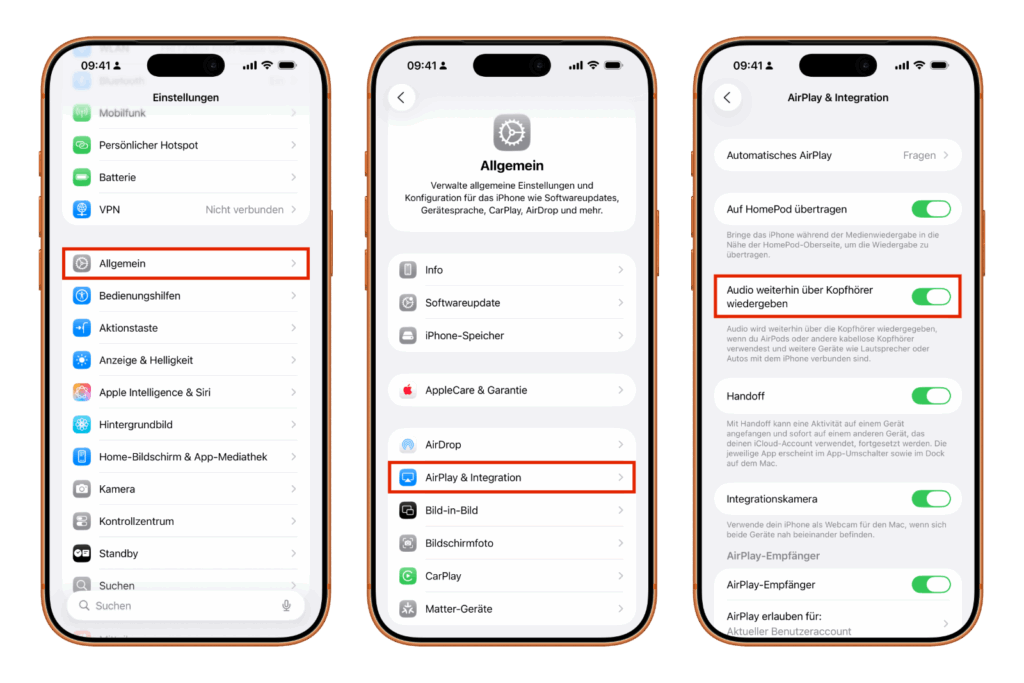
iOS 26 AirPods CarPlay
Image: Apfelpatient

This means the AirPods stay connected even if the iPhone connects to the car's Bluetooth system at the same time. The music or podcast simply continues to play through the headphones.

Manual switching remains possible

Even though the new feature blocks automatic switching, the audio can still be manually redirected to the car if needed. This can be done either via the Control Center or via CarPlay. So, if you prefer to listen through the car speakers, you can switch at any time.

Also works with other headphones

Although Apple advertises the feature for AirPods, it doesn't work exclusively with them. Other wireless headphones connected to the iPhone via Bluetooth also benefit from it. This makes the new feature attractive for many users who use iPhones but not AirPods.

Practical even outside the car

This feature isn't just useful in the car. It also prevents your iPhone from suddenly switching to other Bluetooth speakers in your home or office. If multiple devices are within range—such as a HomePod, a soundbar, or a Bluetooth speaker—the sound remains on the headphones. This provides more control over playback and prevents unwanted interruptions.

iOS 26 scores with smart attention to detail

With iOS 26, Apple introduced a subtle but useful improvement. The new "Keep Audio on Headphones" setting solves a common problem that has bothered many iPhone users. It ensures that audio content stays where it started—on the AirPods or other Bluetooth headphones. Users can still manually switch the audio, but now have the choice of whether or not the iPhone automatically switches to other devices. This demonstrates that iOS 26 is once again an update that stands out less for major innovations, but rather for thoughtful details that make using the iPhone noticeably more pleasant. The best products for you: Our Amazon Storefront offers a wide selection of accessories, including those for HomeKit. (Image: Shutterstock / FabrikaSimf)

  • iPhone: How the new call waiting feature works in iOS 26
  • iPhone gets new feature against spam and advertising calls
  • iOS 26: New option saves time and data when sending photos
  • iOS 26: Over 10 hidden features everyone needs to know
  • iOS 26: Visual intelligence now also for screen content
  • iPhone 17: How iOS 26 colors your app icons
  • iOS 26: Use polls directly in the Messages app
  • New iOS 26 feature: Use live translation with AirPods
  • Discover and manage games with the Apple Games app
  • iPhone 17: Tips for using the Center Stage front camera
  • iPhone 17 Dual Capture explained: Using the front and rear cameras
  • iOS 26 Screenshot Disable full screen and enable old view
  • iPhone 17: Disable or customize the camera control button
  • iPhone Tip: Live Translation in Messages, Phone & FaceTime
  • iOS 26: Filter messages, block spam & keep track
  • Setting up your iPhone correctly: Check, block, and filter calls
  • Keep an eye on your blood pressure: How the iPhone Health app helps
  • Apple explains Apple Watch high blood pressure warnings
  • Setting up Apple Music transitions: AutoMix or Crossfade
  • macOS 26: Automatically connect iPhone hotspot
  • watchOS 26: Why the Apple Watch sometimes charges slowly

FAQ on iOS 26: AirPods stay connected in the car

What changes with iOS 26 regarding connecting AirPods in the car?

With iOS 26, a new setting prevents AirPods from automatically switching to CarPlay or the car speakers when the car is started. The sound remains on the headphones.

What is the name of the new feature in iOS 26 that stops switching?

The setting is called "Keep Audio on Headphones." It ensures that music, podcasts, or calls continue to play through the AirPods even when a Bluetooth connection to the car is active.

Where can I find the new option in iOS 26?

In Settings under General → AirPlay & Continuity, you can enable "Keep Audio on Headphones" with a switch.

Does the new iOS 26 setting only work with AirPods?

No. Other wireless Bluetooth headphones also work with this option. iOS 26 automatically detects when a headset is already connected and pauses playback there.

Can you still listen via CarPlay with iOS 26 if you want?

Yes. Switching is still possible manually – either via the Control Center or directly in CarPlay. iOS 26 only prevents automatic switching, not manual selection.

Does the iOS 26 feature also work outside the car?

Yes, it works wherever the iPhone could switch to other Bluetooth devices – for example, to speakers in the home or office.

Why did Apple introduce this feature in iOS 26?

Many users had complained that podcasts or music would suddenly play through the speakers when starting the car. iOS 26 permanently fixes this problem.

Is there anything I need to consider when enabling the feature in iOS 26?

No, it's safe to activate. Those who prefer to listen via CarPlay can switch manually at any time without changing the setting.

Is the feature automatically enabled in iOS 26?

No. After updating to iOS 26, the "Keep Audio on Headphones" option must be enabled once in Settings.

In which situations is the new feature in iOS 26 particularly useful?

This is especially true when driving, in offices with multiple Bluetooth devices, or in homes with smart speakers. iOS 26 ensures that the audio stays where it started.


Make Apfelpatient a preferred source One click – and you'll see us more often on Google
Was this article helpful?
YesNo
Tags: AirPodsApple CarPlayiOSiOS 26iPhone
SendShareSend
Share

Our Amazon Storefront

A handpicked selection of products for iPhone, Mac and more – sorted by topic and updated regularly.

Shop Now

This post contains affiliate links (including Amazon). We earn a small commission on qualifying purchases – at no extra cost to you. Learn more on our Partner Program page.

Previous Post

When will the M5 MacBook Pro be released? Current information at a glance

Next Post

Apple discontinues Clips app: End of a creative era

Milan Jovicic

Milan Jovicic

Milan founded Apfelpatient in 2016 and has been responsible for all editorial content since 2018 — news, rumors, guides, and product reviews. Apple devices here are not test units on loan for two weeks but everyday tools: from the iPhone through MacBook Pro, MacBook Air, and iMac to the Apple Vision Pro, at least one device from nearly every product category is in daily use, many of them replaced annually. Every menu path in a guide is verified on the device before it is published.

Related posts

Setting up iPhone Handoff: Here's how it works in iOS 27

by Milan Jovicic
September 24, 2026 - 5:50 p.m. CEST
iPhone showing the Set Up eSIM screen with the option to use the number on two iPhones selected, the first step to set up iPhone Handoff

Setting up iPhone Handoff under iOS 27: Requirements, costs at Telekom and why logging out only works via the provider.

Read moreDetails

How to Turn On Advanced Data Protection for iCloud

by Milan Jovicic
September 20, 2026 - 03:27 CEST
Advanced Data Protection for iCloud: iPhone showing the Advanced Data Protection settings page with the list of protected data and the Turn On option, next to a padlock

Advanced Data Protection for iCloud: 25 categories with end-to-end encryption. How to turn it on and secure your recovery options.

Read moreDetails

Selling Your iPhone Safely: How to Prepare Your Device the Right Way

by Milan Jovicic
September 19, 2026 - 9:04 p.m. CEST
Selling an iPhone safely: two iPhones lying face down on a grey surface, one orange and one black

Sell your iPhone safely: Backup, deregistration, activation lock and reset in the correct order – plus shipping step for the 18 Pro Max.

Read moreDetails

iPhone 18 Pro: Setting up Pro video storage for ProRes

by Milan Jovicic
September 19, 2026 - 7:56 p.m. CEST
Pro Video Storage on iPhone 18 Pro: iPhone showing the Configure Pro Video Storage dial at 150 GB and about 26 minutes of ProRes 4K 30 fps, next to a drive with a checkmark

No Pro Video storage, no ProRes: Here's how to reserve storage for video recordings on the iPhone 18 Pro and free it up again when needed.

Read moreDetails

Preparing your iPhone 18 Pro Max for shipping: Here's how

by Milan Jovicic
September 19, 2026 - 03:15 CEST
Preparing iPhone 18 Pro Max for shipping: iPhone showing the shipping reason screen with Repair, Trade-in or Return and Other, next to a battery with a downward arrow

iPhone 18 Pro Max before shipping: Batteries larger than 20 Wh must be discharged using the "Prepare for Shipping" function. Here's how to do it for repairs and sales.

Read moreDetails
Load More

Categories

  • Apple Insights
  • Apple Rumors
  • Apple News
  • Apple Tips & Tricks
  • iPhone news, rumors and tips
  • Mac and MacBook News
  • Reviews

About APFELPATIENT

APFELPATIENT brings you the latest Apple news, product updates, guides, reviews and tips across the entire Apple ecosystem — from the iPhone to the Mac to the Apple Vision Pro. From the first rumors to confirmed news: researched responsibly.

Follow Apfelpatient

Facebook Instagram YouTube Threads Threads

Company

  • About Apfelpatient
  • Contact
  • Author Profiles

Community

  • Netiquette
  • Push Notifications
  • RSS feed

Legal

  • Legal Notice
  • Privacy Policy
  • Terms of Use
  • Cookie Settings
  • Affiliate Program

Resources

  • Sitemap

© 2026 Apfelpatient. All rights reserved.

No Result
View All Result
  • Home
  • News
  • Rumors
  • Tips & Tricks
  • Reviews
  • Insights

© 2026 Apfelpatient. All rights reserved. Page Directory

Change language to Deutsch


