


apple patient
  • Home
  • News
  • Rumors
  • Tips & Tricks
  • Reviews
  • Insights
No Result
View All Result
  • iPhone 18
  • iPhone 18 Pro
  • iPhone Duo
  • Apple Watch Series 12
  • Apple Watch Ultra 4
  • AirPods 5
  • iOS 27
  • iPadOS 27
  • macOS
  • MacBook Neo
  • iPhone 17e
  • AirTags
  • iOS 26
  • iPhone 17
  • MacBook Pro
  • iPadOS
  • iMac
  • Mac mini
  • HomePod
  • Apple TV
  • iPad Pro
  • iPhone Air
  • Apple Vision Pro
  • iPhone 16
  • AirPods 4
  • Apple Watch Ultra
  • HomePod Mini
  • MacBook Air
  • iPad
  • AirPods Max
  • AirPods Pro 3
  • Apple Watch Series 3
  • Mac Studio
  • Studio Display
  • iPad Air
  • iPad mini
  • watchOS 27
  • Apple CarPlay
  • Apple Pay
  • watchOS 26
  • Home
  • News
  • Rumors
  • Tips & Tricks
  • Reviews
  • Insights
No Result
View All Result
apple patient
No Result
View All Result
  • iPhone 18
  • iPhone 18 Pro
  • iPhone Duo
  • Apple Watch Series 12
  • Apple Watch Ultra 4
  • AirPods 5
  • iOS 27
  • iPadOS 27
  • macOS
  • MacBook Neo
  • iPhone 17e
  • AirTags
  • iOS 26
  • iPhone 17
  • MacBook Pro
  • iPadOS
  • iMac
  • Mac mini
  • HomePod
  • Apple TV
  • iPad Pro
  • iPhone Air
  • Apple Vision Pro
  • iPhone 16
  • AirPods 4
  • Apple Watch Ultra
  • HomePod Mini
  • MacBook Air
  • iPad
  • AirPods Max
  • AirPods Pro 3
  • Apple Watch Series 3
  • Mac Studio
  • Studio Display
  • iPad Air
  • iPad mini
  • watchOS 27
  • Apple CarPlay
  • Apple Pay
  • watchOS 26

iPhone tip: Access flight information directly in the system

Milan Jovicic by Milan Jovicic
December 23, 2025 - 2:33 PM CET
in Apple Tips & Tricks
0
Track iPhone flight numbers flight tracker

Image: Shutterstock / Anna Hoychuk

WhatsAppFacebookEmail
Threads

The iPhone offers many features that often go unnoticed in everyday life. Travel, in particular, reveals the operating system's extensive capabilities. If you need quick information about a scheduled flight while on the go, you don't necessarily have to install a separate app. iOS automatically recognizes flight numbers and provides important data directly.

The App Store offers numerous specialized flight trackers. These applications provide extensive additional information such as weather data, delays, aircraft type, or even visual aircraft identification via the iPhone camera. Many users find such apps useful. However, if only basic and up-to-date information about a specific flight is needed, the iPhone's built-in features are perfectly adequate.

Flight information without additional apps

Flight connections can usually be found using their flight number. This consists of a combination of letters, the airline's IATA code, and a sequence of numbers. iOS usually recognizes such flight numbers automatically as soon as they appear in text. If recognition fails, it often helps to also enter the airline's name.

This feature is particularly useful in the messaging app. Recognized flight numbers are displayed underlined. A long press opens a menu from which the flight number can be copied or a preview with a real-time view of the flight can be displayed.

A quick tap doesn't display a map, but it does reveal two further options. The "Flight Info" option shows detailed information about the current flight status. This includes any delays, the scheduled or actual arrival time, and information about the arrival terminal. Additionally, you can see which baggage carousel you'll be using.

Use via Spotlight search

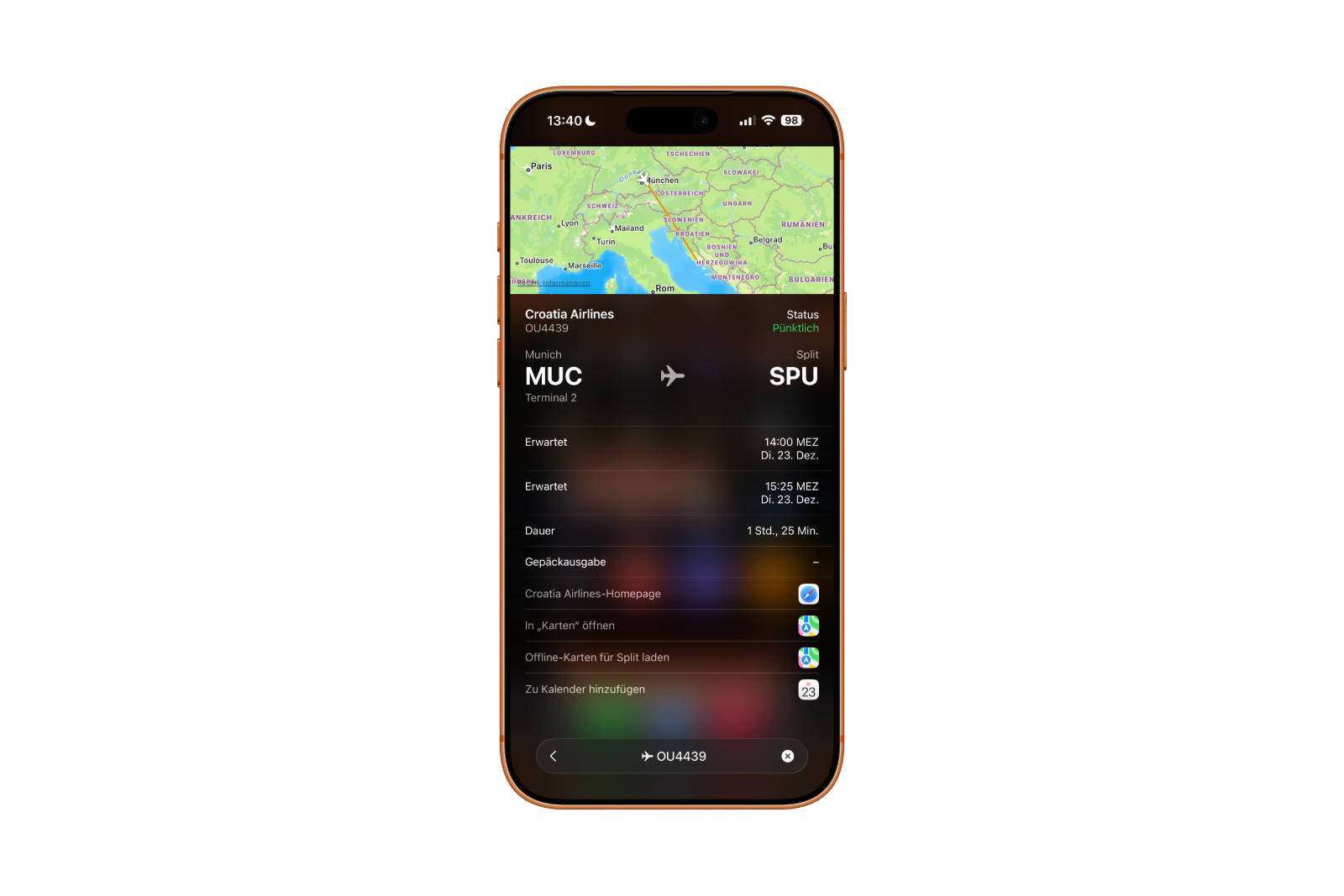
All flight information mentioned can also be accessed via Spotlight search on the iPhone. After entering the flight number, relevant results appear with the same detailed views as in the Messages app.

Apple has expanded this view with additional practical features. For example, the airport can be opened directly in the Maps app. Furthermore, it's possible to download map data for the destination for offline use. This is particularly helpful if there is no or only a limited internet connection available after landing.
iPhone flight tracker iOS
Image: Apfelpatient

Furthermore, the search results allow you to access the website of the respective airline. Flights can also be entered directly into the calendar to clearly document travel times and arrivals.

iPhone tip: Access flight details without additional apps

The iPhone demonstrates just how much functionality is already integrated into the system when displaying flight information. No additional apps are needed for a quick overview of a scheduled flight. Flight status, arrival times, terminal information, baggage claim, and map functions are all available directly through iOS. This makes the iPhone a reliable travel tool that provides relevant information with just a few taps. The best products for you: Our Amazon storefront offers a wide selection of accessories, including those compatible with HomeKit. (Image: Shutterstock / Anna Hoychuk)

  • Family Sharing explained: Easily share and manage iCloud+
  • Quickly set up Family Sharing on iPhone, iPad, and Mac
  • iOS 26.2 explained: How the new AirDrop codes work
  • iOS 26.2 enhances the Reminders app with alarm functionality
  • Here's how to properly create a backup for iPhone and iPad
  • Setting up and using Apple Car Key: All functions explained
  • New iOS 26.2 feature: Screen flashes for notifications
  • Longer battery life with iOS 26 – Adaptive Power explained
  • Live translation with AirPods: Here's how the feature works
  • iOS 26: The new focus mode „Reduce interruptions“
  • iOS 26.1: Reactivate the classic stop button on the alarm clock
  • iOS 26.1 brings a new lock screen setting for the iPhone
  • iOS 26.1: Liquid Glass effects can be toned down
  • watchOS 26 brings hints about the Apple Watch dial
  • macOS 26 Update: Hidden Tools and Improvements
  • New call history in iOS 26: All conversations at a glance
  • iOS 26: iMessage not working? Apple announces the solution
  • iOS 26 Tricks: 26 small innovations with a big impact
  • iOS 26 solves the Bluetooth problem with AirPods in the car
  • iPhone: How the new call waiting feature works in iOS 26
  • iPhone gets new feature against spam and advertising calls
  • iOS 26: New option saves time and data when sending photos
  • iOS 26: Over 10 hidden features everyone needs to know
  • iOS 26: Visual intelligence now also for screen content

FAQs: Access flight information directly on your iPhone

Can the iPhone display flight information without an app?

Yes. The iPhone recognizes flight numbers directly in the operating system and displays relevant flight information without additional apps. The information is displayed via iOS features such as Messages, Spotlight, and built-in previews.

What flight data does the iPhone display?

The iPhone provides information such as the current flight status, any delays, the scheduled or actual arrival time, the arrival terminal, and baggage claim. Depending on the flight, map views are also displayed.

How does the iPhone recognize a flight number?

Flight numbers consist of an airline code and a sequence of numbers. iOS automatically recognizes this combination in text. If recognition fails, it usually helps to also include the airline's name.

Where can I access flight information on my iPhone?

Flight information appears in the Messages app, among other places, if a flight number is included. It can also be accessed via Spotlight search by entering the flight number.

What happens when you tap on a recognized flight number?

A short tap reveals further options such as "Flight Information". A longer tap opens a menu from which the flight number can be copied or a preview with real-time data can be displayed.

Does the iPhone also display maps and airport information?

Yes. Airports can be opened in the map app via the flight information view. Additionally, it's possible to download map data for the destination for offline use.

Is an internet connection required for use?

An internet connection is required for up-to-date real-time data. However, previously downloaded maps can also be used offline, for example after landing without mobile data.

Can flights be saved directly to the calendar?

Yes. iOS offers the option to directly add detected flights to the calendar. This keeps departure and arrival times clearly organized.

Can airline websites be accessed via the flight information?

Yes. The flight information view allows you to directly access the website of the respective airline for further details or services.

Can the iPhone's built-in features replace full-fledged flight tracker apps?

For basic information, yes. Those who only need status, times, and terminal data can manage with the built-in iOS tools. Extensive additional functions are still offered by specialized apps.


Make Apfelpatient a preferred source One click – and you'll see us more often on Google
Was this article helpful?
YesNo
Tags: iOS
SendShareSend
Share

Our Amazon Storefront

A handpicked selection of products for iPhone, Mac and more – sorted by topic and updated regularly.

Shop Now

This post contains affiliate links (including Amazon). We earn a small commission on qualifying purchases – at no extra cost to you. Learn more on our Partner Program page.

Previous Post

iOS 26.3 receives praise from the EU for new features

Next Post

Apple Glasses as a technical intermediate step towards AR glasses

Milan Jovicic

Milan Jovicic

Milan founded Apfelpatient in 2016 and has been responsible for all editorial content since 2018 — news, rumors, guides, and product reviews. Apple devices here are not test units on loan for two weeks but everyday tools: from the iPhone through MacBook Pro, MacBook Air, and iMac to the Apple Vision Pro, at least one device from nearly every product category is in daily use, many of them replaced annually. Every menu path in a guide is verified on the device before it is published.

Related posts

Setting up iPhone Handoff: Here's how it works in iOS 27

by Milan Jovicic
September 24, 2026 - 5:50 p.m. CEST
iPhone showing the Set Up eSIM screen with the option to use the number on two iPhones selected, the first step to set up iPhone Handoff

Setting up iPhone Handoff under iOS 27: Requirements, costs at Telekom and why logging out only works via the provider.

Read moreDetails

How to Turn On Advanced Data Protection for iCloud

by Milan Jovicic
September 20, 2026 - 03:27 CEST
Advanced Data Protection for iCloud: iPhone showing the Advanced Data Protection settings page with the list of protected data and the Turn On option, next to a padlock

Advanced Data Protection for iCloud: 25 categories with end-to-end encryption. How to turn it on and secure your recovery options.

Read moreDetails

Selling Your iPhone Safely: How to Prepare Your Device the Right Way

by Milan Jovicic
September 19, 2026 - 9:04 p.m. CEST
Selling an iPhone safely: two iPhones lying face down on a grey surface, one orange and one black

Sell your iPhone safely: Backup, deregistration, activation lock and reset in the correct order – plus shipping step for the 18 Pro Max.

Read moreDetails

iPhone 18 Pro: Setting up Pro video storage for ProRes

by Milan Jovicic
September 19, 2026 - 7:56 p.m. CEST
Pro Video Storage on iPhone 18 Pro: iPhone showing the Configure Pro Video Storage dial at 150 GB and about 26 minutes of ProRes 4K 30 fps, next to a drive with a checkmark

No Pro Video storage, no ProRes: Here's how to reserve storage for video recordings on the iPhone 18 Pro and free it up again when needed.

Read moreDetails

Preparing your iPhone 18 Pro Max for shipping: Here's how

by Milan Jovicic
September 19, 2026 - 03:15 CEST
Preparing iPhone 18 Pro Max for shipping: iPhone showing the shipping reason screen with Repair, Trade-in or Return and Other, next to a battery with a downward arrow

iPhone 18 Pro Max before shipping: Batteries larger than 20 Wh must be discharged using the "Prepare for Shipping" function. Here's how to do it for repairs and sales.

Read moreDetails
Load More

Categories

  • Apple Insights
  • Apple Rumors
  • Apple News
  • Apple Tips & Tricks
  • iPhone news, rumors and tips
  • Mac and MacBook News
  • Reviews

About APFELPATIENT

APFELPATIENT brings you the latest Apple news, product updates, guides, reviews and tips across the entire Apple ecosystem — from the iPhone to the Mac to the Apple Vision Pro. From the first rumors to confirmed news: researched responsibly.

Follow Apfelpatient

Facebook Instagram YouTube Threads Threads

Company

  • About Apfelpatient
  • Contact
  • Author Profiles

Community

  • Netiquette
  • Push Notifications
  • RSS feed

Legal

  • Legal Notice
  • Privacy Policy
  • Terms of Use
  • Cookie Settings
  • Affiliate Program

Resources

  • Sitemap

© 2026 Apfelpatient. All rights reserved.

No Result
View All Result
  • Home
  • News
  • Rumors
  • Tips & Tricks
  • Reviews
  • Insights

© 2026 Apfelpatient. All rights reserved. Page Directory

Change language to Deutsch


