

With iOS 26, Apple introduces a feature that significantly changes the way you handle reminders. Apple Intelligence suggests suitable reminders directly from apps like Safari, Mail, or Messages, without having to open the Reminders app. Content like action items from an email, ingredients from a recipe, or important appointments from messages can be saved as reminders quickly and easily.
Apple's goal with iOS 26 is clear: to make everyday tasks smarter and more efficient. Apple Intelligence uses generative models that analyze text content and derive useful suggestions. Reminders are no longer generated manually, but automatically – and adapt to the context in which you're working. This transforms the iPhone into a more personal assistant that proactively supports tasks.
Create reminders directly from apps
With iOS 26, creating reminders is straightforward. A typical process looks like this:
- Open a website in Safari, a message in Mail, or any text in another app.
- Tap the "Share" button. If it's not available, such as in Mail, first highlight the text and then tap "Share."
- Select “Memories” from the Share menu.
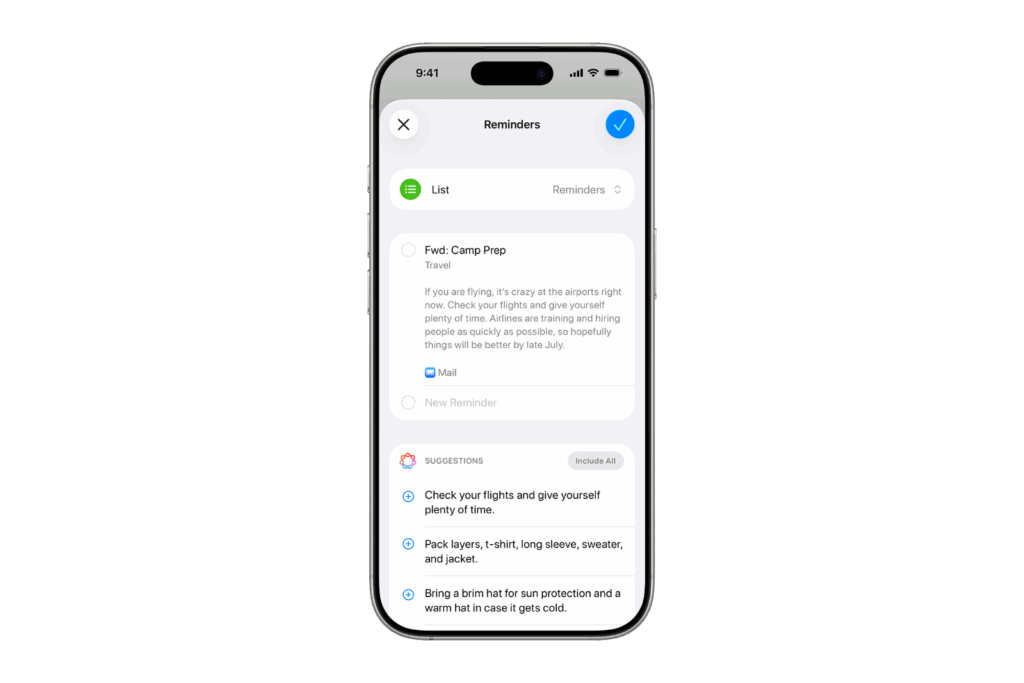
- Under "Suggestions," you'll see the content identified by Apple Intelligence. Individual suggestions can be added using the "Add" button, or you can save all suggestions using "Include All."
- Select the list to which you want to add the reminder and confirm by checking the box.
This allows you to automatically create to-dos, shopping lists, or important appointments from different sources.
Typical use cases
Apple Intelligence in iOS 26 recognizes different content and offers it directly as a reminder:
- Deadlines or specific tasks can be saved in emails.
- In Safari, you can save ingredient lists or other checklists from recipes.
- Appointments or to-dos are automatically recognized in messages.
Availability and supported devices
Apple Intelligence is available in beta with iOS 26. Supported are:
- iPhone 15 Pro and iPhone 15 Pro Max
- all iPhone 16 models and later devices
- iPad mini with A17 Pro
- iPad models with M1 chip and newer
The prerequisite is that Siri and the device language are set to the same supported language.
Limits and notes
Apple Intelligence's suggestions are based on generative models. This means that results may vary. Important information should therefore be reviewed manually to avoid errors. Especially with appointments or detailed lists, a quick check is recommended to ensure everything has been correctly entered.
More efficient reminders with iOS 26 and Apple Intelligence
iOS 26 significantly expands the Reminders feature with Apple Intelligence. Reminders can be generated directly from emails, websites, or messages without having to open the Reminders app. This saves time and ensures that no important tasks are missed. While the suggestions should still be reviewed, iOS 26 demonstrates how Apple uses Apple Intelligence to make everyday life smarter and more efficient. The best products for you: Our Amazon Storefront offers a wide selection of accessories, including those for HomeKit. (Image: Apple)
- Preview App: Everything about PDF and image functions on the iPhone
- iPhone 17: How iOS 26 colors your app icons
- iOS 26: Use polls directly in the Messages app
- New iOS 26 feature: Use live translation with AirPods
- Discover and manage games with the Apple Games app
- iPhone 17: Tips for using the Center Stage front camera
- iPhone 17 Dual Capture explained: Using the front and rear cameras
- iOS 26 Screenshot Disable full screen and enable old view
- iPhone 17: Disable or customize the camera control button
- iPhone Tip: Live Translation in Messages, Phone & FaceTime
- iOS 26: Filter messages, block spam & keep track
- Setting up your iPhone correctly: Check, block, and filter calls
- Keep an eye on your blood pressure: How the iPhone Health app helps
- Apple explains Apple Watch high blood pressure warnings
- Setting up Apple Music transitions: AutoMix or Crossfade
- macOS 26: Automatically connect iPhone hotspot
- watchOS 26: Why the Apple Watch sometimes charges slowly
- iOS 26: Reduce transparency for more clarity
- Find and adjust the camera flash in iOS 26 – here's how
- iOS 26 makes Adaptive Power the norm on the iPhone 17 series
- iOS 26 Tip: Unlock iPhone with Apple Vision Pro
Frequently Asked Questions about iOS 26 and Apple Intelligence
Apple Intelligence analyzes text in apps like Mail, Safari, and Messages, generating reminder suggestions that can be saved directly.
The feature is available in beta on iPhone 15 Pro, iPhone 15 Pro Max, all iPhone 16 models, iPad mini (A17 Pro), and iPads with M1 or later.
No, reminders can be created directly from apps. Apple Intelligence automatically suggests suitable content.
The results are based on generative models. Apple points out that important information should be manually reviewed to avoid errors.
For Apple Intelligence to work, Siri and the device language must be set to the same supported language. Not all languages are currently available.
Yes, Apple Intelligence in iOS 26 allows you to add individual suggestions or save all automatically detected content at once.
With iOS 26, you no longer need to manually create multiple reminders. Apple Intelligence saves time, provides more clarity, and prevents important tasks from being forgotten.





