


The Preview app on the iPhone is one of those obscure yet extremely useful tools. It simplifies the handling of PDF documents, forms, and images, making it possible to complete tasks that would otherwise often require several different apps. Whether filling out forms, scanning documents, adding a signature, or editing photos – the features are integrated directly into iOS and ready to use right away.
In everyday life, situations arise again and again in which documents need to be edited digitally. A form needs to be filled out, a PDF file needs to be encrypted, or text needs to be highlighted. Photos sometimes also require quick adjustments, for example, if the background needs to be removed. This is precisely where Preview comes in: an app that bundles many practical tasks and is available directly on the iPhone. The focus is on ease of use and efficient work – without detours and without additional downloads.
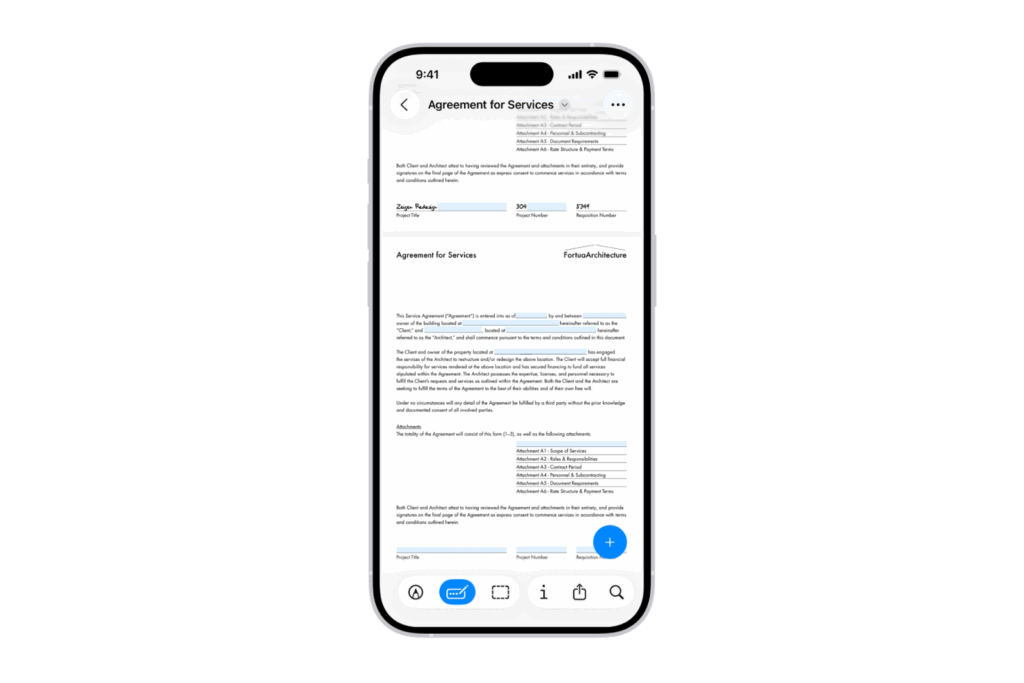
Fill out PDF forms
PDF forms can be easily edited in Preview. The "Fill out forms" button selects a field where you can enter text. Suggestions displayed above the keyboard are also available. If the field is a signature field, you can add a signature directly with your finger. This allows you to complete even legally binding documents directly on your iPhone.
Scan documents and save them as PDFs
Paper documents no longer need to be laboriously processed using an external scanner. With the "Scan Documents" option, the Preview app transforms every image into a clean PDF file. The iPhone's camera captures each page, automatically crops the edges, and combines the scans into a single document. Once complete, simply tap "Done" to save the PDF.
Protect PDF documents with a password
For confidential content, Preview offers the option of protecting PDF files with a password. After opening a document, the "Lock" option is available in the "Actions" menu next to the file name. By selecting "Require password," a password is assigned and confirmed. This reliably protects private or business documents from unauthorized access.
Remove background from photos
In addition to PDF functions, the app also offers simple image editing. With "Remove Background," you can delete the background of a photo, leaving only the main subject. The result is suitable for presentations, profile pictures, or creative projects where distracting elements need to be hidden.
Highlight, underline, or strikethrough text in PDFs
The readability and structure of documents can be improved through markup. In Preview, text in PDFs can be selected and then highlighted in color using "Highlight." Alternatively, "Underline" or "Strikethrough" are available. These functions make it easier to emphasize important passages or clearly mark revised content.
Preview app as an all-in-one solution on the iPhone
The Preview app on the iPhone is a versatile tool for everyday digital life. It combines functions such as filling out and signing forms, scanning documents, password-protecting PDFs, removing photo backgrounds, and highlighting text. This makes editing files simple and efficient. Instead of using multiple apps in parallel, a single application is sufficient for many of your most common tasks. The best products for you: Our Amazon Storefront offers a wide selection of accessories, including those for HomeKit. (Image: Apple)
- iPhone 17: How iOS 26 colors your app icons
- iOS 26: Use polls directly in the Messages app
- New iOS 26 feature: Use live translation with AirPods
- Discover and manage games with the Apple Games app
- iPhone 17: Tips for using the Center Stage front camera
- iPhone 17 Dual Capture explained: Using the front and rear cameras
- iOS 26 Screenshot Disable full screen and enable old view
- iPhone 17: Disable or customize the camera control button
- iPhone Tip: Live Translation in Messages, Phone & FaceTime
- iOS 26: Filter messages, block spam & keep track
- Setting up your iPhone correctly: Check, block, and filter calls
- Keep an eye on your blood pressure: How the iPhone Health app helps
- Apple explains Apple Watch high blood pressure warnings
- Setting up Apple Music transitions: AutoMix or Crossfade
- macOS 26: Automatically connect iPhone hotspot
- watchOS 26: Why the Apple Watch sometimes charges slowly
- iOS 26: Reduce transparency for more clarity
- Find and adjust the camera flash in iOS 26 – here's how
- iOS 26 makes Adaptive Power the norm on the iPhone 17 series
- iOS 26 Tip: Unlock iPhone with Apple Vision Pro
Frequently asked questions about the Preview app on iPhone
The Preview app allows you to fill out and sign PDFs, scan documents, protect files with a password, and edit photos.
The "Fill Forms" option lets you edit fields directly on your iPhone. Text can be entered or signatures added with your finger.
Yes. With the "Scan Documents" feature, the camera captures pages, automatically crops them, and saves them as a PDF.
In the action menu next to the file name, you can select the "Lock" option. After entering and confirming a password, the document is secured.
Yes. The "Remove Background" option deletes the background, leaving only the main subject.
Text in PDFs can be highlighted, underlined, or struck through. To do this, select the text and choose the desired editing option.





