This article may contain affiliate links. Learn more on our Partner Program page.
watchOS 26 is here, and it brings more innovations than many expected. What's particularly noteworthy is that many of the new features aren't limited to the very latest models, but are also available on watches already worn on the wrist.
With watchOS 26, Apple is expanding the Apple Watch in many areas – from design and health to communication and fitness. 26 new features demonstrate that the watch has long been more than just a simple gadget. Liquid Glass creates a fresher look, AI-assisted workouts provide more motivation, and high blood pressure notifications open up new possibilities in the health area. This makes the update one of the most comprehensive Apple has ever released.
New design in watchOS 26
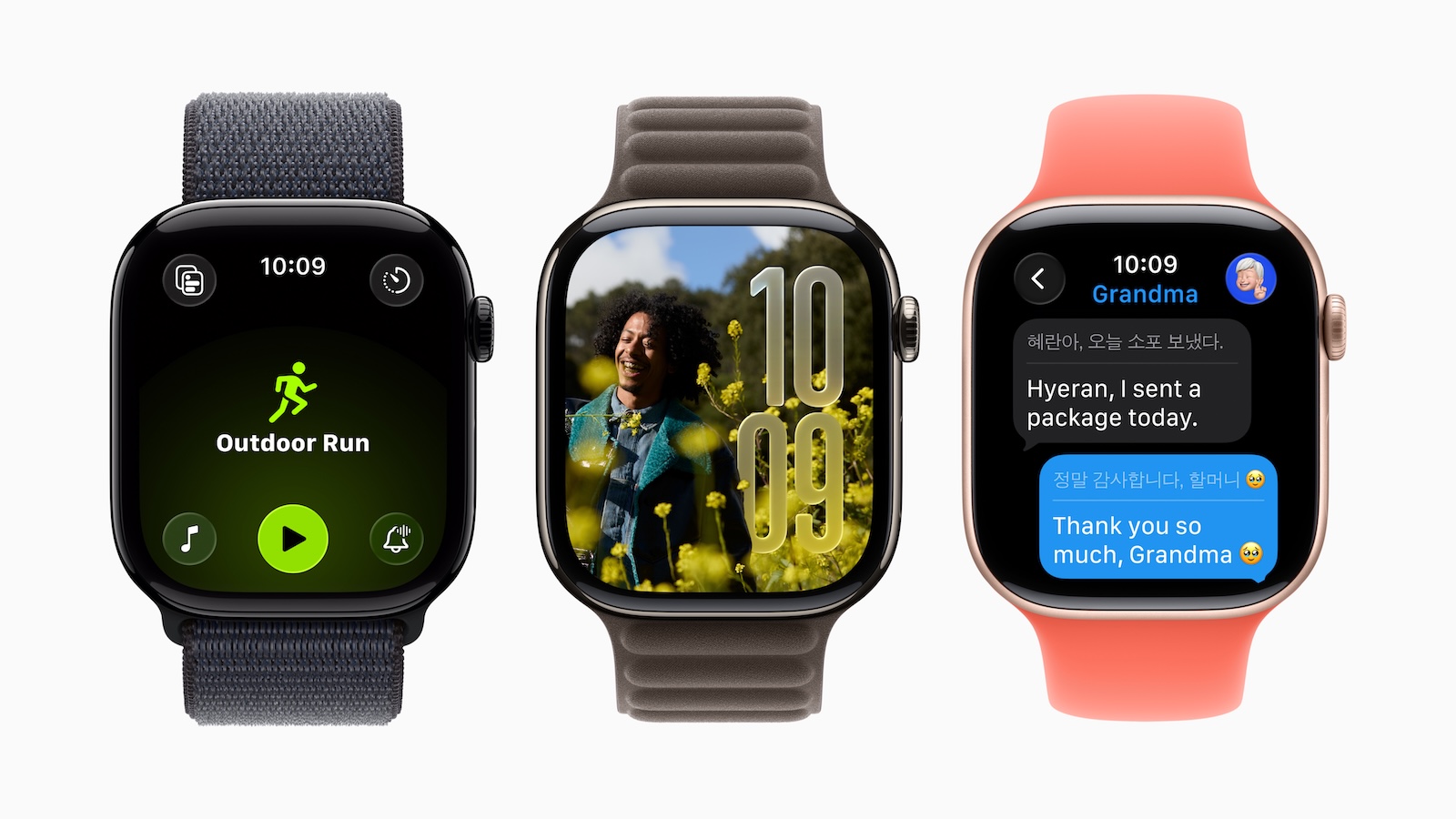
watchOS 26 introduces Liquid Glass, transparent, glass-like controls that are especially noticeable on select watch faces, in the Smart Stack, and in the Control Center. The Control Center can now be customized: Controls can be moved, sorted, or even added from third-party apps. If you're not satisfied with the result, you can simply reset it to the default layout. The Smart Stack has also been improved. A new algorithm suggests content that's most useful at the moment. The widgets within it can be freely arranged so that important information appears first. Third-party apps are also integrated.
Gesture control
A new wrist gesture makes it possible to mute calls or dismiss notifications without touching the screen.
Health and sleep
watchOS 26 introduces notifications for high blood pressure. Based on your heart rate, the watch detects when your blood pressure is elevated for a longer period and notifies you accordingly. This feature is available for Apple Watch Series 9 and later, as well as for Ultra 2 and later. Also new is the sleep score: A numerical metric provides information about your sleep quality. Factors such as sleep duration, frequency of nighttime awakenings, and bedtime are considered in the score.
Fitness and training
Workout Buddy introduces AI-powered support. It motivates you during your workout and provides relevant insights. The Workout app has been redesigned and features a clearer layout. Options like custom workouts, Workout Buddy, and Pacer are easier to access. Automatic media playback provides additional motivation. Suitable music starts playing directly during your workout, or custom playlists play automatically as soon as a workout begins.
Communication and news
In the Messages app, smart actions suggest sharing your location, providing an address, or using other context-dependent replies. Smart replies have also been improved, providing more relevant suggestions that can be sent with a tap. A live translation feature translates incoming messages instantly into your preferred language. Additionally, personalized wallpapers created on your iPhone are automatically synced to your Apple Watch.
Telephone functions
With call verification, the watch asks callers for additional information before the iPhone or the watch itself rings. Another new feature is Hold Assist. This feature allows you to wait on the line while you take care of other things. These features are part of iOS 26 and will also be used by watchOS 26.
New dials
watchOS 26 brings a range of new watch faces. The Photos watch face integrates Liquid Glass into the time display, which adjusts depending on the image size and position. The Shuffle option pulls content directly from your own photos. Flow, a watch face designed specifically for Liquid Glass, features a colored sphere with glass numbers. Exactograph offers precise watch faces for hours, minutes, and seconds. A tap enlarges the minute and second display for even more precise time measurements. Waypoint, available exclusively for Apple Watch Ultra, highlights nearby points of interest. For Hermes models, there is the Hermes Faubourg Party watch face, which plays different animations depending on the time of day. In addition, more watch faces now support the 1 Hz refresh rate on Apple Watch Series 10 and later, so a ticking second hand is visible even when the wrist is down. The watch face gallery has been redesigned and groups watch faces into collections.
Additional functions
Incoming calls and notifications automatically adjust their volume to the ambient noise. The ringtone remains discreet in quiet rooms, but is amplified in noisier environments. When using Live Listen on a connected iPhone, the Apple Watch now displays a transcript of what was said. Also new is the Notes app, which allows you to view existing notes or create new ones directly on the watch.
watchOS 26 makes the Apple Watch more versatile than ever
watchOS 26 demonstrates how versatile the Apple Watch has become. 26 new features cover almost all areas: design, health, fitness, communication, and productivity. A particularly strong feature is that many features aren't tied to the latest models. This makes the update worthwhile even for those who have been wearing their Apple Watch for a while. Anyone who wants to take full advantage of the new capabilities can't miss watchOS 26. The best products for you: Our Amazon Storefront offers a wide selection of accessories, including those for HomeKit. (Image: Apple)
- CarPlay in iOS 26: All new features at a glance
- iOS 26 makes Siri better – five new features at a glance
- iOS 26 brings five improvements for battery performance
- iOS 26: All new features in the Shortcuts app at a glance
- iOS 26: All new camera features at a glance
- iOS 26 at a glance: What's new in the Messages app
- Apple redesigns TV app: What's new in iOS 26
- iOS 26: All the new features and highlights of the Podcasts app
- iOS 26: How Apple fundamentally changes the phone app
- iOS 26: Everything about the new home screen with Liquid Glass
- iOS 26: All the new features around the Liquid Glass design
- iOS 26: 7 exciting AirPods features at a glance
- iOS 26: Everything you need to know about the new FaceTime features
- Genmoji in iOS 26: Apple gives the feature a major update
- iOS 26: Everything about the new games app for iPhone, iPad, and Mac
- iOS 26: The most important new features in the Photos app
- iOS 26: Beats and AirPods automatically pause when you sleep
- iOS 26: All Apple Music innovations at a glance
- iOS 26 expands the functionality of the HomePod
- Image Playground gets significantly better with iOS 26
- iOS 26 brings new screenshot features to the iPhone
- iOS 26: Five new lock screen features at a glance
- iOS 26 design change: Reduce transparency easily
- iOS 26: Create your own ringtones – without GarageBand
- iOS 26: All the new features for Notes and Reminders
Frequently Asked Questions about watchOS 26
watchOS 26 runs on Apple Watch Series 6 and later, Apple Watch SE 2nd generation and later, and all Ultra models.
watchOS 26 includes 26 new features, including Liquid Glass Design, high blood pressure notifications, sleep score, AI-powered Workout Buddy, new watch faces, and improved messaging.
Yes, watchOS 26 brings notifications for high blood pressure (starting with Series 9/Ultra 2) and a sleep score that analyzes duration, wake-up phases, and bedtime.
With Workout Buddy, watchOS 26 offers AI-powered training support. It also features a redesigned workout layout and automatic media playback during training.
The new Liquid Glass design makes buttons and surfaces glassy and transparent. Control Center and Smart Stack are customizable.
New additions include Flow, Exactograph, Waypoint (ultra-exclusive), Hermes Faubourg Party and revised photo dials.
The Messages app offers live translation, smart actions, and better replies. For calls, there's call screening and Hold Assist, which takes care of hold queues.
Practical features include adaptive volume, live lists with transcripts, and the new Notes app, which can be used directly on the watch.
Yes, because watchOS 26 brings numerous new features that make the Apple Watch more versatile—from health to communication. An update is clearly recommended.