This article may contain affiliate links. Learn more on our Partner Program page.
Since August 2026, both new-generation desktop Macs have been available side-by-side – and the line between them has become blurred. A fully equipped Mac mini and a base model Mac Studio meet in the middle, separated by a thousand euros. What this price difference represents is determined by four factors.
Apple introduced the Mac mini with the M6 and M5 Pro models, as well as the Mac Studio with the M5 Max and M5 Ultra, on the same day. This brings the total number of configurations to four, with prices ranging from €1,049 to €6,599. Those upgrading from their previous model can find the answer in the generational comparisons – this text answers the other question: Which of the two devices is right for you? This analysis is based on the technical specifications of the Mac mini and Mac Studio.
Key Facts at a Glance
- The Mac mini, with its two chip options, covers the price range from €1,049 to almost €2,000.
- The Mac Studio picks up where the Mac mini leaves off, and goes up to €6,599.
- The crucial borderline case lies between Mac mini with M5 Pro and Mac Studio with M5 Max
- The Mac mini's RAM tops out at 64 GB, while the Mac Studio goes up to 512 GB.
- In continuous operation, the Mac mini is significantly more energy-efficient at 155 watts instead of 480 watts.
The four configurations side by side
| Feature | Mac mini M6 | Mac mini M5 Pro | Mac Studio M5 Max | Mac Studio M5 Ultra |
|---|---|---|---|---|
| CPU | 12 cores | 15 cores | 18 kernels | 30 cores |
| GPU | 12 cores | 16 cores | 32 cores | 64 cores |
| Neural Engine | Dual 16 cores | 16 cores | 16 cores | 32 cores |
| Memory bandwidth | 153 to 170 GB/s | 307 GB/s | 460 GB/s | 1.2 TB/s |
| RAM | 16 to 32 GB | 24 to 64 GB | 36 to 128 GB | 96 to 512 GB |
| SSD | 256 GB to 2 TB | 512 GB to 8 TB | 512 GB to 8 TB | 1 to 16 TB |
| Price | from 1,049 euros | from 1,999 euros | from 2,999 euros | from 6,599 euros |
The pricing structure appears seamless, but the price jumps are uneven. The price almost doubles between the two Mac mini variants, and more than doubles between the M5 Max and M5 Ultra.
The actual borderline case
Things get interesting where the two devices meet: the Mac mini with M5 Pro for €1,999 versus the Mac Studio with M5 Max for €2,999. A difference of a thousand euros – and the question is what else you get for that price.
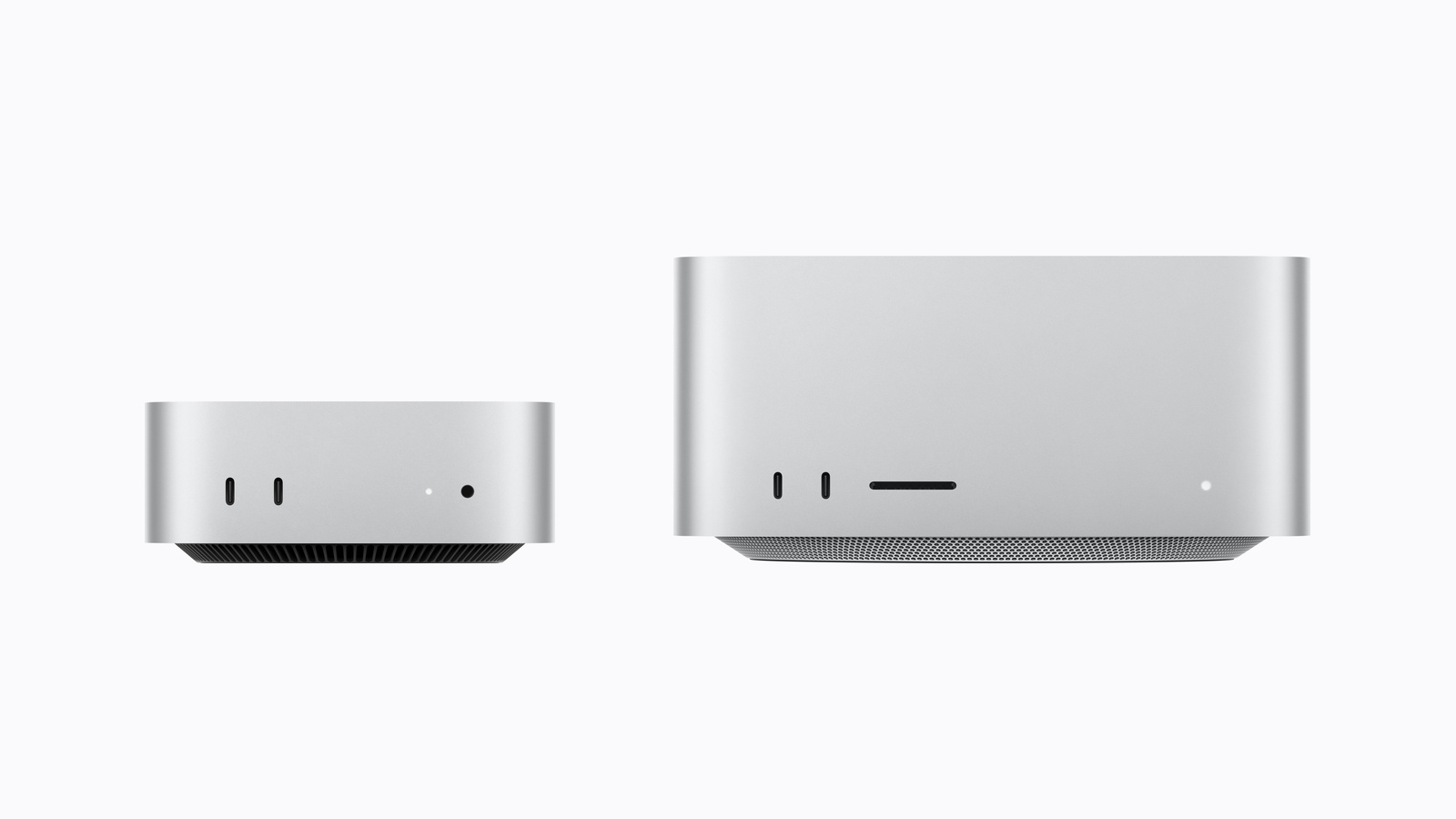
The Mac Studio comes with three additional CPU cores, twice as many graphics cores, and around 50 percent more memory bandwidth. It also starts with 36 GB of RAM instead of 24 GB. Furthermore, it features four Thunderbolt 5 ports instead of three, two USB-A ports, an SDXC card slot, and 10 Gigabit Ethernet as standard instead of an optional extra.
The Mac mini, on the other hand, excels at what it doesn't need: It's small enough to disappear behind a monitor, weighs less than a kilogram, and draws a maximum of 155 watts. For many workplaces, it's the more practical computer, even if it falls short on paper.
Where RAM forces the decision
This point is clearer than any other. The Mac mini tops out at 64 GB, and this limit is absolute – Apple Silicon cannot be upgraded. Anyone who foreseeably needs more storage simply doesn't have the Mac mini as an option, regardless of any other considerations. The amount of memory suitable for a given workload can be estimated using the RAM recommendations for Apple Silicon.
The Mac Studio starts at 36 GB and goes up to 512 GB in the Ultra version. It's important to note that the higher RAM options depend on the fully configured system. For 48 GB and more, you need the M5 Max with 40 graphics cores; for 256 or 512 GB, you need the M5 Ultra with 36 CPU and 80 GPU cores. There is no budget-friendly configuration with a large amount of memory.
Connections and displays
The Mac mini has three Thunderbolt ports on the back, two USB-C ports and a headphone jack on the front. The Mac Studio offers four Thunderbolt 5 ports, two USB-A ports, HDMI 2.1 and a headphone jack on the back, and an SDXC card slot on the front.
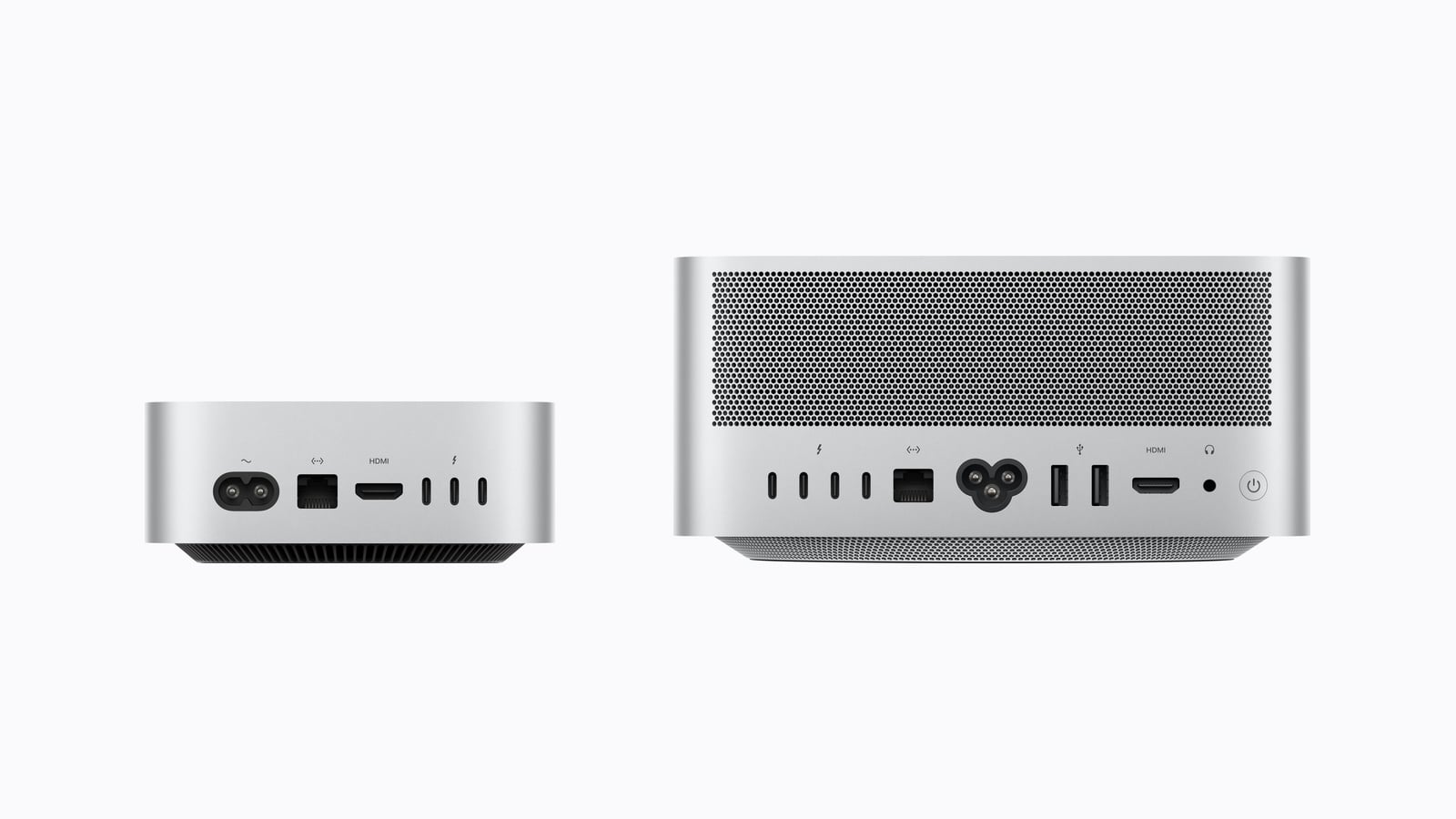
The difference is more pronounced when it comes to displays: The Mac mini supports a maximum of three external displays, while the Mac Studio can handle five with the M5 Max and eight with the M5 Ultra. Users with more than three monitors are therefore limited. Our overview of how many external displays a Mac supports details which combinations are possible with which Mac.
One minor detail that only becomes apparent during a direct comparison: The front ports of the Mac Studio are USB-C with 10 Gbit/s on the M5 Max, while the M5 Ultra has full-fledged Thunderbolt 5 ports.
Consumption during continuous operation
Both devices are increasingly being used as continuously running computers, for example for local AI models. In this context, one figure is important that rarely appears in performance comparisons: the Mac mini consumes a maximum of 155 watts, the Mac Studio up to 480 watts.
That's more than three times as much. For a device that runs around the clock, the difference adds up over the years – and with it, the heat output and noise. For a computer located in the same room where work is done, that's a compelling argument.
What speaks against the chip names
In practical terms, this means that the model names don't help you make this decision. The Mac mini contains the M6, the most modern chip in the entire lineup, manufactured using 2-nanometer technology and with a doubled Neural Engine – yet it's still the slowest of the four devices. The M5 Ultra carries the older generation number and is by far the fastest.
The key factors are memory capacity, bandwidth, and the number of graphics cores. Based on these, the question can be answered in three steps: If 64 GB of RAM and three displays are sufficient, the Mac mini is the choice. If both of these are exceeded, the Mac Studio is the only option. And if the requirements fall somewhere in between, the deciding factor is power consumption – or available desk space.
Two devices, a clear dividing line
Despite the overlap in the mid-price range, the roles are clearly defined. The Mac mini is the versatile computer for desktops, home offices, and continuous operation, with a starting price that now exceeds one thousand euros. The Mac Studio is a workstation for workloads that truly push the limits of its memory and graphics performance – and it costs accordingly.
What makes the difference is rarely the processing power. It's the amount of RAM required and how many displays are connected. How the new generation compares to its predecessors can be found in our comparisons of the Mac mini and the Mac Studio.
Are you facing this decision yourself – and is it more about RAM or the number of ports? Let us know in the comments what the deciding factor is for you.
Frequently Asked Questions: Mac mini or Mac Studio
As long as 64 GB of RAM and three external displays are sufficient, the Mac mini will meet your needs. These are both hard limits that cannot be extended. Anyone needing more will have to opt for the Mac Studio.
For a thousand euros, you get three more CPU cores, twice as many graphics cores, around 50 percent more memory bandwidth, more ports, and 36 GB of RAM instead of 24 GB. Those who need graphics performance or ports get their money's worth – for pure computing power, the difference is smaller than the price.
The Mac mini comes with 64 GB of RAM with the M5 Pro, the Mac Studio with 128 GB with the M5 Max, and 512 GB with the M5 Ultra. The higher capacities require the chip to be fully configured.
The Mac mini can drive up to three external displays, the Mac Studio five with the M5 Max and eight with the M5 Ultra.
The Mac mini is significantly better: a maximum of 155 watts compared to up to 480 watts for the Mac Studio. Over the years, this makes a noticeable difference in continuous operation, and it also generates less heat.
No. The M6 is the more modern chip, but the lowest configuration. The M5 Max has more cores and significantly more memory bandwidth. The generation number says nothing about the performance class here.
No. With Apple Silicon, the memory is permanently integrated with the chip. The purchase decision is binding for the entire lifespan of the device.