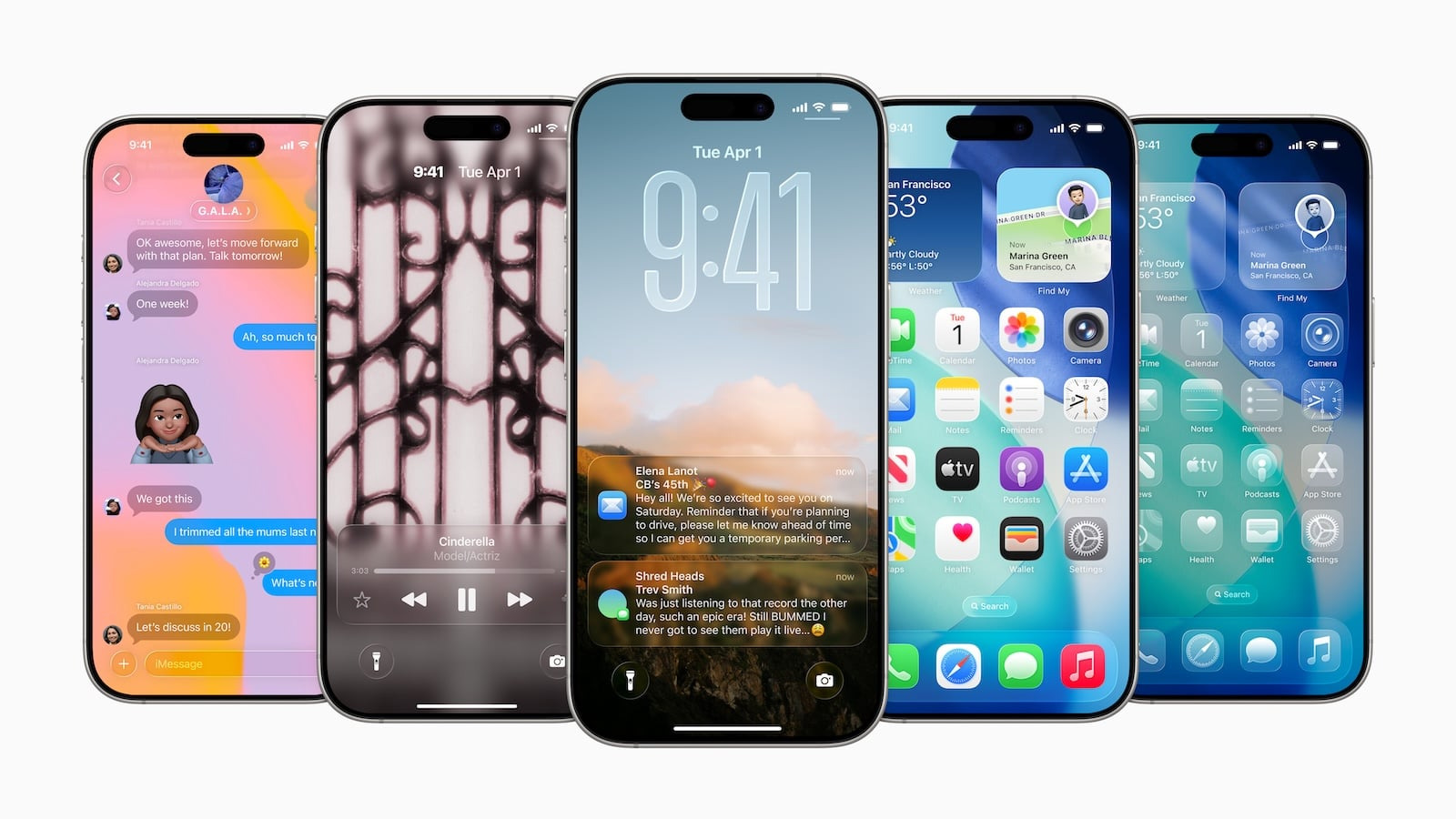
Apple unveiled iOS 26 at the opening of WWDC. The update brings Liquid Glass, the most striking design in years, deeply integrates Apple Intelligence into the system, and redesigns Phone, Messages, Maps, and Wallet. Some of these features run on every supported iPhone, while others are exclusive to newer models.
iOS 26 is more than just a new interface. Apple has changed its version numbering to the year in which a software is primarily used – iOS 18 is therefore followed by iOS 26, not iOS 19. The new features affect design, communication, navigation, entertainment, privacy, and accessibility, and many functions now run directly on the device.
Apple describes the basis for this in its announcement regarding the new software design. This page summarizes what's included in this generation. Which features are tied to newer hardware is listed separately in the overview of device-exclusive features.
Key Facts at a Glance
- Liquid Glass is the cross-platform design material of the generation
- Apple Intelligence brings live translation, visual intelligence for screen content, and smart actions to Shortcuts.
- Phone, Messages, Maps and Wallet are getting separate redesigns.
- iOS 26 runs on iPhone 11 and later, but the AI features only work on iPhone 15 Pro and later.
Liquid Glass: the new design
Liquid Glass is a translucent material with ambient reflections that covers controls, navigation, app icons, and widgets. On the lock screen, even the clock numerals are made of it and adapt to the available space in the background image.
Safari displays websites from top to bottom of the screen without losing refresh functionality or search functionality. In Apple Music, Podcasts, and News, the tab bar floats over the content, minimizes when scrolling, and returns when going back. The Camera app has been streamlined, and the Photos app now separates the library and collections.
In addition, there are spatial scenes: A photo gains depth and moves when the device is tilted. For other changes to the home screen, see the overview of the lock screen in iOS 26.
Apple Intelligence in the system
With iOS 26, Apple is moving intelligence from individual apps to the system level. Live Translation works in Messages, FaceTime, and Phone: Typed text is translated as you type, FaceTime displays translated subtitles, and the translation is read aloud during phone calls. German is one of the default languages; the Live Translation guide shows where the feature is located in the apps.
Visual intelligence now captures screen content in addition to camera images. Using the screenshot buttons, you can select and search for an object, for example on eBay, Poshmark, or Etsy; ChatGPT answers questions about the screen content. Genmoji can be created by combining multiple emojis, and Image Playground gains additional styles that are processed by ChatGPT.
In the Shortcuts app, new actions directly access Apple's models—either locally or via private cloud computing. This includes suggestions in Reminders and a framework that allows developers to integrate the model into their own apps on the device. The Shortcuts app overview details which automations can be built; the Apple Intelligence setup guide explains how to activate these features.
Phone and messages
The phone app consolidates favorites, recent calls, and voicemails into a single view. Call verification displays caller information before answering, and Hold Assist waits on hold until someone answers.
Messages from unknown numbers are placed in a separate, muted, and sortable folder. Group chats get their own backgrounds, polls, and Apple Cash directly within the chat history.
CarPlay
CarPlay gets a compact view for incoming calls that no longer obscures the navigation. Messages support tapbacks and pinned chats, while widgets and live activity keep track of music, route, and appointments.
CarPlay Ultra goes further, connecting iPhone and vehicle systems across all screens to a single interface.
Apple Music, Cards and Wallet
Apple Music translates song lyrics and, if desired, displays the pronunciation; AutoMix blends tracks together according to beat and tempo. Maps guides you to visited locations stored locally and encrypted on the device and suggests preferred routes.
Wallet supports installment payments with Apple Pay, displays rewards programs, and reads shipment details from confirmation emails. Redesigned boarding passes include live activity tracking, airport maps, and "Find My" baggage tracking. All app changes are listed in the Wallet overview for iOS 26.
Apple Games, AirPods and parental controls
The new Apple Games app brings together games, updates, events, and Apple Arcade in one place. AirPods 4 and AirPods Pro 2 get studio-quality recording, stem-based camera controls, and improved voice isolation.
Apple has simplified the setup process for children's accounts and expanded parental controls: blurred content in FaceTime and photo albums, plus the ability to selectively allow individual apps, even if they are above the set age limit.
Data protection and accessibility
Safari protects against fingerprinting by default with enhanced protection. The accessibility reader offers a customizable reading experience, Braille access has been rebuilt, and Live Lists, personalized voice, and background noise are available system-wide.
Availability and requirements
| Platform | Update expires | Apple Intelligence from |
|---|---|---|
| iPhone | iPhone 11, iPhone SE (2nd generation) | iPhone 15 Pro |
| iPad | See compatibility list | A17 Pro or M-Chip |
| Mac | See compatibility list | M1 |
The complete list of compatible devices across all systems can be found in the overview of compatible Apple devices; language and region requirements are detailed in the Apple Intelligence support document. A recent backup is recommended before installation; if the update is stuck or doesn't appear, the guide to iPhone update problems may help.
Why the design is the smaller innovation
Liquid Glass dominated the announcement because it immediately catches the eye. In everyday use, the redesign of communication apps has a greater impact: Call verification that intercepts telemarketing calls and translation that runs during the conversation significantly change the user experience more than transparent buttons.
The second point concerns device selection. With iOS 26, Apple is drawing a line through its own product line: Design, Wallet Passes, Apple Games, and CarPlay are available to every supported iPhone, while voice features are only available on devices from the iPhone 15 Pro onward. Those updating with an older model will get a visibly new, but not significantly smarter, iPhone.
What stuck with you most – the new design or one of the features from Phone and Messages? Tell us in the comments what you actually use daily after switching.