This article may contain affiliate links. Learn more on our Partner Program page.
iCloud runs on almost every Apple device, yet few people know what's actually happening inside. It's not a single service, but rather a dozen or so under one name – from backups and photo libraries to features unrelated to storage. Understanding how it works allows you to make better decisions about what gets synced and what doesn't.
Apple describes iCloud on its German product page as the place where photos, files, and data are automatically backed up and kept available on all your devices – with 5 GB of free storage to get you started. That's only half the story: iCloud is simultaneously storage, synchronization, a backup destination, and, since iCloud+, a collection of privacy features that don't take up a single gigabyte. These four levels operate under the same switch, which regularly leads to confusion – for example, when storage is full even though no files have been uploaded. Which categories are actually triggering the limit is explained in the article on what to do when your iPhone storage is full.
Key Facts at a Glance
- iCloud is a collective name for several services: storage, synchronization between devices, device backup, and data protection features.
- Every Apple account comes with 5 GB of free storage – shared across all devices and services.
- iCloud+ is the paid tier. It offers more storage and additional features such as Private Relay, email address hiding, a custom email domain, and HomeKit Secure Video.
- iCloud+ can be shared with up to five other people in Family Sharing and is included in every Apple One subscription.
- Synchronization is not a backup: What is deleted on one device disappears on all others as well.
What iCloud actually is
The name refers to three different things that technically have little overlap. First, a storage quota that is shared by backups, photos, files, and email attachments. Second, synchronization that keeps contacts, calendars, notes, reminders, Safari tabs, and passwords consistent across all logged-in devices. Third, a subscription called iCloud+ that unlocks additional features unrelated to storage space.
Access is always via your Apple account. Logging in automatically activates parts of iCloud – which services are enabled is shown in the settings under your name. Instructions on how to create, modify, and, if necessary, delete this account can be found in the Apple account guide.
Which services run under this umbrella?
| Service | What he does | Occupies memory |
|---|---|---|
| iCloud Photos | Keeps photos and videos consistent across all devices; originals are stored in iCloud. | Yes |
| iCloud Drive | File storage, also for documents from third-party apps | Yes |
| Device backup | Nightly backup of iPhone and iPad | Yes |
| iCloud email address including attachments | Yes | |
| Messages in iCloud | History and attachments across devices | Yes |
| Contacts, Calendar, Notes, Reminders | Synchronization without significant space requirements | barely |
| Passwords and key ring | Access data and keys across all devices | barely |
| Find My | Location of equipment and objects | no |
| Private relay, hide email address | Privacy features from iCloud+ | no |
The 5 GB and why it's rarely enough
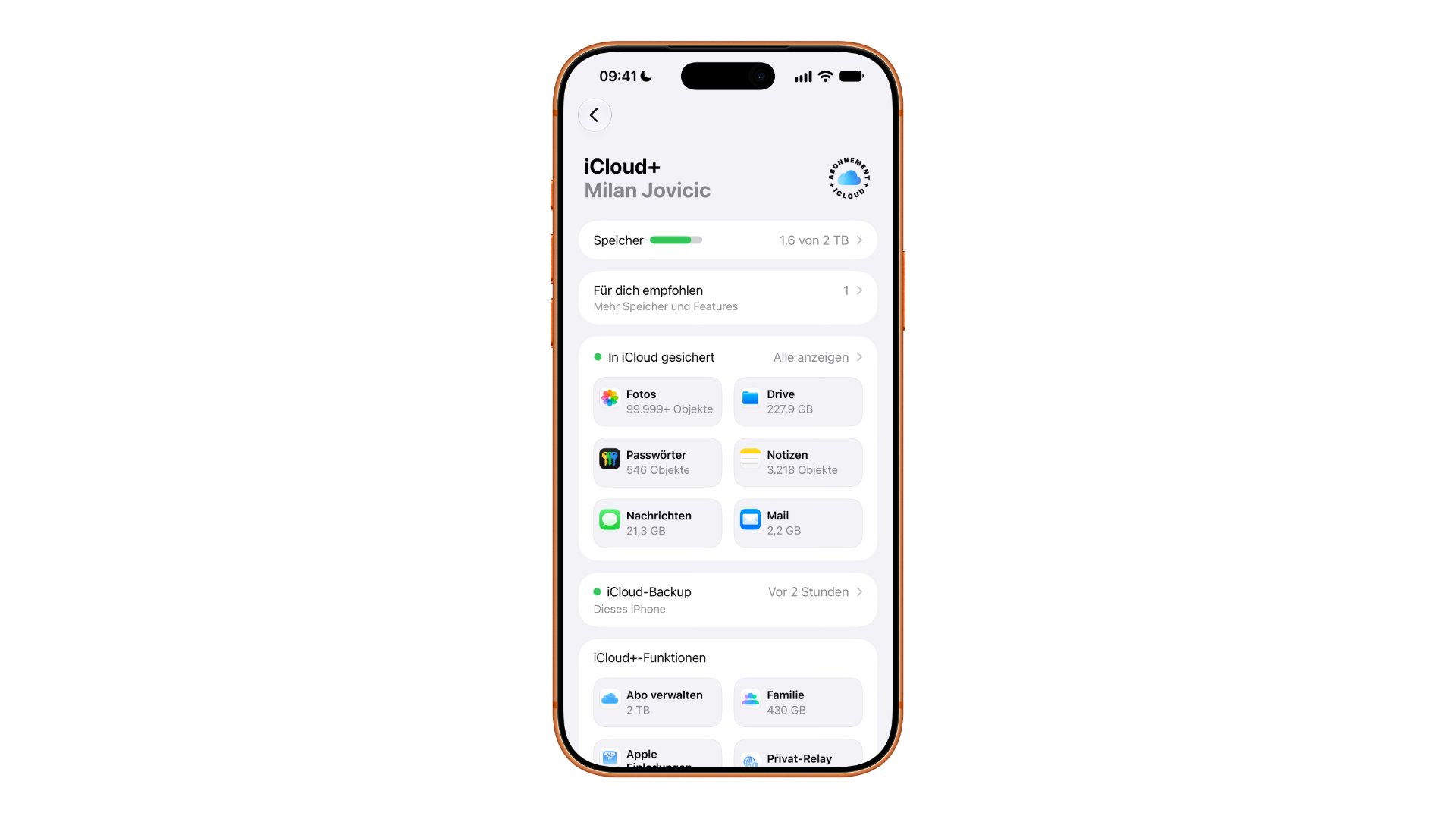
Every Apple account starts with 5 GB of storage. This amount is shared across all services – a single device backup alone fills it up on many iPhones. This is why the backup notification often appears after just a few weeks, even if nothing has been intentionally stored in the cloud.
Apple describes how to break down and selectively clean up used storage space in its iCloud storage document. The second approach involves determining which services actually need to be synchronized: those who already archive photos locally don't need iCloud Photos. The iCloud cost overview calculates which tier is worthwhile and when, and how the different plans compare.
What iCloud+ brings in addition
Once a paid tier is active, the service is called iCloud+ and includes four features not available in the free tier. These features are not dependent on storage size – the smallest tier unlocks the same features as the largest.
| Feature | What she does |
|---|---|
| iCloud Private Relay | Routes Safari traffic through two separate relays, hiding IP address and browsing behavior |
| Hide email address | Generates random redirect addresses that can be disabled at any time. |
| Own email domain | Connects a self-registered domain to the iCloud mailbox |
| HomeKit Secure Video | Stores camera recordings encrypted, without using up the data allowance. |
Regarding Private Relay, a clarification is needed because the service is often mistaken for a VPN. Apple itself states that it routes traffic through two relays so that no one knows both the user's identity and destination simultaneously; however, it cannot bypass geo-blocking and only works in Safari. The limitations are explained in the comparison between Private Relay and VPN. Apple also points out that the feature is not available in all countries and regions – in Germany, Austria, and Switzerland, it can be activated using the setup instructions in the support document.
The option to use your own domain with your mailbox is the least known of the four features and is of interest to anyone who wants to keep an address permanently: The setup is described in the article on using your own email domains with iCloud+.
Share instead of paying twice
iCloud+ can be shared with up to five other people without anyone having access to each other's photos or files. Each person keeps their own space; only the storage quota and features are shared. Instructions on how to set up the group and effectively divide the storage space can be found in the Family Sharing guide.
The second option is via Apple One: iCloud+ is already included in each of these bundles. Those who already pay for multiple Apple services may end up paying for storage twice without realizing it.
Access via browser
Not everything runs through your devices. Photos, files, email, contacts, calendar, and notes are also available in your browser at iCloud.com – practically on other people's computers and under Windows. Searching across all content is a relatively new feature that needs to be enabled; the steps for this are described in the article on searching iCloud.com.
Security: two levels, one decision
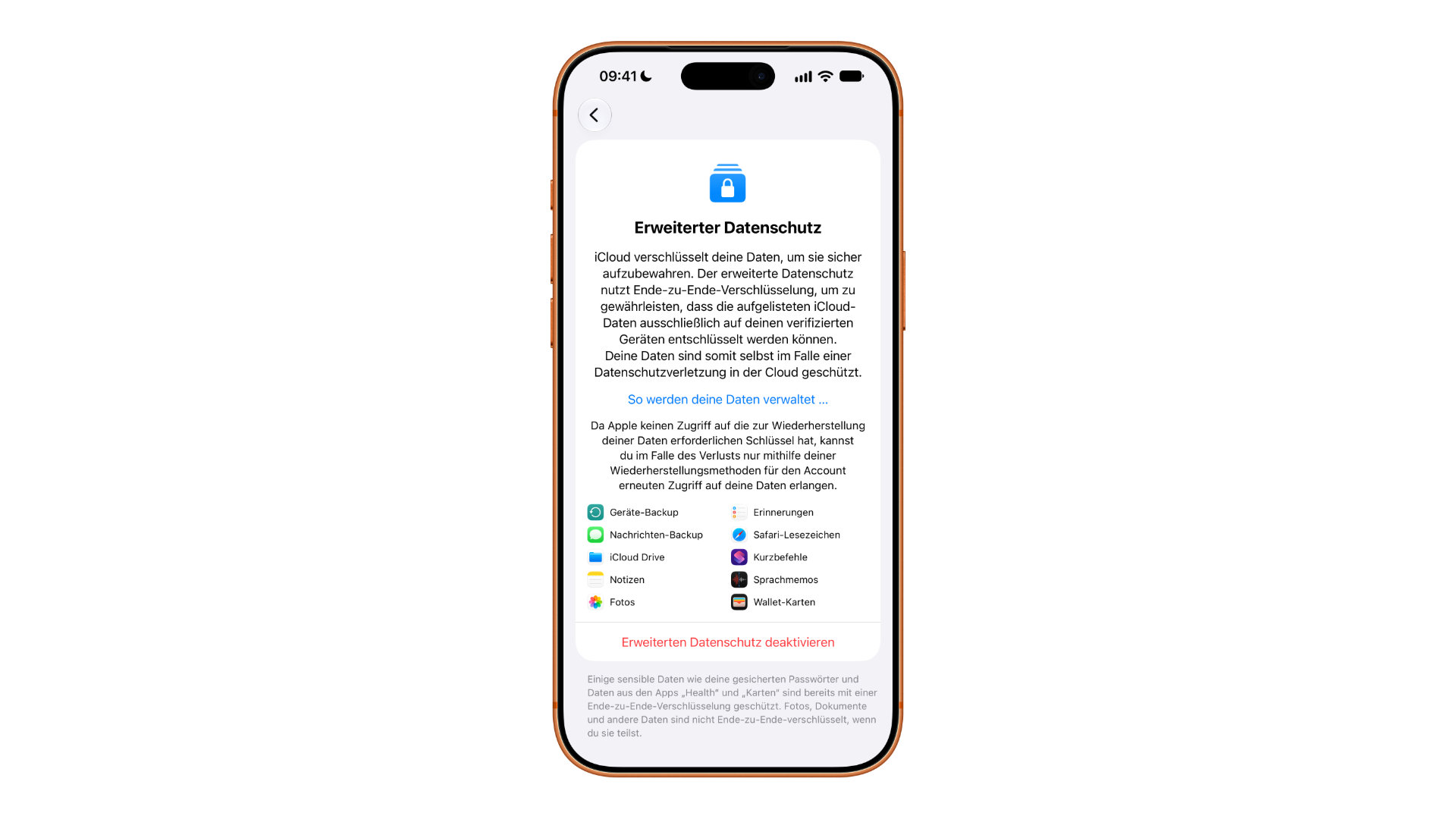
By default, data in iCloud is encrypted, but Apple retains the encryption keys for some categories – this allows for password recovery if the password is forgotten. Enhanced Privacy shifts the encryption keys entirely to your own devices. This significantly increases security but also shifts responsibility: without a recovery key or contact, access is permanently lost. What this change means in everyday use is explained in the article on enhanced privacy for iCloud.
Device backups involve a second layer of security if the backup is stored on a computer instead of iCloud – encryption is a separate option there. The different methods are described in the iPhone backup guide.
The most costly cognitive error
The most common misconception isn't about storage, but about how it works. Synchronization is not a backup. If you delete a photo on your iPhone and iCloud Photos is enabled, it's deleted everywhere – the trash keeps it for 30 days, after which it's gone. A true backup is the nightly device backup, and that's something different from the photo library.
In practical terms, this means that if you want to keep pictures or documents permanently, you need a second storage location outside of your synchronized data – an external hard drive, a computer archive, anything that doesn't delete data. The 5 GB limit is almost never enough anyway, and choosing a larger storage plan is usually less a question of price than of how much data you want to store on a single system. Those who are aware of this can crank up iCloud to its limits; those who aren't will eventually lose data and blame iCloud.
iCloud: the most important information at a glance
iCloud is storage, synchronization, and data protection all in one, managed through a single account. The 5 GB is a starting amount, not a basic requirement, and iCloud+ includes four features that function regardless of the storage amount purchased. Once you've decided which services you actually want to sync, you've done most of the work.
Which iCloud services have you deliberately disabled – and is there one you re-enabled after the first data loss? Tell us about your setup in the comments.
Frequently Asked Questions: iCloud
A collective name for multiple services under one Apple account: a storage quota for backups, photos and files, synchronization for contacts, calendars, notes and passwords, and with iCloud+ additional privacy features that do not take up storage space.
Each Apple account comes with 5 GB of storage. This amount is shared across all services – on many iPhones, a single device backup already fills up the allowance.
iCloud+ is the paid tier. It offers more storage and additional features such as iCloud Private Relay, the ability to hide your email address, a custom email domain, and HomeKit Secure Video. These four features are independent of storage size; the smallest tier unlocks the same features as the largest.
Only partially. Nightly device backups are backups, but synchronizing photos and files is not. Anything deleted on one device disappears from all others – the recycle bin keeps it for 30 days, after which it's gone.
No. The service routes Safari traffic through two separate relays and hides IP address and browsing behavior, but it only works in Safari and cannot be used to bypass regional restrictions. Apple also points out that it is not available in all countries.
Yes, with up to five other people. The storage quota and features are shared, not the content – each person retains their own space. Additionally, iCloud+ is included in every Apple One subscription.
It completely transfers the keys for most categories to the user's own devices. This increases protection, but deprives Apple of the possibility of recovery: Without a recovery key or contact, access is permanently lost.