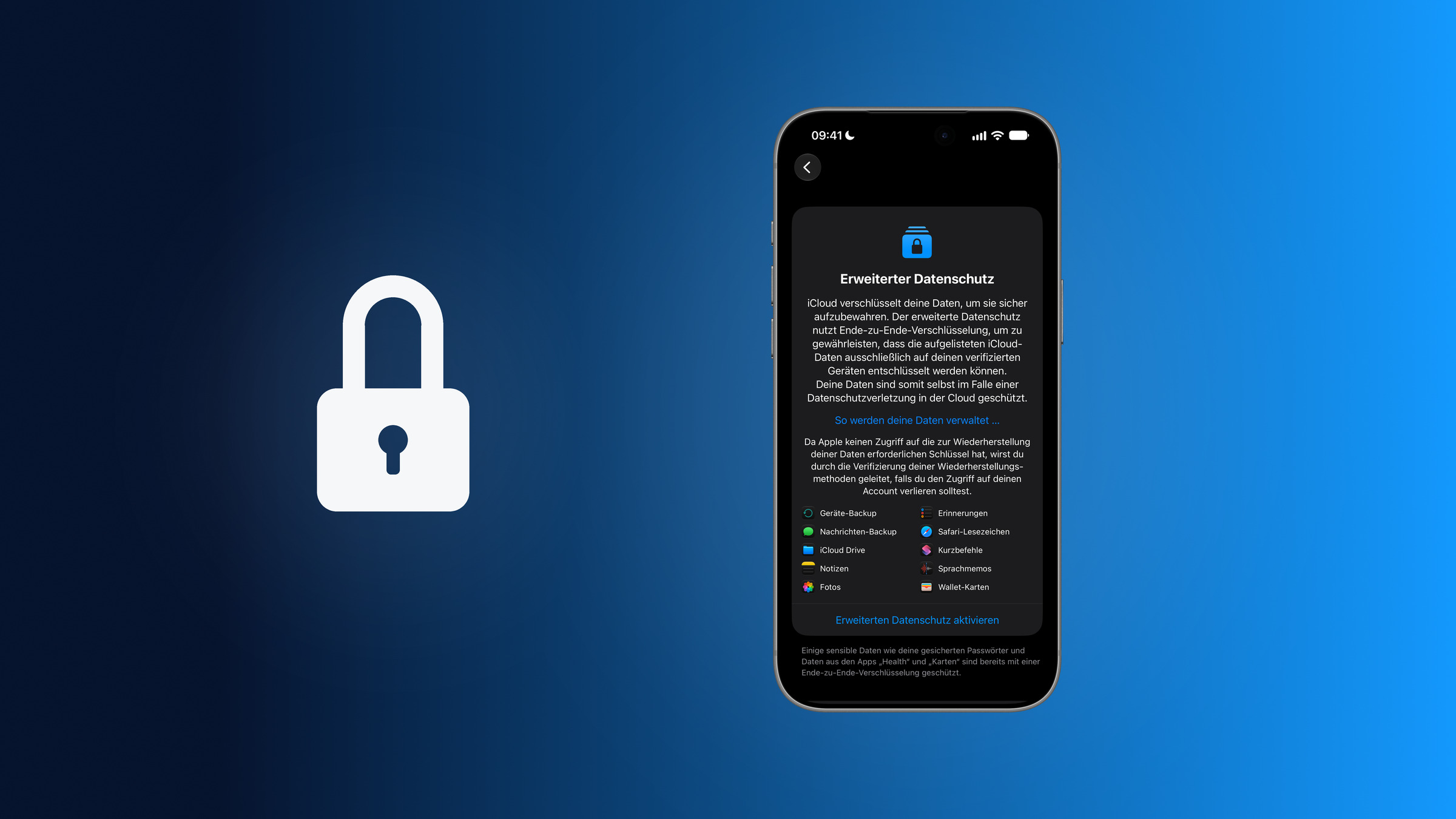
With Advanced Data Protection, Apple takes iCloud security to a new level: end-to-end encryption for 25 instead of 15 data categories, including iCloud Backup, Photos and Notes. Apple itself can then no longer access this data – not even with a court order. Anyone who turns on the feature gains maximum control over their data, but also takes on full responsibility for recovery.
By default, iCloud stores data in encrypted form, but Apple keeps the keys in its own data centres – for example, to be able to reset forgotten passwords or to help restore a backup. With Advanced Data Protection for iCloud (ADP), control over the keys moves from Apple's data centres to your own devices. That brings all the benefits and risks that come with managing the keys yourself.
A prerequisite is properly set up two-factor authentication for your Apple Account. For people with an elevated threat profile, Lockdown Mode for iPhone, iPad and Mac is available as an additional layer. For this guide, we turned Advanced Data Protection off and on again under iOS 27.
Key Facts at a Glance
- Advanced Data Protection extends end-to-end encryption in iCloud from 15 to 25 data categories, including iCloud Backup, Photos, Notes and iCloud Drive.
- iCloud Mail, Contacts and Calendar remain under Standard Data Protection even with it turned on, as do certain metadata such as file sizes and timestamps.
- The requirements are two-factor authentication, a device passcode and at least one recovery contact or recovery key.
- Anyone who loses access to their account and all recovery methods loses their data – Apple cannot help.
- The feature is available in Germany, Austria and Switzerland, but no longer for new users in the UK since February 2025.
What Advanced Data Protection does technically
In standard mode, iCloud encrypts data in transit and on the server, but the keys are stored in Apple data centres. 15 particularly sensitive data categories are already end-to-end encrypted by default, including Passwords and Keychain, Health data, Home data, Journal data and Apple Card transactions. Apple does not hold the keys for these categories.
With Advanced Data Protection, the number of end-to-end encrypted categories rises to 25, according to Apple's iCloud data security overview. The following are then additionally protected:
| Data category | Note according to Apple |
|---|---|
| iCloud Backup | includes device and Messages backup, along with the key for "Messages in iCloud" |
| iCloud Drive | also Pages, Keynote and Numbers documents, PDFs and Safari downloads |
| Photos | none |
| Notes | none |
| Reminders | not for reminders synced via CalDAV |
| Safari Bookmarks | none |
| Shortcuts | none |
| Voice Memos | none |
| Wallet Passes | none |
| Freeform | not for boards shared via "Send Copy" |
This also covers data from third-party apps that store it in encrypted fields in iCloud Backup and CloudKit. Apple Invites is partially protected: unpublished invitations are end-to-end encrypted, but after publication only if the host and all participants have turned on Advanced Data Protection.
Technically, activation runs through Apple's hardware security modules (HSMs) in its data centres. As soon as Advanced Data Protection is turned on, the service keys stored there are deleted. Apple cannot recover them afterwards.
What still isn't end-to-end encrypted
Three categories remain excluded even with Advanced Data Protection: iCloud Mail, Contacts and Calendar. Apple attributes this to the need to interoperate with global standards – the worldwide email system as well as CalDAV and CardDAV, which do not provide for end-to-end encryption. For email, all native Apple mail clients support the optional S/MIME method.
Certain metadata also remains under Standard Data Protection, meaning it is encrypted, but with keys held by Apple. According to Apple, this includes the name, model and serial number of the device associated with a backup, the file type, file size and modification times in iCloud Drive, and checksums of photos. Apple uses this data for sorting and removing duplicates without accessing the content itself.
Requirements for turning it on
According to Apple's guide to Advanced Data Protection, the following conditions apply:
- Apple Account with two-factor authentication
- a passcode or login password set on the device
- at least one recovery contact or recovery key
- up-to-date software on all devices signed in to the Apple Account: iOS 16.2, iPadOS 16.2, macOS 13.1, watchOS 9.2, tvOS 16.2, HomePod software 16.0 or later, and iCloud for Windows 14.1 or later on Windows computers
- not a child account and not a Managed Apple Account, as issued by companies or schools
If a recovery contact or recovery key is still missing, the system guides you through the setup during activation. This is Apple's safeguard against the feature's biggest pitfall: without the keys, Apple can no longer provide account recovery.
Turning on Advanced Data Protection
Before turning it on, the device you are using should be running the latest software version. The feature is turned on from one device and then applies to the entire account and all compatible devices.
On iPhone or iPad:
- Open Settings and tap your name.
- Choose "iCloud", scroll down and tap "Advanced Data Protection".
- Select "Turn On Advanced Data Protection".
- Read the notice "You are responsible for your data recovery" and tap "Review Recovery Methods".
- Confirm or update your saved recovery contacts or recovery key and follow the instructions.
On the Mac:
- Open Apple menu › System Settings and click your name.
- Choose "iCloud" and then "Advanced Data Protection".
- Click "Turn On" and review your recovery methods.
On our iPhone, the "Advanced Data Protection" page lists in advance which data is additionally protected, from device and Messages backup to iCloud Drive and Photos through to Wallet Passes. Below that, the system points out that saved passwords as well as data from the "Health" and "Maps" apps are already end-to-end encrypted without the feature.
If a device prevents activation, for example because of an outdated software version, it can be updated or removed from the Apple Account's device list. While Advanced Data Protection is turned on, you can only sign in on devices that meet the software requirements.
What changes after turning it on
Data access via iCloud.com is turned off. Anyone who wants to keep working in the browser can turn it back on – from iOS 26.4 under Settings › [Name] › iCloud › iCloud.com via "Allow Data Access". When signing in on iCloud.com, a trusted device has to approve access. For the following hour, it then automatically approves each newly opened data category such as Photos or Notes; after that, new categories have to be confirmed again. Health data and passwords are never available on iCloud.com.
Data copies via privacy.apple.com are limited. With Advanced Data Protection turned on, Apple cannot provide copies of end-to-end encrypted categories, regardless of the iCloud.com setting.
Shared content only stays encrypted if everyone takes part. Most sharing features – such as iCloud Shared Photo Library, shared folders in iCloud Drive, shared notes and collaboration in Freeform – remain end-to-end encrypted as long as all participants have turned on Advanced Data Protection. iWork collaboration in Pages, Numbers and Keynote, "Shared Albums" in the Photos app and sharing via "Anyone with the link" do not support the feature at all.
Apple collects information about how the feature is used. When turning it on, the system points out that Apple collects certain information about the use of Advanced Data Protection and about account recovery. This information is linked to the Apple Account and is intended to improve the reliability of recovery.
Recovery in an emergency
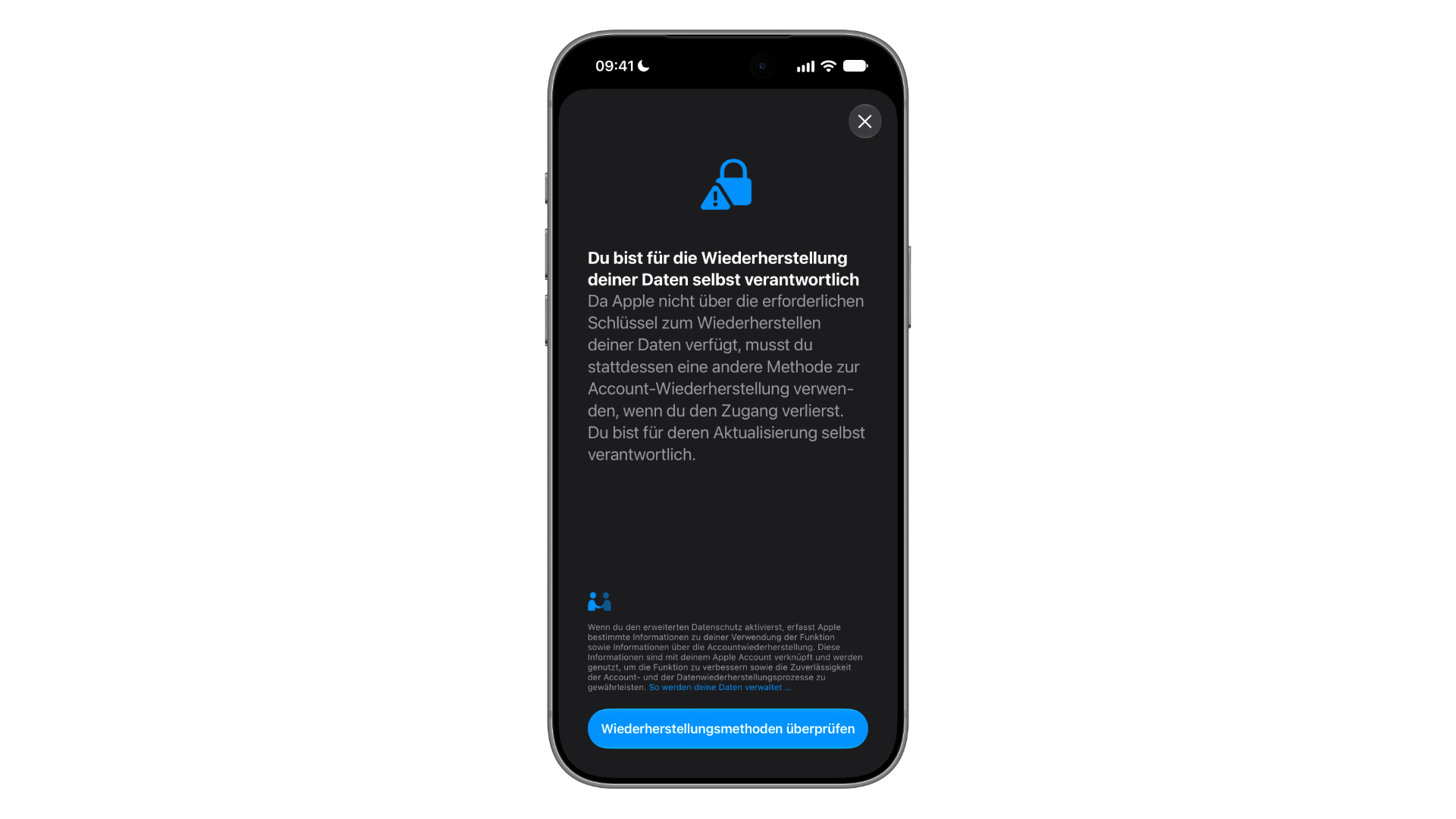
If access to the Apple Account is lost, only three ways to the data remain with Advanced Data Protection turned on:
- the passcode or login password of an Apple device that is already set up
- a recovery contact – a trusted person who generates a code and passes it on in an emergency
- a recovery key – a 28-character code that works together with a trusted phone number and an Apple device
Anyone who can no longer use any of these methods loses their data permanently. Apple Support cannot intervene in that case either. A recovery contact does not get access to the account or data themselves; they can only generate the code. According to Apple, recovery methods are never shared with Apple.
Who should use Advanced Data Protection – and who shouldn't
Apple does not position the feature as a default recommendation, but as an optional setting that offers the highest level of data security in the cloud. It makes sense above all for:
- people with professionally or politically sensitive data, such as journalists, lawyers or activists
- families who want to protect their backups and photos as comprehensively as possible
- people who work with sensitive personal documents, from medical histories to financial records
It is less suitable for:
- users who, from experience, often need Apple Support for forgotten passwords
- people who don't reliably keep their recovery keys or contacts up to date
- people who regularly work in the browser on iCloud.com – possible, but more cumbersome
- families who collaborate a lot via iWork or shared albums
Turning off Advanced Data Protection
The feature can be turned off again at any time. On the iPhone, the same page under Settings › [Name] › iCloud › Advanced Data Protection shows the red option "Turn Off Advanced Data Protection" for this. The device securely uploads the necessary keys back to Apple's servers, after which Standard Data Protection applies again.
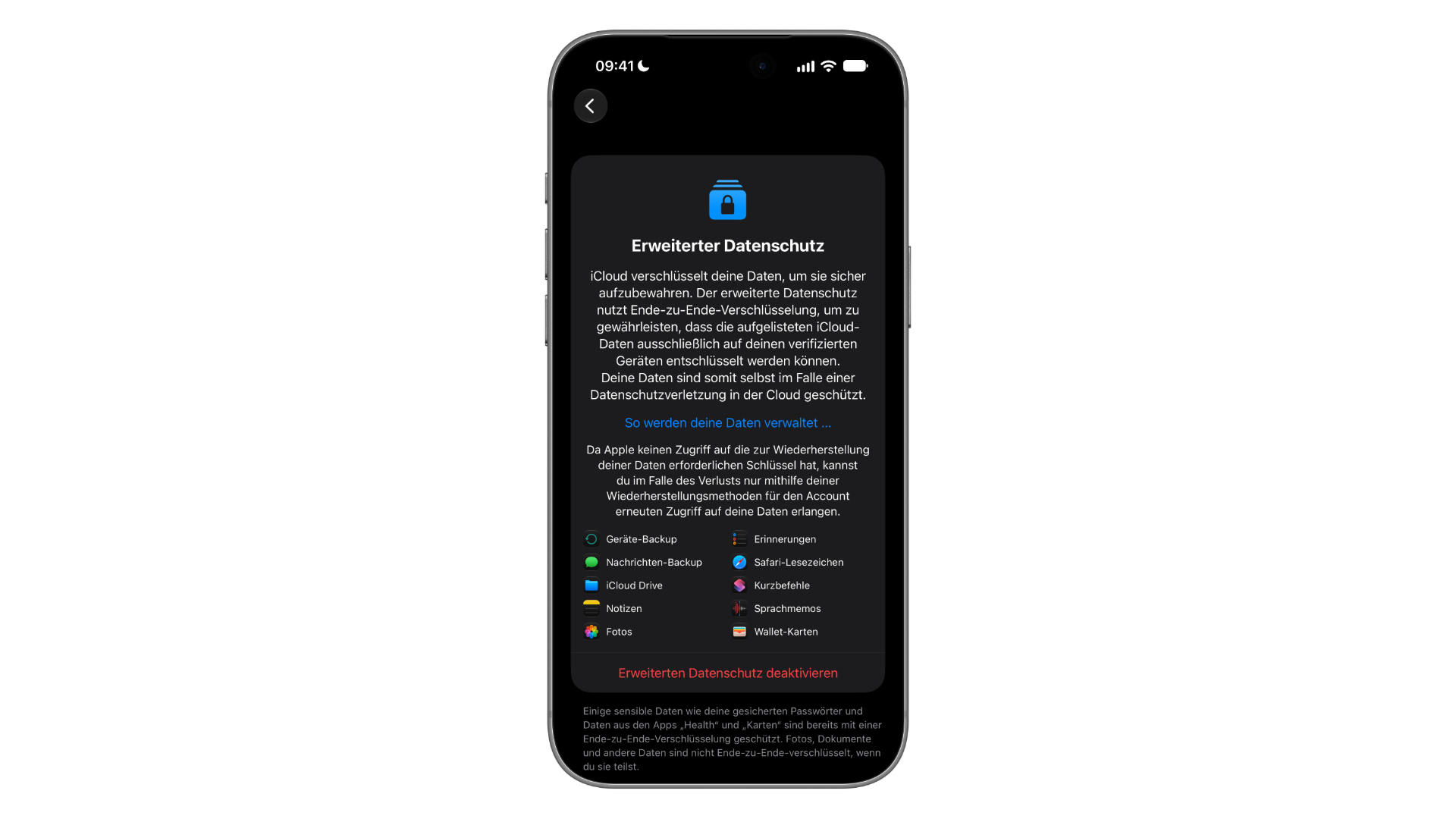
Anyone who is unsure can therefore turn the feature on as a test and check the effects in everyday use. Once activated, the page explicitly reminds you that photos, documents and other data are not end-to-end encrypted when you share them.
Why the UK is left out
In February 2025, Apple withdrew Advanced Data Protection for new users in the UK. The trigger was an order under the UK's Investigatory Powers Act that, according to reports, demanded access to encrypted iCloud data – originally worldwide. Apple decided against a backdoor and discontinued the feature in the country.
In August 2025, it was initially reported that the UK government had withdrawn its demand, but Apple did not re-enable the feature. In autumn 2025, a new order tailored to UK users followed, against which Apple filed another complaint in 2026. On 17 September 2026, the Investigatory Powers Tribunal heard arguments on whether the government may continue to keep the order secret.
In Germany, Austria and Switzerland, Advanced Data Protection can still be turned on without restrictions. At the same time, the dispute shows why the feature is attractive to security-conscious users: Apple can only hand over what Apple itself can decrypt – and with Advanced Data Protection turned on, that is only a small part of the iCloud data.
What Advanced Data Protection doesn't do
The feature does not replace every other security measure. Three common misconceptions:
It doesn't protect against stolen credentials. Anyone who hands over their Apple Account password and verification code, for example through phishing, still lets an attacker into the account. Advanced Data Protection only prevents Apple itself from accessing the data. What helps here is a strong password for your Apple Account and watching for typical warning signs of phishing.
It doesn't protect against theft with a spied-on passcode. If the device passcode was observed while unlocking and the iPhone was stolen afterwards, a different mechanism applies: Stolen Device Protection.
It doesn't replace local backups. Anyone who also wants to guard against a locked or lost account should regularly create encrypted local backups on a Mac or PC. Only encrypted local backups also save passwords and health data.
A question of trust and preparation
Advanced Data Protection for iCloud is the strongest security tool Apple offers to private users. It turns iCloud into storage that neither Apple nor authorities can access via Apple. The price for this is full personal responsibility: anyone who loses access to their account and their recovery methods at the same time loses their data permanently.
This is not a weakness of the feature but part of its design – it is precisely because Apple has no key that the data is protected this way at all. Anyone who sets up a recovery contact and a recovery key and keeps both up to date minimises the risk and gains a layer of protection that is rare in the industry.
Have you turned on Advanced Data Protection – or is it precisely the lack of Apple's help with recovery that's holding you back? Tell us in the comments how you weighed it up for yourself.
Frequently asked questions about Advanced Data Protection for iCloud
Yes. Under Settings › [Name] › iCloud › Advanced Data Protection, you'll find the option "Turn Off Advanced Data Protection". The device securely uploads the encryption keys back to Apple's servers, after which Standard Data Protection applies again.
Then the feature cannot be turned on. The device must either be updated to a compatible software version or removed from the Apple Account's device list. In addition, while Advanced Data Protection is turned on, you can only sign in on devices that meet the software requirements.
"Messages in iCloud" is already end-to-end encrypted. However, if iCloud Backup is turned on, the backup contains a copy of the key for "Messages in iCloud", and under Standard Data Protection Apple has access to this backup. With Advanced Data Protection, the backup, including this key, is end-to-end encrypted.
Data access via iCloud.com is turned off automatically, but from iOS 26.4 it can be turned back on under Settings › [Name] › iCloud › iCloud.com with "Allow Data Access". Each session then has to be approved from a trusted device. Health data and passwords are never available in the browser.
Yes, it can be turned on without restrictions in Germany, Austria and Switzerland. The well-known exception is the UK, where Apple withdrew the feature for new users in February 2025.
No. The setting applies to the entire account and all compatible devices. As soon as it is turned on, all 25 supported categories are end-to-end encrypted; there is no way to select individual categories.
No. The feature only affects encryption; storage space and plans stay the same. Anyone who needs more space can upgrade their iCloud storage plan separately or back up data locally.