Two iPhones, one number, and switching is as simple as unlocking: iPhone Handoff sounds like a feature you'd just try out. Setting it up does indeed take just a few steps. However, you can't simply turn it off on the iPhone alone, and that's exactly what you should know beforehand.
iPhone Handoff is one of the new features that Apple delivers with iOS 27, along with all its functions and compatible iPhones. The feature assigns a phone number to two iPhones, but only one is active at a time. It shares only the name with the familiar Handoff feature, which allows you to continue a task started on another Apple device.
Apple describes the setup process in a support document for iPhone Handoff. In Germany, everything depends on a single provider: Initially, only Telekom supports the feature; it is not currently available in Austria or Switzerland.
Key Facts at a Glance
- iPhone Handoff uses one phone number on two iPhones; the last unlocked device is active.
- The requirements are two iPhones with iOS 27, the same Apple account and a Telekom eSIM.
- The function runs via Telekom's MultiSIM, which costs €6.95 per month without a suitable tariff.
- This is set up when configuring a new iPhone or later under "Cellular".
- iPhone Handoff can only be terminated via Telekom – those who only delete the eSIM may continue to pay.
What moves with you during the change
Calls, voicemail, messages (iMessage, RCS, and SMS/MMS), and the location for "Find My" are transferred to the newly unlocked iPhone. The message "Switched to this iPhone" then appears at the top of the screen. Everything that is already synced via iCloud is available on both devices.
Third-party apps run on both iPhones, but their behavior varies depending on the app. Some log you out on one device as soon as you log in on the other. Banking apps may require that access on the second device be granted on the first.
Requirements
iPhone Handoff requires two iPhones with iOS 27 or later, both of which:
- are connected to the Wi-Fi network,
- use the same Apple account,
- Use "Messages in iCloud" and
- are logged into FaceTime and iMessage with the same Apple account.
This requires an eSIM from a provider that supports the feature – in Germany, that's Telekom. A physical SIM card is not sufficient. The instructions for setting up an eSIM on the iPhone explain how to get an eSIM onto your iPhone.
How much iPhone Handoff costs at Telekom
There is no separate price for iPhone Handoff. Telekom offers the feature as part of its MultiSIM package, and is the exclusive partner for its launch in Germany. An additional MultiSIM costs €6.95 per month.
The current MagentaMobil L plan already includes one MultiSIM, while the MagentaMobil XL plan includes two. If you have one of these plans and aren't already using the included MultiSIM for another purpose, you won't pay anything extra for iPhone Handoff. The second iPhone will use the phone number and data allowance of the primary contract.
Setup when configuring a new iPhone
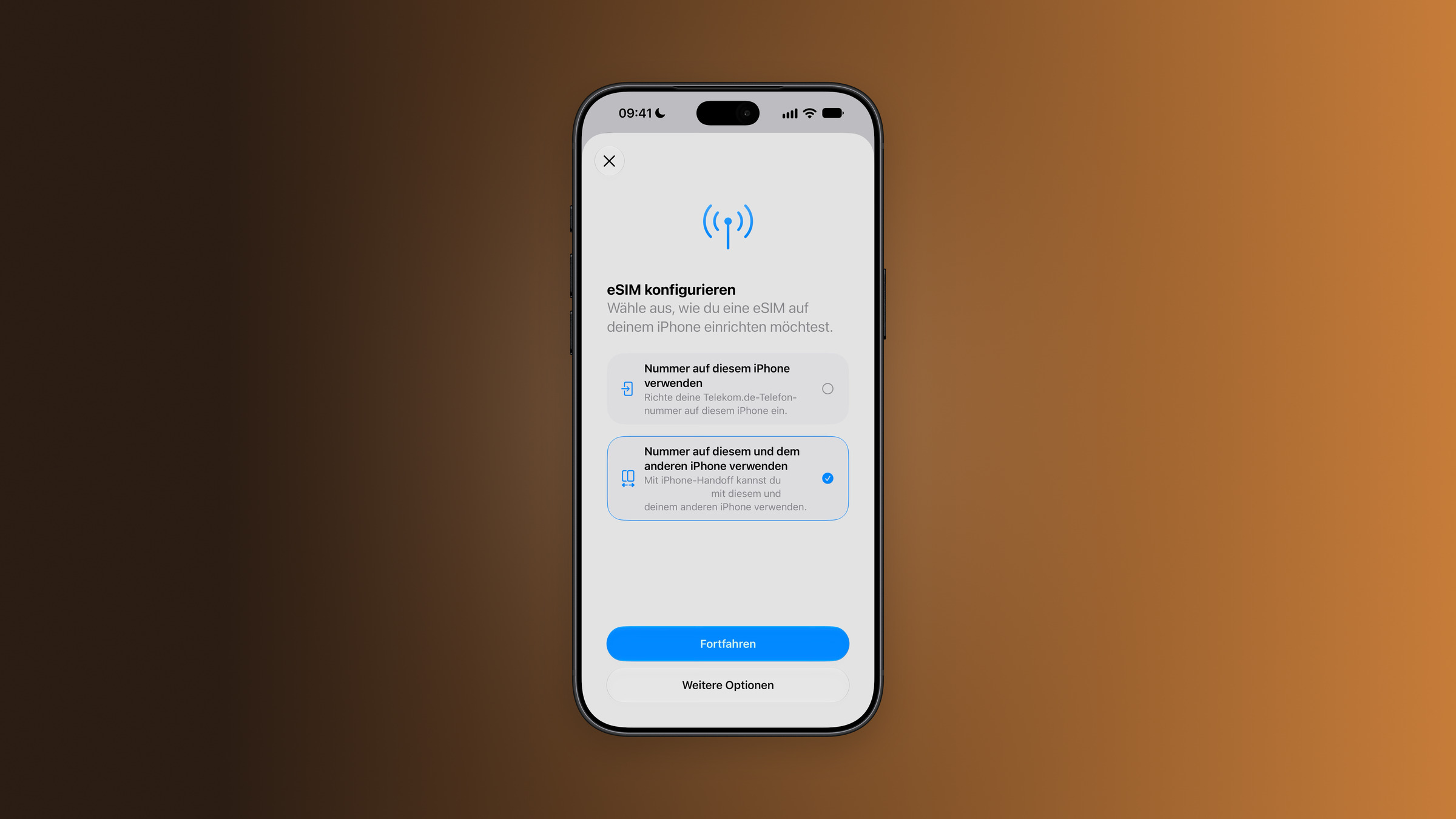
Anyone setting up a new iPhone can activate iPhone Handoff directly during the process. The new device will then become the primary iPhone, and the old one the secondary. Place both devices next to each other beforehand, as instructions will appear on both screens.
- Start configuring the new iPhone.
- Under "Configure Cellular", select the option "Use number on this and the other iPhone" and tap "Next".
- Review the iPhone Handoff details and tap "Next" again.
- Follow the instructions on both devices.
Those who want to fill their new iPhone with data from their old one can find instructions in the overview for transferring data to a new iPhone.
Set it up later in the settings
If both iPhones are already set up, the process is handled via the settings of the device being added. Here you can specify which iPhone will be the primary one.
- On the new iPhone, open the "Settings" app and tap on "Cellular".
- Select "Configure mobile network" or "Add eSIM".
- „Select "Use number on this and the other iPhone" and tap "Next".
- Click "Next" to start the iPhone Handoff configuration.
- To set the primary iPhone: "Other iPhone" keeps the primary eSIM on the previous device, "This iPhone" transfers it to the new one.
- Tap "Continue" on your existing iPhone and follow the instructions on both devices.
The iPhone you use most often is recommended as your primary device. Services such as call forwarding, caller ID, and managing your mobile contract only work on it.
What doesn't change
The Apple Watch remains paired with the iPhone it was set up with when you switch devices. If that iPhone isn't nearby, it connects via Wi-Fi or, if available, cellular data. If neither is available, calls, messages, and notifications may not be available on the watch. Apple therefore recommends pairing the watch with the iPhone you use most often.
Wallet isn't entirely consistent either. Payment cards can be added during setup for both devices, but some content, such as certain tickets, ID cards, or company badges, only works on one iPhone.
Unsubscribing is only possible via Telekom
While the feature can be disabled on the iPhone, this doesn't deactivate it. According to Apple, you must contact your mobile provider to deactivate it. Simply deleting the eSIM from your iPhone doesn't cancel the service – the provider can continue to charge you until they shut down the service themselves.
For a feature that can be set up in just a few steps, this is an unusually high hurdle on the return journey. If you're only planning to use iPhone Handoff for a vacation or a festival weekend, contacting Telekom should therefore be part of your planning from the outset. However, anyone who already has a current MagentaMobil L or XL plan with an unused MultiSIM doesn't incur any cost risk.
iPhone Handoff – the most important points at a glance
iPhone Handoff turns two iPhones into one, at least in terms of accessibility. Setup is quick, the requirements are minimal, and with Telekom, the price depends on your plan. The catch is at the end: If you no longer need the feature, you have to actively unsubscribe from your provider.
Would iPhone Handoff be interesting for you – perhaps with an older iPhone for sports and travel – or does the Telekom process put you off? Tell us in the comments what you think.
Frequently Asked Questions: Setting up iPhone Handoff
A feature introduced in iOS 27 that allows you to use one phone number on two iPhones. The device that is currently unlocked is always active. Calls, messages, voicemail, and the location for "Find My" are transferred between the two devices.
Initially, only Telekom is offering this feature. It is not currently available in Austria or Switzerland.
The feature works via the MultiSIM, which costs €6.95 per month without a suitable tariff. The current MagentaMobil L plan includes one MultiSIM, while the XL plan includes two.
No. Apple requires an eSIM from a supported provider.
By unlocking the device you want to use. The number will then be activated there, and "Switched to this iPhone" will appear at the top.
No. It remains paired with the iPhone it was set up with. Apple recommends pairing it with the iPhone you use most often.
Only via the mobile network provider. Those who simply delete the eSIM from their iPhone may continue to pay until the provider deactivates the service.