This article may contain affiliate links. Learn more on our Partner Program page.
Public USB charging stations at airports, hotels, or on trains are considered a gateway for data theft, and authorities regularly warn against them. However, for a current iPhone, the actual risk is smaller than the headlines suggest. Apple has built in layers of protection over the years that effectively thwart precisely this type of attack.
The term "juice jacking" describes an attack via the power supply: A manipulated charging station or a tampered cable exploits the fact that a USB port transmits not only power but also data. Theoretically, this can be used to steal data or introduce malware. The scenario is not new – the first demonstrations took place as early as 2011 – and it has resurfaced in the media in waves ever since. In practice, the risk depends heavily on the device being used and how recent it is. Unauthorized charging stations are just one of several points to consider when traveling; the others are listed in the security checklist for iPhones and MacBooks on the go.
Key Facts at a Glance
- An iPhone will charge via USB power adapter even when locked, but it will not release any data – the data connection requires unlocking.
- The lock for wired accessories takes effect after one hour; in cases of infrequent cable use, it even takes effect immediately.
- ChoiceJacking bypassed the confirmation prompt in 2025; Apple closed the vulnerability with iOS 18.4.
- To date, no large-scale juice-jacking attack has been publicly documented.
- The most effective measure is a current iOS version, supplemented by a separate power adapter, power bank, or data blocker.
What Juice Jacking Is and How It Works
A USB port transmits both power and data over the same contacts. That is precisely the point of attack. Behind a harmless-looking charging port, there can be a small computer that tries to connect to the smartphone not just as a power source but as a data partner. If it succeeds, it can use protocols like the Media Transfer Protocol or the Picture Transfer Protocol to access photos and files or, in the worst case, transfer malware.
The attack, in its classic form, only works if the device allows the data connection. This is precisely where Apple and Google have focused their efforts in recent years. Modern smartphones, by default, only transmit power and require explicit confirmation before a data connection is established.
Why the iPhone Is Well Protected Out of the Box
Apple has incorporated several layers of protection that work together seamlessly. This is the reason why classic juice jacking against a current, locked iPhone is practically ineffective.
Charging at a Power Adapter and the Data Connection Are Separate
A key point is stated in Apple's instructions for accessory access: An iPhone charges normally when connected to a USB power adapter, even if it remains locked. However, as soon as an accessory or computer wants to establish a data connection, the iPhone must first be unlocked. If this doesn't happen, the device won't communicate with the other device.
One practical side effect is that if the iPhone is connected to an accessory or computer instead of a power adapter, it may not be able to charge at all if it's locked. At a public charging station, it's rarely possible to tell from the outside what's plugged into the socket – so a device that charges noticeably slowly or not at all isn't necessarily defective.
The query „Trust this computer?”
When you connect an iPhone to a computer, the prompt "Trust this computer?" appears. Only after entering the code and confirming "Trust" is a data connection possible. If "Don't trust" is selected or the prompt is ignored, only power is supplied. This confirmation is the actual hurdle an attacker would have to overcome.
The lockdown is taking effect faster than expected
Since iOS 11.4.1, the iPhone blocks data access via the charging port after it has been locked for an extended period. The most well-known limitation is the hourly limit – however, the mechanism is tiered, and the strictest level affects precisely those users of public charging stations.
| Situation | When the data connection is blocked |
|---|---|
| Regular cable use | one hour after the last unlock |
| More than three days without data connection with accessories | immediately upon locking the device |
| Already connected accessories | will be recognized for 30 days after the initial connection. |
Anyone who never connects their iPhone to a computer or accessory via cable will have the port permanently closed as soon as the screen is off. The specific details can be found in Apple's security documentation on data connections. Charging continues in all three cases.
The setting “Wired Accessories”
This behavior can be managed under "Settings" – "Privacy & Security" – "Security" – "Wired Accessories". The full range of options is available on iPhones with a USB-C port, while older models with a Lightning port offer a more limited selection. In earlier iOS versions, the setting was a simple "USB Accessories" toggle under "Face ID & Passcode" in the "Allow Access When Locked" section.
| Attitude | What it does |
|---|---|
| Always ask | Each accessory must be individually approved. |
| Ask about new accessories | Accessories already known to us will be accepted without further inquiry. |
| Allow automatically when unlocked | Standard – when locked, the device is blocked. |
| Always allow | Data connection possible even when locked |
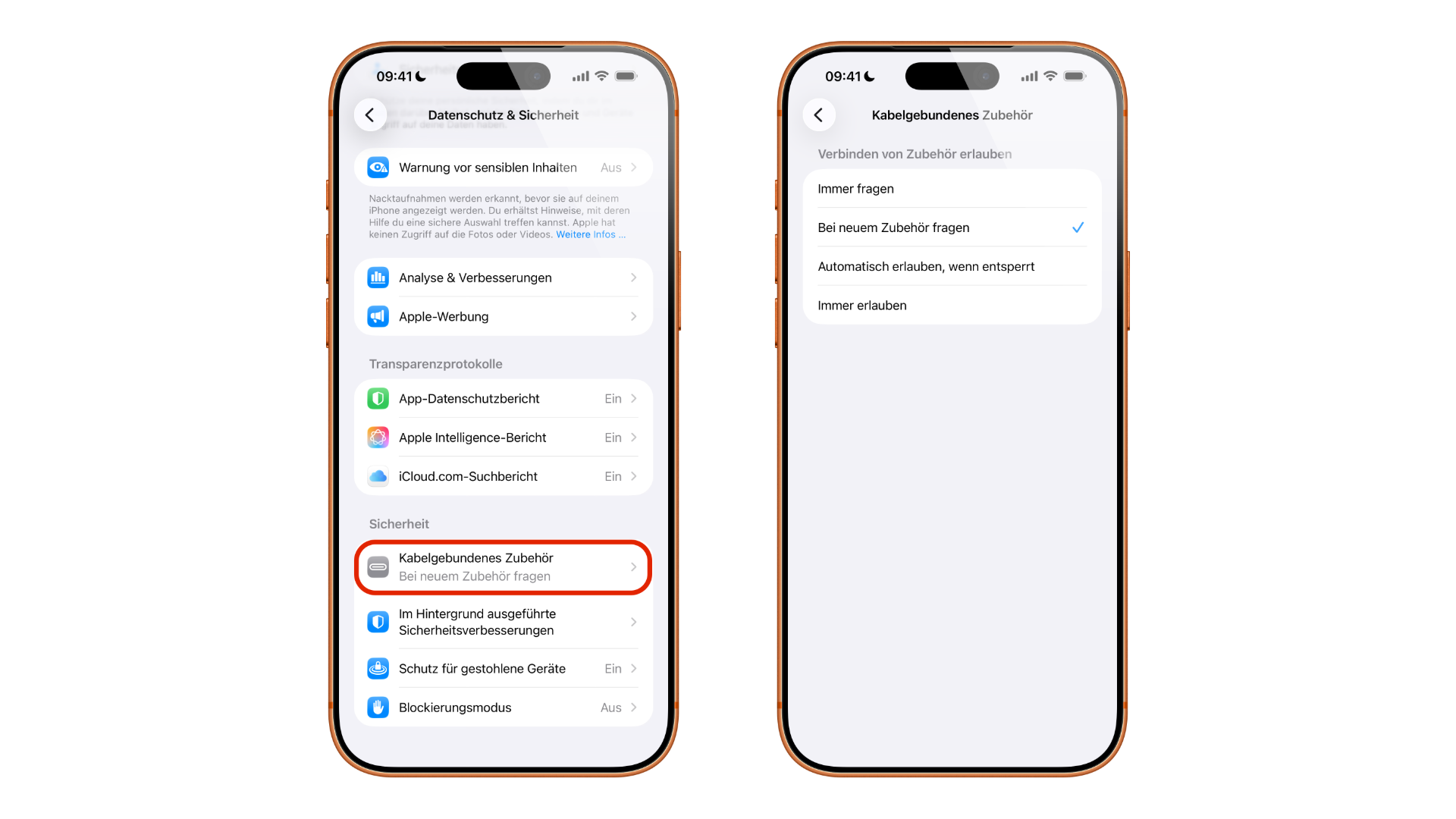
Those who want maximum control should switch to "Always ask". However, the setting should only be relaxed in the other direction – for example, to "Always allow" – for very good reasons, because this eliminates precisely the protection that this article discusses.
ChoiceJacking: the 2025 version
For a long time, confirmation prompts were considered a reliable form of protection. However, in 2025, a research team at Graz University of Technology demonstrated a way to circumvent them. The method, known as ChoiceJacking, tricks the smartphone into automatically confirming data sharing without the user touching the screen. Put simply, the manipulated charging station also masquerades as a keyboard, simulating the press of the "Allow" or "Trust" buttons.
The test was conducted on eleven current-generation devices from eight manufacturers, including Apple, Google, Samsung, and Xiaomi. In the fastest case, the process took 133 milliseconds – however, this best result came from an Android device; times were longer with Apple devices. In some tests, the query flashed for only a few hundredths of a second, too briefly to be noticed. The complete study by TU Graz was presented at the USENIX security conference.
One condition significantly limits the scenario on the iPhone: the screen must not be locked. The method does not work on a switched-off device or one that has not been unlocked since being switched on. It therefore targets the situation where someone plugs in their device and continues to use it simultaneously.
Apple closed the vulnerability with iOS 18.4. Since then, iPhones require authentication via passcode, Face ID, or Touch ID before any interaction with a USB-connected device is possible while locked. Google followed suit with Android 15, but not completely – some of the described attacks initially remained open, and devices from certain manufacturers do not require the additional authentication even after the update.
Just How Real Is the Risk?
Honesty is more valuable than alarmism here. Despite recurring warnings, there are still no publicly documented cases of a large-scale juice-jacking campaign. For most users, the risk is considered largely theoretical because modern operating systems, by default, only load files and require active confirmation.
That doesn't mean the concern is unfounded. Authorities are issuing precautionary warnings: The US security agency TSA published a corresponding alert in March 2025, and the FBI and the US telecommunications agency FCC had done so previously. The FCC specifically pointed to tampered cables that could be distributed as promotional gifts.
The timing is remarkable: The confirmation prompt remained in place for a good decade before being dropped in 2025 – and the vulnerability was closed within a few months. This is less an argument against protection than one for updates. For an iPhone with the latest iOS, classic juice jacking at a public charging station is a very unlikely scenario. Those using older devices, postponing updates, or using third-party cables and power adapters should be more cautious.
How to Protect Yourself While Charging on the Go
The most effective measure is remarkably simple: keep your iPhone and iPad up to date. Many security features only arrive with the respective updates, and the way Apple delivers its security updates makes it clear why a delayed update costs more than a few minutes of waiting.
Furthermore, a few habits have proven useful when you're traveling and relying on external power sources. Ideally, charge using a regular wall outlet with your own power adapter rather than directly from a public USB port – wall power doesn't transmit data. A personal power bank is the most convenient solution, as it eliminates this problem entirely.
If you absolutely have to use an unfamiliar cable or an unknown port, so-called data blockers can help: small adapters that only allow power lines to pass through and physically disconnect the data contacts. Charge-only cables serve the same purpose – when choosing one, it's worth taking a look at the different cable types available, as they are visually indistinguishable.
And if a prompt like "Trust this computer?" appears when you connect the device, even though you only wanted to charge it: do not confirm, but cancel and disconnect the cable. Such a prompt on a charging-only station is a warning sign.
The Bigger Danger Lurks Elsewhere
Despite the importance of USB ports, it's worth considering a more frequent risk when traveling: open networks. An unsecured Wi-Fi network at an airport or hotel offers attackers significantly more opportunities than a charging station, because there's neither a confirmation prompt nor a time limit in place. Our guide to using public Wi-Fi safely on your iPhone explains the necessary steps to take when using unfamiliar networks.
If the iPhone exhibits unusual behavior after an ill-advised connection, possible compromises can be narrowed down based on clear warning signs – most suspected cases turn out to be false alarms.
Juice Jacking – The Key Takeaways at a Glance
Juice jacking is a real attack type, but unlikely for a current iPhone. Apple cleanly separates charging and data connections, requires explicit confirmation, blocks data access when the device is locked—immediately if the cable is rarely used—and also closed the ChoiceJacking vulnerability with iOS 18.4. No widespread attack has been documented to date.
The most important protective measure remains an up-to-date iOS, supplemented by simple habits: charging with your own power adapter or a power bank, using a data blocker or a charge-only cable when using unfamiliar charging ports, and consistently rejecting trust requests at dedicated charging stations. The greater risk while traveling remains open Wi-Fi networks.
Do you use a power bank when you're on the go, or do you just plug your iPhone into the charging station at the gate without a second thought? Tell us in the comments how you handle it when traveling.
Frequently Asked Questions: Juice Jacking
Juice jacking refers to an attack using a manipulated USB charging port or a tampered cable. Because a USB port transmits both power and data through the same contacts, a hidden device can be used to attempt to establish a data connection to the smartphone in order to steal photos or files or to introduce malware. The term has been in use since initial demonstrations in 2011.
This is highly unlikely for a current iPhone. By default, iOS only transmits power via the USB port and requires explicit confirmation before a data connection is established. A locked iPhone will charge, but it will not communicate with a data device. To date, no large-scale attack of this kind has been publicly documented.
Yes, it charges normally when connected to a USB power adapter. However, if the iPhone is connected to an accessory or a computer, it may not charge at all if it's locked – Apple explicitly points this out. At a public charging station, it's rarely possible to tell from the outside what's plugged into the port. Therefore, a device that doesn't charge there isn't necessarily defective.
This depends on how often the cable accessory is used. With regular use, the lock takes effect one hour after the last unlock. If the last data connection with an accessory was more than three days ago, the iPhone immediately blocks new connections by locking the screen. Previously connected accessories are recognized for 30 days. Charging continues in all cases.
ChoiceJacking is an evolution of the attack presented by Graz University of Technology in 2025. The manipulated charging station additionally masquerades as an input device and confirms data sharing itself, without anyone touching the screen. On iPhones, this only works when the screen is unlocked – the method does not work if the device is switched off or before it has been unlocked for the first time.
Yes, starting with iOS 18.4. Since then, iPhones require authentication via Face ID, Touch ID, or passcode before interacting with a connected USB device while locked. The situation is more inconsistent on Android: Google followed suit with Android 15, but didn't close all the described attacks, and some manufacturers' devices still don't require the additional authentication even after the update.
A data blocker is a small adapter between the cable and the charging port that only allows power to pass through while physically disconnecting the data contacts. It's not essential for a current iPhone, as the protection is already built into the system. It becomes useful with older devices, delayed updates, or when using a third-party cable – where it's impossible to tell from the outside whether it's only charging or also transmitting data.