Apfelpatient
  • Home
  • News
  • Rumors
  • Tips & Tricks
  • Reviews
  • Insights
No result
View All Results
  • iPhone 18
  • iPhone 18 Pro
  • iPhone Duo
  • Apple Home
  • Siri AI
  • HomePod
  • HomePod mini
  • HomePod mini 2
  • Apple TV 4K
  • Apple Watch Series 12
  • Apple Watch Ultra 4
  • AirPods 5
  • iOS 27
  • iPadOS 27
  • macOS
  • MacBook Neo
  • iPhone 17e
  • AirTags
  • iOS 26
  • iPhone 17
  • MacBook Pro
  • iPadOS
  • iMac
  • Mac mini
  • Apple TV
  • iPad Pro
  • iPhone Air
  • Apple Vision Pro
  • iPhone 16
  • AirPods 4
  • Apple Watch Ultra
  • MacBook Air
  • iPad
  • AirPods Max
  • AirPods Pro 3
  • Mac Studio
  • Studio Display
  • iPad Air
  • iPad mini
  • watchOS 27
  • Apple CarPlay
  • Apple Pay
  • watchOS 26
  • Home
  • News
  • Rumors
  • Tips & Tricks
  • Reviews
  • Insights
No result
View All Results
Apfelpatient
No result
View All Results
  • iPhone 18
  • iPhone 18 Pro
  • iPhone Duo
  • Apple Home
  • Siri AI
  • HomePod
  • HomePod mini
  • HomePod mini 2
  • Apple TV 4K
  • Apple Watch Series 12
  • Apple Watch Ultra 4
  • AirPods 5
  • iOS 27
  • iPadOS 27
  • macOS
  • MacBook Neo
  • iPhone 17e
  • AirTags
  • iOS 26
  • iPhone 17
  • MacBook Pro
  • iPadOS
  • iMac
  • Mac mini
  • Apple TV
  • iPad Pro
  • iPhone Air
  • Apple Vision Pro
  • iPhone 16
  • AirPods 4
  • Apple Watch Ultra
  • MacBook Air
  • iPad
  • AirPods Max
  • AirPods Pro 3
  • Mac Studio
  • Studio Display
  • iPad Air
  • iPad mini
  • watchOS 27
  • Apple CarPlay
  • Apple Pay
  • watchOS 26

MacBook Pro with Touch: Ternus explains Apple's about-face

Milan Jovicic by Milan Jovicic
October 28, 2026 - 23:22 CET
in Apple News, Mac and MacBook News
0
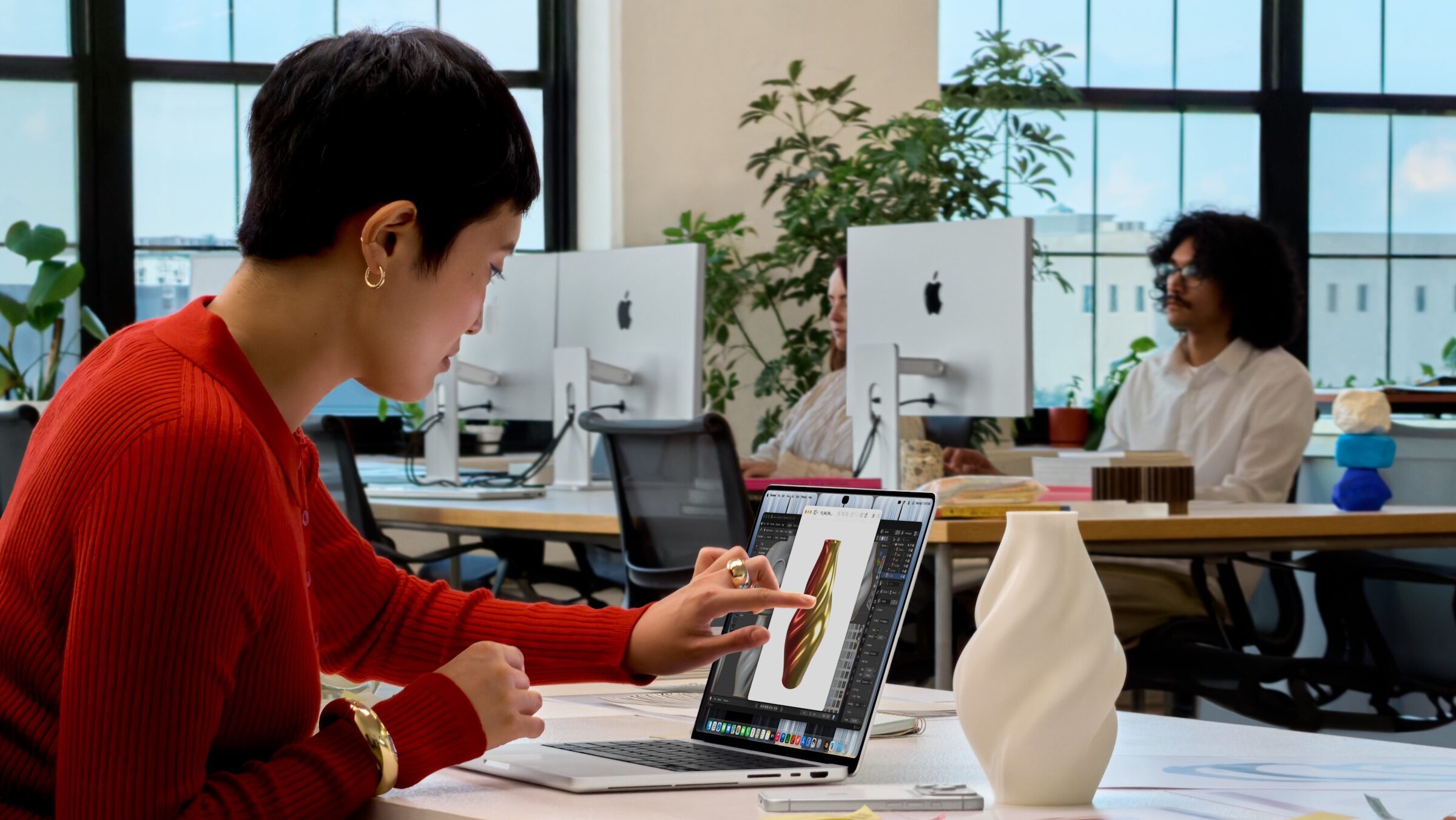
MacBook Pro touch: a woman taps the display of a MacBook Pro to work on a 3D model of a vase

Image: Apple

WhatsAppFacebookEmail
Threads

This article may contain affiliate links. Learn more on our Partner Program page.

Make Apfelpatient a preferred source One click – and you'll see us more often on Google

For 16 years, Apple rejected touchscreens on the Mac, with arguments ranging from Steve Jobs to Craig Federighi. Now the MacBook Pro with PROLED XDR responds to touch, and Apple CEO John Ternus explains why the Mac should still remain a Mac. His answer is less a departure from tradition than a condition.

Since October 28, Apple has offered the first MacBook Pro with a touch-sensitive display. How it came about is described by CEO John Ternus, hardware chief Johny Srouji, and marketing chief Greg Joswiak in a detailed conversation with Steven Levy of Wired. The core message runs through all three answers: touch complements the keyboard and trackpad, but does not replace them. The display, weight, and features of the device are summarized in the complete picture of the MacBook Pro with PROLED XDR.

Key Facts at a Glance

  • Ternus continues to refer to the Mac primarily as a device for indirect input via trackpad and keyboard.
  • According to Ternus, touchscreen technology only came about when it made the MacBook Pro neither heavier nor thicker.
  • Srouji attributes the timing to advances in display technology, chips, and software.
  • Joswiak refers to professionals and a young generation of creatives who expect a touch.
  • This marks the end of a line that Apple has publicly upheld since Jobs' appearance in October 2010.

Touch is an addition, not a new basic principle

Ternus makes it clear in the interview that the Mac's self-image should remain unchanged. He puts it this way:

The Mac is primarily a device for indirect input, built around the trackpad and keyboard. But I think there are times when it's convenient and practical to have touch.

According to him, the crucial factor for Apple was that the new feature be free. Ternus clearly states the condition:

We needed to reach a point where touch functionality in no way makes the product worse.

Touch hasn't made the device heavier or thicker, says Ternus. The numbers bear him out: According to Apple, the 14-inch model weighs around 230 grams less than its predecessor, the 16-inch model around 320 grams less, and both cases are slightly thinner. A large part of this is due to the OLED panel, which doesn't require backlighting. It's also telling how Ternus lists the new features: first the new display as the best Apple has ever built into a Mac, then everything else – and Touch almost as an afterthought at the end.

Why it's the right time

Srouji explained the timing, according to Wired, by stating that display technology, Apple's own chips, and software had advanced to the point where Apple's goal of touch integration had been achieved. Joswiak added the demand side: professionals had been waiting for touch functionality, and a young generation of creatives simply expected it.

On the software side, macOS adapts to the finger. Levy describes how menu bar entries enlarge under the finger and the buttons for closing and hiding windows become larger when tapped. This aligns with what had previously been anticipated regarding touch operation in macOS.

Levy also raises an obvious concern: fingerprints on the display. Apple points to an anti-reflective outer coating, which means the display doesn't need to be cleaned any more often than a screen without touch.

16 years of "no": Apple's previous arguments

The about-face is significant because Apple has justified its refusal for years with the same reasons – ergonomics and the concern that a compromise would harm both operating concepts.

TimeWhoArgument against touchscreen on Mac
October 2010Steve JobsContact surfaces should not be vertical; the arm will tire
April 2012Tim CookUsers do not like the idea of merging toasters and refrigerators
November 2016Phil SchillerIt's impossible to optimize one device for both
June 2018Craig FederighiRaising your arm to tap the screen is tiring

Jobs' most famous commentary comes from his appearance at the "Back to the Mac" event in October 2010: Touch surfaces wouldn't stay upright, and after prolonged use, the arm would fall off. Cook picked up on this analogy in 2012 with regard to Windows 8, comparing touch notebooks to a combination of a toaster and a refrigerator.

A compromise with clear boundaries

I find Ternus's argument more convincing than the about-face initially appears. Jobs and Federighi argued against the touchscreen as the primary interface, against the arm lingering in mid-air for hours. Apple isn't claiming that now: touch is meant to be used occasionally, with the keyboard and trackpad remaining the primary means of operation. Whether this strategy succeeds won't be decided in the interview, but rather by how many apps actually make effective use of touch.

If you already work almost exclusively with the keyboard and trackpad, you won't need to adjust – and the models with Mini-LED will remain available. The differences between the two display variants are explained in the comparison of PROLED XDR and Mini-LED; the Mac buying guide provides an overview of the other Macs. All articles about the device are compiled on the MacBook Pro page.

Would you actually reach for the screen on your MacBook Pro, or would your hands stay on the keyboard and trackpad anyway? Tell us in the comments when you would really use touch on your Mac.
Was this article helpful?
YesNo
Tags: MacMacBook Pro
SendShareSend
Share

Our Amazon Storefront

A handpicked selection of products for iPhone, Mac and more – sorted by topic and updated regularly.

Shop Now

This post contains affiliate links (including Amazon). We earn a small commission on qualifying purchases – at no extra cost to you. Learn more on our Partner Program page.

Previous Post

Mac Buying Guide: Which Mac is worth it?

Milan Jovicic

Milan Jovicic

Milan founded Apfelpatient in 2016 and has been responsible for all editorial content since 2018 – news, rumors, how-to guides and product reviews. Here, Apple devices aren't review units kept for two weeks, they're everyday tools: from iPhone to MacBook Pro, MacBook Air and iMac all the way to Apple Vision Pro, at least one device from every product category is in daily use, many of them replaced every year. Every menu path in a guide is checked on the device before it goes live.

Related posts

Mac Buying Guide: Which Mac is worth it?

by Milan Jovicic
October 28, 2026 - 10:46 PM CET
Mac buying guide: top view of a blue iMac with keyboard and mouse, next to a Mac mini, other Macs and MacBooks in several colours

Mac buying guide: MacBook Neo, Air, Pro, iMac, Mac mini and Mac Studio compared – all standard models with prices starting from 799 euros.

Read moreDetails

iPad Pro vs. MacBook Pro PROLED XDR: Which one is worth it?

by Milan Jovicic
October 28, 2026 - 8:55 PM CET
iPad Pro vs. MacBook Pro: on the left the 13-inch and 11-inch iPad Pro, on the right the 14-inch and 16-inch MacBook Pro with PROLED XDR display

iPad Pro or MacBook Pro with PROLED XDR? Both have OLED and touch – a comparison of display, performance, ports and prices for Germany, Austria, and Switzerland.

Read moreDetails

MacBook Pro PROLED XDR vs. Mini-LED: Is the extra cost worth it?

by Milan Jovicic
October 28, 2026 - 8:16 PM CET
MacBook Pro PROLED XDR vs. Mini-LED: on the left the MacBook Pro with PROLED XDR display, on the right the Mini-LED MacBook Pro, each in 14 and 16 inches in space black and silver

MacBook Pro with OLED or Mini-LED? Same chip, €400 to €500 difference. What PROLED XDR offers in terms of display, touch, and weight.

Read moreDetails

Apple in October 2026: iPad mini, iMac and MacBook Pro

by Milan Jovicic
October 28, 2026 - 19:44 CET
Apple's new products for October 2026: iMac in seven colors, MacBook Pro in two sizes=

iPad mini with OLED, iMac and MacBook Pro with M6, MacBook Pro with touchscreen: All Apple novelties from October with prices and dates.

Read moreDetails

MacBook Pro with PROLED XDR: All the facts at a glance

by Milan Jovicic
October 28, 2026 - 19:06 CET
MacBook Pro with PROLED XDR Display in 14-inch Space Black in front of the 16-inch model in Silver, both showing a Dynamic Island

MacBook Pro with PROLED XDR: All specifications, prices in Germany, Austria, and Switzerland, and the differences compared to the Mini-LED model. Available in stores from November 6th.

Read moreDetails
Load More

Leave a Reply Cancel reply

Required fields are marked with * marked.

By submitting, you consent to the storage of your comment along with your name, email address and IP address. Details are available in our privacy policy.

Categories

  • Apple Insights
  • Apple Rumors
  • Apple News
  • Apple Tips & Tricks
  • iPhone news, rumors and tips
  • Mac and MacBook News
  • Reviews
Make Apfelpatient a preferred source One click – and you'll see us more often on Google

About APPLE PATIENT

APFELPATIENT brings you the latest Apple news, product updates, guides, reviews and tips across the entire Apple ecosystem — from the iPhone to the Mac to the Apple Vision Pro. From the first rumors to confirmed news: researched responsibly.

Follow Apfelpatient

Facebook Instagram YouTube Threads Threads

Company

  • About Apfelpatient
  • Contact
  • Author Profiles

Community

  • Netiquette
  • Push notifications
  • RSS feed

Legal

  • Legal Notice
  • Privacy Policy
  • Terms of Use
  • Cookie settings
  • Affiliate Program

Resources

  • Sitemap

© 2026 Apfelpatient. All rights reserved.

No result
View All Results
  • Home
  • News
  • Rumors
  • Tips & Tricks
  • Reviews
  • Insights

© 2026 Apfelpatient. All rights reserved. Site map

Change language to Deutsch