Apfelpatient
  • Home
  • News
  • Rumors
  • Tips & Tricks
  • Reviews
  • Insights
No result
View All Results
  • iPhone 18
  • iPhone 18 Pro
  • iPhone Duo
  • Apple Home
  • Siri AI
  • HomePod
  • HomePod mini
  • HomePod mini 2
  • Apple TV 4K
  • Apple Watch Series 12
  • Apple Watch Ultra 4
  • AirPods 5
  • iOS 27
  • iPadOS 27
  • macOS
  • MacBook Neo
  • iPhone 17e
  • AirTags
  • iOS 26
  • iPhone 17
  • MacBook Pro
  • iPadOS
  • iMac
  • Mac mini
  • Apple TV
  • iPad Pro
  • iPhone Air
  • Apple Vision Pro
  • iPhone 16
  • AirPods 4
  • Apple Watch Ultra
  • MacBook Air
  • iPad
  • AirPods Max
  • AirPods Pro 3
  • Mac Studio
  • Studio Display
  • iPad Air
  • iPad mini
  • watchOS 27
  • Apple CarPlay
  • Apple Pay
  • watchOS 26
  • Home
  • News
  • Rumors
  • Tips & Tricks
  • Reviews
  • Insights
No result
View All Results
Apfelpatient
No result
View All Results
  • iPhone 18
  • iPhone 18 Pro
  • iPhone Duo
  • Apple Home
  • Siri AI
  • HomePod
  • HomePod mini
  • HomePod mini 2
  • Apple TV 4K
  • Apple Watch Series 12
  • Apple Watch Ultra 4
  • AirPods 5
  • iOS 27
  • iPadOS 27
  • macOS
  • MacBook Neo
  • iPhone 17e
  • AirTags
  • iOS 26
  • iPhone 17
  • MacBook Pro
  • iPadOS
  • iMac
  • Mac mini
  • Apple TV
  • iPad Pro
  • iPhone Air
  • Apple Vision Pro
  • iPhone 16
  • AirPods 4
  • Apple Watch Ultra
  • MacBook Air
  • iPad
  • AirPods Max
  • AirPods Pro 3
  • Mac Studio
  • Studio Display
  • iPad Air
  • iPad mini
  • watchOS 27
  • Apple CarPlay
  • Apple Pay
  • watchOS 26

MacBook Pro: Touch can be disabled, Apple plans to add more

Milan Jovicic by Milan Jovicic
October 29, 2026 - 18:55 CET
in Apple News, Mac and MacBook News
0
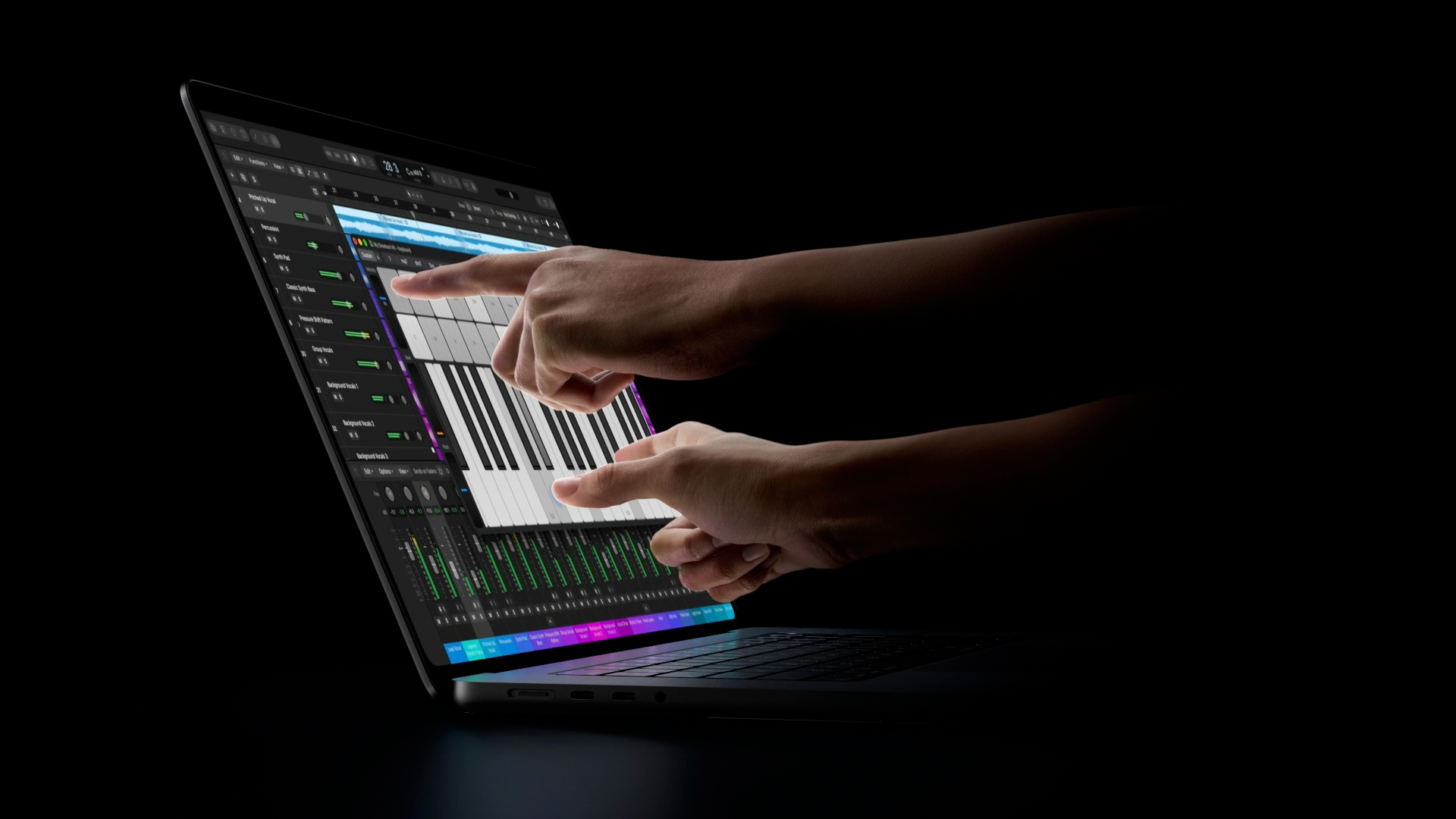
MacBook Pro touch: two hands playing an on-screen keyboard in Logic Pro on the display of a MacBook Pro with PROLED XDR Display

Image: Apple

WhatsAppFacebookEmail
Threads

This article may contain affiliate links. Learn more on our Partner Program page.

Make Apfelpatient a preferred source One click – and you'll see us more often on Google

Those who don't want the touchscreen on the new MacBook Pro don't have to use it – the function can be completely disabled. At the same time, Apple makes it clear that the current touch operation is just the beginning. Apple is already providing videos and online labs for developers.

The MacBook Pro with PROLED XDR display, the first Mac with a touchscreen, has been officially released since Wednesday. The first hands-on reports from the media event in Los Angeles showed how macOS 27 responds to finger input: individual controls are larger, but the interface remains familiar.

More detailed impressions are now available, including a review by Federico Viticci at MacStories and a hands-on by Chris Welch at Bloomberg. Together with Apple's developer materials, this provides a clearer picture of how touch functionality on the MacBook Pro will be developed.

Key Facts at a Glance

  • Touch input can be completely disabled in the accessibility settings.
  • Also in the accessibility settings is a zoom option that allows you to enlarge any area of macOS using a pinch gesture; it is enabled by default.
  • An Apple employee told reporters that Apple is only at the beginning of adapting macOS for touch.
  • For developers there are three videos, online labs on November 18th and 19th, and the beta of Xcode 27.3 coming soon.

Touch can be completely turned off

According to Viticci, touch input can be completely disabled in the accessibility settings of macOS.

A second accessibility option works in the opposite direction: Display zoom magnifies any area of the screen using a pinch gesture, i.e., by spreading two fingers apart. It is disabled by default.

Further details from Viticci's report: When macOS detects a touch, the entries in context menus move further apart. In Finder, a long press lifts a file, which can then be moved by dragging. However, the Mac still does not support the Apple Pencil.

Apple speaks of a beginning

Welch describes Apple's approach as cautious: no oversized buttons, no sweeping changes to macOS. Menu items are spaced further apart when touched, but appear normal again when using a trackpad or mouse. According to Welch, the three small window buttons in the top left corner remain difficult to tap, and their enlargement also seems somewhat sluggish.

Apple itself suggests that this is just the beginning. According to Bloomberg, an Apple employee told reporters that the company is only at the start of adapting macOS for touch.

Videos, Labs and Xcode 27.3 for developers

Apple's developer page for Touch on the Mac shows what's next. It features three videos: one on designing for Touch, one on touch support in custom Mac apps, and one on live activities on the Mac. On November 18th and 19th, Apple is offering two one-hour online labs for which registered developers can sign up.

Apple lists the Xcode 27.3 beta, along with documentation and design resources, as "coming soon." Developers don't need a new MacBook Pro to test it: According to Apple's video, it works with the current macOS beta, the developer tools, and an iPad connected via Sidecar.

A switch that makes buying easier

I consider the option to disable touch controls more important than it might initially seem. Touch functionality is only available with the PROLED display and the lighter chassis, and those buying the device primarily for the screen or the lighter weight don't need to bother with touch operation. Those who don't need touch functionality at all can get the same chips for less with the Mini-LED models – the differences are illustrated in the comparison between PROLED XDR and Mini-LED.

The fact that Apple is offering developers its own Labs at the end of November and releasing Xcode 27.3 suggests that the real benefit will only come with adapted apps. I expect Apple to gradually expand touch controls in the next macOS 27 updates, rather than completely overhauling them all at once.

Would you leave touch input enabled on your MacBook Pro or disable it in the Accessibility settings immediately after setup? Tell us in the comments what you would choose.


Was this article helpful?
YesNo
Tags: DeveloperMacMacBookMacBook PromacOSmacOS 27macOS 27.2macOS 27.3Xcode
SendShareSend
Share

Our Amazon Storefront

A handpicked selection of products for iPhone, Mac and more – sorted by topic and updated regularly.

Shop Now

This post contains affiliate links (including Amazon). We earn a small commission on qualifying purchases – at no extra cost to you. Learn more on our Partner Program page.

Previous Post

MacBook Pro with Touch: How macOS reacts to the finger

Next Post

iOS 27.3: When the update will be released and what it brings

Milan Jovicic

Milan Jovicic

Milan founded Apfelpatient in 2016 and has been responsible for all editorial content since 2018 – news, rumors, how-to guides and product reviews. Here, Apple devices aren't review units kept for two weeks, they're everyday tools: from iPhone to MacBook Pro, MacBook Air and iMac all the way to Apple Vision Pro, at least one device from every product category is in daily use, many of them replaced every year. Every menu path in a guide is checked on the device before it goes live.

Related posts

MacBook Pro with Touch: How macOS reacts to the finger

by Milan Jovicic
October 29, 2026 - 2:29 PM CET
MacBook Pro touch: woman tapping the display of a MacBook Pro with PROLED XDR Display with her finger inside a van at night, a lit-up skyline behind her

MacBook Pro with Touch: Window buttons grow under your finger, professional apps follow in November. What macOS 27 can do with touch.

Read moreDetails

MacBook power adapter: What wattage does your model need?

by Milan Jovicic
October 29, 2026 - 2:09 PM CET
Four stacked MacBooks seen from the port side with MagSafe 3 and USB-C, where each model needs a different MacBook power adapter for full charging speed

Which power adapter does your MacBook need? Wattage figures for Neo, Air and Pro including M6 and PROLED XDR, fast charging and what's missing in the box.

Read moreDetails

Apple Silicon: How Much RAM Do You Really Need?

by Milan Jovicic
October 29, 2026 - 13:34 CET
Four Macs with Apple Silicon side by side: two MacBook Pros, one iMac and one Mac Studio

How much RAM your Apple Silicon Mac really needs: from 16 GB to 512 GB, with all levels from M6 to M5 Ultra and Siri AI.

Read moreDetails

Apple vs. OpenAI: Trial begins on July 19, 2027

by Milan Jovicic
October 29, 2026 - 02:13 CET
Symbolic image for Apple vs. OpenAI: illustrated file folder showing the case number of the proceedings now scheduled for trial on a dark blue background

Apple vs. OpenAI: The trial concerning hardware secrets starts on July 19, 2027, at 6 p.m. in Germany. Here's an overview of the deadlines leading up to it.

Read moreDetails

iPhone Duo: Almost 30 percent foldable market share expected by 2027

by Milan Jovicic
October 29, 2026 - 01:20 CET
iPhone Duo market share: the iPhone Duo box showing the unfolded device on its lid, lying on a grey table

One market researcher predicts the iPhone Duo will capture 29.8 percent of the foldable phone market by 2027, just behind Samsung. This could potentially slow its rise.

Read moreDetails
Load More

Leave a Reply Cancel reply

Required fields are marked with * marked.

By submitting, you consent to the storage of your comment along with your name, email address and IP address. Details are available in our privacy policy.

Categories

  • Apple Insights
  • Apple Rumors
  • Apple News
  • Apple Tips & Tricks
  • iPhone news, rumors and tips
  • Mac and MacBook News
  • Reviews
Make Apfelpatient a preferred source One click – and you'll see us more often on Google

About APPLE PATIENT

APFELPATIENT brings you the latest Apple news, product updates, guides, reviews and tips across the entire Apple ecosystem — from the iPhone to the Mac to the Apple Vision Pro. From the first rumors to confirmed news: researched responsibly.

Follow Apfelpatient

Facebook Instagram YouTube Threads Threads

Company

  • About Apfelpatient
  • Contact
  • Author Profiles

Community

  • Netiquette
  • Push notifications
  • RSS feed

Legal

  • Legal Notice
  • Privacy Policy
  • Terms of Use
  • Cookie settings
  • Affiliate Program

Resources

  • Sitemap

© 2026 Apfelpatient. All rights reserved.

No result
View All Results
  • Home
  • News
  • Rumors
  • Tips & Tricks
  • Reviews
  • Insights

© 2026 Apfelpatient. All rights reserved. Site map

Change language to Deutsch