apple patient
  • Home
  • News
  • Rumors
  • Tips & Tricks
  • Reviews
  • Insights
No Result
View All Result
  • iPhone 18
  • iOS 27
  • iPadOS 27
  • macOS
  • MacBook Neo
  • iPhone 17e
  • AirTags
  • iOS 26
  • iPhone 17
  • MacBook Pro
  • iPadOS
  • iMac
  • Mac mini
  • HomePod
  • Apple TV
  • iPad Pro
  • iPhone Air
  • Apple Vision Pro
  • iPhone 16
  • AirPods 4
  • Apple Watch Ultra
  • HomePod Mini
  • MacBook Air
  • iPad
  • AirPods Max
  • AirPods Pro 3
  • Apple Watch Series 3
  • Mac Studio
  • Studio Display
  • iPad Air
  • iPad mini
  • watchOS 27
  • Apple CarPlay
  • Apple Pay
  • watchOS 26
  • Home
  • News
  • Rumors
  • Tips & Tricks
  • Reviews
  • Insights
No Result
View All Result
apple patient
No Result
View All Result
  • iPhone 18
  • iOS 27
  • iPadOS 27
  • macOS
  • MacBook Neo
  • iPhone 17e
  • AirTags
  • iOS 26
  • iPhone 17
  • MacBook Pro
  • iPadOS
  • iMac
  • Mac mini
  • HomePod
  • Apple TV
  • iPad Pro
  • iPhone Air
  • Apple Vision Pro
  • iPhone 16
  • AirPods 4
  • Apple Watch Ultra
  • HomePod Mini
  • MacBook Air
  • iPad
  • AirPods Max
  • AirPods Pro 3
  • Apple Watch Series 3
  • Mac Studio
  • Studio Display
  • iPad Air
  • iPad mini
  • watchOS 27
  • Apple CarPlay
  • Apple Pay
  • watchOS 26

iOS 27.2 Beta: Apple TV app gets profiles on the iPhone

Milan Jovicic by Milan Jovicic
September 16, 2026 - 9:55 p.m. CEST
in Apple News
0
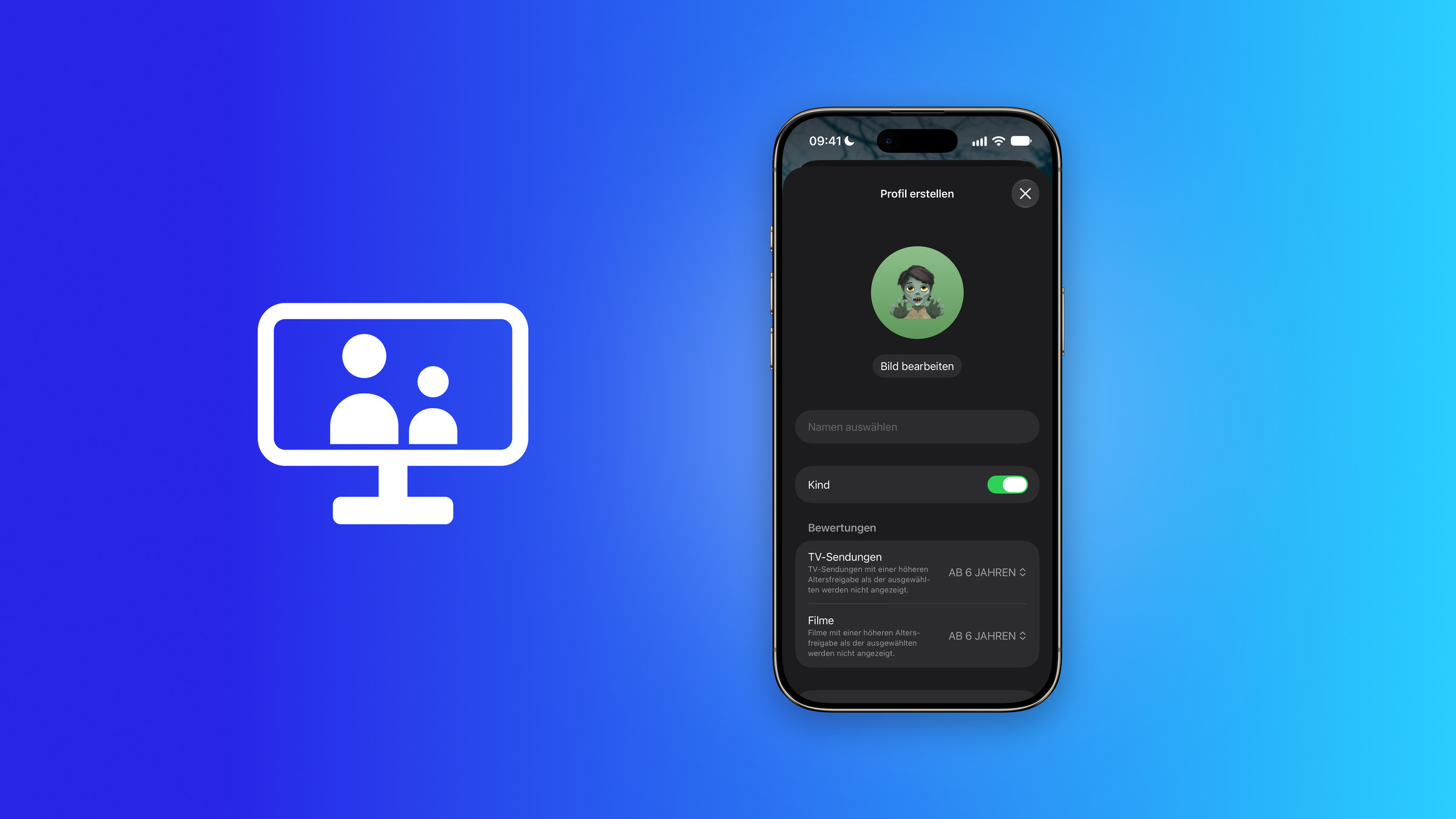
iOS 27.2 Apple TV profiles: iPhone showing the create profile screen with the kid toggle enabled and an age rating of 6 for TV shows and movies, next to a screen icon with two people

Image: Apfelpatient

WhatsAppFacebookEmail
Threads

They've been available on TVs for years, but were previously missing on iPhones: profiles in the Apple TV app. The first beta of iOS 27.2 closes this gap and also includes the child profiles that Apple introduced last December. Age ratings range from 0 to 18 years.

With the first beta of iOS 27.2, Apple is changing not only the new Health app, which is being tested for the first time, but also the Apple TV app on the iPhone. It now allows users to switch between multiple profiles.

The foundation is tvOS. With tvOS 26.2, Apple introduced profiles without a separate Apple account and content restrictions for children's profiles to the Apple TV 4K. These same profiles are now also available on the iPhone.

Key Facts at a Glance

  • The Apple TV app on the iPhone in iOS 27.2 Beta 1 supports profiles; new ones can be created directly in the app.
  • Child profiles restrict series and films to a separate age group from "0 years and up" to "18 years and up", with "6 years and up" being the default setting.
  • Profiles can be protected with a four-digit code; automatic playback can be set for each profile.
  • The managing profile sees playback and searches; the profile also appears on Apple TV and certain devices from other manufacturers.

What changes when the app starts

The profile menu is located in the top right corner of the app. Next to your own account, you'll find the options "Create TV profile" and "Account settings." Once another profile is added alongside your own, the app will ask who is watching each time it's opened. If you don't want this, you can permanently hide the prompt using a dedicated button.
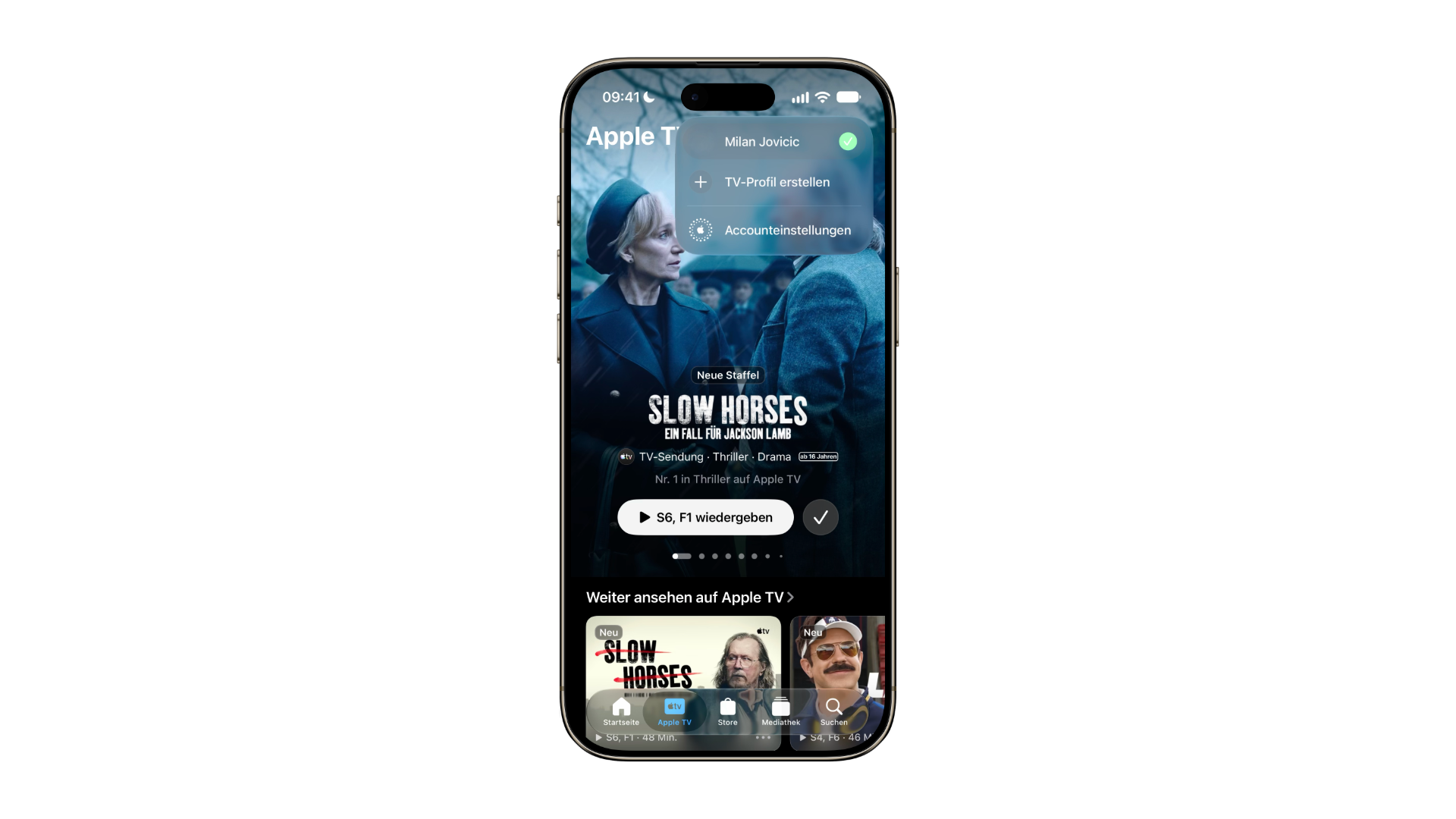
iOS 27.2 Apple TV profiles: profile menu of the Apple TV app on iPhone with the options to create a TV profile and open account settings
Image: Apfelpatient

A new profile only requires a picture, a name, and confirmation that it's for a child. It doesn't need its own Apple account; it's managed through the account it was created under.

Child profiles filter the offer

Once the "Child" switch is activated, two separate age ratings for TV shows and movies appear. The app does not display content with a higher age rating than the selected one.

CategoryStepsDefault setting
TV programsDo not allow, Ages 0, 6, 12, 16, 18, No rating, Allow allAges 6 and up
MoviesDo not allow, Ages 0, 6, 12, 16, 18, No rating, Allow allAges 6 and up

The age ratings are identical, but they are set separately, so a child can, for example, watch films rated for ages 6 and up, and series rated for ages 12 and up. Anyone creating a child's profile should check both values individually instead of relying on the default settings.

From TV to iPhone

Apple doesn't just offer profiles in the Apple TV app for its own streaming device. According to Apple's instructions for profile settings, they can also be switched and managed within the app on smart TVs and other living room devices. The iPhone was the only device that lacked this feature.

The app itself explains how the profiles are related during the setup process: A new profile is available on all supported devices where the managing profile is logged in, explicitly including Apple TV and certain third-party devices. If you create a child profile on your iPhone, it will also be available on your TV. Conversely, only the managing profile can delete such a profile, and according to Apple, it then disappears from all devices associated with that account.

Why children's profiles belong on the iPhone

A child profile is most useful where children watch unsupervised content, which is more likely to be an iPhone in the back seat than the TV in the living room. Under "Customize," you can also set whether the next episode or a recommendation starts automatically for each profile, and access to a profile can be locked with a four-digit code. Anyone wanting to switch back to the main profile must also briefly confirm their identity via Face ID, preventing a child from easily accessing adult content. Additionally, the parents' "Continue Watching" list remains free of children's shows.

Two points are involved in this calculation. According to the app's instructions, the managing profile has access to the child's profile data, such as playback and searches. And the restriction applies to the Apple TV app: other streaming apps, YouTube, and the browser remain unaffected; Screen Time with its content restrictions still applies to the entire device.

Do you let your kids use your iPhone to watch shows – and would a child profile in the Apple TV app change anything, or is that already handled by screen time limits? Tell us in the comments how you manage this at home.


Make Apfelpatient a preferred source One click – and you'll see us more often on Google
Was this article helpful?
YesNo
Tags: Apple ServicesApple TViOSiOS 27iOS 27.2iPadOSiPadOS 27iPadOS 27.2macOSmacOS 27macOS 27.2tvOStvOS 27tvOS 27.2visionOSvisionOS 27visionOS 27.2
SendShareSend
Share

Our Amazon Storefront

A handpicked selection of products for iPhone, Mac and more – sorted by topic and updated regularly.

Shop Now

This post contains affiliate links (including Amazon). We earn a small commission on qualifying purchases – at no extra cost to you. Learn more on our Partner Program page.

Previous Post

iOS 27.2 Beta: New Health app tested for the first time

Milan Jovicic

Milan Jovicic

Milan founded Apfelpatient in 2016 and has been responsible for all editorial content since 2018 — news, rumors, guides, and product reviews. Apple devices here are not test units on loan for two weeks but everyday tools: from the iPhone through MacBook Pro, MacBook Air, and iMac to the Apple Vision Pro, at least one device from nearly every product category is in daily use, many of them replaced annually. Every menu path in a guide is verified on the device before it is published.

Related posts

iOS 27.2 beta Health app: iPhone showing the Longevity tab with Health Age, next to an Apple Watch with health apps
Apple News

iOS 27.2 Beta: New Health app tested for the first time

September 16, 2026 - 8:01 p.m. CEST
iPhone showing the software update settings with iOS 27.2 beta and the update button
Apple News

iOS 27.2 Beta 1: Apple skips the 27.1 testing phase

September 16, 2026 - 7:35 p.m. CEST
Tenzing on Apple TV: Tom Hiddleston and Genden Phuntsok on the key art for the Everest drama
Apple News

Tenzing: Apple TV shows trailer for Everest drama

September 16, 2026 - 6:57 p.m. CEST

Leave a Reply Cancel reply

Required fields are marked with * marked.

By submitting, you consent to the storage of your comment along with your name, email address and IP address. Details are available in our privacy policy.

Categories

  • Apple Insights
  • Apple Rumors
  • Apple News
  • Apple Tips & Tricks
  • iPhone news, rumors and tips
  • Mac and MacBook News
  • Reviews

About APFELPATIENT

APFELPATIENT brings you the latest Apple news, product updates, guides, reviews and tips across the entire Apple ecosystem — from the iPhone to the Mac to the Apple Vision Pro. From the first rumors to confirmed news: researched responsibly.

Follow Apfelpatient

Facebook Instagram YouTube Threads Threads

Company

  • About Apfelpatient
  • Contact
  • Author Profiles

Community

  • Netiquette
  • Push Notifications
  • RSS feed

Legal

  • Legal Notice
  • Privacy Policy
  • Terms of Use
  • Cookie Settings
  • Affiliate Program

Resources

  • Sitemap

© 2026 Apfelpatient. All rights reserved.

No Result
View All Result
  • Home
  • News
  • Rumors
  • Tips & Tricks
  • Reviews
  • Insights

© 2026 Apfelpatient. All rights reserved. Page Directory

Change language to Deutsch