
Apfelpatient
  • Home
  • News
  • Rumors
  • Tips & Tricks
  • Reviews
  • Insights
No result
View All Results
  • iPhone 18
  • iPhone 18 Pro
  • iPhone Duo
  • Apple Home
  • Siri AI
  • HomePod
  • HomePod mini
  • HomePod mini 2
  • Apple TV 4K
  • Apple Watch Series 12
  • Apple Watch Ultra 4
  • AirPods 5
  • iOS 27
  • iPadOS 27
  • macOS
  • MacBook Neo
  • iPhone 17e
  • AirTags
  • iOS 26
  • iPhone 17
  • MacBook Pro
  • iPadOS
  • iMac
  • Mac mini
  • Apple TV
  • iPad Pro
  • iPhone Air
  • Apple Vision Pro
  • iPhone 16
  • AirPods 4
  • Apple Watch Ultra
  • MacBook Air
  • iPad
  • AirPods Max
  • AirPods Pro 3
  • Mac Studio
  • Studio Display
  • iPad Air
  • iPad mini
  • watchOS 27
  • Apple CarPlay
  • Apple Pay
  • watchOS 26
  • Home
  • News
  • Rumors
  • Tips & Tricks
  • Reviews
  • Insights
No result
View All Results
Apfelpatient
No result
View All Results
  • iPhone 18
  • iPhone 18 Pro
  • iPhone Duo
  • Apple Home
  • Siri AI
  • HomePod
  • HomePod mini
  • HomePod mini 2
  • Apple TV 4K
  • Apple Watch Series 12
  • Apple Watch Ultra 4
  • AirPods 5
  • iOS 27
  • iPadOS 27
  • macOS
  • MacBook Neo
  • iPhone 17e
  • AirTags
  • iOS 26
  • iPhone 17
  • MacBook Pro
  • iPadOS
  • iMac
  • Mac mini
  • Apple TV
  • iPad Pro
  • iPhone Air
  • Apple Vision Pro
  • iPhone 16
  • AirPods 4
  • Apple Watch Ultra
  • MacBook Air
  • iPad
  • AirPods Max
  • AirPods Pro 3
  • Mac Studio
  • Studio Display
  • iPad Air
  • iPad mini
  • watchOS 27
  • Apple CarPlay
  • Apple Pay
  • watchOS 26

iPhone Duo: Display zoom is missing after setup

Milan Jovicic by Milan Jovicic
November 2, 2026 - 2:57 PM CET
in Apple News, iPhone news, rumors and tips
0
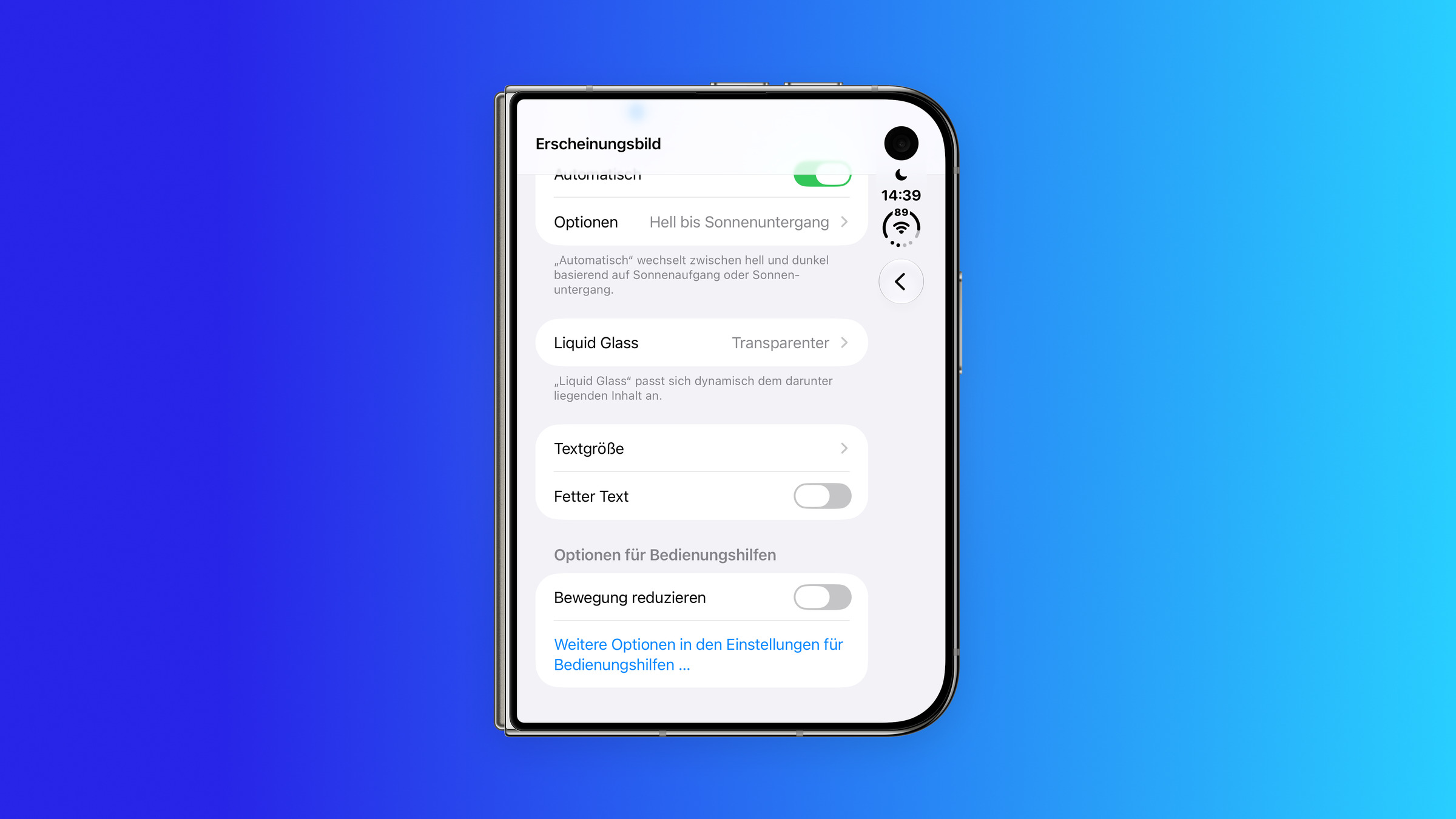
iPhone Duo Display Zoom missing: Appearance settings show Text Size and Bold Text, but there is no Display Zoom entry

Image: Apfelpatient

WhatsAppFacebookEmail
Threads

This article may contain affiliate links. Learn more on our Partner Program page.

Make Apfelpatient a preferred source One click – and you'll see us more often on Google

The size of text and controls on the iPhone Duo is set only once. The device offers the display zoom option during setup, but it disappears from the settings afterward. I tested this side-by-side on my Duo and an iPhone 18 Pro Max.

On other iPhones such as the iPhone 18 Pro Max, the display can be switched at any time: "Default" shows more content, while "Larger Text" enlarges text and controls. On the iPhone Duo, this option is missing from the settings. It was first noticed by a user who described it in a post on Reddit.

My own device confirms the finding. This view was offered to me during setup, and I selected "Standard". I can't find a way to change it afterwards.

Key Facts at a Glance

  • The display zoom option is missing on the iPhone Duo under Settings > Appearance.
  • On the iPhone 18 Pro Max, it's located in exactly this position, with the options "Standard" and "Larger Text".
  • The duo offers a choice during the setup process, but not afterwards.
  • Text size and bold text can still be adjusted on the Duo.

What's missing in the settings

In iOS 27, the display zoom is located in Settings under "Appearance," right below Text Size and Bold Text. On the iPhone 18 Pro Max, the system describes the function as follows: "Larger Text" makes the controls larger, while "Standard" displays more content.

On the iPhone Duo, the same section ends after "Bold Text". Directly below are the accessibility options; the entry for display zoom is missing.
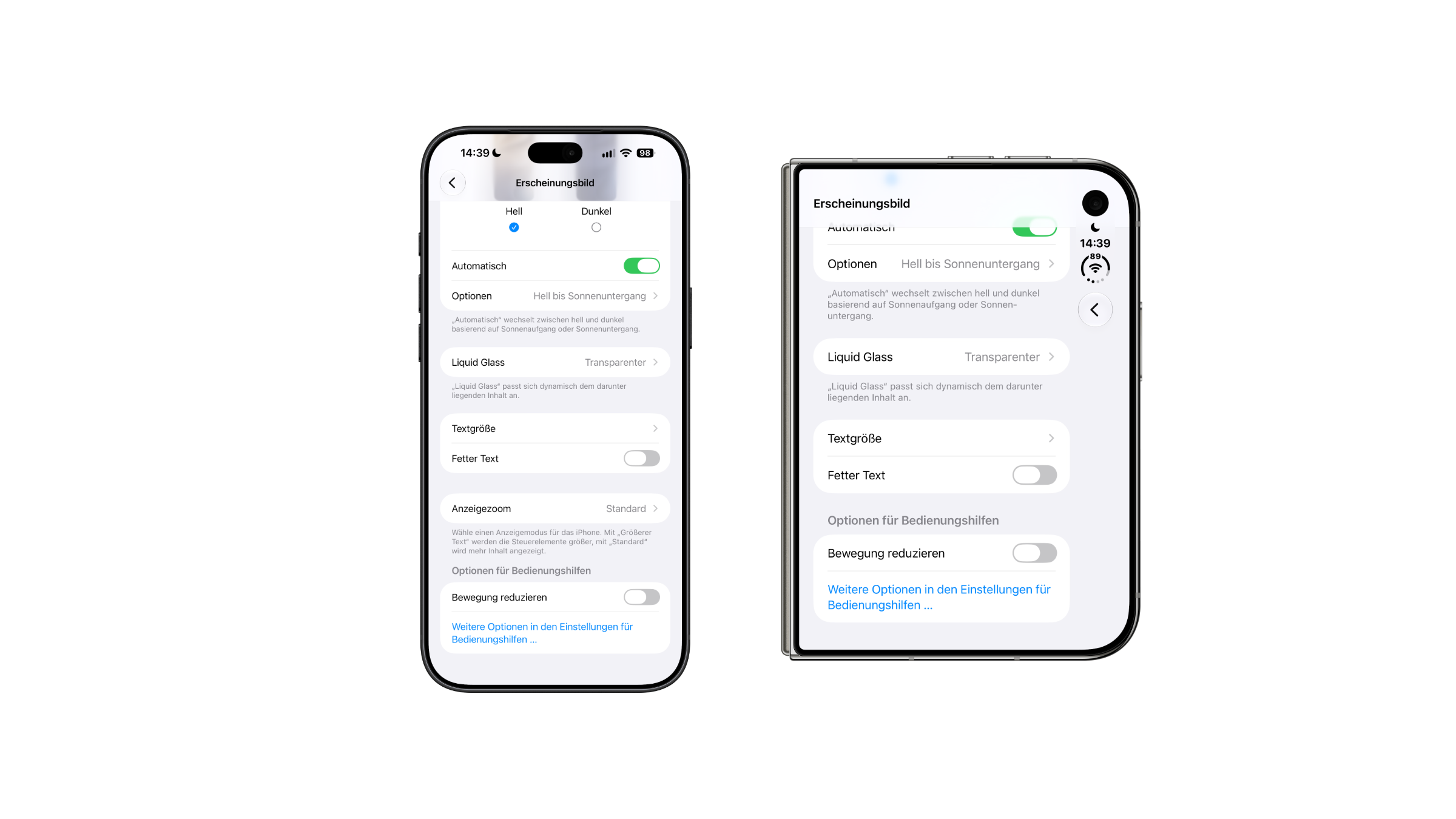
iPhone Duo Display Zoom compared: the iPhone 18 Pro Max shows Display Zoom under Appearance, while the entry is missing on the iPhone Duo
On the left, the iPhone 18 Pro Max with display zoom; on the right, the iPhone Duo without. (Image: Apfelpatient)
Setting under "Appearance"iPhone 18 Pro MaxiPhone Duo
Light, Dark, AutomaticYesYes
Liquid GlassYesYes
Text sizeYesYes
Bold textYesYes
Display zoomYesmissing

The choice is made during the setup process

The view is only offered on the iPhone Duo during the initial setup. My setup was done via Quick Start from the iPhone 17 Pro Max, and the selection step appeared normally.

Anyone who wants to change the view later can currently only do so by going through the setup process. This means resetting the iPhone Duo and setting it up again, after restoring from a backup.

What remains on the iPhone Duo

The duo isn't entirely without customization options. Under "Appearance," you can adjust the text size and enable bold text. The link "More options in Accessibility settings" leads to further display assistance.

Text size only affects fonts in apps that support it. Display zoom, on the other hand, enlarges controls system-wide. Both settings are among the typical reasons why everything suddenly appears too large on an iPhone.

Who is affected by the missing option?

I suspect the absence of this feature is more of an oversight than a deliberate choice. The fact that the Duo offers the option during setup supports this. An option that the system prompts you for during setup but then disappears later makes little sense as an intentional design choice. Therefore, I expect Apple to bring the display zoom back to the settings in one of the next updates.

For me, using "Default," nothing changes in everyday use. But anyone who relies on larger controls and picked the wrong option during setup, or changes their mind later, is faced with a reset. Anyone who still has to set up the iPhone Duo should therefore make this choice deliberately. This applies especially to a device for parents or grandparents.

Which view did you choose when setting up your iPhone, and have you changed it since? Tell us in the comments whether you made a conscious decision during setup or simply clicked through the steps.
Was this article helpful?
YesNo
Tags: iOSiOS 27iOS 27.2iPhoneiPhone Duo
SendShareSend
Share

Our Amazon Storefront

A handpicked selection of products for iPhone, Mac and more – sorted by topic and updated regularly.

Shop Now

This post contains affiliate links (including Amazon). We earn a small commission on qualifying purchases – at no extra cost to you. Learn more on our Partner Program page.

Previous Post

Apple HomeView: Code reveals mode as security camera

Next Post

iPhone spyware: Apple warns the German Bundestag and government

Milan Jovicic

Milan Jovicic

Milan founded Apfelpatient in 2016 and has been responsible for all editorial content since 2018 – news, rumors, how-to guides and product reviews. Here, Apple devices aren't review units kept for two weeks, they're everyday tools: from iPhone to MacBook Pro, MacBook Air and iMac all the way to Apple Vision Pro, at least one device from every product category is in daily use, many of them replaced every year. Every menu path in a guide is checked on the device before it goes live.

Related posts

iOS 27.2.1: Apple is testing the next iPhone update

by Milan Jovicic
November 2, 2026 - 17:47 CET
iOS 27.2.1: folded iPhone Duo showing the General section of Settings, including the Software Update entry

iOS 27.2.1 is apparently being tested at Apple: What the update is likely to bring, when it might be released, and what's in store for Mac and iOS 27.3 Beta.

Read moreDetails

iPhone spyware: Apple warns the German Bundestag and government

by Milan Jovicic
November 2, 2026 - 3:38 PM CET
iPhone spyware: two iPhones lying face down on a grey stone surface, one white and one blue

Apple is warning members of the German Bundestag and government officials about a spyware attack on their iPhones. The German Federal Office for Information Security (BSI) advises caution.

Read moreDetails

Apple HomeView: Code reveals mode as security camera

by Milan Jovicic
November 1, 2026 - 21:12 CET
HomeView security camera: Apple HomeView tabletop model showing Home controls and a living room camera feed on its display

HomeView software version 27.2 includes settings that allow HomeView to work as a security camera with HomeKit Secure Video.

Read moreDetails

iPad mini (A20 Pro): Smaller battery, better energy efficiency rating

by Milan Jovicic
October 31, 2026 - 10:05 PM CET
iPad mini (A20 Pro) battery: the new iPad mini in starlight held sideways in one hand, showing an animation app with a timeline

The EU datasheet for the iPad mini (A20 Pro) shows 4,900 mAh instead of 5,034 mAh – and yet more endurance in the test cycle and energy class D.

Read moreDetails

Setting Up iPhone Widgets: 6 Tricks for iOS 27

by Milan Jovicic
October 31, 2026 - 19:02 CET
Setting up iPhone widgets: unfolded iPhone running iOS 27 in landscape, standing on a grey table, with app icons and widgets for music and an app on the Home Screen

Setting up iPhone widgets in iOS 27: how to stack widgets, change their size, make icons clear and use shortcuts.

Read moreDetails
Load More

Leave a Reply Cancel reply

Required fields are marked with * marked.

By submitting, you consent to the storage of your comment along with your name, email address and IP address. Details are available in our privacy policy.

Categories

  • Apple Insights
  • Apple Rumors
  • Apple News
  • Apple Tips & Tricks
  • iPhone news, rumors and tips
  • Mac and MacBook News
  • Reviews
Make Apfelpatient a preferred source One click – and you'll see us more often on Google

About APPLE PATIENT

APFELPATIENT brings you the latest Apple news, product updates, guides, reviews and tips across the entire Apple ecosystem — from the iPhone to the Mac to the Apple Vision Pro. From the first rumors to confirmed news: researched responsibly.

Follow Apfelpatient

Facebook Instagram YouTube Threads Threads

Company

  • About Apfelpatient
  • Contact
  • Author Profiles

Community

  • Netiquette
  • Push notifications
  • RSS feed

Legal

  • Legal Notice
  • Privacy Policy
  • Terms of Use
  • Cookie settings
  • Affiliate Program

Resources

  • Sitemap

© 2026 Apfelpatient. All rights reserved.

No result
View All Results
  • Home
  • News
  • Rumors
  • Tips & Tricks
  • Reviews
  • Insights

© 2026 Apfelpatient. All rights reserved. Site map

Change language to Deutsch