Apfelpatient
  • Home
  • News
  • Rumors
  • Tips & Tricks
  • Reviews
  • Insights
No result
View All Results
  • iPhone 18
  • iPhone 18 Pro
  • iPhone Duo
  • Apple Home
  • Siri AI
  • HomePod
  • HomePod mini
  • HomePod mini 2
  • MacBook Pro
  • Apple TV 4K
  • Apple Watch Series 12
  • Apple Watch Ultra 4
  • AirPods 5
  • iOS 27
  • iPadOS 27
  • macOS
  • MacBook Neo
  • iPhone 17e
  • AirTags
  • iOS 26
  • iPhone 17
  • iPadOS
  • iMac
  • Mac mini
  • Apple TV
  • iPad Pro
  • iPhone Air
  • Apple Vision Pro
  • iPhone 16
  • AirPods 4
  • Apple Watch Ultra
  • MacBook Air
  • iPad
  • AirPods Max
  • AirPods Pro 3
  • Mac Studio
  • Studio Display
  • iPad Air
  • iPad mini
  • watchOS 27
  • Apple CarPlay
  • Apple Pay
  • watchOS 26
  • Home
  • News
  • Rumors
  • Tips & Tricks
  • Reviews
  • Insights
No result
View All Results
Apfelpatient
No result
View All Results
  • iPhone 18
  • iPhone 18 Pro
  • iPhone Duo
  • Apple Home
  • Siri AI
  • HomePod
  • HomePod mini
  • HomePod mini 2
  • MacBook Pro
  • Apple TV 4K
  • Apple Watch Series 12
  • Apple Watch Ultra 4
  • AirPods 5
  • iOS 27
  • iPadOS 27
  • macOS
  • MacBook Neo
  • iPhone 17e
  • AirTags
  • iOS 26
  • iPhone 17
  • iPadOS
  • iMac
  • Mac mini
  • Apple TV
  • iPad Pro
  • iPhone Air
  • Apple Vision Pro
  • iPhone 16
  • AirPods 4
  • Apple Watch Ultra
  • MacBook Air
  • iPad
  • AirPods Max
  • AirPods Pro 3
  • Mac Studio
  • Studio Display
  • iPad Air
  • iPad mini
  • watchOS 27
  • Apple CarPlay
  • Apple Pay
  • watchOS 26

iOS 26: All Safari innovations explained at a glance

Milan Jovicic by Milan Jovicic
July 19, 2025 - 18:58 CEST
in Apple Insights
0
iOS 26 Safari

Image: Shutterstock / miss.cabul

WhatsAppFacebookEmail
Threads

This article may contain affiliate links. Learn more on our Partner Program page.

Make Apfelpatient a preferred source One click – and you'll see us more often on Google

With iOS 26, Apple is not only introducing system-wide innovations, but also major updates for many pre-installed apps. Safari has been particularly noticeably redesigned. This affects both the design and usability, data protection, and new technical features. With the update, the browser adapts more closely to the system's look, works more efficiently, and better protects your data.

Safari in iOS 26 looks cleaner, more modern, and more versatile. Apple has made many improvements and incorporated features that play a role in everyday life. Whether you're simply browsing, frequently working with web apps, or concerned about privacy, this update brings practical new features you should know about.

Design: Safari with liquid glass look

Safari now features the new Liquid Glass design, which Apple also uses in other apps. You'll notice this especially in the address bar, tab bar, and controls. These elements are semi-transparent, allowing background content to show through slightly. Everything appears more compact, rounded, and slimmer. When you scroll down, Safari automatically hides the tab bar. Only a small bar with the URL remains visible, leaving more space for the website content. Scroll back up and the full bar reappears.

Layout: Three view options to choose from

In the Safari settings on iOS 26, you can choose between three layouts: Compact, Tabs on Top, or Tabs on Bottom. The compact layout hides the sharing, bookmarking, and tab management functions behind a three-dot button on the left side of the bar. This appears more organized, but can be cumbersome if you need to access these functions frequently.
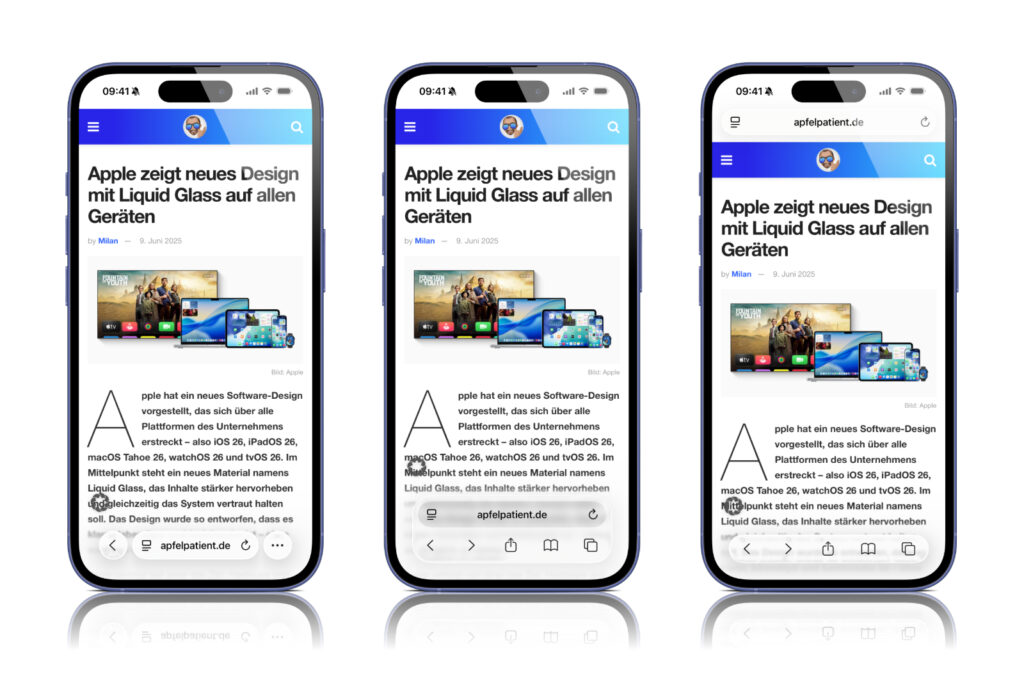
Image: Apfelpatient (from left to right: Compact, Bottom, Top)

The back arrow adjusts dynamically and also displays a forward arrow when needed. Functions like translate and read mode are still accessible via the small icon next to the URL. The classic layouts with tabs at the top or bottom are also still available – but now also in Liquid Glass style and slightly slimmer. Both bars no longer take up the entire screen width.

Tabs and groups: More overview, less typing

Tab management has also been redesigned. The button for opening a new tab is still on the left. In the middle of the tab overview, you'll now find a bar that shows how many tabs are open in the current tab group. You can now switch between tab groups by simply swiping from left to right. At the top of the display, you'll find a dropdown menu that allows you to switch between profiles. As usual, you'll find further tab management options behind the icon with the three dots. When you're finished organizing your tabs, a small blue checkmark indicates completion.

Web apps: Home screen behavior changes

In iOS 26, websites you add to the Home screen will automatically open as web apps—even if they aren't technically optimized for that. This is new. If you'd rather they continue to open in the Safari browser, you can disable the new "Open as Web App" option when adding them.

Data protection: Fingerprinting protection expanded

Previously, Apple's fingerprinting protection was only active in private browsing. In iOS 26, it applies by default to all Safari sessions. This is intended to prevent websites from tracking your usage across different pages. Safari also blocks known fingerprinting scripts. These scripts are prevented from using web APIs that read device data such as screen size or system settings. Persistent cookies and tracking parameters in URLs are also restricted.

Technology: HDR images, SVGs and WebGPU

Safari in iOS 26 supports HDR images with an expanded color space and greater dynamic range. On iPhones with XDR displays, P3 HDR images are now displayed correctly and with greater detail. SVG files are now fully supported. This applies to icons in tabs, menus, web apps, and on the home screen. Compared to PNGs, SVGs have the advantage of lossless scaling. WebGPU introduces a new interface that is particularly interesting for developers. It is based on Metal and is more efficient than WebGL. WebGPU ensures better graphics performance for web apps, games, CAD applications, and image editing sites – but only on devices from iPhone 15 Pro onwards. The improved hardware connection is intended to reduce power consumption and increase performance without placing a heavy load on the CPU.

Digital IDs: Wallet integration for the web

Safari in iOS 26 supports the W3C Digital Credentials API. This allows websites to request identity documents such as a driver's license from Apple Wallet, for example, for age verification (not available in all regions). The "Verify on the Web with Wallet" feature uses Face ID or Touch ID for secure authentication. This allows you to share your date of birth, for example, without sharing unnecessary personal information. Platforms such as Uber Eats, Turo, Chime, and US Bank already support this feature.

Feedback function: Report errors more easily

If you come across a website that's malfunctioning, you can report it directly to Apple starting with iOS 26. The Safari menu under "Page" now offers a new option called "Report a Problem with Website." Apple is using this to specifically improve the browser.

  • Apple will introduce over 14 products in fall 2025

Availability of iOS 26

iOS 26 is currently available as a developer beta. The public beta is expected in July. The final release is planned for September, as usual—to coincide with the launch of the new iPhones. The best products for you: Our Amazon Storefront offers a wide selection of accessories, including those for HomeKit. (Image: Shutterstock / miss.cabul)

  • Apple Wallet in iOS 26: All new features at a glance
  • ChatGPT with Apple Intelligence: Easy setup on the iPhone
  • iOS 26: Five new lock screen features at a glance
  • iOS 26 design change: Reduce transparency easily
  • iOS 26: Create your own ringtones – without GarageBand
  • iOS 26 brings new screenshot features to the iPhone
  • iOS 26 expands the functionality of the HomePod
  • iOS 26: All Apple Music innovations at a glance
  • iOS 26: Apple Intelligence brings these innovations
Was this article helpful?
YesNo
Tags: Apple ServicesiOSiOS 26iPadOSiPadOS 26Safari
SendShareSend
Share

Our Amazon Storefront

A handpicked selection of products for iPhone, Mac and more – sorted by topic and updated regularly.

Shop Now

This post contains affiliate links (including Amazon). We earn a small commission on qualifying purchases – at no extra cost to you. Learn more on our Partner Program page.

Previous Post

Use Apple Maps offline – 5 easy steps

Next Post

iOS 26 makes iPhones smarter in handling calls

Milan Jovicic

Milan Jovicic

Milan founded Apfelpatient in 2016 and has been responsible for all editorial content since 2018 – news, rumors, how-to guides and product reviews. Here, Apple devices aren't review units kept for two weeks, they're everyday tools: from iPhone to MacBook Pro, MacBook Air and iMac all the way to Apple Vision Pro, at least one device from every product category is in daily use, many of them replaced every year. Every menu path in a guide is checked on the device before it goes live.

Related posts

iPhone 18e: All the rumors at a glance

by Milan Jovicic
November 9, 2026 - 17:03 CET
Symbolic image for the iPhone 18e rumors: two entry-level iPhones stacked flat, the pink back with a single camera on top and a black housing with a glowing display below

iPhone 18e: Spring 2027, A20 chip, 6.3-inch display, larger battery, and Dynamic Island for the first time. All the rumors about the display, camera, and price.

Read moreDetails

Apfelpatient Weekly #31: Ternus Presents His First Results

by Milan Jovicic
November 8, 2026 - 4:18 PM CET
Cover image of the Apfelpatient Weekly showing illustrated stacked cards above the wordmark on a blue-to-cyan gradient

Record quarter under Ternus, iPhone Duo shortages, spyware warning in the Bundestag, and a Health app without German.

Read moreDetails

MacBook Neo 2: All the rumors at a glance

by Milan Jovicic
November 7, 2026 - 3:02 PM CET
MacBook Neo 2: the current MacBook Neo in Citrus seen from behind, opened on a grey table in front of a light wall

MacBook Neo 2: All the rumors about the A19 Pro, 12 GB RAM, colors, price and market launch – and why the touchscreen is off the table.

Read moreDetails

iPhone 18: All models, prices and release dates at a glance

by Milan Jovicic
November 7, 2026 - 13:17 CET
Five iPhone models side by side, one facing forward with visible Dynamic Island – the iPhone 18 generation launches in two waves

iPhone 18: Pro, Pro Max and Duo are available in stores, the base model will follow in spring 2027. All prices, dates and specifications of the series.

Read moreDetails

MacBook Pro vs. Studio Display XDR: OLED vs. Mini-LED

by Milan Jovicic
November 5, 2026 - 18:56 CET
MacBook Pro vs. Studio Display XDR: person using the touchscreen of a MacBook Pro at a desk, with large monitors in the background

MacBook Pro vs. Studio Display XDR: OLED vs. Mini-LED compared. Contrast, brightness, size, prices, and which is right for whom.

Read moreDetails
Load More

Categories

  • Apple Insights
  • Apple Rumors
  • Apple News
  • Apple Tips & Tricks
  • iPhone news, rumors and tips
  • Mac and MacBook News
  • Reviews
Make Apfelpatient a preferred source One click – and you'll see us more often on Google

About APFELPATIENT

APFELPATIENT brings you the latest Apple news, product updates, guides, reviews and tips across the entire Apple ecosystem — from the iPhone to the Mac to the Apple Vision Pro. From the first rumors to confirmed news: researched responsibly.

Follow Apfelpatient

Facebook Instagram YouTube Threads Threads

Company

  • About Apfelpatient
  • Contact
  • Author Profiles

Community

  • Netiquette
  • Push notifications
  • RSS feed

Legal

  • Legal Notice
  • Privacy Policy
  • Terms of Use
  • Cookie settings
  • Affiliate Program

Resources

  • Sitemap

© 2026 Apfelpatient. All rights reserved.

No result
View All Results
  • Home
  • News
  • Rumors
  • Tips & Tricks
  • Reviews
  • Insights

© 2026 Apfelpatient. All rights reserved. Site map

Change language to Deutsch