

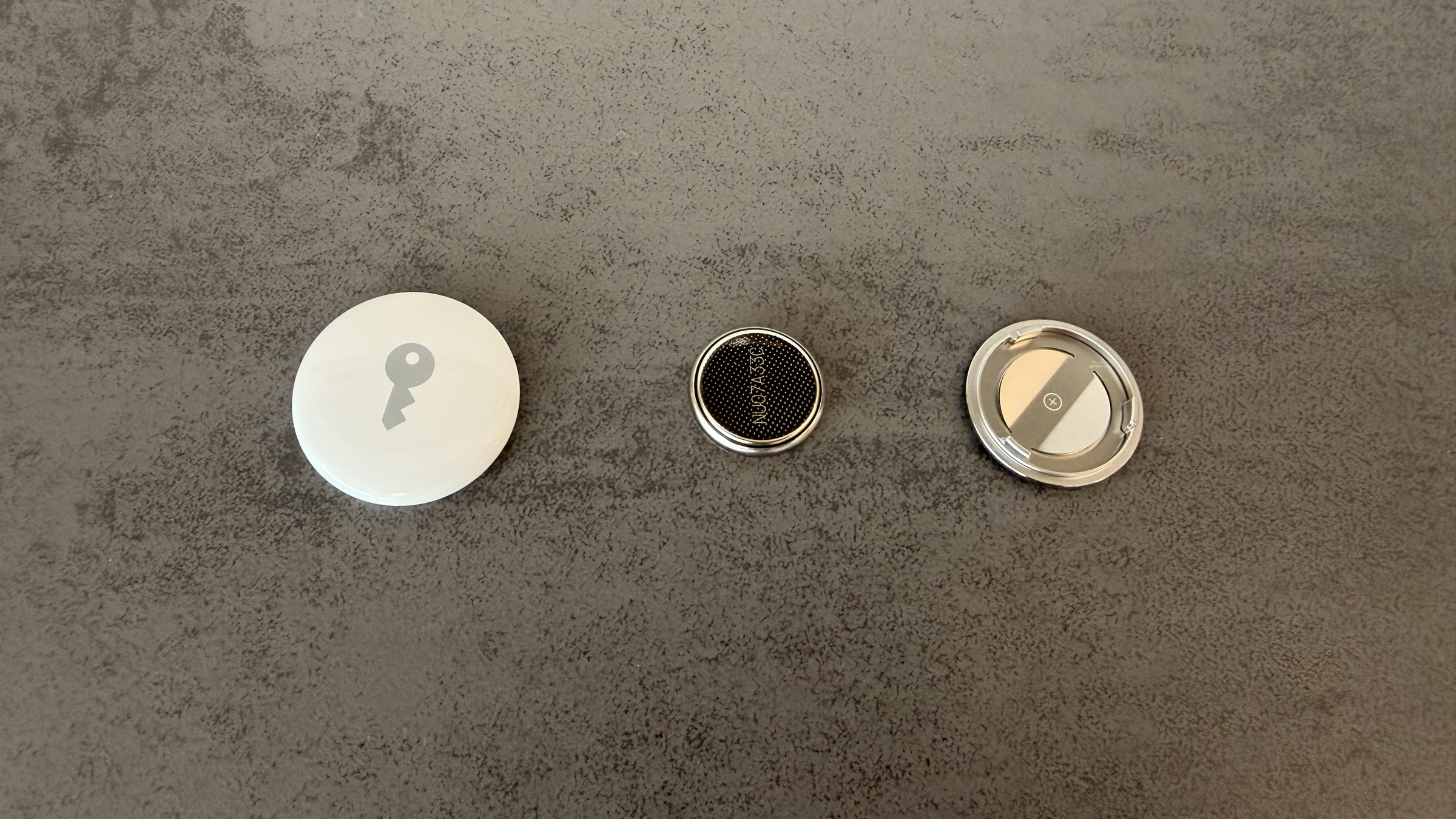
An AirTag runs for about a year on a single coin cell battery, then the iPhone notifies you that it needs replacing. Replacing it takes less than a minute and requires no tools – but the most common problem still occurs afterward: the tracker continues to report a low battery even though a brand new one is installed. The reason for this is explained in Apple's own battery selection guidelines.
The AirTag has no battery and no charging cable. It runs on a standard CR2032 coin cell battery, which can be replaced manually – even in the current generation, as Apple states on the AirTag product page. This is precisely what distinguishes it from trackers with permanently glued-in batteries, which become electronic waste after a few years.
This article explains both: what indicates a weak cell and how the transition occurs. For everything related to the location tracking itself, there is the... Overview of the “Where is?” app.
Key Facts at a Glance
- The AirTag requires a CR2032 lithium coin cell battery with 3 volts, positive side facing up.
- The system does not display a percentage value – only a notification and the message "Battery almost empty" in the "Find My" app.
- Apple explicitly recommends a cell with Bitter coating, but recommends the package marked „Compatible with Apple AirTag”
- If the AirTag doesn't recognize a new battery, it's almost always due to this coating on the contact surfaces.
- After the switch, the AirTag remains linked to the Apple account; no new setup is required.
How to tell if a battery is weak
If the battery level drops significantly, the iPhone automatically sends a notification. You can also check the level at any time: Open the "Find My" app, tap the "Items" tab, and then tap the AirTag. If the battery is almost empty, the message "Battery Low" will appear under the AirTag's name.
There is no percentage value. The system only recognizes two states – inconspicuous or almost empty – and both are based on an estimate. How long the cell will then last depends on how often the tracker plays a tone and how frequently the precision search is performed.
In practical terms, this means: Before a longer trip, it's worth checking the app instead of waiting for a notification – it can arrive in the middle of the journey. If you're using multiple AirTags, it's best to replace all the cells once a year.
Which battery does the AirTag need?
Apple's battery replacement support document specifies only one type: a CR2032 lithium coin cell battery with 3 volts, available in electronics stores and drugstores. Similar-looking cells with a different part number will fit in the compartment, but will not make a reliable connection – the packaging must state CR2032.
You are free to choose your own brand. The crucial point is something else, and this is regularly misrepresented.
Bitter coating: Apple's advice is often misunderstood
Many manufacturers coat button cells with a bitter-tasting substance to make small children spit them out instead of swallowing them. Numerous instruction manuals therefore advise against using such batteries – this was the situation in 2021.
Apple's latest document says the opposite: To prevent accidental ingestion, should A CR2032 battery with a bittering agent coating should be used; Apple cites the Duracell 2032 with this coating as an example. The additional advice is to look for packaging marked "Compatible with Apple AirTag," as some coated cells may not work.
This is not a contradiction, but a trade-off: The coating is non-conductive. If it's on the contact surfaces, no electrical circuit is formed. That's why the packaging is labeled instead of foregoing the protection altogether.
The safety warning applies regardless: Button cell batteries should be kept out of reach of children. Apple also points out that the AirTag, battery cover, and battery itself can pose a choking hazard to small children.
Step by step: replacing the battery
- Hold the AirTag with the stainless steel side facing up, press down on the cover with two fingers and turn counterclockwise until it can no longer be turned.
- Remove the cover and take out the old cell
- Insert the new CR2032 battery with the positive side facing up – a tone confirms that the battery is making contact.
- Place the cover on, aligning the three tabs with the three slots of the AirTag.
- Turn clockwise until it is firmly in place.
If there is no confirmation tone, the cell is inserted incorrectly or is not making contact. In that case, it's worth checking the contact surfaces before dismissing the battery as defective.
If the AirTag does not recognize the new battery
| Symptom | Probable cause | What helps |
|---|---|---|
| No sound when inserting the device | Cell upside down or contact blocked | Check positive side facing up, wipe contact surfaces dry |
| Still "battery almost empty" despite new cell | non-conductive coating on the contact surface | Wipe the cell with a dry cloth, then completely remove the protective film |
| The cover cannot be closed | The tabs are not sitting in the slots | Remove the cover, realign it, rotate it again |
| AirTag is no longer responding at all | Cell empty or without contact | Test another CR2032 from a different pack |
After a successful switch, no further action is required. The AirTag remains linked to the Apple account and reconnects automatically without needing to be paired again.
Properly disposing of old cells
Button cells do not belong in household waste. They can be disposed of free of charge wherever batteries are sold – collection boxes are available in supermarkets, drugstores and electronics stores; municipal recycling centers also accept them.
It's best to place lithium cells with a strip of adhesive tape over the terminals. This prevents short circuits if several cells are stacked on top of each other in the collection box.
Those who need to supply several AirTags can find suitable cells and accessories in our AirTag list on Amazon.
Why battery replacement is the better design
A replaceable button cell battery looks outdated next to trackers that charge via USB-C. However, this results in a significantly longer lifespan for an AirTag: After a year, you can simply replace the cell for a few cents, whereas a permanently glued-in battery limits the lifespan of the entire device after a few charging cycles.
The price for this is one battery per year that needs to be disposed of – a point on which Apple rightly faces criticism. However, compared to a device that is completely replaced after three years, the calculation is still clear.
How long does a cell actually last for you – do you make it to the promised year, or does the tracker give you notice much sooner? Let us know in the comments which brand lasted the longest.
Frequently Asked Questions: Replacing the AirTag Battery
A CR2032 lithium coin cell battery with 3 volts. This applies to both generations. Types with other numbers look similar but are thinner and do not make a reliable connection – the packaging must say CR2032.
Apple estimates a battery life of about one year, based on average use with occasional ringtone playback and precision search. Users who frequently ring the tracker or often use precision search will experience a shorter battery life. Cold temperatures also noticeably reduce battery life.
Almost always due to the bittering agent coating on the new cell. It's non-conductive and sits precisely where contact is supposed to occur. Wipe the cell with a dry cloth and completely remove any protective film, then reinsert it.
Apple recommends a coated AirTag because it prevents small children from swallowing it, and advises choosing packs labeled "Compatible with Apple AirTag." Instructions that generally advise against using the bittering agent reflect an older version of the information.
No. It remains linked to the Apple account and will reconnect automatically. Re-pairing is only necessary if the AirTag was previously reset.
There is no percentage value. In the "Find My" app, under the "Objects" tab, a notification only appears for each AirTag when the cell is almost empty. Until then, the display remains inconspicuous.
Place the batteries in a battery collection box, which can be found in supermarkets, drugstores, and electronics stores, or take them to a recycling center. Disposal is free of charge. Beforehand, cover the terminals with tape to prevent short circuits in the collection box.





