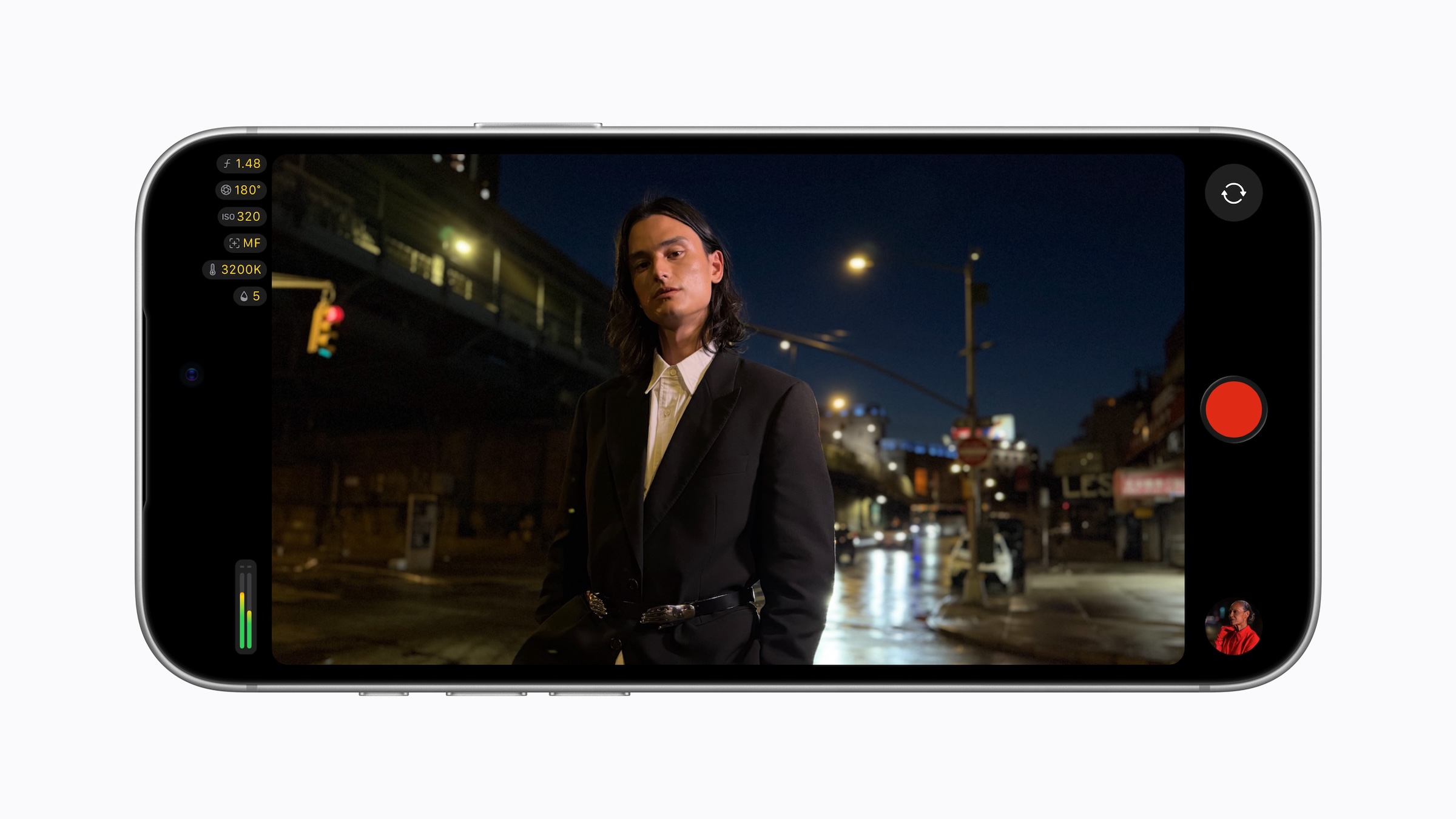
Apple's video app for professionals looks different and offers more features after the update. With the iPhone 18 Pro, the aperture can now be controlled directly in Final Cut Camera, and iOS 27 adds tools for setups with external equipment.
Final Cut Camera is Apple's free app for manually controlled video recording. A year ago, version 2.0 introduced ProRes RAW, Genlock, and Apple Log 2 for the iPhone 17 Pro. Version 2.4 has been available in the App Store since September 29th, as announced by Apple in a Newsroom post.
The focus is on the variable aperture of the main camera in the iPhone 18 Pro and iPhone 18 Pro Max, the first of its kind on an iPhone. This is complemented by a new design and a range of professional tools that require iOS 27.
Key Facts at a Glance
- Final Cut Camera 2.4 is a free update with a completely redesigned interface.
- On the iPhone 18 Pro, the aperture can be set manually, or alternatively via aperture or shutter priority mode.
- Cinema mode effects now also work with regular videos, including ProRes and Apple Log.
- iOS 27 introduces RGB parade and histogram, a clean SDI signal via converter, and a genlock offset.
The aperture becomes the third adjustable parameter
Previously, iPhone video allowed you to control the shutter angle and ISO, but the aperture was fixed. With the iPhone 18 Pro's Fusion main camera, that changes. Final Cut Camera now offers three options: set the aperture manually, use aperture priority mode, or select shutter priority mode.
In aperture priority mode, you set the shutter speed, and the app adjusts the aperture. In shutter priority mode, it's the other way around: the aperture remains fixed, and the exposure is adjusted via the shutter speed. If you want to manually set the aperture to control the depth of field, use shutter priority mode. Independent of Final Cut Camera, the variable aperture can also be used in the camera app.
In addition, there are cinematic effects for regular recordings. This also applies to footage in ProRes and Apple Log. Focus points and depth of field can then be adjusted in Final Cut Pro.
New interface, better control
The design is completely new. Shutter angle, ISO, and white balance are now more easily accessible. On the iPhone 18 Pro, the camera app now also offers white balance, shutter speed, and histogram as Pro controls; on older models, Final Cut Camera remains the only way to access these features. In addition, there are customizable overlays: false color and clipping indicators for assessing exposure, as well as a revamped focus peaking feature with adjustable sensitivity.
A new recording light indicates when the camera is recording. A two-finger tap removes the controls from the viewfinder, leaving the image clear.
What iOS 27 adds
Three features require iOS 27. The RGB Parade displays red, green, and blue separately and helps in checking color balance and exposure, supplemented by a histogram. Such video scopes are otherwise known from external monitors or video editing software.
Clean SDI Out outputs a signal without on-screen controls via an HDMI-to-SDI converter. This is intended for broadcast-quality streaming, where SDI is the standard connection. Finally, Genlock Offset compensates for image artifacts when filming displays, as well as latency differences between an iPhone and other cameras synchronized via genlock.
| Feature | Requirements according to Apple |
|---|---|
| New design, overlays, recording light | Final Cut Camera 2.4 |
| Manual aperture, aperture and shutter priority | iPhone 18 Pro |
| Cinema mode effects for regular videos | mentioned in connection with the iPhone 18 Pro |
| RGB parade and histogram | iOS 27 |
| Clean SDI Out | iOS 27, HDMI-to-SDI converter |
| Genlock offset | iOS 27, Genlock architecture |
Genlock itself is not new. Apple introduced support for it with the iPhone 17 Pro and Final Cut Camera 2.0; it requires compatible additional hardware. The offset is the fine-tuning mechanism for this.
The app becomes a monitor
I consider the iOS 27 features to be the bigger step forward, even though the aperture is the headline-grabbing addition. The aperture only affects the new Pro models. RGB Parade, clean SDI signal, and Genlock Offset, on the other hand, are geared towards setups where an iPhone is positioned alongside other cameras and monitored externally. Final Cut Camera is thus moving further away from being solely a recording tool and towards becoming a building block in multi-camera productions.
For amateur filmmakers, however, little changes. Those who shoot without converters and genlock hardware will primarily benefit from the new interface and – with an iPhone 18 Pro – from the aperture. Those who frequently record in ProRes should set up the Pro Video storage for ProRes on the new Pro model before longer recording sessions.
Apple's video tools are merging
The update aligns with a strategy Apple has pursued since the app's launch: the camera functions of the Pro iPhones are integrated into Final Cut Camera, while editing takes place in Final Cut Pro. With the addition of cinematic effects for ProRes and Log footage, both platforms now integrate more closely.
Do you use Final Cut Camera or is the camera app sufficient for you – and would aperture control be a reason for you to switch to the iPhone 18 Pro? Tell us in the comments what you film with.