This article may contain affiliate links. Learn more on our Partner Program page.
For the first time, an iPhone camera can actually open and close its aperture. In everyday use, the iPhone 18 Pro does this automatically, but manual intervention determines how much of the image is in focus. This guide shows which aperture setting is suitable for which purpose and where to find the corresponding setting.
Up until the iPhone 17 Pro, the main camera operated with a fixed aperture of ƒ/1.78. The iPhone 18 Pro and iPhone 18 Pro Max feature a 48MP Fusion main camera that switches between four aperture levels: ƒ/1.48, ƒ/1.8, ƒ/2.8, and ƒ/4.0. This is stated in the iPhone 18 Pro specifications. By default, the iPhone selects the aperture automatically, but it can also be set manually.
The aperture control is one of the new Pro controls in the camera app. It's located in the control panel behind the icon with the six dots and can be placed in the top bar of the camera app, just like any other element. All steps were taken using an iPhone 18 Pro Max with German system language.
Key Facts at a Glance
- The main camera of the iPhone 18 Pro and Pro Max offers four aperture levels from ƒ/1.48 to ƒ/4.0.
- A small number means a large aperture: more light, less depth of field. A large number means the opposite.
- The aperture can be adjusted via the six-dot symbol and "aperture", and to return to automatic mode, select "Automatic".
- If a fixed aperture is set, the top bar of the camera app displays the aperture icon along with the selected value.
- The variable aperture only applies to the main camera, i.e., for 1x and 2x.
What the four aperture settings do
The aperture is the opening in the lens. The smaller the f-number, the wider the aperture is open: more light falls on the sensor, and the area in focus in the image becomes narrower. As the f-number increases, the opening closes, less light enters the image, but more of the scene is in focus.
In the press release for the iPhone 18 Pro, Apple lists a typical use case for three of the four power levels.
| Aperture | Opening | Depth of field | Use mentioned by Apple |
|---|---|---|---|
| ƒ/1.48 | largest | the least | Low light photography |
| ƒ/1.8 | large | low | Portraits, best balance of light and depth of field |
| ƒ/2.8 | moderate | moderate | – |
| ƒ/4.0 | smallest | largest | Group photos, more people in focus |
Manually adjust the aperture
- Open the camera app and select "Photo" mode. The aperture can also be adjusted in video mode.
- Use the main camera, i.e., set the zoom to 1x or 2x.
- Tap the symbol with the six dots in the bottom right corner.
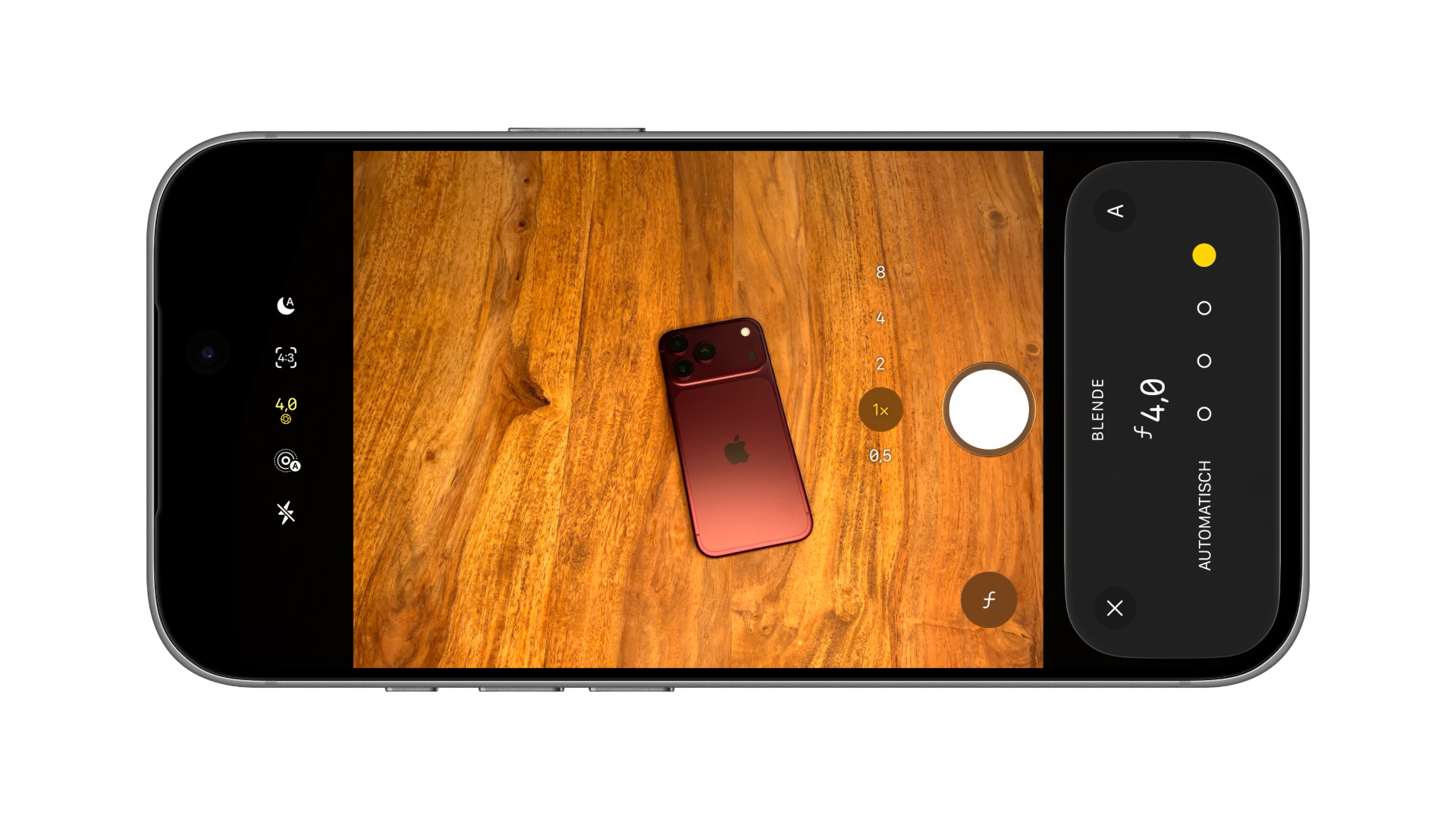
- Tap on "Aperture". The aperture selection will appear at the bottom with "Automatic" and four circles.
- Tap one of the four circles. From left to right, they represent ƒ/1.48, ƒ/1.8, ƒ/2.8 and ƒ/4.0. The selected value appears large above the circles.
- Use the arrow in the top left corner to return to the control panel or close the control panel.
The circles themselves do not display any numbers. The large display above them reveals which level is active – if you're unsure, tap through all four.
Keep an eye on the selected aperture
If a fixed aperture is selected, the camera app displays the aperture icon with the set value in the top bar. This makes it clear even after closing the control panel that automatic mode is not active – for example, if an aperture of f/4.0 selected for a group photo is still active when it gets dark outside.
Users who frequently change the aperture can permanently add the "Aperture" element to the top bar. This allows for a single tap on the setting, eliminating the need to navigate through the control panel. In editing mode, this can be accessed via "Add photo control," and in video mode via "Add video control".
Back to automatic
In the aperture selection, tapping "Auto" restores automatic mode. When automatic mode is active, "Auto" and the button with the "A" in the upper right corner are highlighted in yellow.
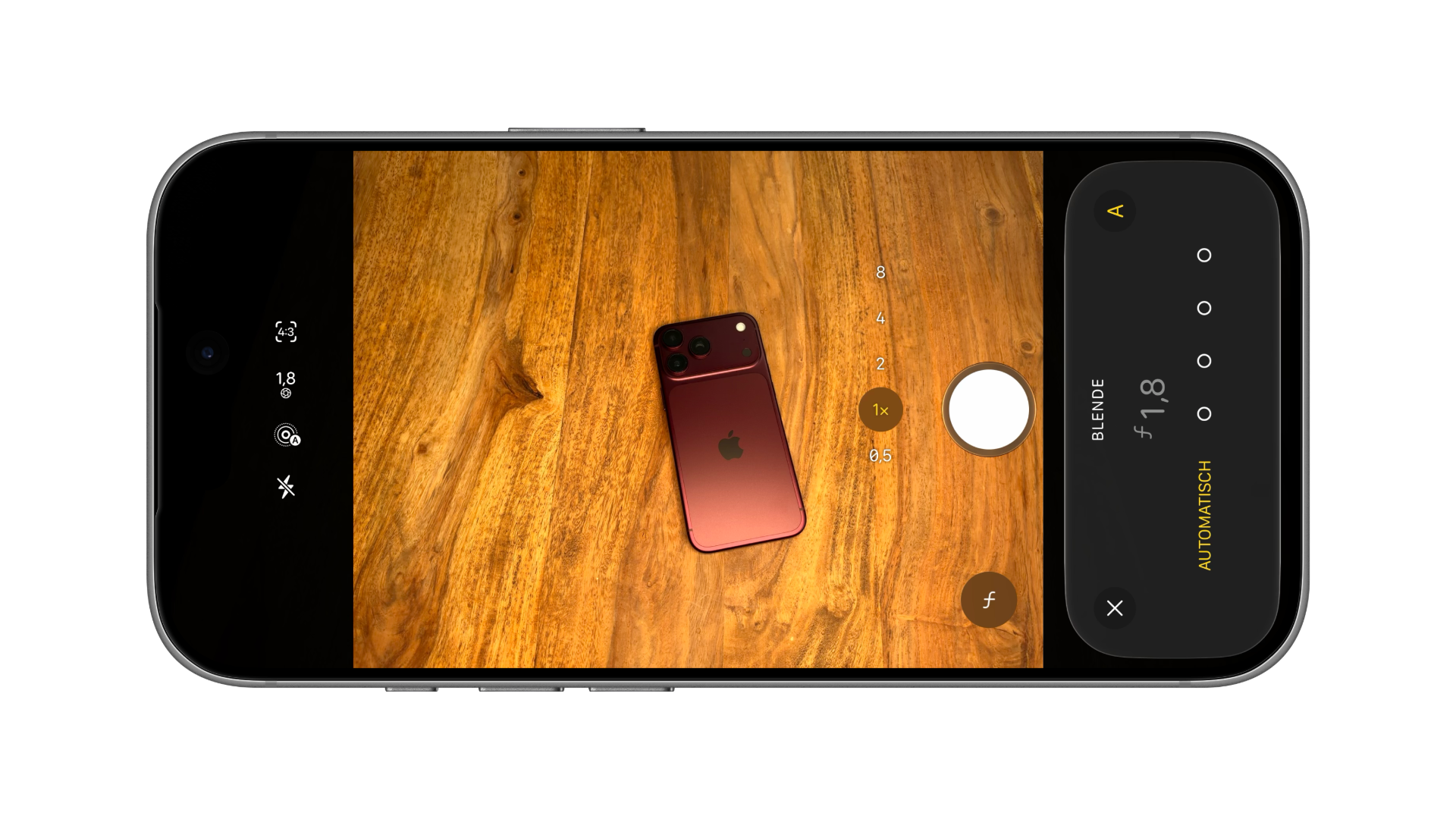
In automatic mode, the iPhone adjusts the aperture to the light and desired depth of field. The large display shows the value the iPhone has currently selected – in our test, f/1.8 under indoor lighting conditions. According to Apple, in dark environments, the iPhone automatically opens the aperture to gather more light for Night mode.
When it's worth adjusting the aperture
For most shots, the automatic settings deliver good results, and in low light, it's best to let them do the work anyway. Manual aperture becomes interesting in two situations: For group photos and landscapes, f/4.0 ensures that more of the image is in focus. For portraits or close-ups, f/1.48 or f/1.8 isolates the subject more strongly from the background.
Expectations should remain realistic. A smartphone's sensor is small, so even the largest aperture produces less background blur than a system camera. Those who want a heavily blurred background should still use portrait mode – the variable aperture complements it, it doesn't replace it.
Variable aperture on the iPhone 18 Pro – the most important points at a glance
The main camera of the iPhone 18 Pro and Pro Max operates with four aperture settings, from ƒ/1.48 to ƒ/4.0. It can be adjusted via the six-dot icon and "Aperture," and returned to "Auto" via "Auto." A fixed aperture is displayed in the top bar with its icon and value, and users who frequently work manually can permanently assign this setting there.
Do you let the aperture be controlled automatically, or have you already tried out how f/4.0 performs in group photos? Tell us in the comments which subjects you manually adjust.
Frequently Asked Questions: Variable Aperture on the iPhone 18 Pro
The main camera offers four levels: ƒ/1.48, ƒ/1.8, ƒ/2.8 and ƒ/4.0.
In the camera app, tap the icon with the six dots, then tap "Aperture". Select one of the four circles, from left to right ƒ/1.48 to ƒ/4.0. The selected value will appear prominently above it.
The top bar of the camera app then displays the aperture icon with the selected value. To return to automatic mode, select "Auto" in the aperture settings.
Apple cites f/1.8 as the best balance of light and depth of field for portraits. For a heavily blurred background, Portrait mode remains the better choice.
No. The main camera of the iPhone 17 Pro has a fixed aperture of ƒ/1.78. The variable aperture is only available on the iPhone 18 Pro and iPhone 18 Pro Max.
Only the main camera, i.e., at 1x and 2x magnification. The ultra-wide-angle and telephoto cameras still have a fixed aperture.
Yes, aperture control is also available in video mode.