

apple patient
  • Home
  • News
  • Rumors
  • Tips & Tricks
  • Reviews
  • Insights
No Result
View All Result
  • iPhone 18
  • iPhone 18 Pro
  • iPhone Duo
  • Apple Watch Series 12
  • Apple Watch Ultra 4
  • AirPods 5
  • iOS 27
  • iPadOS 27
  • macOS
  • MacBook Neo
  • iPhone 17e
  • AirTags
  • iOS 26
  • iPhone 17
  • MacBook Pro
  • iPadOS
  • iMac
  • Mac mini
  • HomePod
  • Apple TV
  • iPad Pro
  • iPhone Air
  • Apple Vision Pro
  • iPhone 16
  • AirPods 4
  • Apple Watch Ultra
  • HomePod Mini
  • MacBook Air
  • iPad
  • AirPods Max
  • AirPods Pro 3
  • Apple Watch Series 3
  • Mac Studio
  • Studio Display
  • iPad Air
  • iPad mini
  • watchOS 27
  • Apple CarPlay
  • Apple Pay
  • watchOS 26
  • Home
  • News
  • Rumors
  • Tips & Tricks
  • Reviews
  • Insights
No Result
View All Result
apple patient
No Result
View All Result
  • iPhone 18
  • iPhone 18 Pro
  • iPhone Duo
  • Apple Watch Series 12
  • Apple Watch Ultra 4
  • AirPods 5
  • iOS 27
  • iPadOS 27
  • macOS
  • MacBook Neo
  • iPhone 17e
  • AirTags
  • iOS 26
  • iPhone 17
  • MacBook Pro
  • iPadOS
  • iMac
  • Mac mini
  • HomePod
  • Apple TV
  • iPad Pro
  • iPhone Air
  • Apple Vision Pro
  • iPhone 16
  • AirPods 4
  • Apple Watch Ultra
  • HomePod Mini
  • MacBook Air
  • iPad
  • AirPods Max
  • AirPods Pro 3
  • Apple Watch Series 3
  • Mac Studio
  • Studio Display
  • iPad Air
  • iPad mini
  • watchOS 27
  • Apple CarPlay
  • Apple Pay
  • watchOS 26

Apple Sports now available in Germany: All features

Milan Jovicic by Milan Jovicic
September 16, 2025 - 3:27 p.m. CEST
in Apple News
0
Apple Sports Germany

Image: Apple

WhatsAppFacebookEmail
Threads

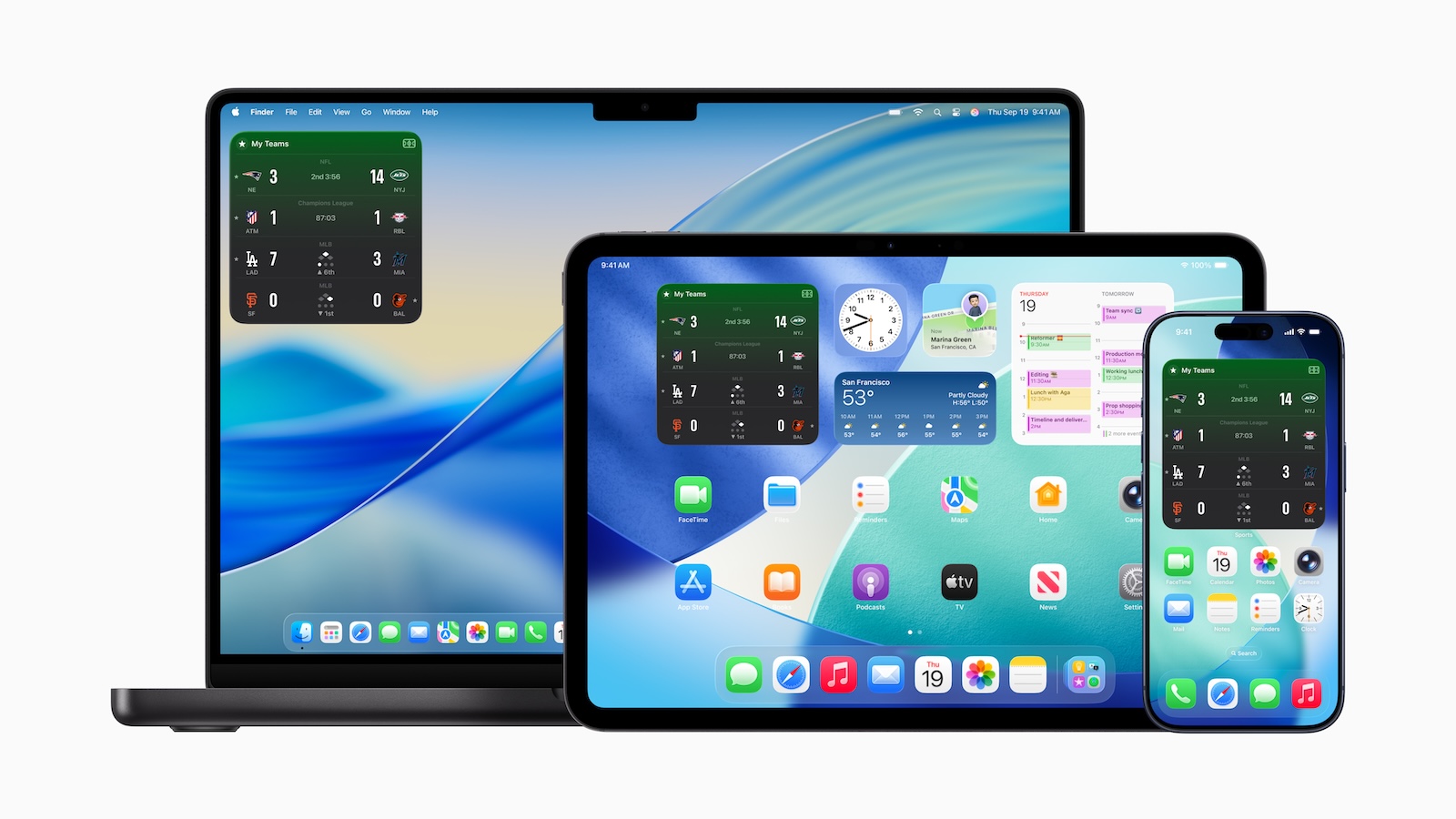
Apple Sports is expanding its offerings just in time for the new soccer season. The app now offers widgets for iPhone, iPad, and Mac and is now available in eight additional countries. This makes it easier to follow results and fixtures in real time and keep track of the most important teams and leagues.

Apple Sports was developed to give sports fans a quick and easy way to stay up-to-date with their favorite teams and leagues. The app is free, easy to use, and features a clean, Apple-designed interface. With the new widgets and the expansion into Europe, Apple is consistently expanding its offering.

Widgets on iPhone, iPad and Mac

The most important new feature is the widgets, which are now available for iPhone, iPad, and Mac. They can be customized and allow you to display results and fixtures directly on your home screen. Two views are available:

  • “My Teams” shows the results and upcoming matches of your favorite clubs.
  • “League” provides an overview of all teams and matches in a league.

There's no limit to the number of widgets, allowing you to follow multiple leagues and teams simultaneously. Widgets are cross-platform, ensuring sports fans always have up-to-date information, even on their Mac or iPad. Live activities have also been improved. These deliver real-time updates directly to the iPhone lock screen and Apple Watch. A new feature is the ability to schedule live activities in advance for upcoming games.

Apple Sports in eight new countries

Apple Sports is now available for free in eight additional European countries: Austria, France, Germany, Iceland, Ireland, Italy, Portugal, and Spain. This significantly expands the app's international reach. At the same time, league coverage is also being expanded. New additions include European competitions such as Bundesliga 2, Ligue 2, Segunda División, Serie B, and Primeira Liga.

Functions and usage

The app focuses on speed and simplicity. Fans can customize their scoreboards, toggle between scores and upcoming matches, and access game information such as lineups. The app also offers direct access to the Apple TV app to watch live games on the MLS Season Pass or Friday Night Baseball. A subscription is required for this content. Apple Sports automatically syncs with favorites saved in "My Sports," ensuring consistent use across devices. The app is available on the App Store in several countries, including:

  • Austria
  • Canada
  • France
  • Germany
  • Iceland
  • Ireland
  • Italy
  • Mexico
  • Portugal
  • Spain
  • UK
  • USA

It's free and can be used on all iPhone models running iOS 17.2 or later. To take advantage of the new features, you should always have the latest versions of iOS, iPadOS, macOS, and the Apple Sports app installed. A compatible version of the app is required to use widgets on the iPad.

Apple Sports is significantly expanding its offering

Apple Sports is significantly expanding its feature set, making it easier for fans to follow their favorite teams and leagues. With widgets for iPhone, iPad, and Mac, improved live activities, and expansion into eight new countries, the app becomes the central hub for sports updates. Combined with the new European football competitions, this creates an offering that is both comprehensive and user-friendly. (Image: Apple)

  • iOS 26 makes Adaptive Power the norm on the iPhone 17 series
  • iOS 26 Tip: Unlock iPhone with Apple Vision Pro
  • iOS 26: The most important tips for setup and use
  • iOS 26: Impact on battery life after the update
  • iOS 26: Use spatial scenes directly in the Photos app
  • iOS 26 Update: Markdown Import and Export in Notes Explained
  • iOS 26: Easily change backgrounds in iMessage
  • iOS 26: Trigger iPhone camera with AirPods – here's how
  • How to enable transparent iPhone app icons with iOS 26
  • iOS 26: Apple Music finally gets folders for playlists
  • iOS 26: Capture reminders faster and easier
  • Apple Music in iOS 26: Music Pins make access easier
  • Apple ends iCloud support for iOS 10 and macOS Sierra

Make Apfelpatient a preferred source One click – and you'll see us more often on Google
Was this article helpful?
YesNo
Tags: Apple ServicesApple Sports
SendShareSend
Share

Our Amazon Storefront

A handpicked selection of products for iPhone, Mac and more – sorted by topic and updated regularly.

Shop Now

This post contains affiliate links (including Amazon). We earn a small commission on qualifying purchases – at no extra cost to you. Learn more on our Partner Program page.

Previous Post

iOS 26 makes Adaptive Power the norm on the iPhone 17 series

Next Post

Apple Watch Series 11, Ultra 3 & SE 3 Reviews at a Glance

Milan Jovicic

Milan Jovicic

Milan founded Apfelpatient in 2016 and has been responsible for all editorial content since 2018 — news, rumors, guides, and product reviews. Apple devices here are not test units on loan for two weeks but everyday tools: from the iPhone through MacBook Pro, MacBook Air, and iMac to the Apple Vision Pro, at least one device from nearly every product category is in daily use, many of them replaced annually. Every menu path in a guide is verified on the device before it is published.

Related posts

watchOS 27.2: Code reveals new screenshot preview

by Milan Jovicic
September 24, 2026 - 8:36 p.m. CEST
Apple Watch Ultra with an orange band showing the app view, the device getting the new screenshot preview in watchOS 27.2

watchOS 27.2 includes a new screenshot interface for the Apple Watch: preview, share, and delete, just like on the iPhone. It's currently inactive.

Read moreDetails

Apple TV: Peanuts classics free again for Christmas

by Milan Jovicic
September 24, 2026 - 6:43 p.m. CEST
Charlie Brown holding a small Christmas tree under a starry sky in the snow, a scene from A Charlie Brown Christmas, free again on Apple TV

Three classic Peanuts cartoons are back on Apple TV for the holidays, no subscription required. Plus, there are new specials featuring Snoopy and the Fraggle Rocks.

Read moreDetails

The Wanted Man: Hugh Laurie on Apple TV from January

by Milan Jovicic
September 24, 2026 - 6:19 p.m. CEST
Hugh Laurie as crime boss Felix Carmichael in an evening scene from The Wanted Man on Apple TV

The Wanted Man premieres on January 6, 2027 on Apple TV. Hugh Laurie plays a crime boss who wants to escape – the finale is in February.

Read moreDetails

Apple and Qualcomm extend patent license from 2027

by Milan Jovicic
September 24, 2026 - 6:04 p.m. CEST
Back of an iPhone 18 Pro Max in a burgundy case on a grey surface, covered by the renewed Apple Qualcomm patent license

Apple and Qualcomm are extending their patent license from April 2027. Why this has nothing to do with the modem change and affects Germany.

Read moreDetails

iPhone 18 Pro: Update to prevent Face ID restarts is coming

by Milan Jovicic
September 24, 2026 - 1:13 p.m. CEST
iPhone showing the General settings with Software Update, where the fix for the Face ID reboots on iPhone 18 Pro will arrive

Apple has confirmed an update to fix the restarts after failed Face ID recognition on the iPhone 18 Pro and Pro Max. An exchange is not worthwhile.

Read moreDetails
Load More

Categories

  • Apple Insights
  • Apple Rumors
  • Apple News
  • Apple Tips & Tricks
  • iPhone news, rumors and tips
  • Mac and MacBook News
  • Reviews

About APFELPATIENT

APFELPATIENT brings you the latest Apple news, product updates, guides, reviews and tips across the entire Apple ecosystem — from the iPhone to the Mac to the Apple Vision Pro. From the first rumors to confirmed news: researched responsibly.

Follow Apfelpatient

Facebook Instagram YouTube Threads Threads

Company

  • About Apfelpatient
  • Contact
  • Author Profiles

Community

  • Netiquette
  • Push Notifications
  • RSS feed

Legal

  • Legal Notice
  • Privacy Policy
  • Terms of Use
  • Cookie Settings
  • Affiliate Program

Resources

  • Sitemap

© 2026 Apfelpatient. All rights reserved.

No Result
View All Result
  • Home
  • News
  • Rumors
  • Tips & Tricks
  • Reviews
  • Insights

© 2026 Apfelpatient. All rights reserved. Page Directory

Change language to Deutsch



