

Apfelpatient
  • Home
  • News
  • Rumors
  • Tips & Tricks
  • Reviews
  • Insights
No result
View All Results
  • iPhone 18
  • iPhone 18 Pro
  • iPhone Duo
  • Apple Home
  • Siri AI
  • HomePod
  • HomePod mini
  • HomePod mini 2
  • MacBook Pro
  • Apple TV 4K
  • Apple Watch Series 12
  • Apple Watch Ultra 4
  • AirPods 5
  • iOS 27
  • iPadOS 27
  • macOS
  • MacBook Neo
  • iPhone 17e
  • AirTags
  • iOS 26
  • iPhone 17
  • iPadOS
  • iMac
  • Mac mini
  • Apple TV
  • iPad Pro
  • iPhone Air
  • Apple Vision Pro
  • iPhone 16
  • AirPods 4
  • Apple Watch Ultra
  • MacBook Air
  • iPad
  • AirPods Max
  • AirPods Pro 3
  • Mac Studio
  • Studio Display
  • iPad Air
  • iPad mini
  • watchOS 27
  • Apple CarPlay
  • Apple Pay
  • watchOS 26
  • Home
  • News
  • Rumors
  • Tips & Tricks
  • Reviews
  • Insights
No result
View All Results
Apfelpatient
No result
View All Results
  • iPhone 18
  • iPhone 18 Pro
  • iPhone Duo
  • Apple Home
  • Siri AI
  • HomePod
  • HomePod mini
  • HomePod mini 2
  • MacBook Pro
  • Apple TV 4K
  • Apple Watch Series 12
  • Apple Watch Ultra 4
  • AirPods 5
  • iOS 27
  • iPadOS 27
  • macOS
  • MacBook Neo
  • iPhone 17e
  • AirTags
  • iOS 26
  • iPhone 17
  • iPadOS
  • iMac
  • Mac mini
  • Apple TV
  • iPad Pro
  • iPhone Air
  • Apple Vision Pro
  • iPhone 16
  • AirPods 4
  • Apple Watch Ultra
  • MacBook Air
  • iPad
  • AirPods Max
  • AirPods Pro 3
  • Mac Studio
  • Studio Display
  • iPad Air
  • iPad mini
  • watchOS 27
  • Apple CarPlay
  • Apple Pay
  • watchOS 26

Apple shows new design with Liquid Glass on all devices

Milan Jovicic by Milan Jovicic
June 9, 2025 - 19:51 CEST
in Apple News
0
Apple Design iOS 26

Image: Apple

WhatsAppFacebookEmail
Threads

This article may contain affiliate links. Learn more on our Partner Program page.

Make Apfelpatient a preferred source One click – and you'll see us more often on Google

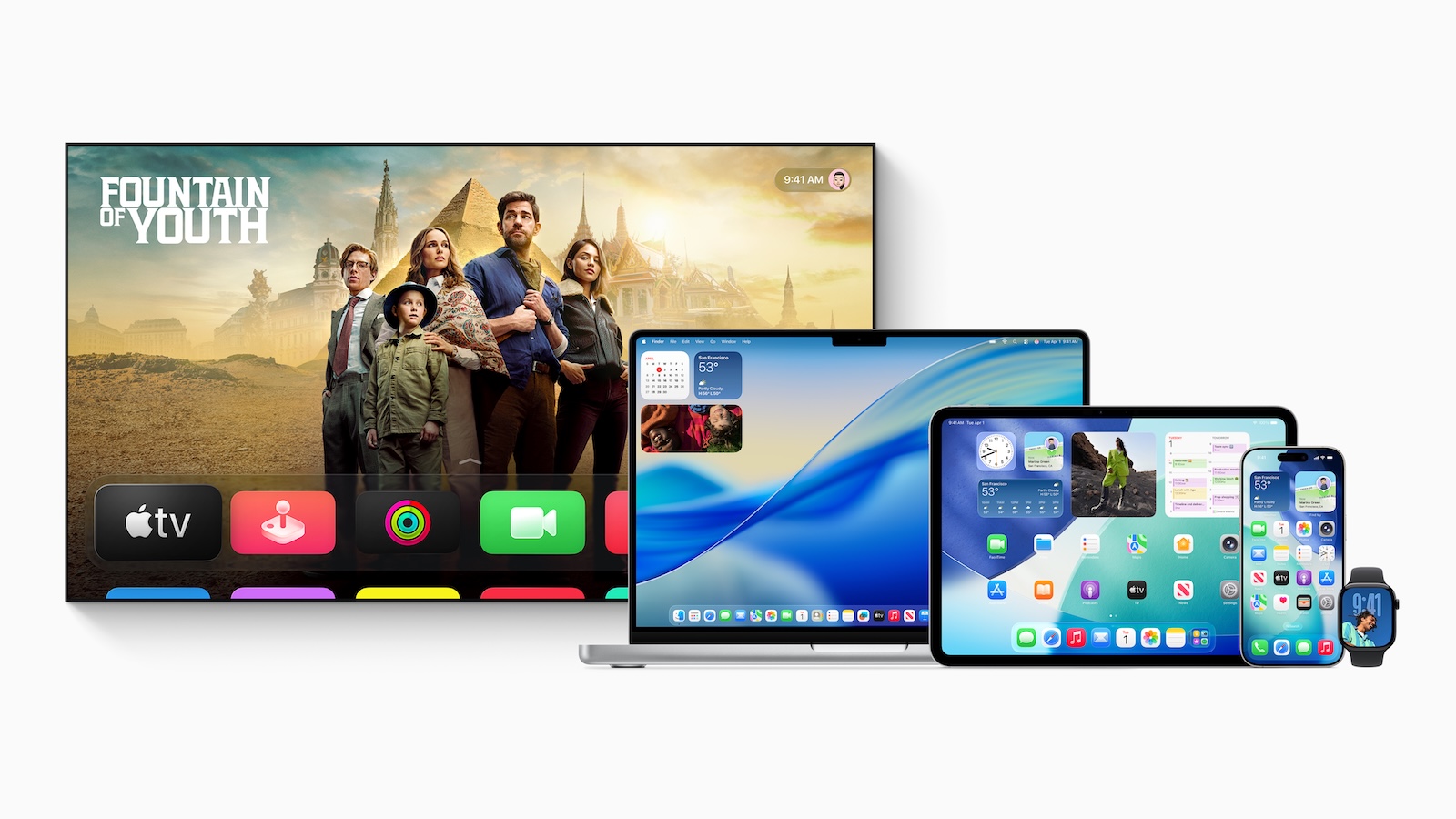
Apple has unveiled a new software design across all of the company's platforms—iOS 26, iPadOS 26, macOS Tahoe 26, watchOS 26, and tvOS 26. At the center of it all is a new material called Liquid Glass, designed to highlight content while keeping the system familiar. The design is designed to be cleaner, more vibrant, and more functional—without being intrusive.

Apple has always pursued the goal of seamlessly connecting hardware and software. Now the company is taking another step to make this integration even clearer. With a universal design approach, Apple is bringing new visual elements, sophisticated animations, and dynamic interfaces to all devices. The user experience remains familiar, but more modern and flexible. Anyone who uses an iPhone, iPad, or Mac daily will notice many changes—especially in the way content is presented and how controls behave.

Liquid Glass: the central design element

At the core of the new design is Liquid Glass – a translucent, digital material that creates visual depth. It reflects and refracts the surroundings, changing depending on content or context, creating the appearance of a blend of real glass and liquid light. Rendered in real time, Liquid Glass reacts to movement, displays reflective highlights, and adapts to bright or dark environments. The material is used in many areas: buttons, toggles, sliders, text fields, media controls, tab bars, sidebars, and even system-wide interfaces like the lock screen, home screen, Control Center, and notifications.
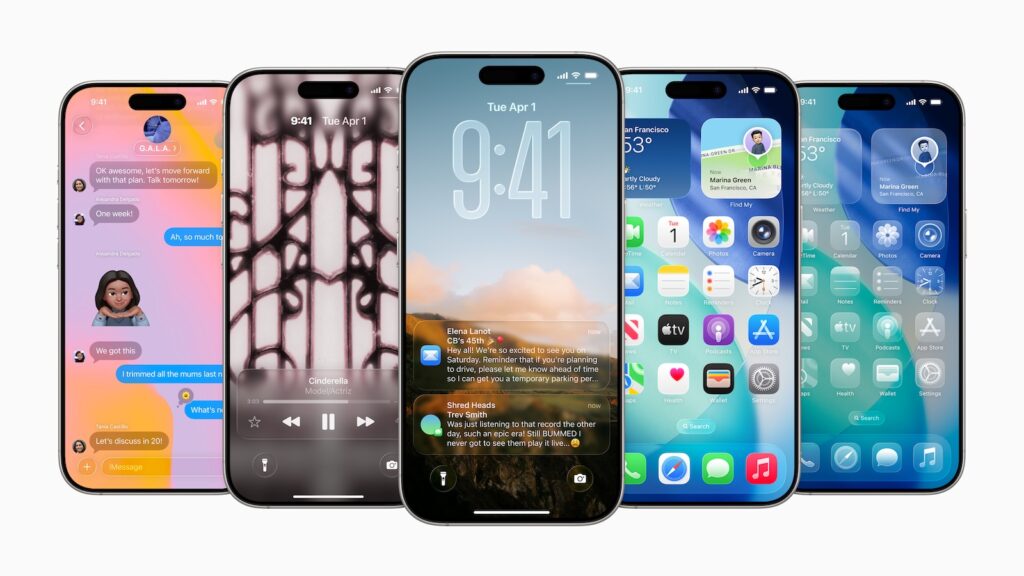
Image: Apple

Cross-platform design

For the first time, the new design is being rolled out across all Apple systems. On iOS 26, tab bars automatically shrink as you scroll, making more space for the content. As soon as you scroll back up, they reappear. This makes navigation more compact yet easier to access. In iPadOS 26 and macOS Tahoe 26, the sidebars have been redesigned, for example in apps like Apple TV, to make the user experience more immersive. On the Apple Watch, clearer controls and reduced interfaces provide a better overview. On Apple TV, menus and content benefit from the new graphical clarity. The consistent visual language is particularly striking – despite the differences between small watch screens and large monitors, the design remains consistent.

System-wide changes

The system UI has also been updated. The clock on the lock screen is now also made of Liquid Glass and automatically adapts to the selected wallpaper. Widgets, app icons, and the dock on the home screen and desktop consist of multiple layers of Liquid Glass and appear light or dark depending on the background. In macOS Tahoe 26, the menu bar has been made completely transparent. This makes the display appear larger and brings content more to the forefront. Additionally, users can customize the desktop with widgets and icons—with new colors and a cleaner look.
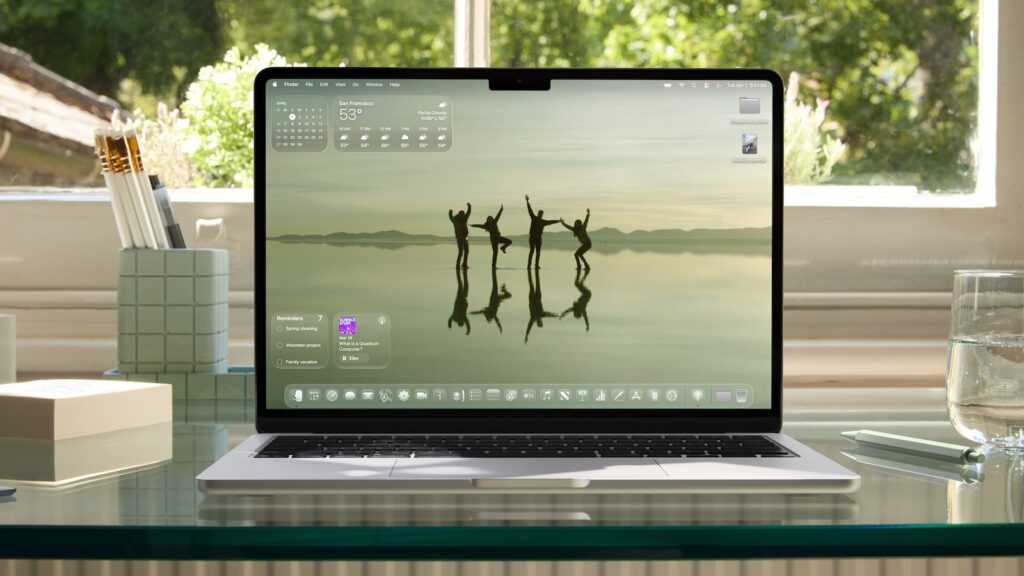
Image: Apple

Revised apps

Many Apple apps have been redesigned as part of the new design: Camera, Photos, Safari, FaceTime, Apple Music, Apple News, and Podcasts feature updated controls, regrouped navigation bars, and customized toolbars. These new UI components are no longer strictly rectangular, but instead adapt to the rounded corners of the hardware. The controls sit as their own functional layer above the app content. They change dynamically depending on which function you need or where you go within the app. This new structure helps you navigate more quickly without overwhelming you with too many options.

Innovations for developers

It's been made easier for developers to adopt the new design. Those working with SwiftUI, UIKit, or AppKit can access updated APIs. Liquid Glass is available right away, as are the new controls and navigation patterns. The goal is to seamlessly integrate third-party apps into the new design – without lengthy conversions. This also benefits users from a more consistent user experience, regardless of which app they're currently using.
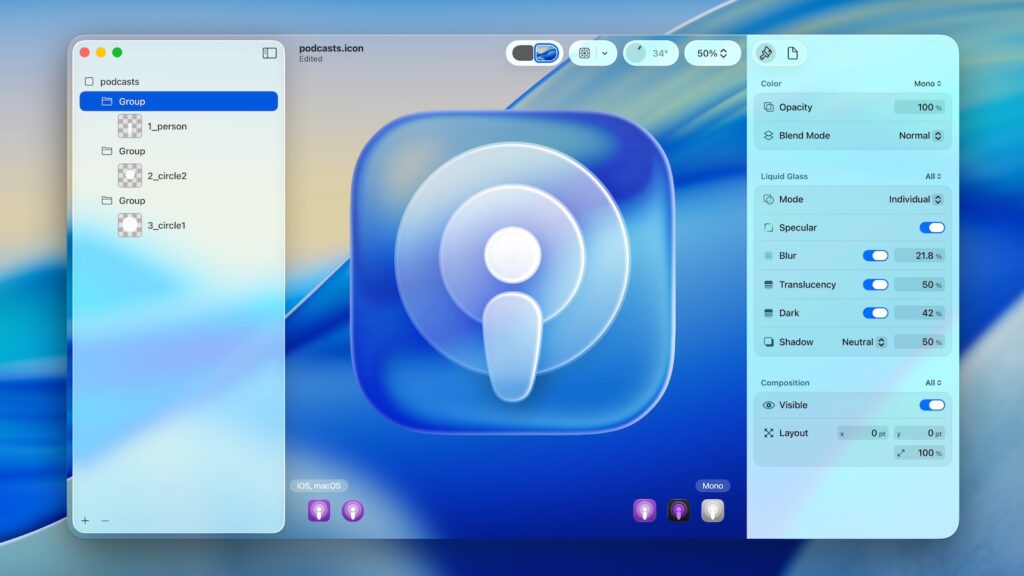
Image: Apple

Apple relies on cautious change

Apple's new software design brings many changes without fundamentally altering the user experience. Liquid Glass is at the center of it, ensuring a more modern, dynamic display across all devices. Apple is thus laying the design foundation for future developments while preserving familiar workflows. It's not a radical overhaul, but rather a systematic refinement at all levels. If you use an Apple device, you'll gradually encounter the new design over the coming months. It brings clarity, consistency, and visual elegance—and that's exactly what Apple has been focusing on for years. (Image: Apple)

  • Apple Intelligence: New AI features in focus
  • AirPods Update: Control Studio Sound and Camera via Stick
  • visionOS 26 at a glance: All new features and improvements
  • watchOS 26 – All new features at a glance
  • macOS 26 in detail: New design, AI and more
  • iPadOS 26: New design, AI features, more control
  • iOS 26 introduced: Apple brings major innovations to the iPhone
  • Apple presents new developer tools for modern apps
  • tvOS 26 significantly improves Apple TV – all information about the update

Was this article helpful?
YesNo
Tags: Apple EventiOSiOS 26iPadOSiPadOS 26macOSmacOS 26tvOStvOS 26visionOSvisionOS 26watchOSwatchOS 26WWDCWWDC 2025
SendShareSend
Share

Our Amazon Storefront

A handpicked selection of products for iPhone, Mac and more – sorted by topic and updated regularly.

Shop Now

This post contains affiliate links (including Amazon). We earn a small commission on qualifying purchases – at no extra cost to you. Learn more on our Partner Program page.

Previous Post

Setting up Time Machine backup on your Mac – here's how

Next Post

Apple presents new developer tools for modern apps

Milan Jovicic

Milan Jovicic

Milan founded Apfelpatient in 2016 and has been responsible for all editorial content since 2018 – news, rumors, how-to guides and product reviews. Here, Apple devices aren't review units kept for two weeks, they're everyday tools: from iPhone to MacBook Pro, MacBook Air and iMac all the way to Apple Vision Pro, at least one device from every product category is in daily use, many of them replaced every year. Every menu path in a guide is checked on the device before it goes live.

Related posts

AirPods: Apple rolls out new firmware 9B47

by Milan Jovicic
November 10, 2026 - 11:24 PM CET
AirPods firmware 9B47: White AirPods Max 2 with case seen from above on a grey surface, with the iPhone Duo in a blue Folio above them.

New AirPods firmware 9B47 for AirPods Pro 2, Pro 3, AirPods 4, 5 and Max 2: Which version was valid before and how to check for the update.

Read moreDetails

Apple TV: New Fraggles special starts on December 4th

by Milan Jovicic
November 10, 2026 - 7:25 PM CET
Fraggles special on Apple TV: Key art for "Fraggle Rock: A Holiday Gift" with five Fraggles gathered around a glowing snow globe in a wintry cave.

Apple TV is showing the trailer for „Fraggle Rock: A Big Gift“. The holiday special starts on December 4th, also with a German dub.

Read moreDetails

Apple Arcade: Football Manager 27 and LEGO DUPLO

by Milan Jovicic
November 10, 2026 - 7:15 PM CET
Apple Arcade Football Manager 27 and LEGO DUPLO: Artwork for LEGO DUPLO Playtime with two figures, a dog, a red car and colourful DUPLO bricks.

Apple Arcade: Football Manager 27 Touch is here, and on December 3rd LEGO DUPLO, Prince of Persia and two other games will follow in German.

Read moreDetails

Apple TV: Sign language is coming to the app

by Milan Jovicic
November 10, 2026 - 18:57 CET
Apple TV sign language: A screen shows a scene from "Being Heumann" with an on-screen interpreter, in front of it Apple TV 4K and the Siri Remote.

The Apple TV app is getting sign language support: Starting November 13th, the feature will launch with "Being Heumann", initially only in ASL and BSL instead of DGS.

Read moreDetails

Apple: Class action lawsuit over Google deal allowed in Canada

by Milan Jovicic
November 10, 2026 - 1:34 PM CET
Apple class action Canada: unfolded iPhone Duo on a wooden table, the Settings app shows Google selected as the search engine, with Yahoo, Bing, DuckDuckGo and Ecosia below

A court in Canada has allowed a class-action lawsuit against Apple. The allegation: Apple accepted payment from Google to avoid competition.

Read moreDetails
Load More

Categories

  • Apple Insights
  • Apple Rumors
  • Apple News
  • Apple Tips & Tricks
  • iPhone news, rumors and tips
  • Mac and MacBook News
  • Reviews
Make Apfelpatient a preferred source One click – and you'll see us more often on Google

About APFELPATIENT

APFELPATIENT brings you the latest Apple news, product updates, guides, reviews and tips across the entire Apple ecosystem — from the iPhone to the Mac to the Apple Vision Pro. From the first rumors to confirmed news: researched responsibly.

Follow Apfelpatient

Facebook Instagram YouTube Threads Threads

Company

  • About Apfelpatient
  • Contact
  • Author Profiles

Community

  • Netiquette
  • Push notifications
  • RSS feed

Legal

  • Legal Notice
  • Privacy Policy
  • Terms of Use
  • Cookie settings
  • Affiliate Program

Resources

  • Sitemap

© 2026 Apfelpatient. All rights reserved.

No result
View All Results
  • Home
  • News
  • Rumors
  • Tips & Tricks
  • Reviews
  • Insights

© 2026 Apfelpatient. All rights reserved. Site map

Change language to Deutsch



