apple patient
  • Home
  • News
  • Rumors
  • Tips & Tricks
  • Reviews
  • Insights
No Result
View All Result
  • iPhone 18
  • iPhone 18 Pro
  • iPhone Duo
  • Apple Watch Series 12
  • Apple Watch Ultra 4
  • AirPods 5
  • iOS 27
  • iPadOS 27
  • macOS
  • MacBook Neo
  • iPhone 17e
  • AirTags
  • iOS 26
  • iPhone 17
  • MacBook Pro
  • iPadOS
  • iMac
  • Mac mini
  • HomePod
  • Apple TV
  • iPad Pro
  • iPhone Air
  • Apple Vision Pro
  • iPhone 16
  • AirPods 4
  • Apple Watch Ultra
  • HomePod Mini
  • MacBook Air
  • iPad
  • AirPods Max
  • AirPods Pro 3
  • Apple Watch Series 3
  • Mac Studio
  • Studio Display
  • iPad Air
  • iPad mini
  • watchOS 27
  • Apple CarPlay
  • Apple Pay
  • watchOS 26
  • Home
  • News
  • Rumors
  • Tips & Tricks
  • Reviews
  • Insights
No Result
View All Result
apple patient
No Result
View All Result
  • iPhone 18
  • iPhone 18 Pro
  • iPhone Duo
  • Apple Watch Series 12
  • Apple Watch Ultra 4
  • AirPods 5
  • iOS 27
  • iPadOS 27
  • macOS
  • MacBook Neo
  • iPhone 17e
  • AirTags
  • iOS 26
  • iPhone 17
  • MacBook Pro
  • iPadOS
  • iMac
  • Mac mini
  • HomePod
  • Apple TV
  • iPad Pro
  • iPhone Air
  • Apple Vision Pro
  • iPhone 16
  • AirPods 4
  • Apple Watch Ultra
  • HomePod Mini
  • MacBook Air
  • iPad
  • AirPods Max
  • AirPods Pro 3
  • Apple Watch Series 3
  • Mac Studio
  • Studio Display
  • iPad Air
  • iPad mini
  • watchOS 27
  • Apple CarPlay
  • Apple Pay
  • watchOS 26

iOS 27: Texture and grain not for older iPhones after all

Milan Jovicic by Milan Jovicic
September 22, 2026 - 3:54 p.m. CEST
in Apple News, iPhone news, rumors and tips
0
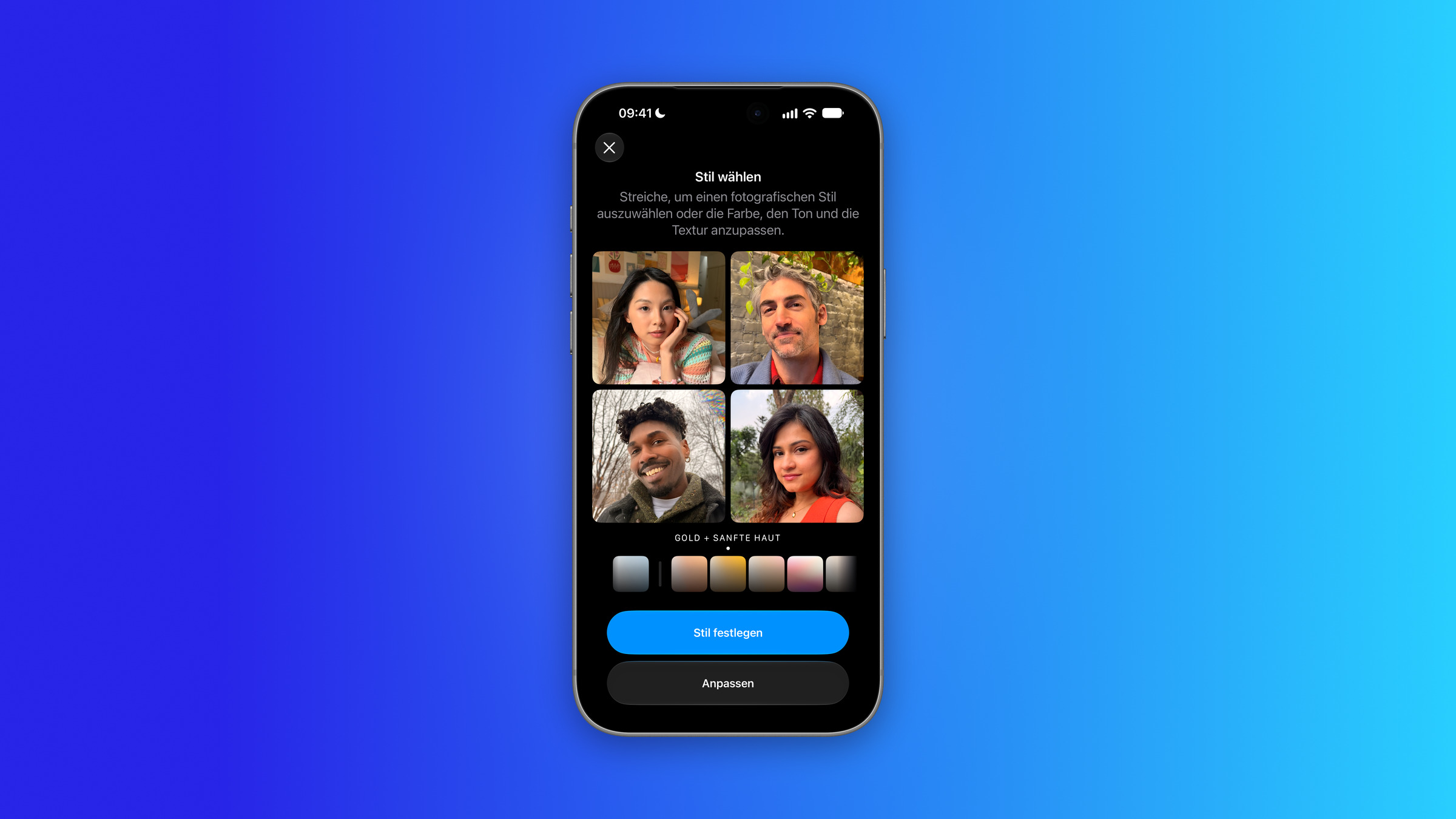
Style picker for texture and grain on iPhone: Photographic Style Gold with the Soft Skin texture, above it four sample portraits

Image: Apfelpatient

WhatsAppFacebookEmail
Threads

At the launch of iOS 27, it appeared that the iPhone 16 and iPhone 17 would also receive the new texture and grain settings. However, Apple has since changed this. The feature remains exclusive to the iPhone 18 Pro and iPhone Duo.

Texture and Grain are the two new adjustment controls in Photographic Styles. With Texture, looks like "Smooth Skin," "Glow," or "Film" can be applied to a photo, while Grain adds a visible film grain. On the iPhone 18 Pro, both options are located in the Camera app under "Styles".

However, Apple has described differently which devices will receive the settings since the introduction of the iPhone 18 Pro models on September 9th.

Key Facts at a Glance

  • At the presentation on September 9th, Apple stated that all iPhones are compatible with the latest generation of photographic styles.
  • The press release now states that texture and grain are only available for photos taken with the iPhone 18 Pro and three cameras on the iPhone Duo.
  • Apple's iPhone manual also only describes the texture setting for the iPhone 18 Pro models.
  • The photographic styles themselves remain usable on the older models, only without texture and grain.

What Apple had announced at launch

The footnote to the press release of September 9 stated that the new texture and grain settings would be available in iOS 27 on all iPhone models that support the latest generation of Photographic Styles.

The new footnote

The press release for the iPhone 18 Pro now includes a different footnote. Texture and grain are only available for photos taken with the iPhone 18 Pro models, as well as with the iPhone Duo using the ultra-wide, main, and center-stage cameras. Apple's iPhone user manual also explicitly states that texture and grain are only available for the iPhone 18 Pro models. The new footnote does not mention any technical requirement that would prevent the older models from using the feature.

For owners of an iPhone 16 or iPhone 17, this means less will change than it initially sounds. The photographic styles will remain usable on the older models, but according to the new information, the options for texture and grain will not be added.

One more camera argument in favor of the iPhone 18 Pro

This change shifts the equation for anyone considering an upgrade. Texture and grain are no longer an iOS 27 feature that older devices get for free, but rather a feature of the new Pro models and the iPhone Duo. Along with variable aperture and Pro controls, it now joins the list of camera features that justify switching from the iPhone 17 Pro.

How much of a difference it makes depends on how you use the camera. Those who have hardly used photographic styles before will lose little from the change.

Were you excited about texture and grain for your iPhone 16 or 17 – or does the feature not matter for your photos anyway? Tell us in the comments how you use the photographic styles.
Make Apfelpatient a preferred source One click – and you'll see us more often on Google
Was this article helpful?
YesNo
Tags: iOSiOS 27iPhoneiPhone 16iPhone 17iPhone 18 Pro
SendShareSend
Share

Our Amazon Storefront

A handpicked selection of products for iPhone, Mac and more – sorted by topic and updated regularly.

Shop Now

This post contains affiliate links (including Amazon). We earn a small commission on qualifying purchases – at no extra cost to you. Learn more on our Partner Program page.

Milan Jovicic

Milan Jovicic

Milan founded Apfelpatient in 2016 and has been responsible for all editorial content since 2018 — news, rumors, guides, and product reviews. Apple devices here are not test units on loan for two weeks but everyday tools: from the iPhone through MacBook Pro, MacBook Air, and iMac to the Apple Vision Pro, at least one device from nearly every product category is in daily use, many of them replaced annually. Every menu path in a guide is verified on the device before it is published.

Related posts

Symbolic image for iPhone Pro display without polarizer: black iPhone Pro model seen from the back on a grey stone surface
Apple Rumors

iPhone Pro from 2029: Display without polarizer expected

September 22, 2026 - 4:07 p.m. CEST
Apple Watch Series 12 with Milanese Loop shown front and back, with the Digital Crown on the right side of the case, whose double press no longer opens the app switcher in watchOS 27.2
Apple News

watchOS 27.2 Beta 2: The app switcher is back

September 22, 2026 - 2:14 p.m. CEST
Apple Music Hall in Battersea Power Station: view across the open floor to red seating tiers, balconies and brick walls, with a glass wall behind
Apple News

Apple Music Hall: Apple opens concert hall in London

September 22, 2026 - 1:49 p.m. CEST

Leave a Reply Cancel reply

Required fields are marked with * marked.

By submitting, you consent to the storage of your comment along with your name, email address and IP address. Details are available in our privacy policy.

Categories

  • Apple Insights
  • Apple Rumors
  • Apple News
  • Apple Tips & Tricks
  • iPhone news, rumors and tips
  • Mac and MacBook News
  • Reviews

About APFELPATIENT

APFELPATIENT brings you the latest Apple news, product updates, guides, reviews and tips across the entire Apple ecosystem — from the iPhone to the Mac to the Apple Vision Pro. From the first rumors to confirmed news: researched responsibly.

Follow Apfelpatient

Facebook Instagram YouTube Threads Threads

Company

  • About Apfelpatient
  • Contact
  • Author Profiles

Community

  • Netiquette
  • Push Notifications
  • RSS feed

Legal

  • Legal Notice
  • Privacy Policy
  • Terms of Use
  • Cookie Settings
  • Affiliate Program

Resources

  • Sitemap

© 2026 Apfelpatient. All rights reserved.

No Result
View All Result
  • Home
  • News
  • Rumors
  • Tips & Tricks
  • Reviews
  • Insights

© 2026 Apfelpatient. All rights reserved. Page Directory

Change language to Deutsch