

Apfelpatient
  • Home
  • News
  • Rumors
  • Tips & Tricks
  • Reviews
  • Insights
No result
View All Results
  • iPhone 18
  • iPhone 18 Pro
  • iPhone Duo
  • Apple Home
  • Siri AI
  • HomePod
  • HomePod mini
  • HomePod mini 2
  • MacBook Pro
  • Apple TV 4K
  • Apple Watch Series 12
  • Apple Watch Ultra 4
  • AirPods 5
  • iOS 27
  • iPadOS 27
  • macOS
  • MacBook Neo
  • iPhone 17e
  • AirTags
  • iOS 26
  • iPhone 17
  • iPadOS
  • iMac
  • Mac mini
  • Apple TV
  • iPad Pro
  • iPhone Air
  • Apple Vision Pro
  • iPhone 16
  • AirPods 4
  • Apple Watch Ultra
  • MacBook Air
  • iPad
  • AirPods Max
  • AirPods Pro 3
  • Mac Studio
  • Studio Display
  • iPad Air
  • iPad mini
  • watchOS 27
  • Apple CarPlay
  • Apple Pay
  • watchOS 26
  • Home
  • News
  • Rumors
  • Tips & Tricks
  • Reviews
  • Insights
No result
View All Results
Apfelpatient
No result
View All Results
  • iPhone 18
  • iPhone 18 Pro
  • iPhone Duo
  • Apple Home
  • Siri AI
  • HomePod
  • HomePod mini
  • HomePod mini 2
  • MacBook Pro
  • Apple TV 4K
  • Apple Watch Series 12
  • Apple Watch Ultra 4
  • AirPods 5
  • iOS 27
  • iPadOS 27
  • macOS
  • MacBook Neo
  • iPhone 17e
  • AirTags
  • iOS 26
  • iPhone 17
  • iPadOS
  • iMac
  • Mac mini
  • Apple TV
  • iPad Pro
  • iPhone Air
  • Apple Vision Pro
  • iPhone 16
  • AirPods 4
  • Apple Watch Ultra
  • MacBook Air
  • iPad
  • AirPods Max
  • AirPods Pro 3
  • Mac Studio
  • Studio Display
  • iPad Air
  • iPad mini
  • watchOS 27
  • Apple CarPlay
  • Apple Pay
  • watchOS 26

iOS 27.3: Apple checks iCloud links for harmful content

Milan Jovicic by Milan Jovicic
November 4, 2026 - 18:31 CET
in Apple News
0
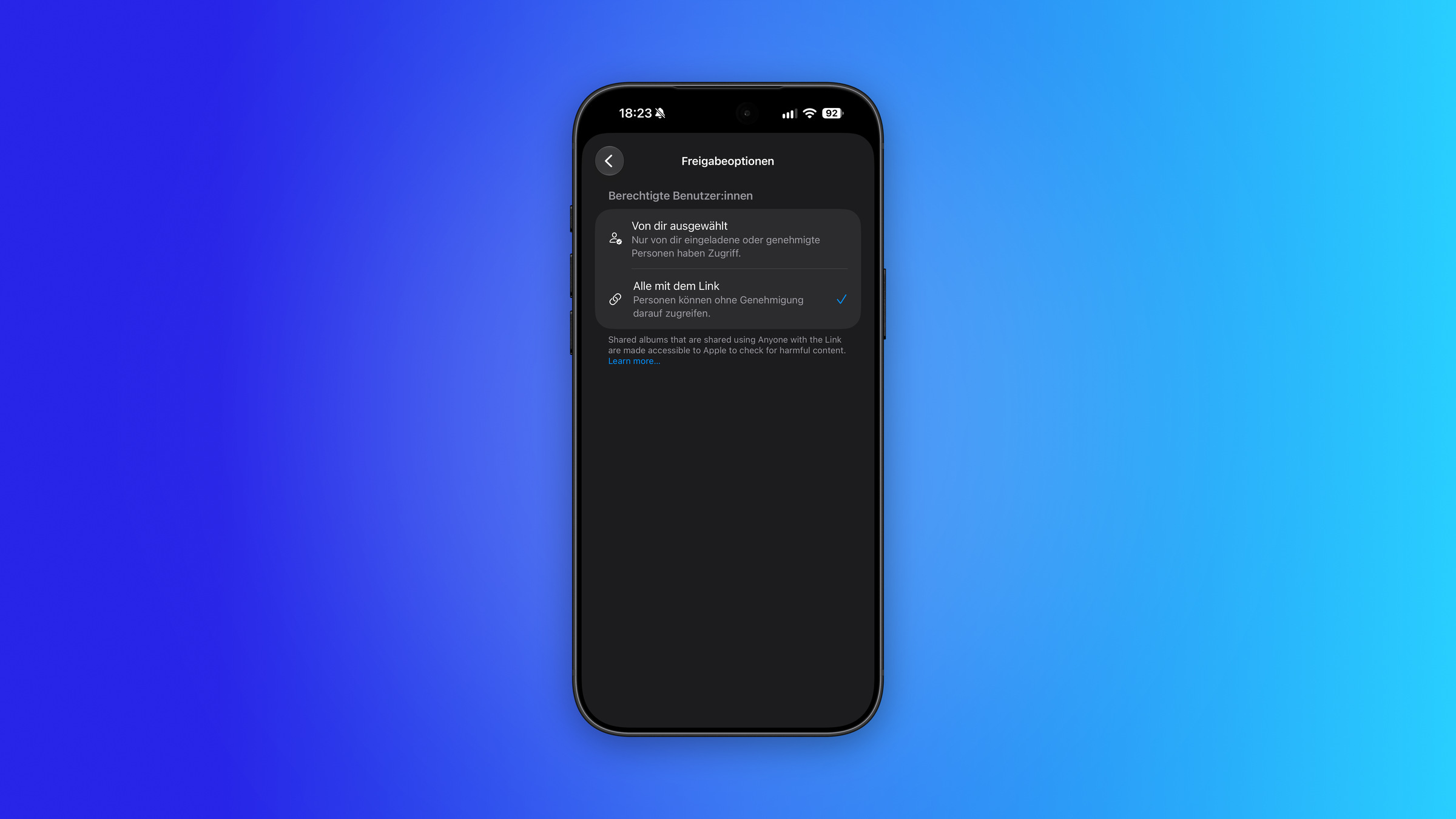
iOS 27.3 iCloud links: iPhone showing sharing options with Anyone with the Link and the notice about Apple checking content

Image: Apfelpatient

WhatsAppFacebookEmail
Threads

This article may contain affiliate links. Learn more on our Partner Program page.

Make Apfelpatient a preferred source One click – and you'll see us more often on Google

Anyone sharing a photo or file via a public iCloud link will, starting with iOS 27.3, also be making the content available for review by Apple. The company reserves the right to block access to harmful content and even involve the authorities. While the change affects a single sharing option, its consequences extend to the Apple account itself.

Apple released a new support document on November 3rd, currently only available in English. It describes a change that will take effect with version 27.3 of iOS, iPadOS, macOS, and visionOS. The first beta of iOS 27.3 is already available to developers, and Apple says the final version will be released in December.

All articles about this version are compiled on the iOS 27.3 page; the new features of this generation are listed under iOS 27. The overview of iCloud in iOS 27 shows what has changed with the service itself.

Key Facts at a Glance

  • Starting with version 27.3, Apple checks content shared using the „Everyone with the link“ option for harmful content.
  • The affected versions are iOS, iPadOS, macOS and visionOS; Apple cites iCloud Photos and iCloud Drive as examples.
  • Harmful content can result in removal, suspension of the Apple account, and involvement of law enforcement.
  • The document does not specify what is considered harmful or how the testing process works.
  • Such links were not end-to-end encrypted even before.

What's changing with version 27.3

Anyone sharing content stored in iCloud has two options: a link or a copy. With a link, the sharing is either with selected people or with „Everyone with the link.“ According to Apple, the second option makes the content accessible to everyone who has the link, including Apple itself. The document states:

Starting with version 27.3 of iOS, iPadOS, macOS and visionOS, content shared using the ‚Everyone with the link‘ option will be checked by Apple for harmful content.

Apple cites a photo from iCloud Photos and a file from iCloud Drive as examples. An audit only mentions this one option, not sharing with selected people or sending a copy.

On my iPhone, the iOS 27.3 beta already displays the notification directly in the sharing options, currently only in English. There, Apple explicitly mentions shared albums: Sharing them with this option makes them accessible to Apple to check for harmful content.

What can happen with harmful content

Apple reserves the right to move, reject, modify, remove, or delete such content at any time. Furthermore, the company may take action against the Apple Account: suspend or deactivate it and prevent a new account from being created using the same email address or phone number. If necessary, Apple may also involve law enforcement.

The document does not define what constitutes harmful content. It also does not specify whether software or humans are responsible for reviewing it. Furthermore, it does not include an exception for Germany, Austria, or Switzerland, only a general note that not all features are available in all countries.

Encryption and Terms of Use

The fact that such links are not end-to-end encrypted is not a consequence of the new check. According to Apple's enhanced privacy guidelines, this option does not support the protection; the support documents still list it as „Anyone with the link.“ This applies even if it is enabled for iCloud. According to Apple's iCloud security overview, the keys for shared content then end up in the company's data centers.

Apple had already secured this right legally. In its iCloud Terms of Service, the company reserves the right to review content at any time to ensure it is lawful and appropriate, and to filter, move, reject, or modify it without notice if it violates the law or the agreement, or is offensive. The same terms also mention checks on content sharing between users, specifically targeting depictions of child abuse. What's new is that Apple now explicitly announces the review process for this sharing option.

Why the step is smaller than it sounds

The document does not describe an audit of the private photo library, but rather of content that the owner has made publicly available via a link. This differs from Apple's 2021 plan to directly compare photos on the device against databases of abusive content. This system was abandoned following criticism. In February, the US state of West Virginia sued the company for failing to effectively detect such content in iCloud, citing the abandoned plan as a point of contention.

I find the limit understandable, even if the lack of a clear benchmark is bothersome. A link that anyone can open is not private storage, and a provider would hardly want its servers used to distribute harmful content. More problematic is that Apple lists consequences up to and including account loss without specifying what triggers them.

If you want to share sensitive files, it's best to choose the sharing option with selected people. If you have enhanced privacy enabled, shared iCloud Drive folders, for example, remain end-to-end encrypted according to Apple, provided all participants are also using the same folder.

Do you use public iCloud links for private photos and files, or do you prefer to send a copy directly? Let us know in the comments if the review changes anything about your sharing habits.


Was this article helpful?
YesNo
Tags: Apple ServicesiCloudiOSiOS 27iOS 27.3iPadOSiPadOS 27iPadOS 27.3macOSmacOS 27macOS 27.3
SendShareSend
Share

Our Amazon Storefront

A handpicked selection of products for iPhone, Mac and more – sorted by topic and updated regularly.

Shop Now

This post contains affiliate links (including Amazon). We earn a small commission on qualifying purchases – at no extra cost to you. Learn more on our Partner Program page.

Previous Post

HomePod mini 2: Initial tests confirm improved sound

Milan Jovicic

Milan Jovicic

Milan founded Apfelpatient in 2016 and has been responsible for all editorial content since 2018 – news, rumors, how-to guides and product reviews. Here, Apple devices aren't review units kept for two weeks, they're everyday tools: from iPhone to MacBook Pro, MacBook Air and iMac all the way to Apple Vision Pro, at least one device from every product category is in daily use, many of them replaced every year. Every menu path in a guide is checked on the device before it goes live.

Related posts

HomePod mini 2: Initial tests confirm improved sound

by Milan Jovicic
November 4, 2026 - 4:38 PM CET
HomePod mini 2 sound: pink speaker on a round side table, with three people nearby drawing, reading and threading beads

HomePod mini 2 sound: Two direct comparisons show it sounds better than its predecessor, and it also responds faster. That's what the first tests show.

Read moreDetails

iOS 27.3 Beta 1: All new features at a glance

by Milan Jovicic
November 4, 2026 - 01:18 CET
iOS 27.3 beta 1: iPhone showing the Software Update screen with iOS 27.3 up to date

iOS 27.3 Beta 1 brings a new Health app, standby mode for all iPhones, one-handed mode for the Duo, vertical tabs, and more. Here's what's available in our region.

Read moreDetails

Apple bans insider betting on prediction markets

by Milan Jovicic
November 4, 2026 - 00:55 CET
Apple prediction markets: curved glass facade of Apple Park with trees and hills in the background

Apple is prohibiting employees from using confidential information on prediction markets like Polymarket. This is stated in the new insider policy.

Read moreDetails

iOS 27.3: New standby mode from iPhone Duo for all iPhones

by Milan Jovicic
November 3, 2026 - 10:27 PM CET
iOS 27.3 StandBy: iPhone Duo in tent position on a gray table showing an analog clock on the outer display

iOS 27.3 brings the calendar, weather, and new clocks from the iPhone Duo to all iPhones from the iPhone 11 onwards. The Duo retains one advantage.

Read moreDetails

watchOS 27.3: Live Rewind and Siri Summary without EU

by Milan Jovicic
November 3, 2026 - 8:30 PM CET
watchOS 27.3 with Live Rewind: Apple Watch Ultra with an orange band resting on the back of a white iPhone

watchOS 27.3 brings Live Rewind and Siri Summary to the beta. The EU is initially excluded; only English will be available at launch.

Read moreDetails
Load More

Leave a Reply Cancel reply

Required fields are marked with * marked.

By submitting, you consent to the storage of your comment along with your name, email address and IP address. Details are available in our privacy policy.

Categories

  • Apple Insights
  • Apple Rumors
  • Apple News
  • Apple Tips & Tricks
  • iPhone news, rumors and tips
  • Mac and MacBook News
  • Reviews
Make Apfelpatient a preferred source One click – and you'll see us more often on Google

About APPLE PATIENT

APFELPATIENT brings you the latest Apple news, product updates, guides, reviews and tips across the entire Apple ecosystem — from the iPhone to the Mac to the Apple Vision Pro. From the first rumors to confirmed news: researched responsibly.

Follow Apfelpatient

Facebook Instagram YouTube Threads Threads

Company

  • About Apfelpatient
  • Contact
  • Author Profiles

Community

  • Netiquette
  • Push notifications
  • RSS feed

Legal

  • Legal Notice
  • Privacy Policy
  • Terms of Use
  • Cookie settings
  • Affiliate Program

Resources

  • Sitemap

© 2026 Apfelpatient. All rights reserved.

No result
View All Results
  • Home
  • News
  • Rumors
  • Tips & Tricks
  • Reviews
  • Insights

© 2026 Apfelpatient. All rights reserved. Site map

Change language to Deutsch