
Apfelpatient
  • Home
  • News
  • Rumors
  • Tips & Tricks
  • Reviews
  • Insights
No result
View All Results
  • iPhone 18
  • iPhone 18 Pro
  • iPhone Duo
  • Apple Home
  • Siri AI
  • HomePod
  • HomePod mini
  • HomePod mini 2
  • MacBook Pro
  • Apple TV 4K
  • Apple Watch Series 12
  • Apple Watch Ultra 4
  • AirPods 5
  • iOS 27
  • iPadOS 27
  • macOS
  • MacBook Neo
  • iPhone 17e
  • AirTags
  • iOS 26
  • iPhone 17
  • iPadOS
  • iMac
  • Mac mini
  • Apple TV
  • iPad Pro
  • iPhone Air
  • Apple Vision Pro
  • iPhone 16
  • AirPods 4
  • Apple Watch Ultra
  • MacBook Air
  • iPad
  • AirPods Max
  • AirPods Pro 3
  • Mac Studio
  • Studio Display
  • iPad Air
  • iPad mini
  • watchOS 27
  • Apple CarPlay
  • Apple Pay
  • watchOS 26
  • Home
  • News
  • Rumors
  • Tips & Tricks
  • Reviews
  • Insights
No result
View All Results
Apfelpatient
No result
View All Results
  • iPhone 18
  • iPhone 18 Pro
  • iPhone Duo
  • Apple Home
  • Siri AI
  • HomePod
  • HomePod mini
  • HomePod mini 2
  • MacBook Pro
  • Apple TV 4K
  • Apple Watch Series 12
  • Apple Watch Ultra 4
  • AirPods 5
  • iOS 27
  • iPadOS 27
  • macOS
  • MacBook Neo
  • iPhone 17e
  • AirTags
  • iOS 26
  • iPhone 17
  • iPadOS
  • iMac
  • Mac mini
  • Apple TV
  • iPad Pro
  • iPhone Air
  • Apple Vision Pro
  • iPhone 16
  • AirPods 4
  • Apple Watch Ultra
  • MacBook Air
  • iPad
  • AirPods Max
  • AirPods Pro 3
  • Mac Studio
  • Studio Display
  • iPad Air
  • iPad mini
  • watchOS 27
  • Apple CarPlay
  • Apple Pay
  • watchOS 26

iOS 27.3: New standby mode from iPhone Duo for all iPhones

Milan Jovicic by Milan Jovicic
November 3, 2026 - 10:27 PM CET
in Apple News, iPhone news, rumors and tips
0
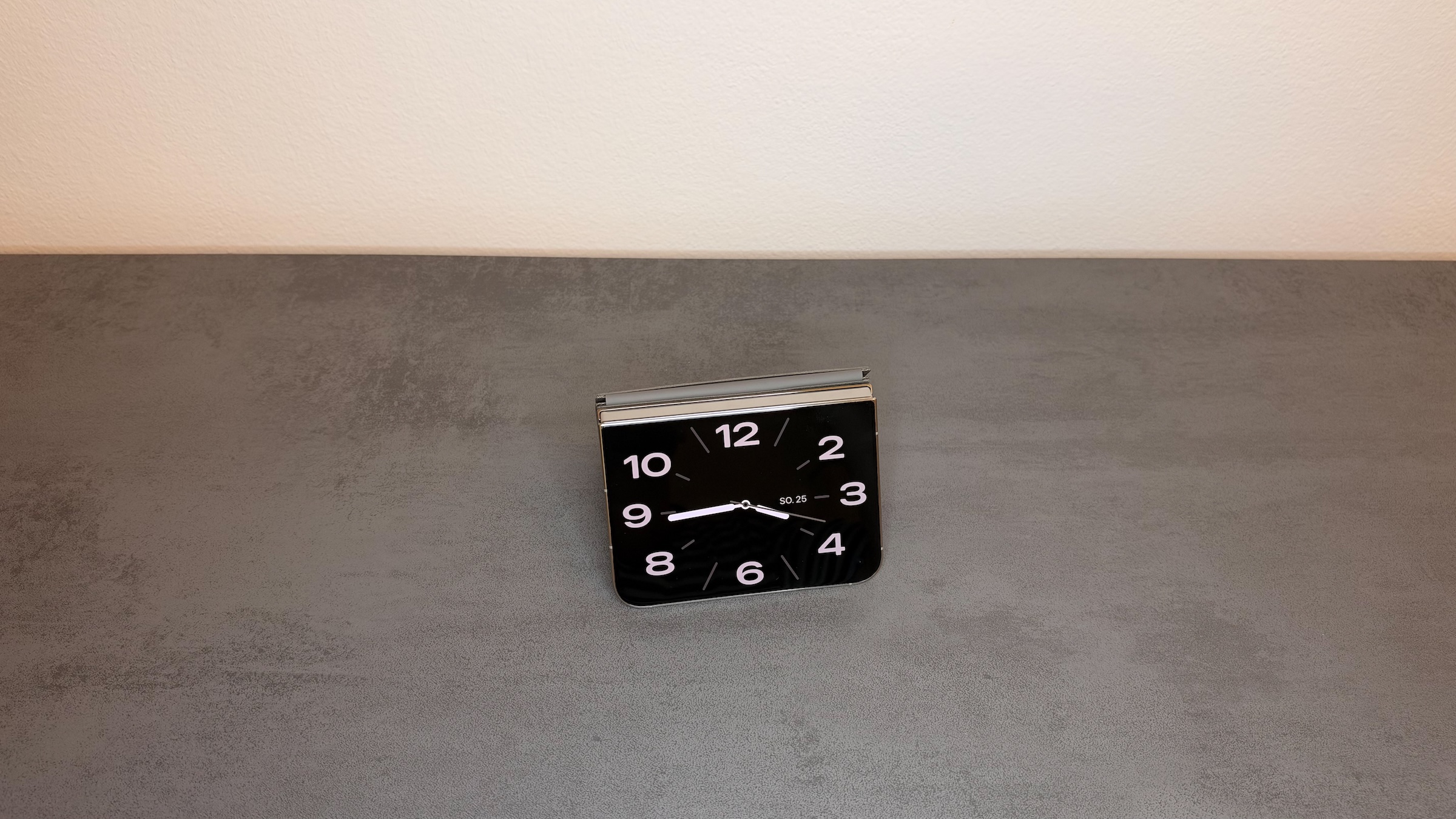
iOS 27.3 StandBy: iPhone Duo in tent position on a gray table showing an analog clock on the outer display

Standby mode on the iPhone Duo: Without a charger and in a tent, this feature remains exclusive to the Duo. (Image: Apfelpatient)

WhatsAppFacebookEmail
Threads

This article may contain affiliate links. Learn more on our Partner Program page.

Make Apfelpatient a preferred source One click – and you'll see us more often on Google

Since the iPhone Duo's launch, standby mode has offered significantly more features than on any other iPhone. With iOS 27.3, this gap is set to narrow: Calendar, weather, and more customizable clocks will be available on all models that receive the update. However, the Duo will retain one advantage.

Apple is rolling out the standby improvements from the iPhone Duo to the rest of the iPhones. This isn't mentioned in the developer release notes, but the update is already included in the first beta of iOS 27.3, which Apple released to developers today.

Apple unveiled the new features on September 9th as a major upgrade for the iPhone Duo. Apple has announced a December release date for iOS 27.3, but has not specified a date. It is the third point update in the iOS 27 series.

Key Facts at a Glance

  • iOS 27.3 brings the standby innovations of the iPhone Duo to all compatible iPhones.
  • New features include calendar and weather views, redesigned clocks, split albums in the photo view, and multiple versions per view.
  • Standby mode without a charger remains exclusive to the iPhone Duo.
  • The new features are included in the first developer beta; the final version is expected in December.

These four new features are coming to the other iPhones

The analog and digital watches are being redesigned and will receive more options for colors and complications. The „Photos“ view will now also display shared albums, which can be selected individually.

In addition, there are new calendar and weather views. Furthermore, multiple versions of each view type can be created, which can be switched between, for example, two clocks with different colors.

So far, the interface on other iPhones is much more limited. According to Apple's user manual, you can switch between widgets, photos, and clocks by swiping left or right, and between the styles of the respective view by swiping up or down. The manual currently only describes how to add, customize, and delete custom views for the iPhone Duo.

What changes with iOS 27.3 and what doesn't

StandbyOther iPhones todayOther iPhones with iOS 27.3iPhone Duo
Starton the charger, lying on its sideon the charger, lying on its sideas a tent or book, without a charger
Calendar and weather viewnoYesYes
Shared albums in „Photos“noYesYes
Multiple versions per viewnoYesYes

The cable remains the difference that no software can close. The iPhone Duo stands on its own when half-folded and therefore needs no charger for StandBy, while every other iPhone, according to the user guide, has to be connected to a charger and lying on its side.

The extent of this functionality is evident when looking at my own iPhone Duo. The gallery there includes, among other things, weather, photos, memories, analog, digital, and calendar. The „Analog“ clock offers tabs for style, color, numbers, and widgets with seven color swatches and two small widget slots. Calendar, weather, both clocks, and shared albums are all part of this selection.

Included from the iPhone 11 onwards, but not visible everywhere in the same way

The new features apply to all iPhones compatible with iOS 27.3, meaning from the iPhone 11 onward. iOS 27 also runs on the iPhone SE (2nd generation), which therefore also belongs to this group.

The practical difference lies in the display. Standby mode only shows information permanently on models with the „Always On“ option. According to Apple, on all other iPhones, standby mode can be activated at any time by tapping the display, gently nudging the table, or using Siri.

What became of the findings in the code

In September, five additional standby views appeared in the code of iOS 27.1, including one for home cameras and one featuring Snoopy. They do not appear in the list for iOS 27.3.

The duo loses their lead, but not their advantage

I think this is the right move, especially since standby mode doesn't require any hardware from the Duo as long as the iPhone is plugged into the charger. The iPhone Duo has been on the market since October 23rd, so calendar and weather features will only be exclusive to it for a short time: I expect iOS 27.3 around mid-December, which would be about seven weeks.

The duo doesn't lose much in the process. On my iPhone, standby reliably starts as a tent without a cable, something the other iPhones don't get. With iOS 27.3, standby becomes more versatile on those iPhones, but remains tied to the charging port. Those who already charge their iPhones via MagSafe will likely benefit the most, as standby remembers the preferred display for each MagSafe charging port.

If you still have an iPhone 11 or another model without „Always On“, your daily routine will change less, because the new views will not remain visible continuously.

What else does iOS 27.3 bring?

Standby is not the only new feature in the beta. Others include vertical tabs in Safari, the returning Health app, and the launch of Apple Intelligence in China.

Does your iPhone already stay plugged in on standby at night, or would you only be tempted to do that with custom calendar and weather views? Let us know in the comments which view would stay on your nightstand.

Was this article helpful?
YesNo
Tags: iOSiOS 27iOS 27.3
SendShareSend
Share

Our Amazon Storefront

A handpicked selection of products for iPhone, Mac and more – sorted by topic and updated regularly.

Shop Now

This post contains affiliate links (including Amazon). We earn a small commission on qualifying purchases – at no extra cost to you. Learn more on our Partner Program page.

Previous Post

watchOS 27.3: Live Rewind and Siri Summary without EU

Milan Jovicic

Milan Jovicic

Milan founded Apfelpatient in 2016 and has been responsible for all editorial content since 2018 – news, rumors, how-to guides and product reviews. Here, Apple devices aren't review units kept for two weeks, they're everyday tools: from iPhone to MacBook Pro, MacBook Air and iMac all the way to Apple Vision Pro, at least one device from every product category is in daily use, many of them replaced every year. Every menu path in a guide is checked on the device before it goes live.

Related posts

watchOS 27.3: Live Rewind and Siri Summary without EU

by Milan Jovicic
November 3, 2026 - 8:30 PM CET
watchOS 27.3 with Live Rewind: Apple Watch Ultra with an orange band resting on the back of a white iPhone

watchOS 27.3 brings Live Rewind and Siri Summary to the beta. The EU is initially excluded; only English will be available at launch.

Read moreDetails

Safari in iOS 27.3: Vertical tabs and adaptive dark mode

by Milan Jovicic
November 3, 2026 - 8:12 PM CET
Safari iOS 27.3: Safari app icon with compass on a dark gray background

Safari gets vertical tabs and an adaptive dark mode for light-colored websites in iOS 27.3. Here's what both features do and where to turn them on.

Read moreDetails

Health app: More languages in iOS 27.3 Beta, German is missing

by Milan Jovicic
November 3, 2026 - 7:48 PM CET
Health app new languages: three iPhones showing the new Health app with sleep score, Health Age and heart rate in English

The new Health app is back in the iOS 27.3 beta and is getting new languages. German is missing, even though Apple Intelligence supports it.

Read moreDetails

iOS 27.3 Beta 1 released for developers

by Milan Jovicic
November 3, 2026 - 19:12 CET
iOS 27.3 beta 1: iPhone showing the software update settings with iOS 27.3 beta and the update button

Apple is distributing the first beta of iOS 27.3. The Health app, one-handed mode for the iPhone Duo, and two features from iOS 27 are still pending.

Read moreDetails

iPhone 18: Leak reveals larger battery, price could rise

by Milan Jovicic
November 3, 2026 - 18:03 CET
iPhone 18 battery: five iPhone 17 models in black, lavender, mist blue, sage and white, fanned out from the side

iPhone 18 battery: A leak reveals a larger battery and a possible price increase. What this means for the current price of €1,099.

Read moreDetails
Load More

Leave a Reply Cancel reply

Required fields are marked with * marked.

By submitting, you consent to the storage of your comment along with your name, email address and IP address. Details are available in our privacy policy.

Categories

  • Apple Insights
  • Apple Rumors
  • Apple News
  • Apple Tips & Tricks
  • iPhone news, rumors and tips
  • Mac and MacBook News
  • Reviews
Make Apfelpatient a preferred source One click – and you'll see us more often on Google

About APPLE PATIENT

APFELPATIENT brings you the latest Apple news, product updates, guides, reviews and tips across the entire Apple ecosystem — from the iPhone to the Mac to the Apple Vision Pro. From the first rumors to confirmed news: researched responsibly.

Follow Apfelpatient

Facebook Instagram YouTube Threads Threads

Company

  • About Apfelpatient
  • Contact
  • Author Profiles

Community

  • Netiquette
  • Push notifications
  • RSS feed

Legal

  • Legal Notice
  • Privacy Policy
  • Terms of Use
  • Cookie settings
  • Affiliate Program

Resources

  • Sitemap

© 2026 Apfelpatient. All rights reserved.

No result
View All Results
  • Home
  • News
  • Rumors
  • Tips & Tricks
  • Reviews
  • Insights

© 2026 Apfelpatient. All rights reserved. Site map

Change language to Deutsch