Twelve days before the expected launch of Apple's smart home hub, screenshots of its software have appeared for the first time. They show a photo view that is said to be exactly the same as that of the iPhone Duo. However, there is a requirement that not every household meets.
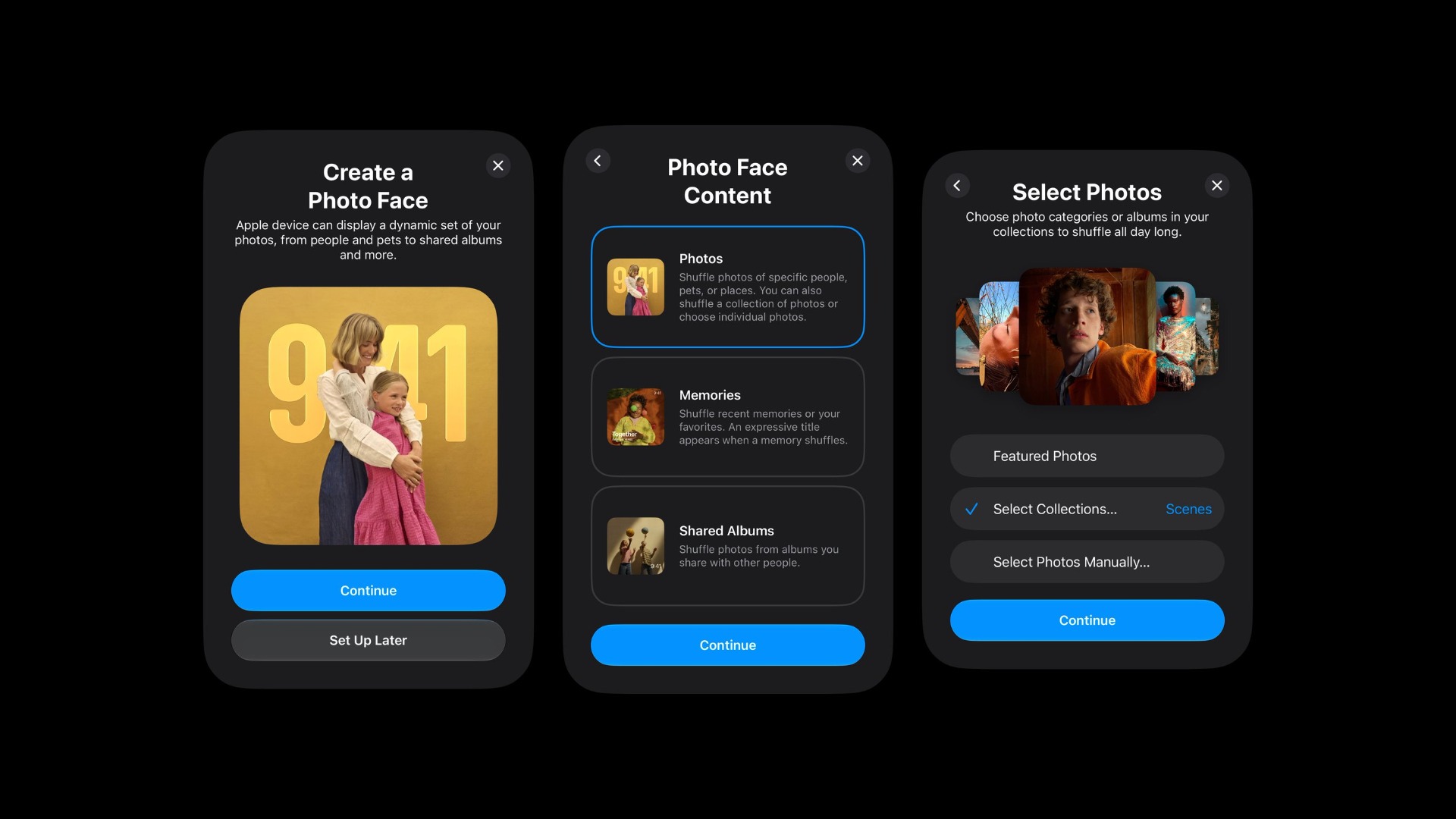
Apple is expected to unveil its smart home hub with a display on October 13, along with a new HomePod mini and a new Apple TV. Now, user pdfu has published setup screens on X, which are said to belong to this device. They show the setup of a view called "Photo Face" in the English material.
These are the first images of the Hub software ever. Until now, everything known about the interface was based on descriptions and code snippets. These are compiled in the overview of all HomePad rumors.
Key Facts at a Glance
- Leaked setup screens show a photo view for Apple's smart home hub.
- Photo collections, retrospectives, or shared albums can be chosen as sources.
- The images come from iCloud; iCloud Photos must be enabled for this to work.
- According to pdfu, it's the same photo view as in standby mode on the iPhone Duo.
What the setup screens show
According to the images, several sources can be selected for the photo view: photo collections, flashbacks, or shared albums. The selected images then scroll across the hub's display.
Setting up Apple's upcoming Home device includes a new step: creating a Photo Face.
— pdfu (@itspdfu) September 30, 2026
It's the same Photo Face coming to StandBy on iPhone Duo. That might explain why Apple hasn't officially made StandBy available in the simulator.
Photo Face requires iCloud Photos. During setup,… pic.twitter.com/Zh3cvAcjPx
The hub retrieves the photos from iCloud. Without iCloud Photos enabled, the view won't work. The setup option appears to be offered immediately upon first activating the device, not later in the settings.
The same view as on the iPhone Duo
According to pdfu, the photo view on the Hub is identical to that of the iPhone Duo. Apple presented standby mode as one of the key features of the foldable iPhone: When propped up, the Duo can be used as a photo frame, clock, or widget display, even without a charger. On other iPhones, standby mode only activates when the phone is plugged in, and the photo frame can also be set to display specific albums.
One notable limitation in Apple's developer tools is that, according to Apple, standby mode is currently unavailable in the iPhone Duo simulator. A shared interface with the Hub would explain why Apple is withholding the mode there – however, this connection has not been proven.
How the screens fit with the existing picture
The images corroborate Bloomberg's report the previous day about the interface. According to them, it is heavily structured around clock and photo views, with slideshows explicitly listed as one of its intended functions. A photo view as part of the initial setup fits this pattern.
Personal photos on the Hub raise a question that the iPhone doesn't have. The device is supposed to recognize who is standing in front of it and have a mode for visitors that hides personal content. The facial recognition is said to work without a depth sensor and be less reliable than Face ID.
Source: pdfu recently analyzed five previously unknown standby views from the iOS 27.1 code and made some of them functional. A second, independent confirmation is lacking for the Hub screens. However, their content aligns with what is known about the device from other sources.
Why the photographic view carries more weight in this country
Siri AI, around which Apple is said to have built the Hub, doesn't yet speak German. A photo view, on the other hand, isn't tied to any language. I therefore expect this part of the device to be more important in German-speaking countries than in the US, where voice functions are the main focus.
The iCloud connection is the crucial hurdle. If your pictures are stored locally or with another service, the photo view remains inaccessible, according to the screens. The free 5 GB of iCloud storage is hardly sufficient for a growing photo library, so without an iCloud+ subscription, the feature is likely unsuitable for many households.
Would you rather use a hub in your kitchen to display the clock or a slideshow – and are your photos even stored in iCloud? Let us know in the comments where your pictures are currently located.