Apfelpatient
  • Home
  • News
  • Rumors
  • Tips & Tricks
  • Reviews
  • Insights
No result
View All Results
  • iPhone 18
  • iPhone 18 Pro
  • iPhone Duo
  • Apple Home
  • Siri AI
  • HomePod
  • HomePod mini
  • HomePod mini 2
  • MacBook Pro
  • Apple TV 4K
  • Apple Watch Series 12
  • Apple Watch Ultra 4
  • AirPods 5
  • iOS 27
  • iPadOS 27
  • macOS
  • MacBook Neo
  • iPhone 17e
  • AirTags
  • iOS 26
  • iPhone 17
  • iPadOS
  • iMac
  • Mac mini
  • Apple TV
  • iPad Pro
  • iPhone Air
  • Apple Vision Pro
  • iPhone 16
  • AirPods 4
  • Apple Watch Ultra
  • MacBook Air
  • iPad
  • AirPods Max
  • AirPods Pro 3
  • Mac Studio
  • Studio Display
  • iPad Air
  • iPad mini
  • watchOS 27
  • Apple CarPlay
  • Apple Pay
  • watchOS 26
  • Home
  • News
  • Rumors
  • Tips & Tricks
  • Reviews
  • Insights
No result
View All Results
Apfelpatient
No result
View All Results
  • iPhone 18
  • iPhone 18 Pro
  • iPhone Duo
  • Apple Home
  • Siri AI
  • HomePod
  • HomePod mini
  • HomePod mini 2
  • MacBook Pro
  • Apple TV 4K
  • Apple Watch Series 12
  • Apple Watch Ultra 4
  • AirPods 5
  • iOS 27
  • iPadOS 27
  • macOS
  • MacBook Neo
  • iPhone 17e
  • AirTags
  • iOS 26
  • iPhone 17
  • iPadOS
  • iMac
  • Mac mini
  • Apple TV
  • iPad Pro
  • iPhone Air
  • Apple Vision Pro
  • iPhone 16
  • AirPods 4
  • Apple Watch Ultra
  • MacBook Air
  • iPad
  • AirPods Max
  • AirPods Pro 3
  • Mac Studio
  • Studio Display
  • iPad Air
  • iPad mini
  • watchOS 27
  • Apple CarPlay
  • Apple Pay
  • watchOS 26

CarPlay on iOS 26: All new features in detail

Milan Jovicic by Milan Jovicic
June 13, 2025 - 18:28 CEST
in Apple Insights
0
CarPlay iOS 26 Apple

Image: Apple

WhatsAppFacebookEmail
Threads

This article may contain affiliate links. Learn more on our Partner Program page.

Make Apfelpatient a preferred source One click – and you'll see us more often on Google

Apple has announced iOS 26. The update brings several new features to CarPlay that make in-car use more practical, modern, and flexible. Users with an iPhone and a compatible vehicle can look forward to design improvements and functional enhancements. To help you know what to expect, here's a complete overview of all the new features.

To use the new CarPlay features, you need an iPhone running iOS 26. The update is currently only available as a developer beta, so you can only test it if you register your device. Once the final version is released, the changes will be available to all users.

New design: Liquid Glass

The CarPlay design is getting a visual overhaul with iOS 26. Apple is now bringing the so-called Liquid Glass design from the iPhone operating system to the CarPlay interface. This includes shimmering app icons and semi-transparent elements in the user interface. This creates a more modern, high-quality look without affecting usability.
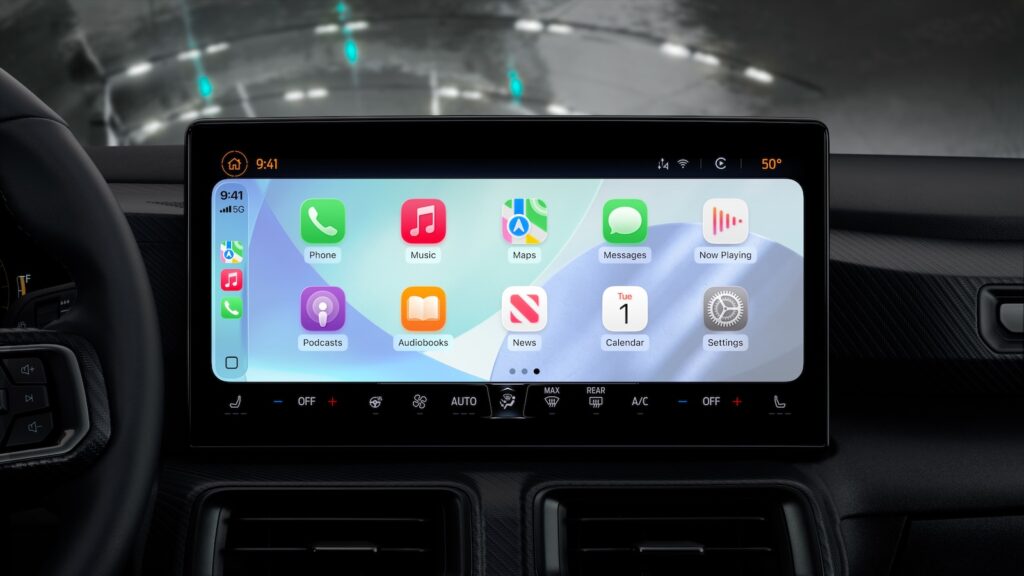
CarPlay iOS 26 Apple
Image: Apple

News app with Tapbacks

In the Messages app on CarPlay, you can now respond to iMessages with so-called Tapbacks. These include icons like a heart, a thumbs-up, a question mark, or an exclamation point. This feature makes it easier to quickly respond while driving without having to type messages.

Pinned conversations

iOS 26 now brings pinned chats from the Messages app to CarPlay. If you've pinned conversations to the top of your iPhone, they'll also appear at the top in your car. This lets you access frequently used chats faster without having to scroll.
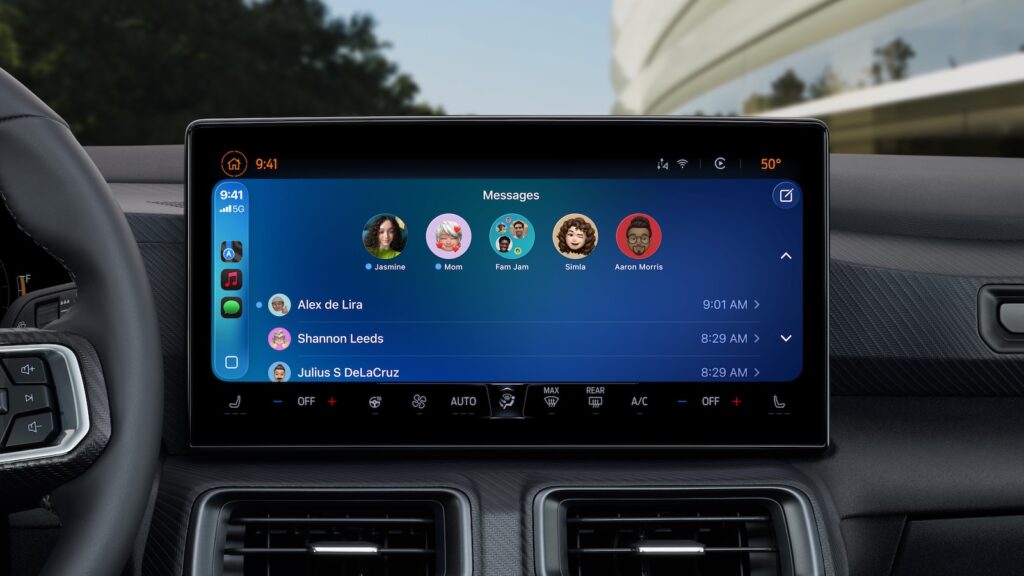
CarPlay iOS 26
Image: Apple

Compact view for calls

In iOS 26, incoming calls are displayed in a new compact view. Instead of taking up the entire screen, the call is displayed at the top. At the same time, other information such as navigation or music remains visible. This reduces distractions and improves clarity while driving.

Live activities in the dashboard

The CarPlay dashboard can now display live activity. This gives you instant access to information like flight status or delivery service ETAs. You don't have to open an app to see updates—they appear in real time.

Widgets for everyone

Previously, widgets were only available to CarPlay Ultra users. With iOS 26, Apple is bringing the feature to the standard version of CarPlay. You can now display widgets for calendar appointments or HomeKit devices directly in your car. This gives you more control over important functions without having to pick up your iPhone.

Multi-touch gestures in map apps

CarPlay will soon support multi-touch gestures in map applications – but only in vehicles that support this feature. This means you can zoom, swipe, and pan the map with two fingers, just like on your iPhone. This makes navigation more precise and intuitive.

Videos via AirPlay while parked

Another new feature concerns video playback. With iOS 26, you can stream videos from your iPhone to the CarPlay display via AirPlay – but only when the car is parked. The iPhone automatically detects whether the vehicle is moving and pauses playback when you start driving. However, car manufacturers have yet to implement this feature. So it won't be available in all vehicles immediately and may initially be reserved for newer models.

Smart Display Zoom

With iOS 26, CarPlay gets a new setting called Smart Display Zoom. This feature automatically adjusts the user interface to the shape and size of your vehicle's screen. Elements like app icons are displayed smaller when more space is available—for example, to display an additional row of apps. This ensures optimized use of the available space on the dashboard display.

iOS 26 makes CarPlay smarter and more modern

With iOS 26, CarPlay receives a comprehensive update that enhances both its design and functionality. Users benefit from a clearer display, new interaction options, and practical enhancements such as widgets and Live Activity. However, many of the new features require a compatible vehicle and an updated iPhone. If you use CarPlay regularly, the update is definitely worth checking out—especially if you value more convenience and a modern interface. The best products for you: Our Amazon Storefront offers a wide selection of accessories, including those for HomeKit. (Image: Apple)

  • iOS 26: These new features await you in Apple Notes
  • iOS 26 explained: Why iOS 18 will not be followed by iOS 19
  • iOS 26: These features are only available on new iPhones
  • iOS 26: Apple Maps becomes more personal and intelligent
  • iOS 26: When will the new update for the iPhone be released?
  • iPadOS 26 is ready for the upcoming 18.8-inch iPad Fold
Was this article helpful?
YesNo
Tags: Apple CarPlayApple ServicesiOSiOS 26
SendShareSend
Share

Our Amazon Storefront

A handpicked selection of products for iPhone, Mac and more – sorted by topic and updated regularly.

Shop Now

This post contains affiliate links (including Amazon). We earn a small commission on qualifying purchases – at no extra cost to you. Learn more on our Partner Program page.

Previous Post

tvOS 26 shows: Apple TV 4K is about to get a major upgrade

Next Post

Apple declares iPhone XS a vintage device: All the details

Milan Jovicic

Milan Jovicic

Milan founded Apfelpatient in 2016 and has been responsible for all editorial content since 2018 – news, rumors, how-to guides and product reviews. Here, Apple devices aren't review units kept for two weeks, they're everyday tools: from iPhone to MacBook Pro, MacBook Air and iMac all the way to Apple Vision Pro, at least one device from every product category is in daily use, many of them replaced every year. Every menu path in a guide is checked on the device before it goes live.

Related posts

iPhone 18e: All the rumors at a glance

by Milan Jovicic
November 9, 2026 - 17:03 CET
Symbolic image for the iPhone 18e rumors: two entry-level iPhones stacked flat, the pink back with a single camera on top and a black housing with a glowing display below

iPhone 18e: Spring 2027, A20 chip, 6.3-inch display, larger battery, and Dynamic Island for the first time. All the rumors about the display, camera, and price.

Read moreDetails

Apfelpatient Weekly #31: Ternus Presents His First Results

by Milan Jovicic
November 8, 2026 - 4:18 PM CET
Cover image of the Apfelpatient Weekly showing illustrated stacked cards above the wordmark on a blue-to-cyan gradient

Record quarter under Ternus, iPhone Duo shortages, spyware warning in the Bundestag, and a Health app without German.

Read moreDetails

MacBook Neo 2: All the rumors at a glance

by Milan Jovicic
November 7, 2026 - 3:02 PM CET
MacBook Neo 2: the current MacBook Neo in Citrus seen from behind, opened on a grey table in front of a light wall

MacBook Neo 2: All the rumors about the A19 Pro, 12 GB RAM, colors, price and market launch – and why the touchscreen is off the table.

Read moreDetails

iPhone 18: All models, prices and release dates at a glance

by Milan Jovicic
November 7, 2026 - 13:17 CET
Five iPhone models side by side, one facing forward with visible Dynamic Island – the iPhone 18 generation launches in two waves

iPhone 18: Pro, Pro Max and Duo are available in stores, the base model will follow in spring 2027. All prices, dates and specifications of the series.

Read moreDetails

MacBook Pro vs. Studio Display XDR: OLED vs. Mini-LED

by Milan Jovicic
November 5, 2026 - 18:56 CET
MacBook Pro vs. Studio Display XDR: person using the touchscreen of a MacBook Pro at a desk, with large monitors in the background

MacBook Pro vs. Studio Display XDR: OLED vs. Mini-LED compared. Contrast, brightness, size, prices, and which is right for whom.

Read moreDetails
Load More

Categories

  • Apple Insights
  • Apple Rumors
  • Apple News
  • Apple Tips & Tricks
  • iPhone news, rumors and tips
  • Mac and MacBook News
  • Reviews
Make Apfelpatient a preferred source One click – and you'll see us more often on Google

About APFELPATIENT

APFELPATIENT brings you the latest Apple news, product updates, guides, reviews and tips across the entire Apple ecosystem — from the iPhone to the Mac to the Apple Vision Pro. From the first rumors to confirmed news: researched responsibly.

Follow Apfelpatient

Facebook Instagram YouTube Threads Threads

Company

  • About Apfelpatient
  • Contact
  • Author Profiles

Community

  • Netiquette
  • Push notifications
  • RSS feed

Legal

  • Legal Notice
  • Privacy Policy
  • Terms of Use
  • Cookie settings
  • Affiliate Program

Resources

  • Sitemap

© 2026 Apfelpatient. All rights reserved.

No result
View All Results
  • Home
  • News
  • Rumors
  • Tips & Tricks
  • Reviews
  • Insights

© 2026 Apfelpatient. All rights reserved. Site map

Change language to Deutsch