

apple patient
  • Home
  • News
  • Rumors
  • Tips & Tricks
  • Reviews
  • Insights
No Result
View All Result
  • iPhone 18
  • iOS 27
  • iPadOS 27
  • macOS
  • MacBook Neo
  • iPhone 17e
  • AirTags
  • iOS 26
  • iPhone 17
  • MacBook Pro
  • iPadOS
  • iMac
  • Mac mini
  • HomePod
  • Apple TV
  • iPad Pro
  • iPhone Air
  • Apple Vision Pro
  • iPhone 16
  • AirPods 4
  • Apple Watch Ultra
  • HomePod Mini
  • MacBook Air
  • iPad
  • AirPods Max
  • AirPods Pro 3
  • Apple Watch Series 3
  • Mac Studio
  • Studio Display
  • iPad Air
  • iPad mini
  • watchOS 27
  • Apple CarPlay
  • Apple Pay
  • watchOS 26
  • Home
  • News
  • Rumors
  • Tips & Tricks
  • Reviews
  • Insights
No Result
View All Result
apple patient
No Result
View All Result

"Find My" Network: How to track third-party accessories

Milan Jovicic by Milan Jovicic
11. April 2021 - 18:45 CEST
in Apple Tips & Tricks
0
Where is Network

Image: Apple

WhatsAppFacebookEmail
Threads

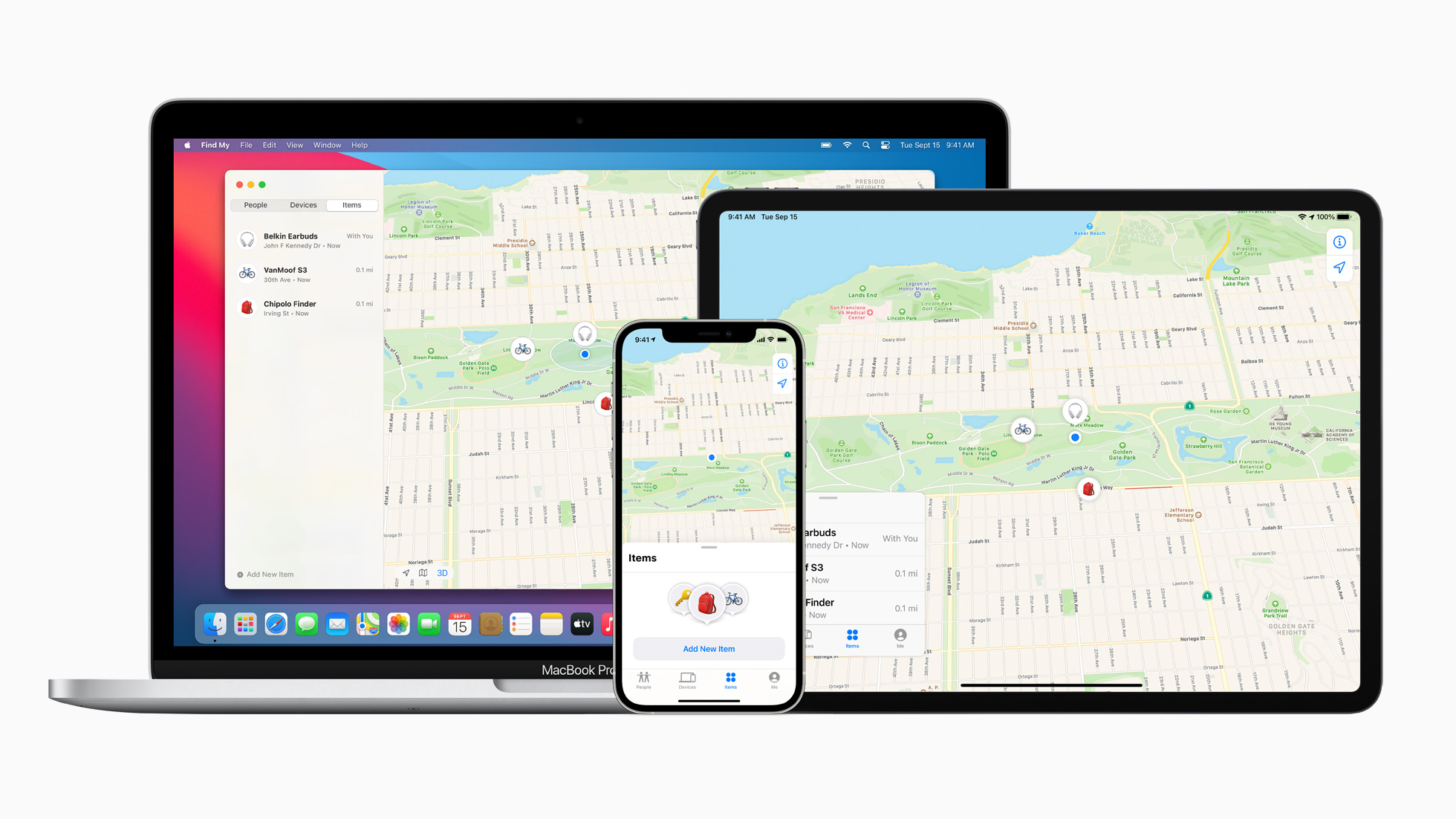
Apple announced on April 7th that third-party accessories will be able to receive support for the Find My app in the future. In addition to locating your own Apple devices, it is now also possible to locate selected third-party accessories.

With iOS 14.3, iPadOS 14.3, and macOS Big Sur 11.1 or later, users can locate compatible third-party products in the Items tab of the Find My app, using an encrypted, anonymous network of hundreds of millions of Apple devices. The company explainedthat devices on the Find My network use secure Bluetooth technology to detect nearby missing items and report their approximate location to the owner.

How to track third-party accessories using Apple's Find My app

First, users must follow the manufacturer's instructions to start the connection process.

  • To do this, open the “Find My” app on your iPhone, iPad or iPod touch
  • Now tap “Add Object” in the “Objects” tab

Now follow the steps to name the product and link it to your Apple ID. After following the instructions, you will be able to see the accessory on the map, play a sound when it is nearby, activate Lost Mode and receive a notification when it is found. The range of functions depends on the respective accessory itself. Future third-party accessories will also be able to use Apple's U1 chip. This is currently available in the iPhone 11 or later, the Apple Watch Series 6 and the HomePod mini. At the moment there are three products that are compatible with Apple's "Find My" app:

  • Belkin SOUNDFORM Freedom True Wireless Earbuds
  • VanMoof S3 & X3 e-bikes
  • Chipolo ONE Spot

Apple has a strict set of rules for devices that are part of the Find My Network accessory program. This means that all third-party products that want to participate must adhere to all of the "Find My Network" data protection regulations. A so-called "Works with Apple Find My" license is therefore not that easy to obtain. More products will certainly follow over the next few months. Finally, a small note. Please remember to protect your Apple ID with two-factor authentication and keep Bluetooth activated. (Image: Apple)

Make Apfelpatient a preferred source One click – and you'll see us more often on Google
Was this article helpful?
YesNo
Tags: iOSiPadOSmacOS
SendShareSend
Share

Our Amazon Storefront

A handpicked selection of products for iPhone, Mac and more – sorted by topic and updated regularly.

Shop Now

This post contains affiliate links (including Amazon). We earn a small commission on qualifying purchases – at no extra cost to you. Learn more on our Partner Program page.

Previous Post

“Your package is being delivered”: BSI warns of smishing wave

Next Post

Sony plans to offer PlayStation franchises for iPhone

Milan Jovicic

Milan Jovicic

Milan founded Apfelpatient in 2016 and has been responsible for all editorial content since 2018 — news, rumors, guides, and product reviews. Apple devices here are not test units on loan for two weeks but everyday tools: from the iPhone through MacBook Pro, MacBook Air, and iMac to the Apple Vision Pro, at least one device from nearly every product category is in daily use, many of them replaced annually. Every menu path in a guide is verified on the device before it is published.

Key art for the Apple TV series Pluribus showing a screaming woman against a yellow background, with Pluribus season 2 about to begin filming

Pluribus: Gilligan plans at least three seasons

August 12, 2026 - 8:27 PM CEST
The iPhone 17 lineup in five colors seen from the back, whose successor is expected to adopt the smaller iPhone 18 Dynamic Island from the Pro models

iPhone 18: Smaller Dynamic Island already in the base model

August 12, 2026 - 8:13 PM CEST
Drawn outline of the folded iPhone Ultra with square corners on the hinge side and rounded corners opposite, matching the leaked iPhone Ultra screen protectors

iPhone Ultra: Screen protectors reveal the camera position

August 12, 2026 - 3:58 PM CEST

About APFELPATIENT

APFELPATIENT brings you the latest Apple news, product updates, guides, reviews and tips across the entire Apple ecosystem — from the iPhone to the Mac to the Apple Vision Pro. From the first rumors to confirmed news: researched responsibly.

Follow Apfelpatient

Facebook Instagram YouTube Threads Threads

Company

  • About Apfelpatient
  • Contact
  • Author Profiles

Community

  • Netiquette
  • Push Notifications
  • RSS feed

Legal

  • Legal Notice
  • Privacy Policy
  • Terms of Use
  • Cookie Settings
  • Affiliate Program

Resources

  • Sitemap

© 2026 Apfelpatient. All rights reserved.

No Result
View All Result
  • Home
  • News
  • Rumors
  • Tips & Tricks
  • Reviews
  • Insights

© 2026 Apfelpatient. All rights reserved. Page Directory

Change language to Deutsch




