

apple patient
  • Home
  • News
  • Rumors
  • Tips & Tricks
  • Reviews
  • Insights
No Result
View All Result
  • iPhone 18
  • iOS 27
  • iPadOS 27
  • macOS
  • MacBook Neo
  • iPhone 17e
  • AirTags
  • iOS 26
  • iPhone 17
  • MacBook Pro
  • iPadOS
  • iMac
  • Mac mini
  • HomePod
  • Apple TV
  • iPad Pro
  • iPhone Air
  • Apple Vision Pro
  • iPhone 16
  • AirPods 4
  • Apple Watch Ultra
  • HomePod Mini
  • MacBook Air
  • iPad
  • AirPods Max
  • AirPods Pro 3
  • Apple Watch Series 3
  • Mac Studio
  • Studio Display
  • iPad Air
  • iPad mini
  • watchOS 27
  • Apple CarPlay
  • Apple Pay
  • watchOS 26
  • Home
  • News
  • Rumors
  • Tips & Tricks
  • Reviews
  • Insights
No Result
View All Result
apple patient
No Result
View All Result

iPhone Screen Distance: The Importance for Eye Health

Milan Jovicic by Milan Jovicic
9. March 2024 - 23:35 CET
in Apple Tips & Tricks
0
iPhone screen distance

Anapa, Russia - October 4, 2019: Woman hand holding Apple iPhone 11 and sitting at the table. iPhone was created and developed by the Apple inc.

WhatsAppFacebookEmail
Threads

In today's digital world, we spend more time in front of screens than ever before. Whether for work, entertainment or education, electronic devices are constant companions. But how does this intensive screen use affect our health? Eye health in particular is an area that requires special attention. This is where screen distance comes in, a feature introduced from iOS 17 and iPadOS 17 to reduce eye strain and promote healthy viewing habits.

Screen distancing, enabled by default for children under 13 in Family Sharing groups, offers an effective way to protect eye health. This article explains the meaning of screen distancing, how it works, and how to enable or disable it to help everyone, regardless of age, reduce eye strain from electronic devices.

The importance of screen distance for eye health

Focusing intensely on screens for long periods of time can strain your eyes and increase your risk of nearsightedness. Healthy vision is especially important for children as they are still developing. The Screen Distance feature in Screen Time uses the TrueDepth camera to detect when a device is held closer than 12 inches from your eyes for a long period of time and prompts you to move it further away. This reduces your risk of nearsightedness and promotes healthy vision habits.

Enable or disable screen spacing

Enabling or disabling screen spacing is easy. By visiting the settings and accessing the Screen Time option, this feature can be enabled or disabled. It is important to note that screen spacing settings should be synced across devices to ensure consistent application across all devices.
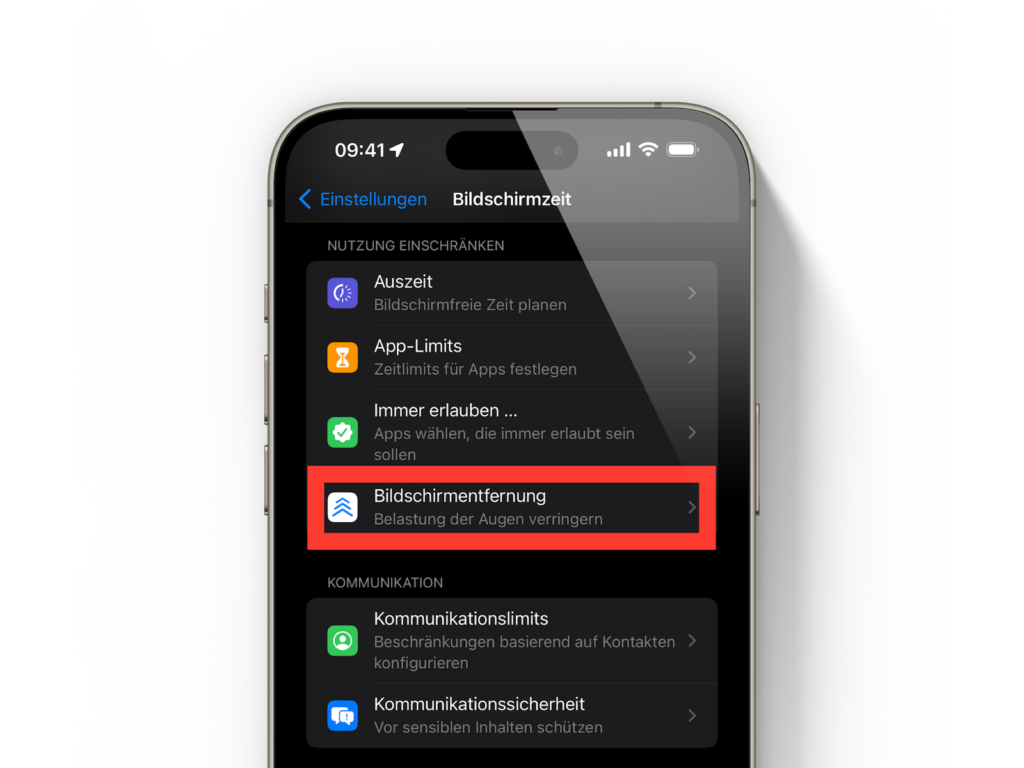
Image: Apfelpatient

How to display the warning

When the screen distance warning appears, users should hold the device more than 30 cm away from the eyes and tap "Continue". This simple action allows the warning to be removed and the screen distance to be used effectively.

Which iPhone and iPad devices support screen spacing?

Screen distance is only available on devices with TrueDepth camera that support iOS 17 or iPadOS 17 or later. This includes devices like the iPhone and iPad that feature this special camera technology.

Conclusion

Screen distance is more than just a feature - it's an important step in promoting eye health in a digital era. By using this feature, we can all help reduce eye strain and develop healthy viewing habits. So familiarize yourself with screen distance and protect your eyes for long-term vision health. Looking for new accessories? Then take a look in our Amazon Storefront - there you will find numerous products from leading suppliers, also for HomeKit and Co.! (Photo by DenPhoto / Bigstockphoto)


  • Block alternative app stores: Instructions for iOS 17.4 users
Make Apfelpatient a preferred source One click – and you'll see us more often on Google
Was this article helpful?
YesNo
Tags: iOSiPadiPadOSiPhone
SendShareSend
Share

Our Amazon Storefront

A handpicked selection of products for iPhone, Mac and more – sorted by topic and updated regularly.

Shop Now

This post contains affiliate links (including Amazon). We earn a small commission on qualifying purchases – at no extra cost to you. Learn more on our Partner Program page.

Previous Post

iPad Air & iPad Pro 2024 with FaceTime camera in landscape mode?

Next Post

New iPads, Apple Pencil and Magic Keyboard are on the way

Milan Jovicic

Milan Jovicic

Milan founded Apfelpatient in 2016 and has been responsible for all editorial content since 2018 — news, rumors, guides, and product reviews. Apple devices here are not test units on loan for two weeks but everyday tools: from the iPhone through MacBook Pro, MacBook Air, and iMac to the Apple Vision Pro, at least one device from nearly every product category is in daily use, many of them replaced annually. Every menu path in a guide is verified on the device before it is published.

Key art for the Apple TV series Pluribus showing a screaming woman against a yellow background, with Pluribus season 2 about to begin filming

Pluribus: Gilligan plans at least three seasons

August 12, 2026 - 8:27 PM CEST
The iPhone 17 lineup in five colors seen from the back, whose successor is expected to adopt the smaller iPhone 18 Dynamic Island from the Pro models

iPhone 18: Smaller Dynamic Island already in the base model

August 12, 2026 - 8:13 PM CEST
Drawn outline of the folded iPhone Ultra with square corners on the hinge side and rounded corners opposite, matching the leaked iPhone Ultra screen protectors

iPhone Ultra: Screen protectors reveal the camera position

August 12, 2026 - 3:58 PM CEST

About APFELPATIENT

APFELPATIENT brings you the latest Apple news, product updates, guides, reviews and tips across the entire Apple ecosystem — from the iPhone to the Mac to the Apple Vision Pro. From the first rumors to confirmed news: researched responsibly.

Follow Apfelpatient

Facebook Instagram YouTube Threads Threads

Company

  • About Apfelpatient
  • Contact
  • Author Profiles

Community

  • Netiquette
  • Push Notifications
  • RSS feed

Legal

  • Legal Notice
  • Privacy Policy
  • Terms of Use
  • Cookie Settings
  • Affiliate Program

Resources

  • Sitemap

© 2026 Apfelpatient. All rights reserved.

No Result
View All Result
  • Home
  • News
  • Rumors
  • Tips & Tricks
  • Reviews
  • Insights

© 2026 Apfelpatient. All rights reserved. Page Directory

Change language to Deutsch


