Apfelpatient
  • Home
  • News
  • Rumors
  • Tips & Tricks
  • Reviews
  • Insights
No result
View All Results
  • iPhone 18
  • iPhone 18 Pro
  • iPhone Duo
  • Apple Home
  • Siri AI
  • HomePod
  • HomePod mini
  • HomePod mini 2
  • Apple TV 4K
  • Apple Watch Series 12
  • Apple Watch Ultra 4
  • AirPods 5
  • iOS 27
  • iPadOS 27
  • macOS
  • MacBook Neo
  • iPhone 17e
  • AirTags
  • iOS 26
  • iPhone 17
  • MacBook Pro
  • iPadOS
  • iMac
  • Mac mini
  • Apple TV
  • iPad Pro
  • iPhone Air
  • Apple Vision Pro
  • iPhone 16
  • AirPods 4
  • Apple Watch Ultra
  • AirPods Pro 3
  • MacBook Air
  • iPad
  • AirPods Max
  • Mac Studio
  • Studio Display
  • iPad Air
  • iPad mini
  • watchOS 27
  • Apple CarPlay
  • Apple Pay
  • watchOS 26
  • Home
  • News
  • Rumors
  • Tips & Tricks
  • Reviews
  • Insights
No result
View All Results
Apfelpatient
No result
View All Results
  • iPhone 18
  • iPhone 18 Pro
  • iPhone Duo
  • Apple Home
  • Siri AI
  • HomePod
  • HomePod mini
  • HomePod mini 2
  • Apple TV 4K
  • Apple Watch Series 12
  • Apple Watch Ultra 4
  • AirPods 5
  • iOS 27
  • iPadOS 27
  • macOS
  • MacBook Neo
  • iPhone 17e
  • AirTags
  • iOS 26
  • iPhone 17
  • MacBook Pro
  • iPadOS
  • iMac
  • Mac mini
  • Apple TV
  • iPad Pro
  • iPhone Air
  • Apple Vision Pro
  • iPhone 16
  • AirPods 4
  • Apple Watch Ultra
  • AirPods Pro 3
  • MacBook Air
  • iPad
  • AirPods Max
  • Mac Studio
  • Studio Display
  • iPad Air
  • iPad mini
  • watchOS 27
  • Apple CarPlay
  • Apple Pay
  • watchOS 26

iPhone Duo hinge: What really helps with problems

Milan Jovicic by Milan Jovicic
October 23, 2026 - 23:40 CEST
in Apple Tips & Tricks, iPhone news, rumors and tips
0
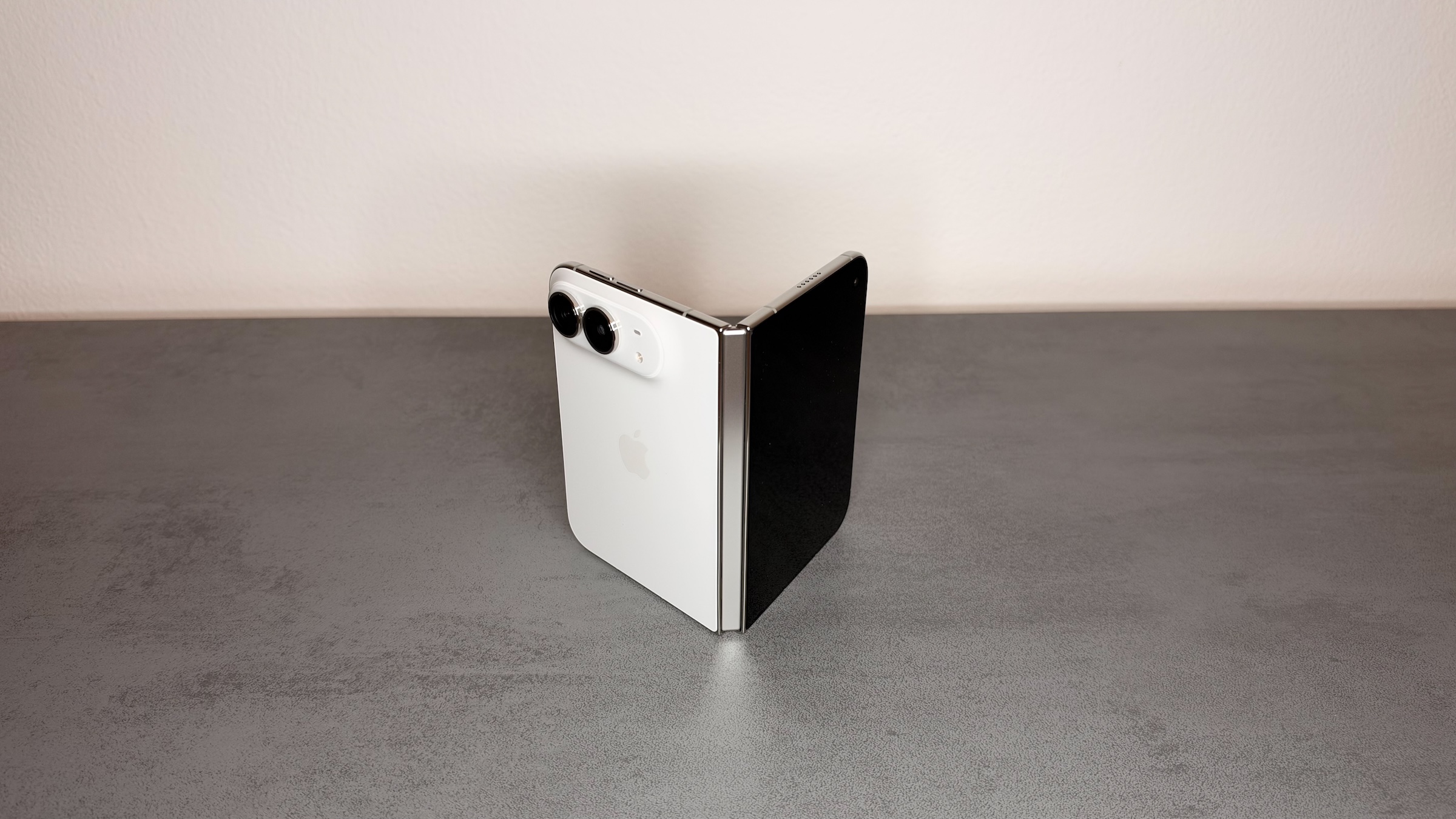
iPhone Duo hinge: a white iPhone Duo half unfolded and standing like a book on a gray stone surface, with the silver hinge facing the camera

Image: Apfelpatient

WhatsAppFacebookEmail
Threads

This article may contain affiliate links. Learn more on our Partner Program page.

Make Apfelpatient a preferred source One click – and you'll see us more often on Google

If the hinge cracks, wobbles, or the iPhone Duo no longer closes completely, neither a restart nor an update will help. At launch, Apple described how to narrow down a hinge problem – and what parts will ultimately be replaced. This is more expensive than it sounds.

With the sales launch on October 23, Apple released a series of support documents for the iPhone Duo, including a guide to hinge problems. It came at just the right time: On the first day of sales, the first reports of cracks in the inner display surfaced, almost all of which ran along the hinge.

The following steps reflect Apple's instructions and include information on the cost for buyers in Germany. All other device specifications can be found on the iPhone Duo fact page.

Key Facts at a Glance

  • Apple lists five signs of a hinge problem, ranging from unusual noises to a broken hinge.
  • According to Apple, there is no software diagnosis or solution for hinge problems – restarting, updating, or restoring will not help.
  • Third-party cases and screen protectors should be removed before each test.
  • If the problem cannot be fixed, Apple will replace the entire internal display assembly.
  • Without AppleCare, damage to the internal display costs 1,149 euros; with AppleCare, it costs 99 euros.

How Apple detects a hinge problem

Apple lists five scenarios for which the instructions are intended:

  • The device cannot be fully opened or closed.
  • Unexpected noises occur when opening or closing.
  • The hinge is loose.
  • The hinge is bent or broken.
  • The casing is so damaged that it impairs the function of the hinge.

Before proceeding with the test, Apple refers to the instructions in the user manual regarding the use of the hinge. There, Apple describes how to open, close, and partially fold the iPhone Duo – for example, like a book, a tent, or in a sitting position. When fully unfolded and in landscape mode, two apps also run side-by-side in Split View .

Restarting and updating don't help

The most important point in the instructions is buried in a subordinate clause: There is neither a software diagnosis nor a solution for hinge problems. According to Apple, restarting, updating, or restoring the iPhone is unnecessary. So, if you hear an unusual noise when opening and closing your phone, you can skip these steps and start checking it directly.

Here's how to check the hinge yourself

Apple describes several tests that can help narrow down the cause:

  1. Remove third-party cases and screen protectors.
  2. Take a close look at the hinge.
  3. Open and close the iPhone Duo several times and listen for any unusual noises. Check if the hinge feels loose, stiff, or crooked.
  4. Make sure the hinge securely holds the device in all positions.
  5. Check along the hinge for particles or dust and on the casing for dents or scratches.

Clean properly

If dust or dirt is found, Apple recommends cleaning the displays with a soft, slightly damp, lint-free cloth. Beforehand, all cables must be disconnected, including the USB-C cable, which charges the iPhone Duo to about 50% in approximately 20 minutes using the appropriate power adapter. The following applies:

  • Turn off the iPhone beforehand
  • Do not use products containing bleach or hydrogen peroxide.
  • Do not allow moisture to enter any openings and do not immerse the device in cleaning agents.
  • Do not use compressed air

If nothing else works: replace the interior display

If these steps don't resolve the problem, Apple specifies only one solution: replacing the internal display assembly. Apple doesn't mention a separate replacement part for the hinge. For other service options, the instructions refer to Apple's repair page.

According to Apple's repair prices for the iPhone Duo, damage to the inner display costs €1,149 without AppleCare and €99 with AppleCare. If the damage is due to a manufacturing defect, the repair is covered under warranty. Customers who recently purchased the device from Apple can also return it within 14 calendar days of delivery.

Why hinge damage is so expensive

I believe the sentence about replacement is the real message of the instructions. Because Apple replaces the entire internal display assembly when hinge problems are unresolved, such damage, occurring outside of warranty, becomes the second most expensive repair item, right after other types of damage. Without a warranty plan, a worn-out hinge after a few years of use costs as much as a broken internal display.

Anyone planning to keep their Duo for a long time should consider AppleCare when purchasing it and document any unusual noises early on, while the warranty is still valid. Further articles about the foldable iPhone can be found on the iPhone Duo topic page.

iPhone Duo hinge – the most important points at a glance

No software can fix problems with the iPhone Duo's hinge. Apple recommends removing third-party cases, inspecting the hinge, and carefully cleaning it—without compressed air. If the problem persists, the entire internal display assembly will be replaced for €1,149 without AppleCare.

Did you purchase AppleCare for your iPhone Duo, or are you relying on the warranty and statutory guarantee? Tell us in the comments how you're protecting your Duo.

Frequently Asked Questions: iPhone Duo Hinge

What to do if the hinge of the iPhone Duo cracks?

Remove any third-party cases and screen protectors, open and close the iPhone Duo several times, and listen for any unusual noises. If the noise persists, the next step is to schedule an appointment with Apple Support.

Will a restart or a software update help with hinge problems?

No. According to Apple, there is neither a software diagnosis nor a solution for hinge problems. Restarting, updating, or restoring is not necessary.

How can I tell if there's a problem with the hinge?

Apple lists five signs: The device cannot be fully opened or closed, makes unexpected noises, the hinge is loose, bent or broken, or damage to the casing hinders movement.

How do I clean the hinge of the iPhone Duo?

Use a soft, slightly damp, lint-free cloth after disconnecting all cables and switching off the device. Do not use compressed air, bleach or hydrogen peroxide, or allow moisture to enter the openings.

Can Apple replace just the hinge?

Apple does not specify a separate replacement part for the hinge. If a problem cannot be fixed, the entire internal display assembly is replaced.

How much does it cost to repair the hinge on an iPhone Duo?

Since the internal display assembly needs to be replaced, the cost is €1,149 without AppleCare and €99 with AppleCare. If there is a manufacturing defect, the warranty applies.

Can I return an iPhone Duo with a hinge problem?

When purchasing directly from Apple, returns are possible within 14 calendar days of delivery. Regardless, the statutory two-year warranty against the retailer applies.
Was this article helpful?
YesNo
Tags: iPhoneiPhone Duo
SendShareSend
Share

Our Amazon Storefront

A handpicked selection of products for iPhone, Mac and more – sorted by topic and updated regularly.

Shop Now

This post contains affiliate links (including Amazon). We earn a small commission on qualifying purchases – at no extra cost to you. Learn more on our Partner Program page.

Previous Post

iPhone Duo: First reports of cracks in the inner display

Milan Jovicic

Milan Jovicic

Milan founded Apfelpatient in 2016 and has been responsible for all editorial content since 2018 – news, rumors, how-to guides and product reviews. Here, Apple devices aren't review units kept for two weeks, they're everyday tools: from iPhone to MacBook Pro, MacBook Air and iMac all the way to Apple Vision Pro, at least one device from every product category is in daily use, many of them replaced every year. Every menu path in a guide is checked on the device before it goes live.

Related posts

iPhone Duo: First reports of cracks in the inner display

by Milan Jovicic
October 23, 2026 - 10:44 PM CEST
iPhone Duo display crack: an intact, half-unfolded iPhone Duo on a stone surface, the crease of the inner display showing as a light stripe in the light

Initial photos show cracked internal displays on the iPhone Duo, mostly along the hinge. Here's what's known and what rights buyers have.

Read moreDetails

iPhone in China: Apple jumps from sixth to second place

by Milan Jovicic
October 23, 2026 - 10:24 PM CEST
iPhone China market share: a dark red iPhone from the Pro lineup seen from the back on a light marble surface, with camera plateau and three lenses

China's smartphone market has fallen to a 14-year low, with Apple jumping to second place according to Counterpoint. IDC comes to a different conclusion.

Read moreDetails

iPhone Duo Split View: Use two apps side by side

by Milan Jovicic
October 23, 2026 - 10:03 PM CEST
iPhone Duo Split View: unfolded iPhone Duo in landscape with a split inner display, the Home Screen on the left and Safari with an open article on the right

Two apps side by side on iPhone Duo: how to start Split View, pair apps together and why the right side matters.

Read moreDetails

iPhone Duo Touch ID: Rest your finger to open it directly

by Milan Jovicic
October 23, 2026 - 19:21 CEST
iPhone Duo Touch ID: folded iPhone Duo showing the Enter Touch ID or Passcode lock screen with keypad and a fingerprint symbol in the Dynamic Island

On iPhone Duo, Touch ID opens the device directly when your finger rests on the side button. Where to find the switch and what it does.

Read moreDetails

Fast charge iPhone Duo: Power adapter, cable and MagSafe

by Milan Jovicic
October 23, 2026 - 16:41 CEST
iPhone Duo fast charging: an unfolded iPhone Duo on a gray stone surface next to a white USB-C power adapter and a braided USB-C charging cable

The iPhone Duo charges to 50 percent in 20 minutes – with the right power adapter. What Apple requires, what MagSafe can do, and how much it costs.

Read moreDetails
Load More

Leave a Reply Cancel reply

Required fields are marked with * marked.

By submitting, you consent to the storage of your comment along with your name, email address and IP address. Details are available in our privacy policy.

Categories

  • Apple Insights
  • Apple Rumors
  • Apple News
  • Apple Tips & Tricks
  • iPhone news, rumors and tips
  • Mac and MacBook News
  • Reviews
Make Apfelpatient a preferred source One click – and you'll see us more often on Google

About APPLE PATIENT

APFELPATIENT brings you the latest Apple news, product updates, guides, reviews and tips across the entire Apple ecosystem — from the iPhone to the Mac to the Apple Vision Pro. From the first rumors to confirmed news: researched responsibly.

Follow Apfelpatient

Facebook Instagram YouTube Threads Threads

Company

  • About Apfelpatient
  • Contact
  • Author Profiles

Community

  • Netiquette
  • Push notifications
  • RSS feed

Legal

  • Legal Notice
  • Privacy Policy
  • Terms of Use
  • Cookie settings
  • Affiliate Program

Resources

  • Sitemap

© 2026 Apfelpatient. All rights reserved.

No result
View All Results
  • Home
  • News
  • Rumors
  • Tips & Tricks
  • Reviews
  • Insights

© 2026 Apfelpatient. All rights reserved. Site map

Change language to Deutsch