Apfelpatient
  • Home
  • News
  • Rumors
  • Tips & Tricks
  • Reviews
  • Insights
No result
View All Results
  • iPhone 18
  • iPhone 18 Pro
  • iPhone Duo
  • Apple Home
  • Siri AI
  • HomePod
  • HomePod mini
  • HomePod mini 2
  • Apple TV 4K
  • Apple Watch Series 12
  • Apple Watch Ultra 4
  • AirPods 5
  • iOS 27
  • iPadOS 27
  • macOS
  • MacBook Neo
  • iPhone 17e
  • AirTags
  • iOS 26
  • iPhone 17
  • MacBook Pro
  • iPadOS
  • iMac
  • Mac mini
  • Apple TV
  • iPad Pro
  • iPhone Air
  • Apple Vision Pro
  • iPhone 16
  • AirPods 4
  • Apple Watch Ultra
  • AirPods Pro 3
  • MacBook Air
  • iPad
  • AirPods Max
  • Mac Studio
  • Studio Display
  • iPad Air
  • iPad mini
  • watchOS 27
  • Apple CarPlay
  • Apple Pay
  • watchOS 26
  • Home
  • News
  • Rumors
  • Tips & Tricks
  • Reviews
  • Insights
No result
View All Results
Apfelpatient
No result
View All Results
  • iPhone 18
  • iPhone 18 Pro
  • iPhone Duo
  • Apple Home
  • Siri AI
  • HomePod
  • HomePod mini
  • HomePod mini 2
  • Apple TV 4K
  • Apple Watch Series 12
  • Apple Watch Ultra 4
  • AirPods 5
  • iOS 27
  • iPadOS 27
  • macOS
  • MacBook Neo
  • iPhone 17e
  • AirTags
  • iOS 26
  • iPhone 17
  • MacBook Pro
  • iPadOS
  • iMac
  • Mac mini
  • Apple TV
  • iPad Pro
  • iPhone Air
  • Apple Vision Pro
  • iPhone 16
  • AirPods 4
  • Apple Watch Ultra
  • AirPods Pro 3
  • MacBook Air
  • iPad
  • AirPods Max
  • Mac Studio
  • Studio Display
  • iPad Air
  • iPad mini
  • watchOS 27
  • Apple CarPlay
  • Apple Pay
  • watchOS 26

iPhone Duo Touch ID: Rest your finger to open it directly

Milan Jovicic by Milan Jovicic
October 23, 2026 - 19:21 CEST
in Apple Tips & Tricks, iPhone news, rumors and tips
0
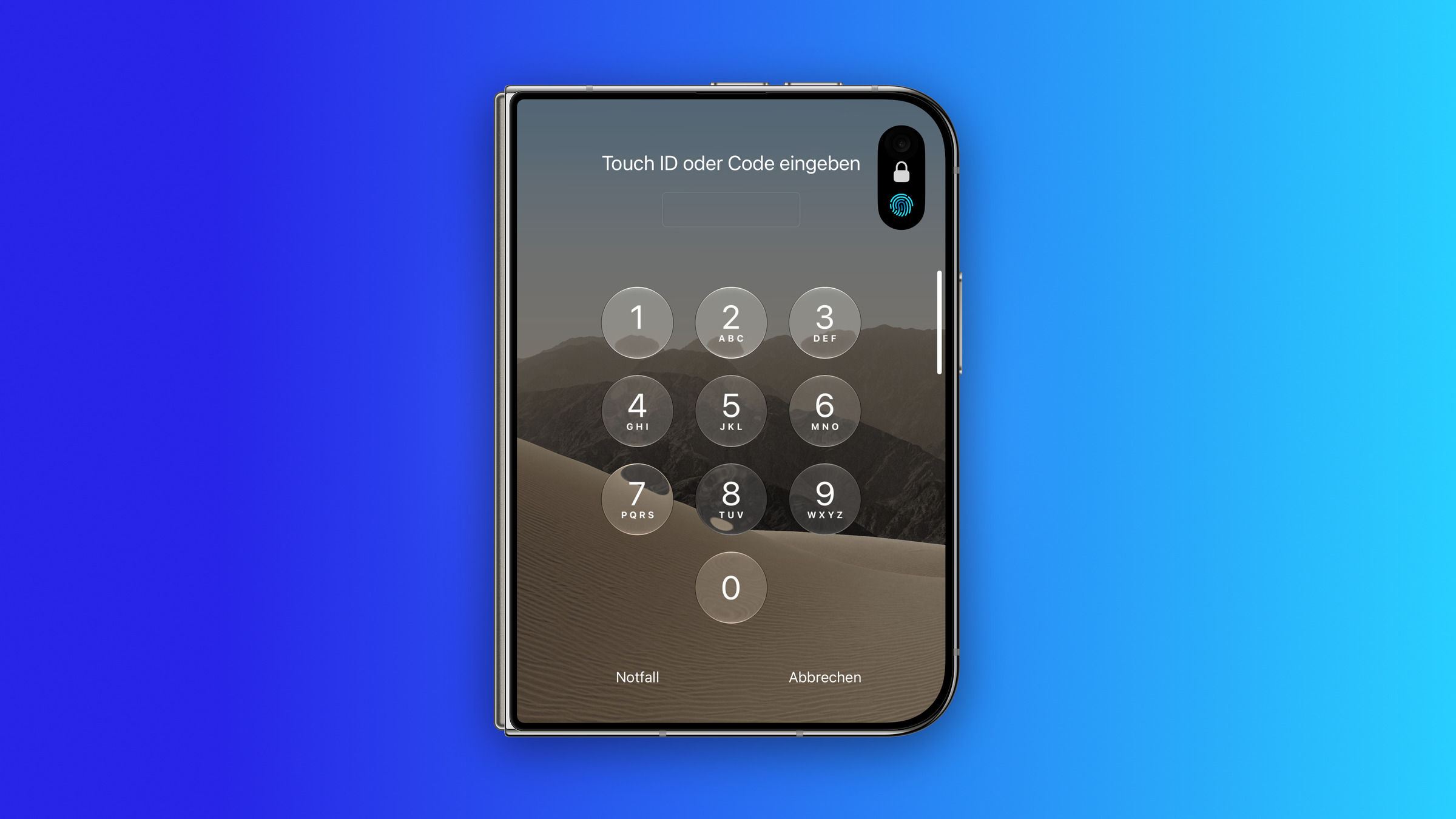
iPhone Duo Touch ID: folded iPhone Duo showing the Enter Touch ID or Passcode lock screen with keypad and a fingerprint symbol in the Dynamic Island

Image: Apfelpatient

WhatsAppFacebookEmail
Threads

This article may contain affiliate links. Learn more on our Partner Program page.

Make Apfelpatient a preferred source One click – and you'll see us more often on Google

On iPhone Duo, Touch ID is built into the side button. With one setting, simply resting your finger on the button opens the iPhone directly. You can check whether it is already turned on in two places in Settings.

iPhone Duo is the first new iPhone with a fingerprint sensor since the iPhone SE (3rd generation) from 2022. Instead of Face ID, Touch ID sits in the side button, as Apple describes in the iPhone Duo technical specifications. According to reports, Apple is only testing Face ID in prototypes for an iPhone Duo 2.

The feature is familiar from iPads with Touch ID in the top button. Apple describes it in the support document Use Touch ID on iPhone and iPad under the name "Rest Finger to Open." On iPhone Duo, the switch has the same name, as I checked on my own device. All other details about the device are on the iPhone Duo fact page.

Key Facts at a Glance

  • "Rest Finger to Open" opens iPhone Duo with Touch ID as soon as the enrolled finger rests on the side button.
  • If the setting is off, Touch ID only unlocks the device, and you still have to swipe up afterward.
  • On my iPhone Duo, it was already turned on after setup – a quick look in Settings will tell you for sure.
  • The switch is located under Accessibility › Side Button and also under Touch ID & Passcode.
  • Both switches control the same setting: flip one, and the other flips too.
  • A fingerprint must be set up first.

What the setting does

Apple describes the feature directly below the switch: "Open iPhone with Touch ID by resting your finger on the side button." When the enrolled finger rests on the button, Touch ID recognizes the fingerprint, and the iPhone opens without any further step. On my iPhone Duo, the switch was already turned on after setup.

If the switch is off, Touch ID still unlocks the device, but it stays on the Lock Screen. It only continues once you swipe up. The two methods below show whether the switch is on or off on your own device.

Method 1: Via Accessibility

Here's how to turn the feature on or off via Accessibility:

  1. Open Settings and tap "Accessibility."
  2. Scroll to the "Physical and Motor" section and tap "Side Button."
  3. "Rest Finger to Open" is at the very bottom of the page. Flip the switch.
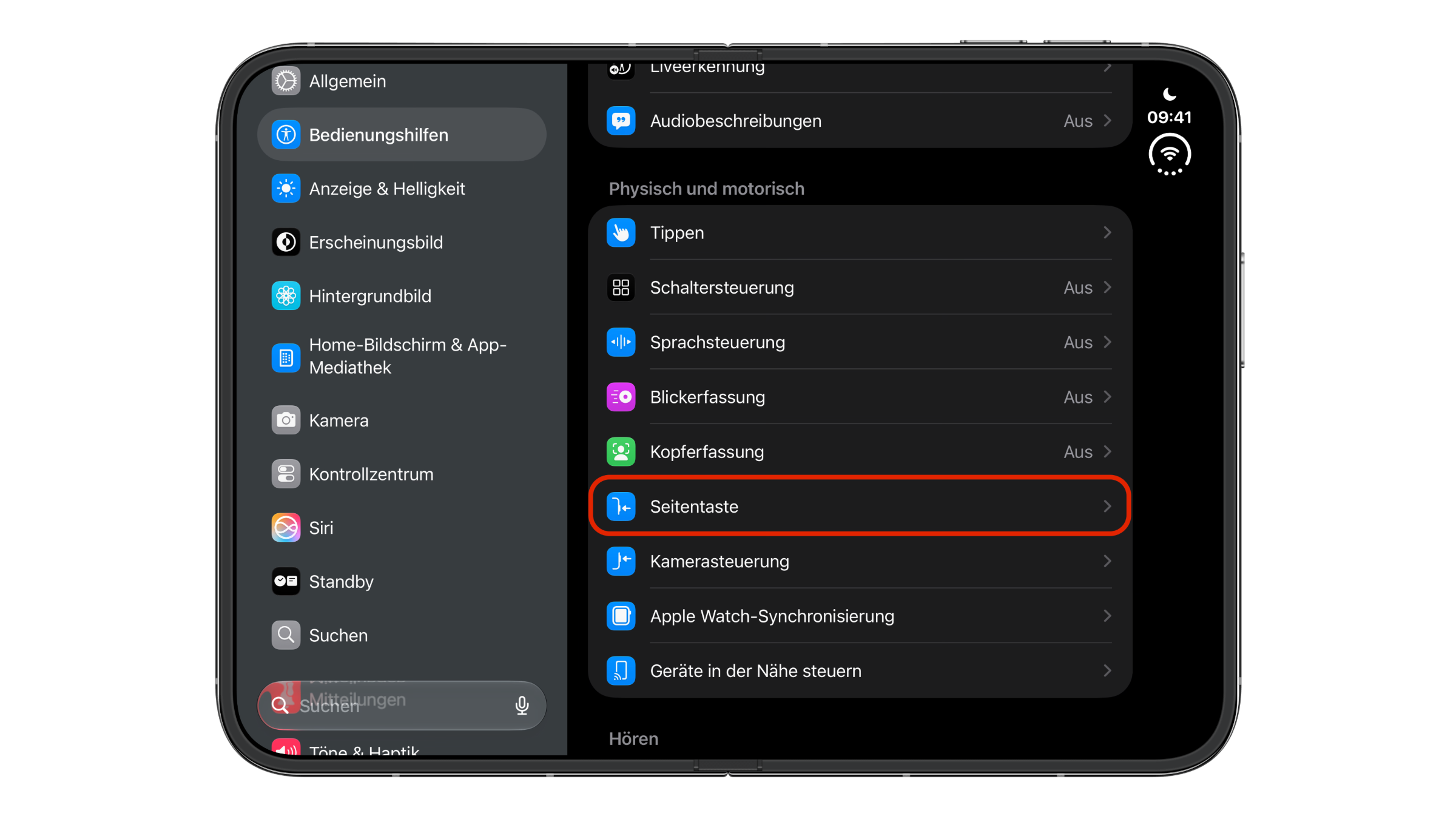
iPhone Duo Touch ID: Settings on an unfolded iPhone Duo with Accessibility open, the Side Button entry highlighted in the Physical and Motor section
Image: Apfelpatient

The same page also lets you adjust the click speed for double- and triple-clicks and choose what happens when you press and hold the side button – the options are Siri, Classic Voice Control or "Off."
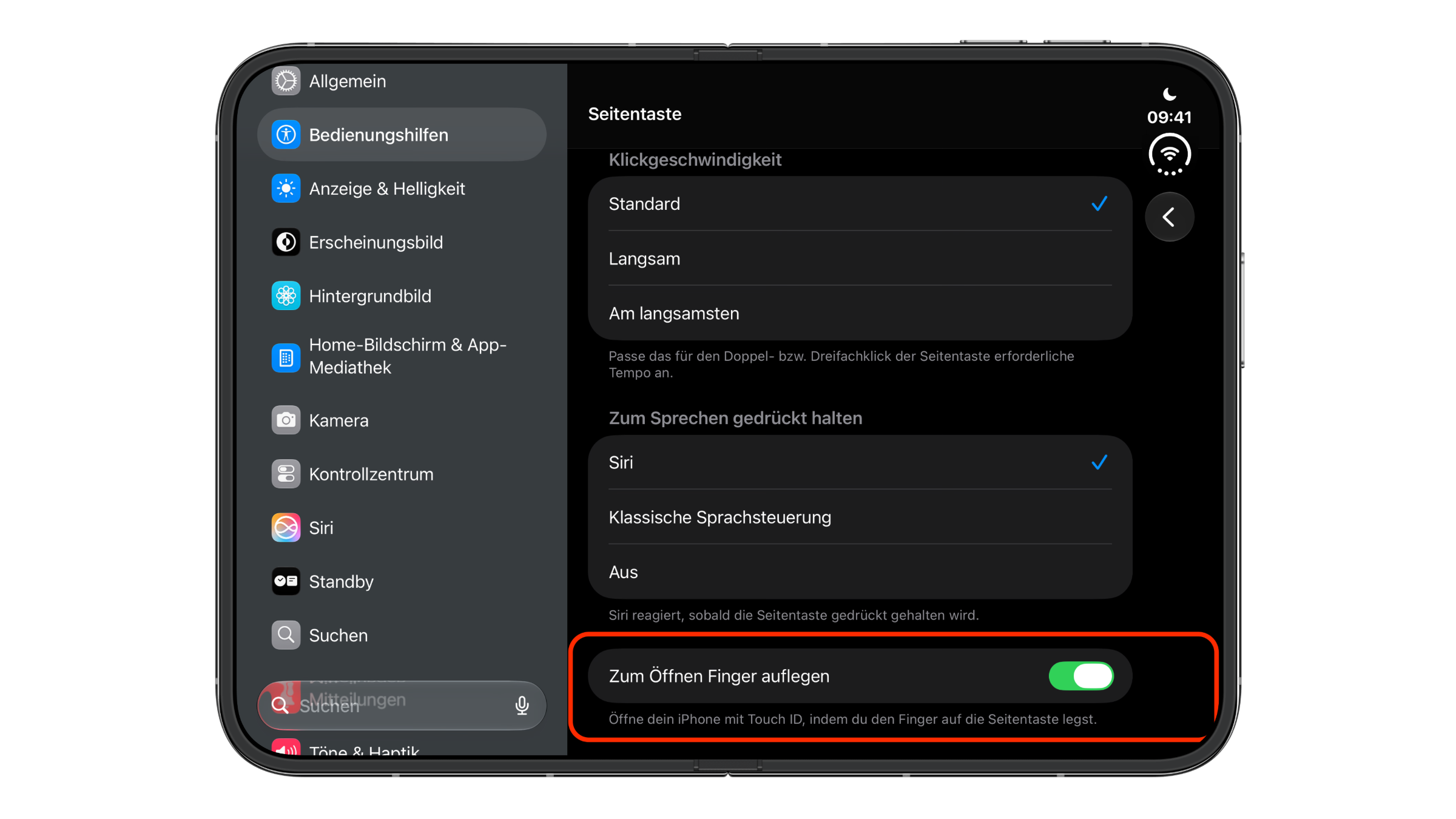
iPhone Duo Touch ID: Side Button settings page on iPhone Duo with the Rest Finger to Open switch turned on
Image: Apfelpatient

Method 2: Via Touch ID & Passcode

The same switch also appears where fingerprints are managed:

  1. Open Settings and tap "Touch ID & Passcode."
  2. Enter your passcode.
  3. "Rest Finger to Open" is below the list of fingerprints. Flip the switch.
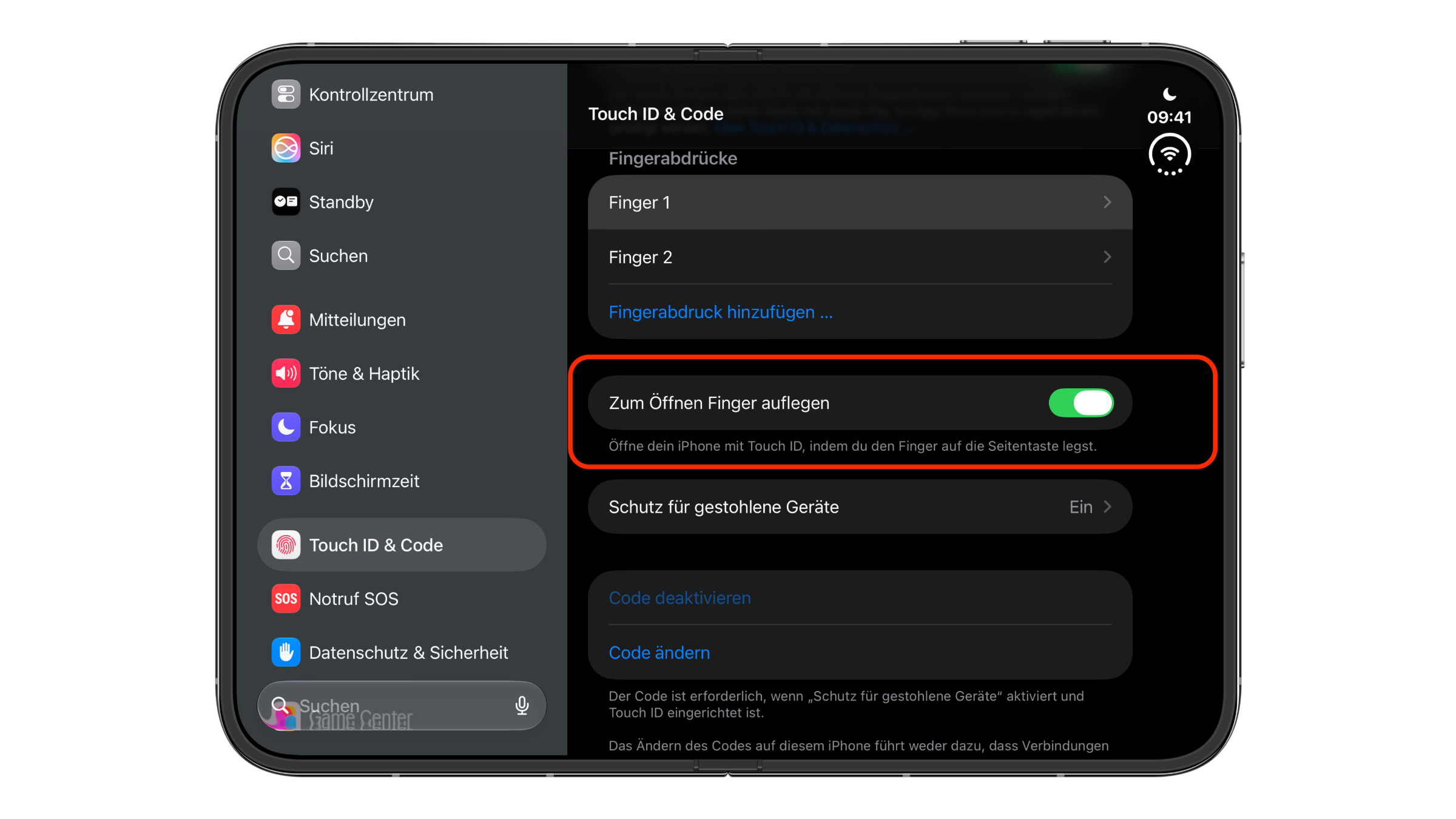
iPhone Duo Touch ID: Touch ID & Passcode settings page on iPhone Duo with two fingerprints and the Rest Finger to Open switch turned on
Image: Apfelpatient

It doesn't matter which method you use. On iPhone Duo, I checked both switches against each other: when one is flipped, the other changes with it – both when turning it on and when turning it off. So it is a single setting that Apple offers in two places.

Set up a fingerprint first

Without an enrolled finger, the switch has no effect. Fingerprints are added under "Touch ID & Passcode" with "Add a Fingerprint." Apple recommends holding the device the way you normally would when unlocking it.

Because iPhone Duo is held differently when folded and unfolded, it can make sense to enroll more than one finger. According to Apple, up to five fingerprints are possible, although each additional one can slightly slow down recognition.

Why I keep the setting turned on

I think "Rest Finger to Open" is the better choice on iPhone Duo. Touch ID already recognizes the finger as soon as it rests on the button, and I see no security benefit in the swipe afterward – in both cases, the device is only unlocked with the enrolled finger.

However, if you often pick up the device with your finger on the side button while the display is on, you will open the iPhone even when you only wanted to glance at the Lock Screen. In that case, turning the switch off is the better setting. More articles about the foldable iPhone are collected on the iPhone Duo topic page.

iPhone Duo Touch ID – the key points at a glance

With "Rest Finger to Open," iPhone Duo opens directly as soon as the enrolled finger rests on the side button – without the setting, you still have to swipe up after unlocking. The switch is located under Accessibility › Side Button and under Touch ID & Passcode, and both control the same setting. On my device, it was turned on from the start – a look at either of the two places will tell you for sure on your own iPhone Duo.

Do you keep the switch turned on on your iPhone Duo, or do you prefer to swipe up yourself after the fingerprint? Tell us in the comments which finger you rest on the side button – folded and unfolded.

Frequently asked questions: iPhone Duo Touch ID

Where is Touch ID on iPhone Duo?

In the side button. iPhone Duo does not have Face ID.

What does "Rest Finger to Open" mean?

When the setting is on, iPhone Duo opens directly with Touch ID as soon as the enrolled finger rests on the side button. When it is off, Touch ID only unlocks the device, and you still have to swipe up afterward.

Where can I find the setting?

Under Settings › Accessibility › Side Button and also under Settings › Touch ID & Passcode.

Are these two different settings?

No. Both switches control the same setting. Flip one, and the other changes with it.

Is "Rest Finger to Open" turned on by default on iPhone Duo?

On my iPhone Duo, the setting was already turned on after setup. To check whether this applies to every device, look under Settings › Accessibility › Side Button or under Touch ID & Passcode.

How many fingerprints can I enroll on iPhone Duo?

Up to five. According to Apple, each additional fingerprint can slightly slow down recognition.

How do I add another fingerprint?

In Settings, tap "Touch ID & Passcode," enter your passcode and choose "Add a Fingerprint."
Was this article helpful?
YesNo
Tags: iPhoneiPhone Duo
SendShareSend
Share

Our Amazon Storefront

A handpicked selection of products for iPhone, Mac and more – sorted by topic and updated regularly.

Shop Now

This post contains affiliate links (including Amazon). We earn a small commission on qualifying purchases – at no extra cost to you. Learn more on our Partner Program page.

Previous Post

Fast charge iPhone Duo: Power adapter, cable and MagSafe

Next Post

iPhone Duo Split View: Use two apps side by side

Milan Jovicic

Milan Jovicic

Milan founded Apfelpatient in 2016 and has been responsible for all editorial content since 2018 – news, rumors, how-to guides and product reviews. Here, Apple devices aren't review units kept for two weeks, they're everyday tools: from iPhone to MacBook Pro, MacBook Air and iMac all the way to Apple Vision Pro, at least one device from every product category is in daily use, many of them replaced every year. Every menu path in a guide is checked on the device before it goes live.

Related posts

iPhone Duo Split View: Use two apps side by side

by Milan Jovicic
October 23, 2026 - 10:03 PM CEST
iPhone Duo Split View: unfolded iPhone Duo in landscape with a split inner display, the Home Screen on the left and Safari with an open article on the right

Two apps side by side on iPhone Duo: how to start Split View, pair apps together and why the right side matters.

Read moreDetails

Fast charge iPhone Duo: Power adapter, cable and MagSafe

by Milan Jovicic
October 23, 2026 - 16:41 CEST
iPhone Duo fast charging: an unfolded iPhone Duo on a gray stone surface next to a white USB-C power adapter and a braided USB-C charging cable

The iPhone Duo charges to 50 percent in 20 minutes – with the right power adapter. What Apple requires, what MagSafe can do, and how much it costs.

Read moreDetails

iPhone Duo available in stores starting today: What buyers need to know

by Milan Jovicic
October 23, 2026 - 00:26 CEST
iPhone Duo in three views: folded with a calendar on the outer display, unfolded with the Lock Screen and half-open with the camera, for the iPhone Duo launch

The iPhone Duo is available starting today in Germany, Austria, and Switzerland. Pricing, store availability, and setup tips.

Read moreDetails

iPhone Duo: Apple names almost 60 adapted apps

by Milan Jovicic
October 22, 2026 - 3:11 PM CEST
Two optimized apps on iPhone Duo: unfolded with the Edits video timeline, half-folded with the racing game Asphalt Legends

Apple lists nearly 60 apps and games for the iPhone Duo, including Netflix and Instagram. It details what will be available at launch and what will be released later.

Read moreDetails

iPhone Duo: Apple is expected to produce 44 percent more

by Milan Jovicic
October 22, 2026 - 1:37 PM CEST
Unfolded iPhone Duo held in landscape with both hands showing the Home Screen, Apple is said to raise iPhone Duo production

Apple is reportedly increasing its production target for the iPhone Duo from 9.7 to 14 million units. Here's what that means for delivery times in Germany.

Read moreDetails
Load More

Leave a Reply Cancel reply

Required fields are marked with * marked.

By submitting, you consent to the storage of your comment along with your name, email address and IP address. Details are available in our privacy policy.

Categories

  • Apple Insights
  • Apple Rumors
  • Apple News
  • Apple Tips & Tricks
  • iPhone news, rumors and tips
  • Mac and MacBook News
  • Reviews
Make Apfelpatient a preferred source One click – and you'll see us more often on Google

About APPLE PATIENT

APFELPATIENT brings you the latest Apple news, product updates, guides, reviews and tips across the entire Apple ecosystem — from the iPhone to the Mac to the Apple Vision Pro. From the first rumors to confirmed news: researched responsibly.

Follow Apfelpatient

Facebook Instagram YouTube Threads Threads

Company

  • About Apfelpatient
  • Contact
  • Author Profiles

Community

  • Netiquette
  • Push notifications
  • RSS feed

Legal

  • Legal Notice
  • Privacy Policy
  • Terms of Use
  • Cookie settings
  • Affiliate Program

Resources

  • Sitemap

© 2026 Apfelpatient. All rights reserved.

No result
View All Results
  • Home
  • News
  • Rumors
  • Tips & Tricks
  • Reviews
  • Insights

© 2026 Apfelpatient. All rights reserved. Site map

Change language to Deutsch