


apple patient
  • Home
  • News
  • Rumors
  • Tips & Tricks
  • Reviews
  • Insights
No Result
View All Result
  • iPhone 18
  • iOS 27
  • iPadOS 27
  • macOS
  • MacBook Neo
  • iPhone 17e
  • AirTags
  • iOS 26
  • iPhone 17
  • MacBook Pro
  • iPadOS
  • iMac
  • Mac mini
  • HomePod
  • Apple TV
  • iPad Pro
  • iPhone Air
  • Apple Vision Pro
  • iPhone 16
  • AirPods 4
  • Apple Watch Ultra
  • HomePod Mini
  • MacBook Air
  • iPad
  • AirPods Max
  • AirPods Pro 3
  • Apple Watch Series 3
  • Mac Studio
  • Studio Display
  • iPad Air
  • iPad mini
  • watchOS 27
  • Apple CarPlay
  • Apple Pay
  • watchOS 26
  • Home
  • News
  • Rumors
  • Tips & Tricks
  • Reviews
  • Insights
No Result
View All Result
apple patient
No Result
View All Result

iOS 15: How to invite Android users to FaceTime

Milan Jovicic by Milan Jovicic
June 19, 2021 - 4:15 PM CEST
in Apple Tips & Tricks
0
iOS 15 FaceTime Link

Photo by Unsplash / Toa Heftiba

WhatsAppFacebookEmail
Threads

With iOS 15 and iPadOS 15, you can allow anyone, even if they don't have an Apple device, to join a FaceTime call with you. All you have to do is create a link and then share it. I'll show you how to do it below.

With this new link feature, friends and family members who don't have an Apple account can log into a FaceTime call with you by opening a web browser on any non-Apple device. It doesn't matter whether that's a Windows PC or an Android phone. The new feature makes FaceTime “almost” a platform-independent video service. Please note: You need an iOS, iPadOS or Mac device to create such a FaceTime call.

iOS 15: How to create a FaceTime call via link

Before you make your first FaceTime call with an Android user, you need to follow these steps.

  • Launch the FaceTime app on your iPhone or iPad.
  • Tap Create Link.
  • Give your FaceTime link a name by tapping Add Name in the Actions menu.
  • Now choose a method to share your link from the Actions menu, e.g. via Messages or Mail.

iOS 15 FaceTime Link
Image: Apfelpatient – FaceTime Link

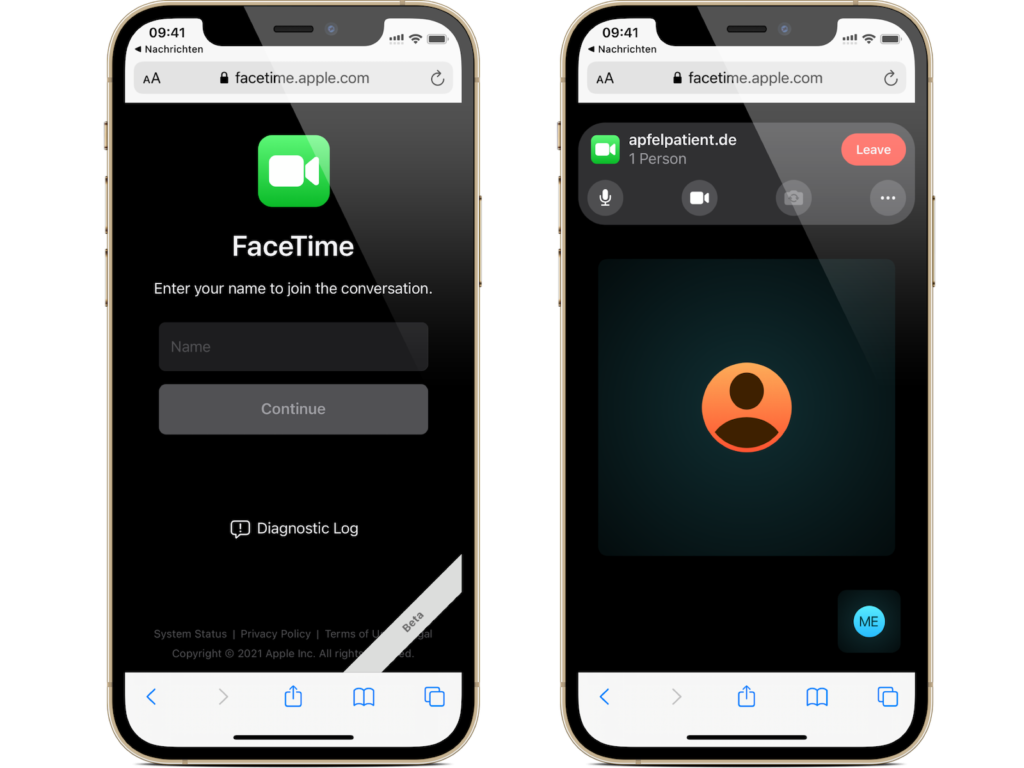
Once you send the link and the recipient opens it, they will be taken to a web page where they can enter their name to join the conversation.
iOS 15 FaceTime Link
Image: Apfelpatient – FaceTime Link

Once he joins the call, he has the usual FaceTime options to mute his microphone, turn off the video, change the camera view and leave the call, cool right?! (Photo by Unsplash / Toa Heftiba)


  • iOS 15: How to activate background noises
Make Apfelpatient a preferred source One click – and you'll see us more often on Google
Was this article helpful?
YesNo
Tags: iOSiOS 15iPadOSiPadOS 15
SendShareSend
Share

Our Amazon Storefront

A handpicked selection of products for iPhone, Mac and more – sorted by topic and updated regularly.

Shop Now

This post contains affiliate links (including Amazon). We earn a small commission on qualifying purchases – at no extra cost to you. Learn more on our Partner Program page.

Previous Post

MacBook Pro 2021: Leaker reveals launch details

Next Post

iOS 15 Find My: Notify when left behind – here's how

Milan Jovicic

Milan Jovicic

Milan founded Apfelpatient in 2016 and has been responsible for all editorial content since 2018 — news, rumors, guides, and product reviews. Apple devices here are not test units on loan for two weeks but everyday tools: from the iPhone through MacBook Pro, MacBook Air, and iMac to the Apple Vision Pro, at least one device from nearly every product category is in daily use, many of them replaced annually. Every menu path in a guide is verified on the device before it is published.

Customers crowding an Apple Store as the US smartphone market lost five percent in sales during the second quarter

US smartphone market shrinks, iPhone 18 expected to be more expensive

August 12, 2026 - 23:47 CEST
Ted Lasso standing beside a coach in the empty AFC Richmond stadium while Apple has yet to decide on Ted Lasso season 5

Ted Lasso Season 5: Apple still sees plenty of stories

August 12, 2026 - 10:11 PM CEST
Concept design of the iPhone Ultra in its unfolded state with a large inner display

iPhone Ultra (iPhone Fold): All rumors and facts at a glance

August 12, 2026 - 9:32 PM CEST

About APFELPATIENT

APFELPATIENT brings you the latest Apple news, product updates, guides, reviews and tips across the entire Apple ecosystem — from the iPhone to the Mac to the Apple Vision Pro. From the first rumors to confirmed news: researched responsibly.

Follow Apfelpatient

Facebook Instagram YouTube Threads Threads

Company

  • About Apfelpatient
  • Contact
  • Author Profiles

Community

  • Netiquette
  • Push Notifications
  • RSS feed

Legal

  • Legal Notice
  • Privacy Policy
  • Terms of Use
  • Cookie Settings
  • Affiliate Program

Resources

  • Sitemap

© 2026 Apfelpatient. All rights reserved.

No Result
View All Result
  • Home
  • News
  • Rumors
  • Tips & Tricks
  • Reviews
  • Insights

© 2026 Apfelpatient. All rights reserved. Page Directory

Change language to Deutsch


