

Apple Music has continued to evolve since its launch and regularly offers its users new features. With the release of iOS 18, Apple introduced an innovative technology that could revolutionize music listening on the iPhone - Music Haptics. This feature allows you to not only hear music but also feel it. Below you will learn all about the new Music Haptics feature, how it works and how it enriches the music experience especially for people with hearing problems. We also take a look at the new Apple Music playlists that are perfectly tailored to this feature.
The constant development of the iOS platform shows that Apple is striving to integrate barrier-free technologies into its users' everyday lives. With the introduction of Music Haptics in iOS 18, Apple is primarily targeting those who want to experience music not only through their hearing but also through their sense of touch. This function is particularly interesting for deaf or hard of hearing people, who now have an additional way of enjoying music. But it also opens up a completely new way of experiencing music for other users.
What is Music Haptics?
Music Haptics is an innovative feature first introduced in iOS 18. It uses iPhone's Taptic Engine to provide haptic feedback in the form of vibrations synchronized to the music being played. This means that when you listen to music in Apple Music, Apple Music Classical, Shazam, and certain third-party apps, your iPhone will vibrate to match the rhythm and beats. This opens up a whole new dimension to music listening by letting you not only hear the music but also feel it.
How does music haptics work?
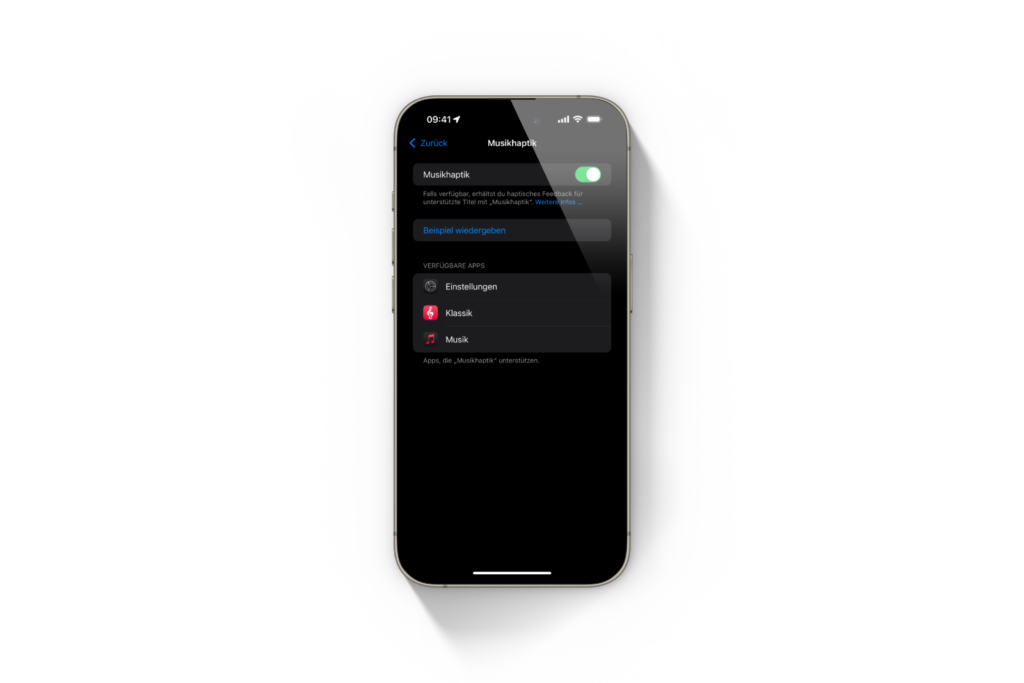
To use Music Haptics, you need an iPhone 12 or later, although the third-generation iPhone SE is not supported. The feature is available with iOS 18 and later versions. Once you have activated the feature in Settings under Accessibility → Music Haptics, your iPhone will react with vibrations when playing music over Wi-Fi or mobile data. These vibrations are not random but precisely coordinated with the rhythm of the music, so that you can feel the beats and basslines.
New playlists on Apple Music
In addition to introducing Music Haptics, Apple has also released new playlists in Apple Music that have been curated specifically for this feature. These playlists have names like:
- Haptics Beats: Ideal for anyone who wants to feel rhythmic, fast beats.
- Haptics Bass: This playlist lets you feel deep bass vibrations, which are particularly noticeable with bass-heavy music.
- Haptics Vibrations: A diverse selection of songs featuring varied vibrations.
- Haptics Hits: Here you will find popular songs that are perfectly tailored to the haptic experience.
These playlists are a great starting point to fully experience the haptics of music and explore the musical spectrum from rhythmic beats to gentle vibrations.
Advantages of Music Haptics
The Music Haptics feature brings a number of benefits, especially in the area of accessibility:
- For deaf or hard of hearing users: Music Haptics offers these users a completely new way to experience music. The vibrations allow them to perceive the rhythm and dynamics of a song, which significantly enhances the music experience.
- For all users: Even if you don't have any hearing problems, Music Haptics offers an exciting new dimension in listening to music. The ability to physically feel music makes the music experience more intense and immersive.
- More interactive music experience: Synchronizing the vibrations with the beat of the music creates a more intense sense of interactivity and can take music enjoyment to a new level.
How to activate Music Haptics
Activating the music haptics is very easy. Just follow these steps:
- Open the Settings on your iPhone.
- Select Accessibility.
- Scroll to Music Haptics and activate the feature.
Make sure you have iOS 18 or later installed on your iPhone and that your device is connected to a Wi-Fi or cellular network for vibrations to work optimally.
Feeling music with Apple: Music Haptics as a game-changer
With the introduction of Music Haptics in iOS 18, Apple has once again proven that it is committed to providing its users with innovative and accessible technologies. This feature is a fantastic way for people with hearing problems in particular to experience music in a new and unique way. But for everyone else, it also opens up an exciting, interactive music experience that takes hearing and feeling music to a whole new level. So if you have iOS 18 installed, you should definitely try out this new feature - and the specially developed playlists in Apple Music are the perfect place to start. With Music Haptics, you can turn your iPhone into the ultimate musical instrument that you not only hear but also feel. Are you looking for accessories from top brands? In our Amazon Storefront you will find a large selection of products, perfect for HomeKit and much more! (Image: Apple)
- Apple Watch: New sleep apnea feature explained
- iOS 18: Some app icons remain bright in dark mode
- iOS 18, visionOS 2 & more released: The most exciting features





