apple patient
  • Home
  • News
  • Rumors
  • Tips & Tricks
  • Reviews
  • Insights
No Result
View All Result
  • iPhone 18
  • iOS 27
  • iPadOS 27
  • macOS
  • MacBook Neo
  • iPhone 17e
  • AirTags
  • iOS 26
  • iPhone 17
  • MacBook Pro
  • iPadOS
  • iMac
  • Mac mini
  • HomePod
  • Apple TV
  • iPad Pro
  • iPhone Air
  • Apple Vision Pro
  • iPhone 16
  • AirPods 4
  • Apple Watch Ultra
  • HomePod Mini
  • MacBook Air
  • iPad
  • AirPods Max
  • AirPods Pro 3
  • Apple Watch Series 3
  • Mac Studio
  • Studio Display
  • iPad Air
  • iPad mini
  • watchOS 27
  • Apple CarPlay
  • Apple Pay
  • watchOS 26
  • Home
  • News
  • Rumors
  • Tips & Tricks
  • Reviews
  • Insights
No Result
View All Result
apple patient
No Result
View All Result

App Store – How to use Sign in with Apple

Milan Jovicic by Milan Jovicic
October 19, 2019 - 3:04 PM CEST
in Apple Tips & Tricks
0
Anapa, Russia - October 4, 2019: Woman hand holding Apple iPhone 11 and sitting at the table. iPhone was created and developed by the Apple inc.

Anapa, Russia - October 4, 2019: Woman hand holding Apple iPhone 11 and sitting at the table. iPhone was created and developed by the Apple inc.

WhatsAppFacebookEmail
Threads

Apple's newest feature, Sign in with Apple, was introduced this fall in iOS 13, iPadOS, and macOS 10.15 Catalina. We'll show you how to use and manage the feature on iPhone, iPad, and Mac.

Some of you may now be wondering, what exactly is “Sign in with Apple”? The single sign-on feature was announced on the WWDC 2019 stage as a secure alternative to the ubiquitous solutions Facebook and Google. The feature allows users to create a new account on suitable platforms without revealing potentially sensitive private information. Unlike existing solutions, “Sign in with Apple” users can authenticate using Face ID or Touch ID.

You decide for yourself which personal information is passed on to the respective provider, which significantly strengthens data protection. A special email forwarding system allows users of this solution to disguise their personal email address with an anonymized version. This is generated based on apps or services. The strategy increases privacy and makes it possible to completely end communication with the company when the account is deleted.

Each application gets its own email address

The "Sign in with Apple" option allows developers to communicate with users even if they don't have a personal email address. As mentioned above, users receive a verified but anonymized email address that is linked to the customer's Apple ID. Apple does not store any emails - they are deleted from the database as soon as they are delivered. The disguised but still verified email address is also generated individually for each application. This means that none of these email addresses are used for two services at the same time. If the user deletes their account, the developer is informed. The link to the Apple ID is then removed and the generated email address is irrevocably deleted.

How to use Sign in with Apple

If you want to register with an application, it should of course support the so-called third-party registration option.  Here you will be able to choose between Apple, Facebook and Google. If this requirement is met, you can continue with the new "Sign in with Apple" function. In the second step, you will be asked whether you want to share your Apple ID with the company or hide it. Users of this option will most likely use the anonymization option. You will then log in with your Apple ID. The remaining steps are completed automatically in the background, as there is no need to enter another password or an email address.
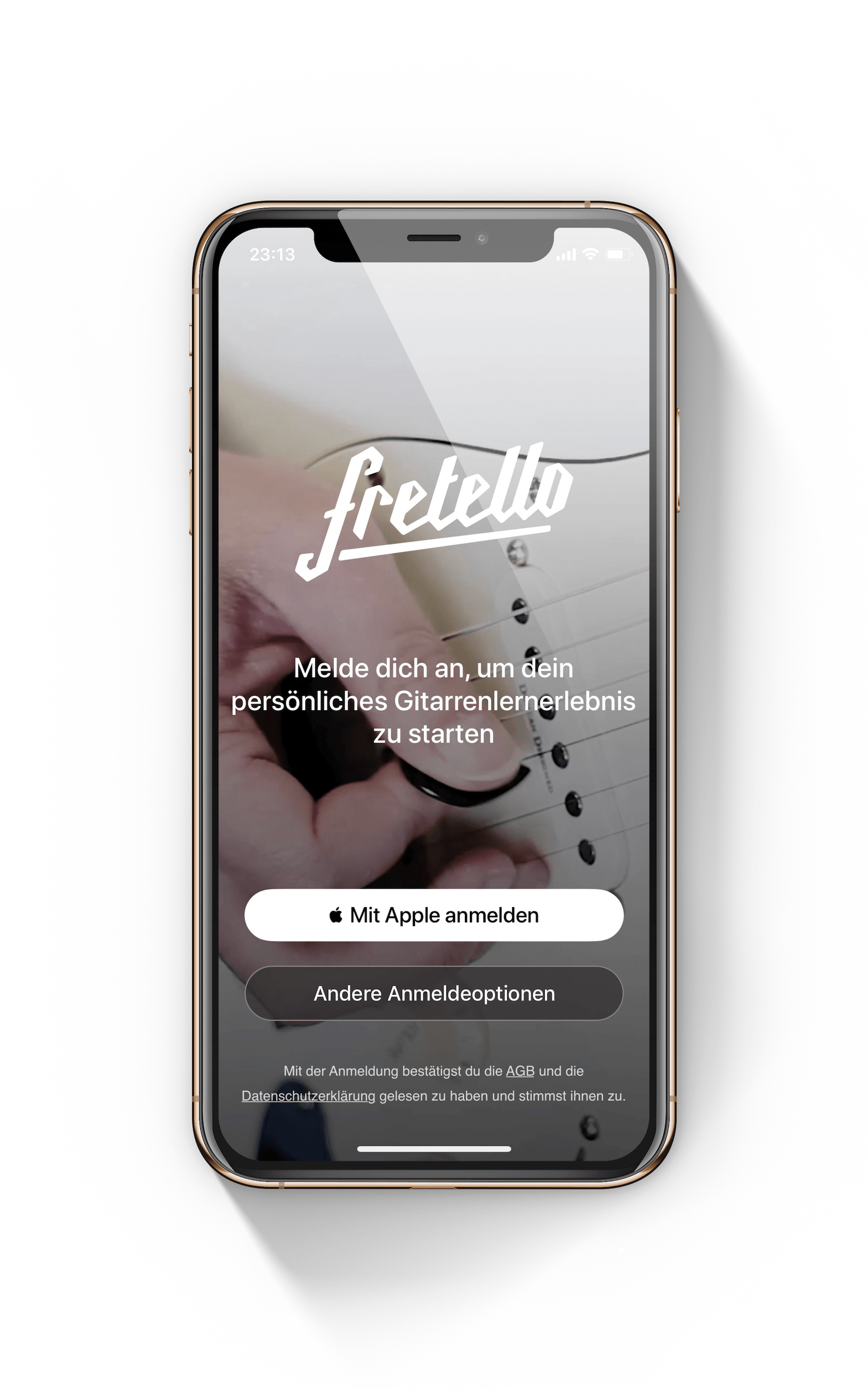
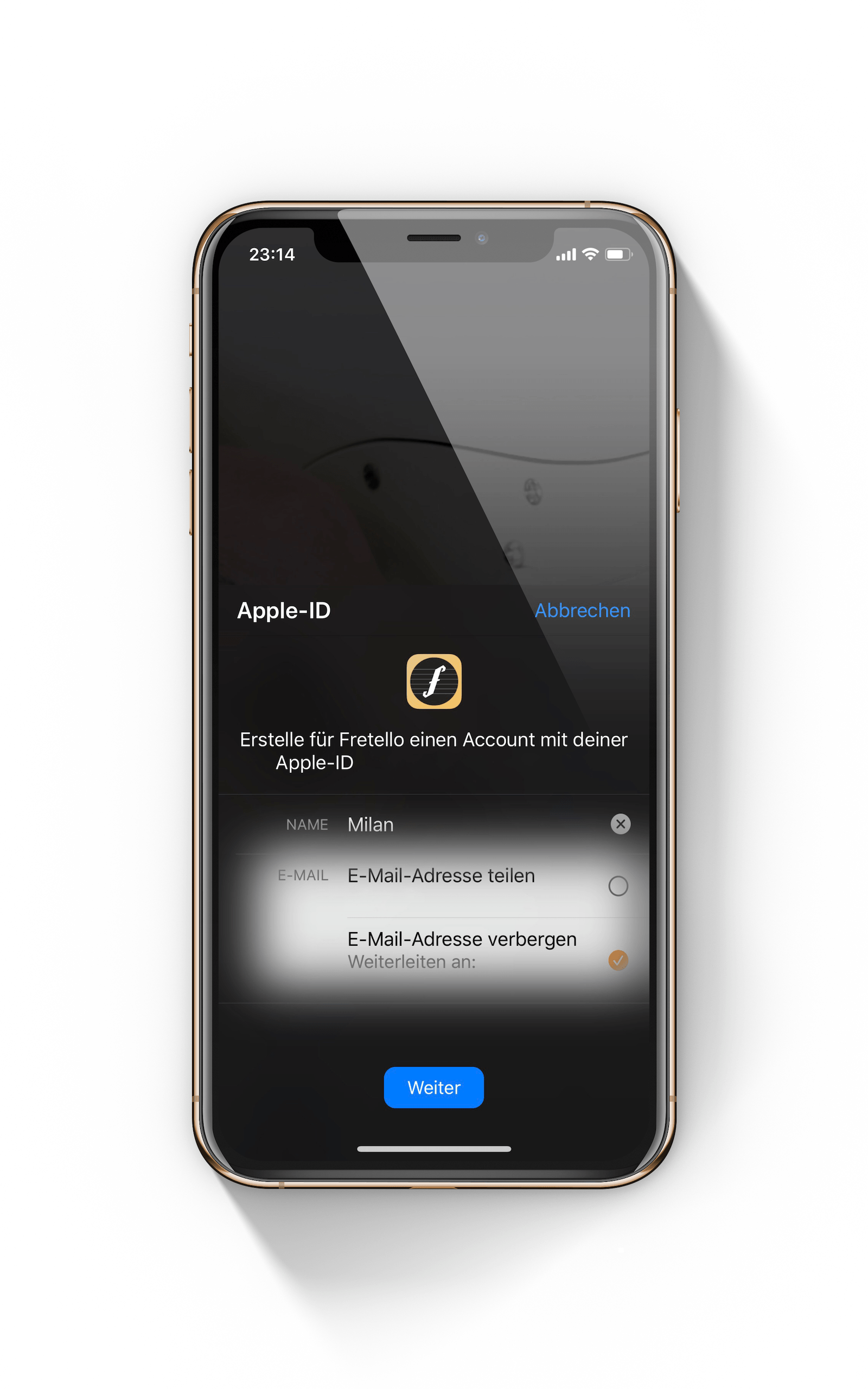
Example of the "Sign in with Apple" function on an iPhone screen using the Fretello app as an example.
Apple ID login window on the iPhone to confirm signing in with Apple for the Fretello app

“Sign in with Apple” – How to manage registered apps

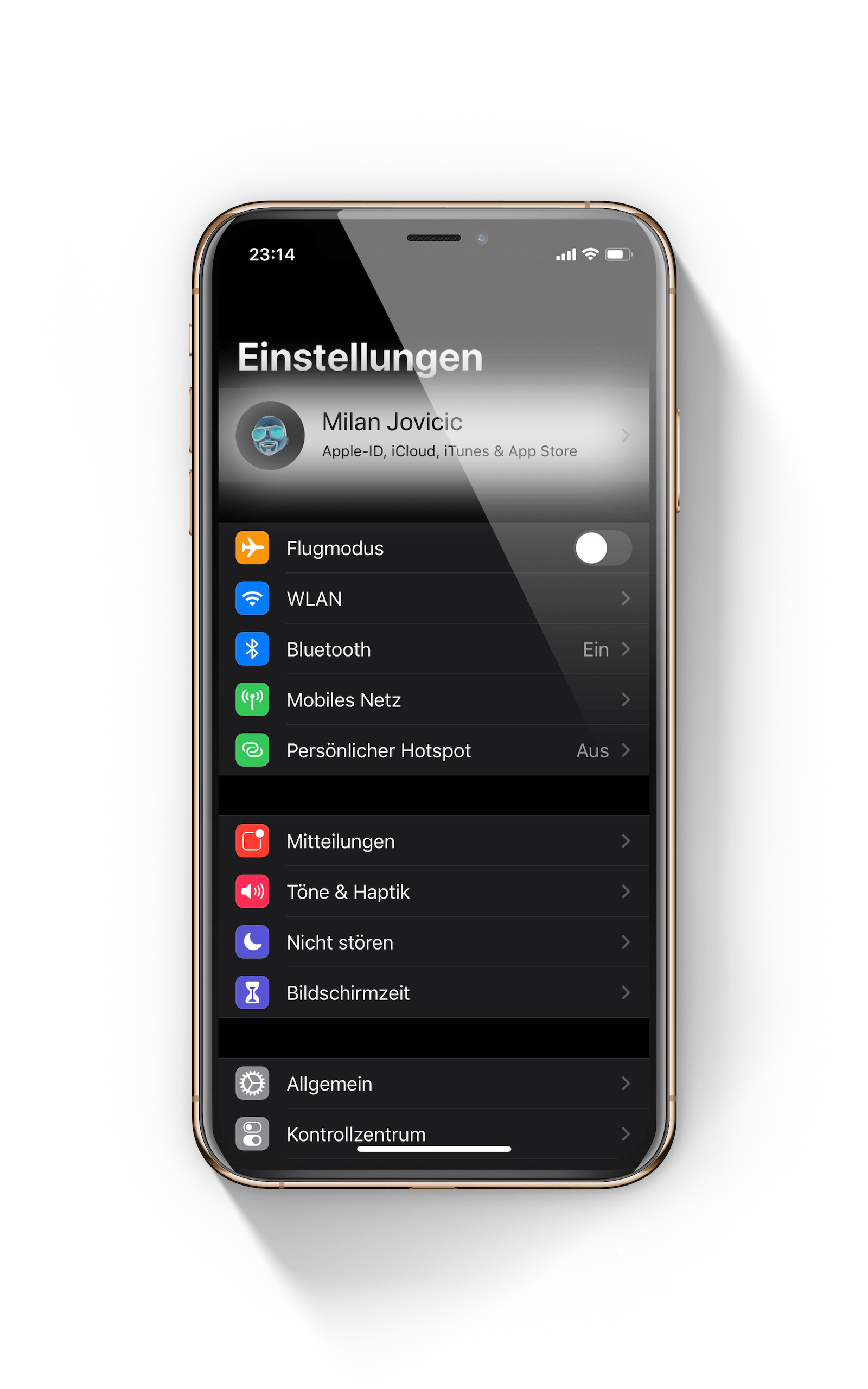
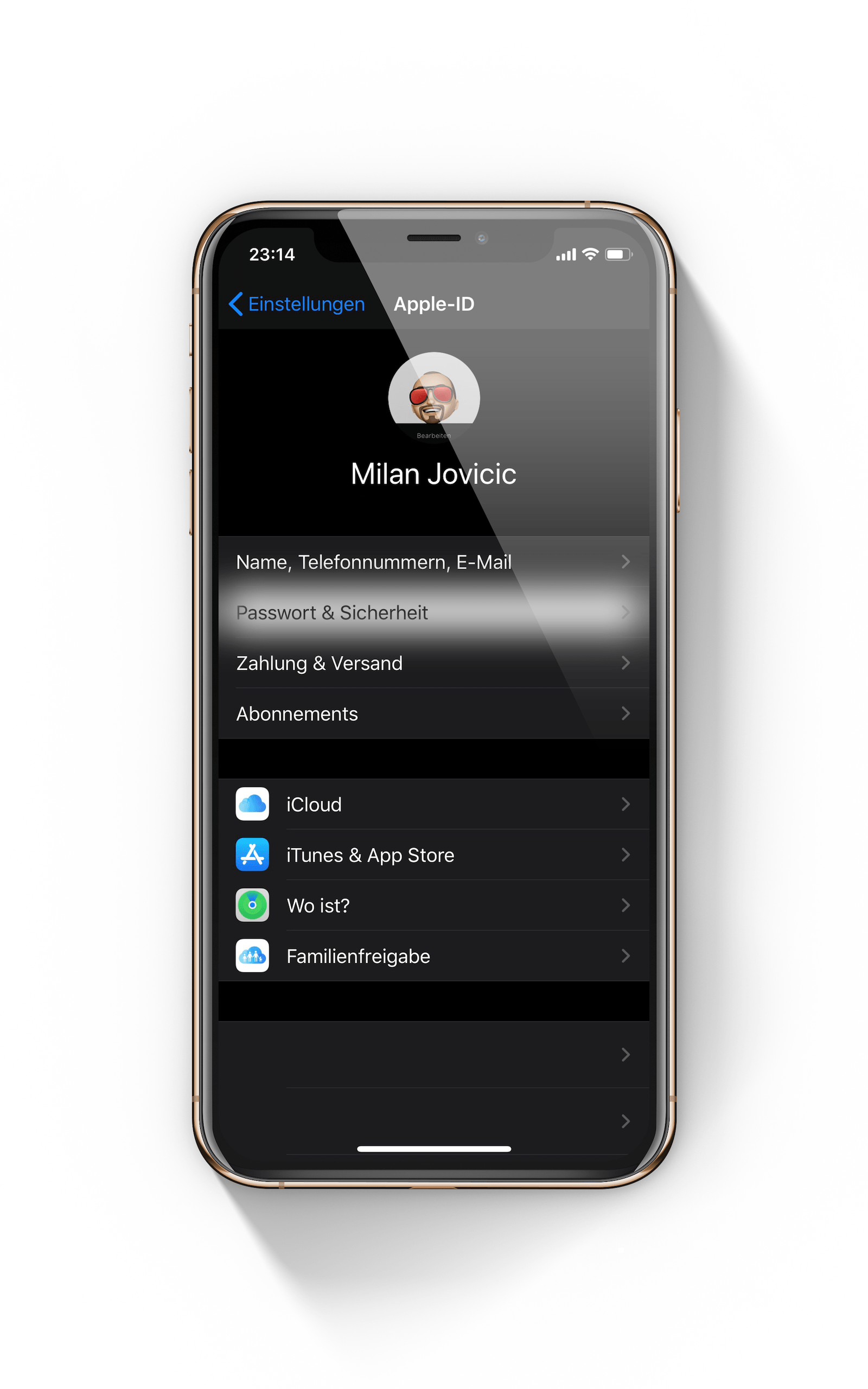
Of course, users also have the option of managing all applications afterwards. If you actively use “Sign in with Apple”, a number of apps could accumulate over time. This makes it all the more important to keep track of them. Apple has also thought of this. In the iOS settings, under “Your name”, you will find the “Password & security” section.

iPhone settings opened on the overview page for managing the Apple ID for Sign in with Apple
Apple ID account settings on the iPhone for selecting a password and security for app management.
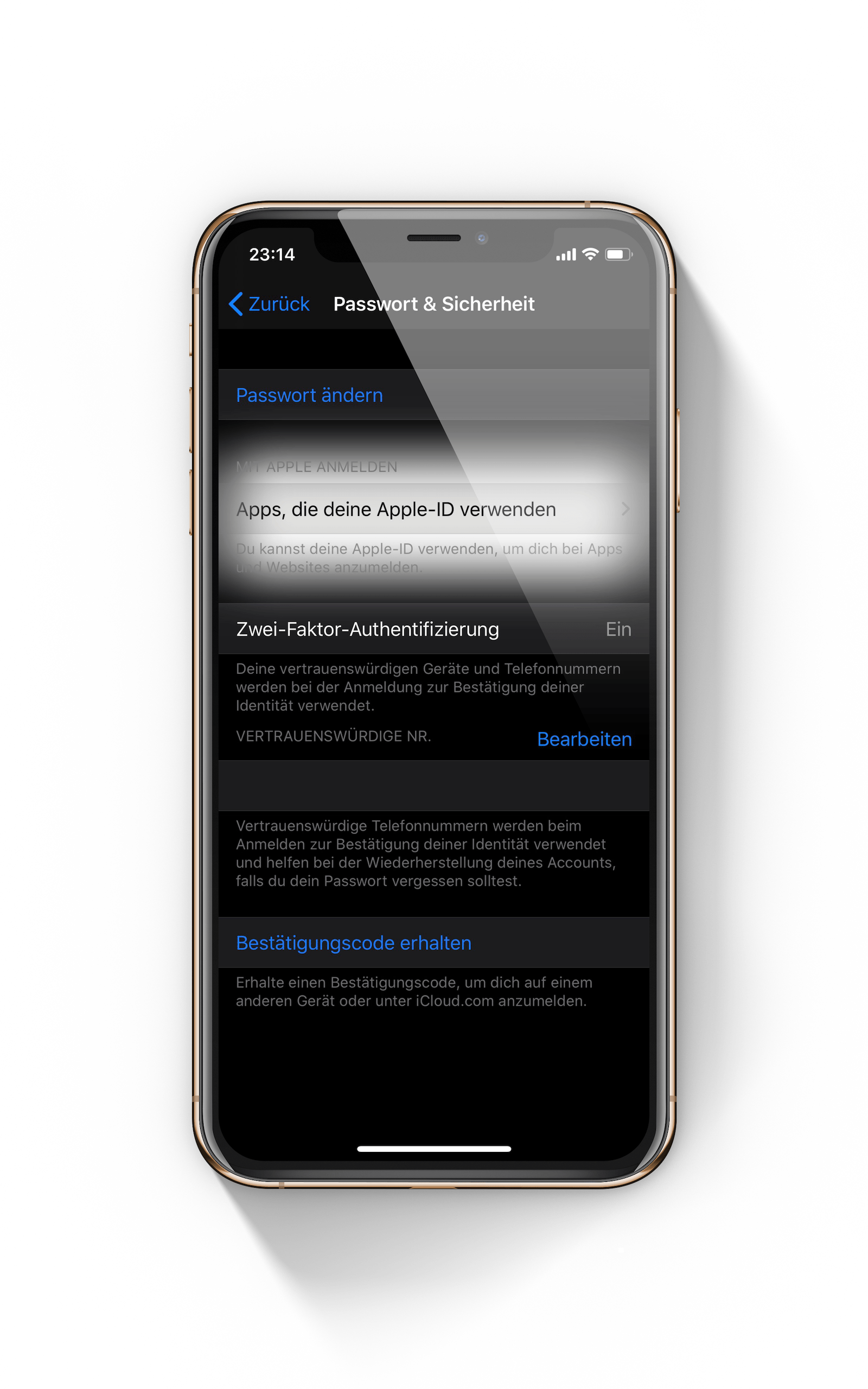
The "Apps that use your Apple ID" menu item under Password & Security on your iPhone allows you to manage registered applications.

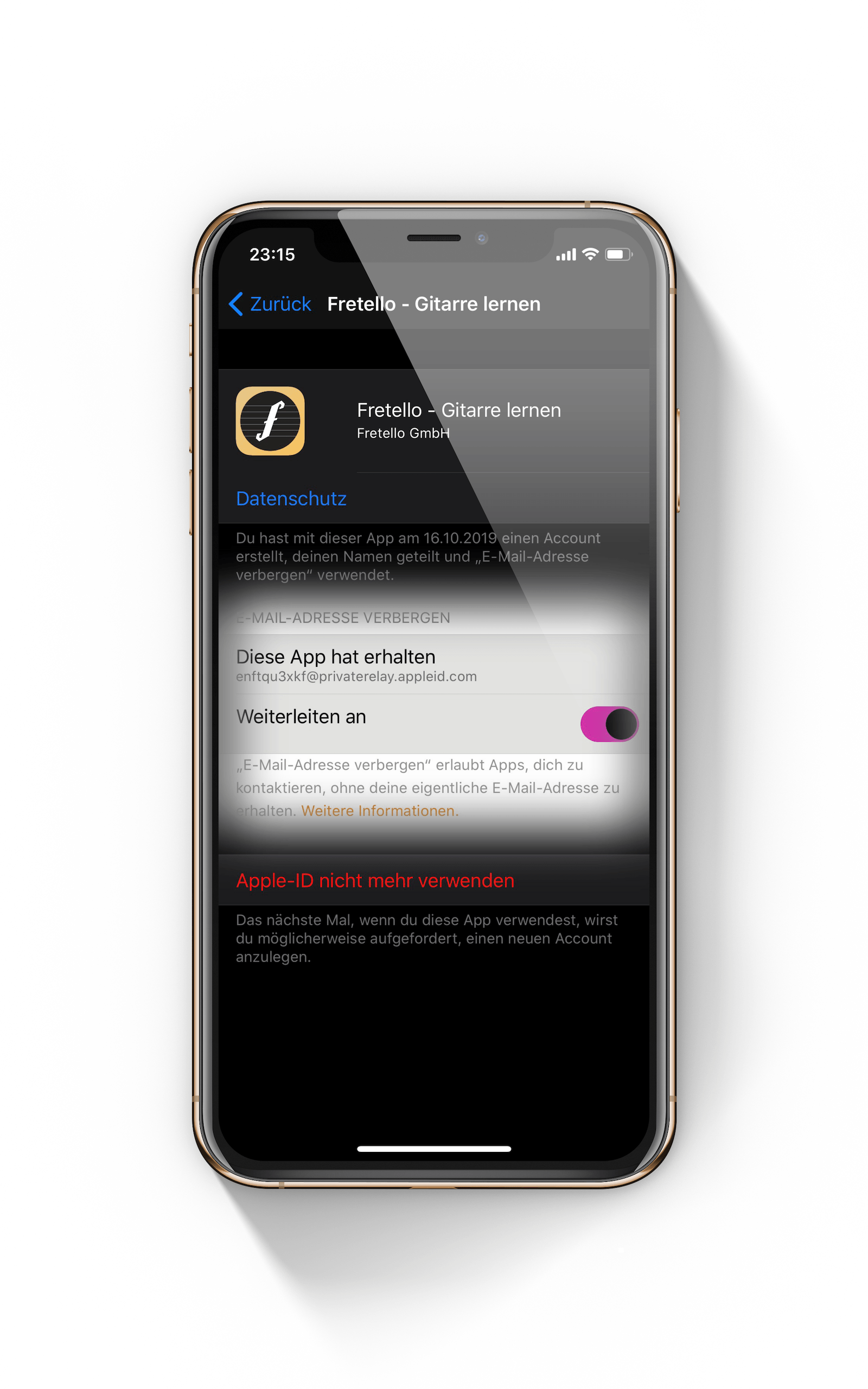
This area now contains the menu item "Apps that use your Apple ID". Important: This area will only be visible once you have completed the first "Sign in with Apple" registration. All registered apps will now be listed. You have the option of opening each individual application. Some important details will be shown to you - you can also make changes to the settings or delete the respective account directly.
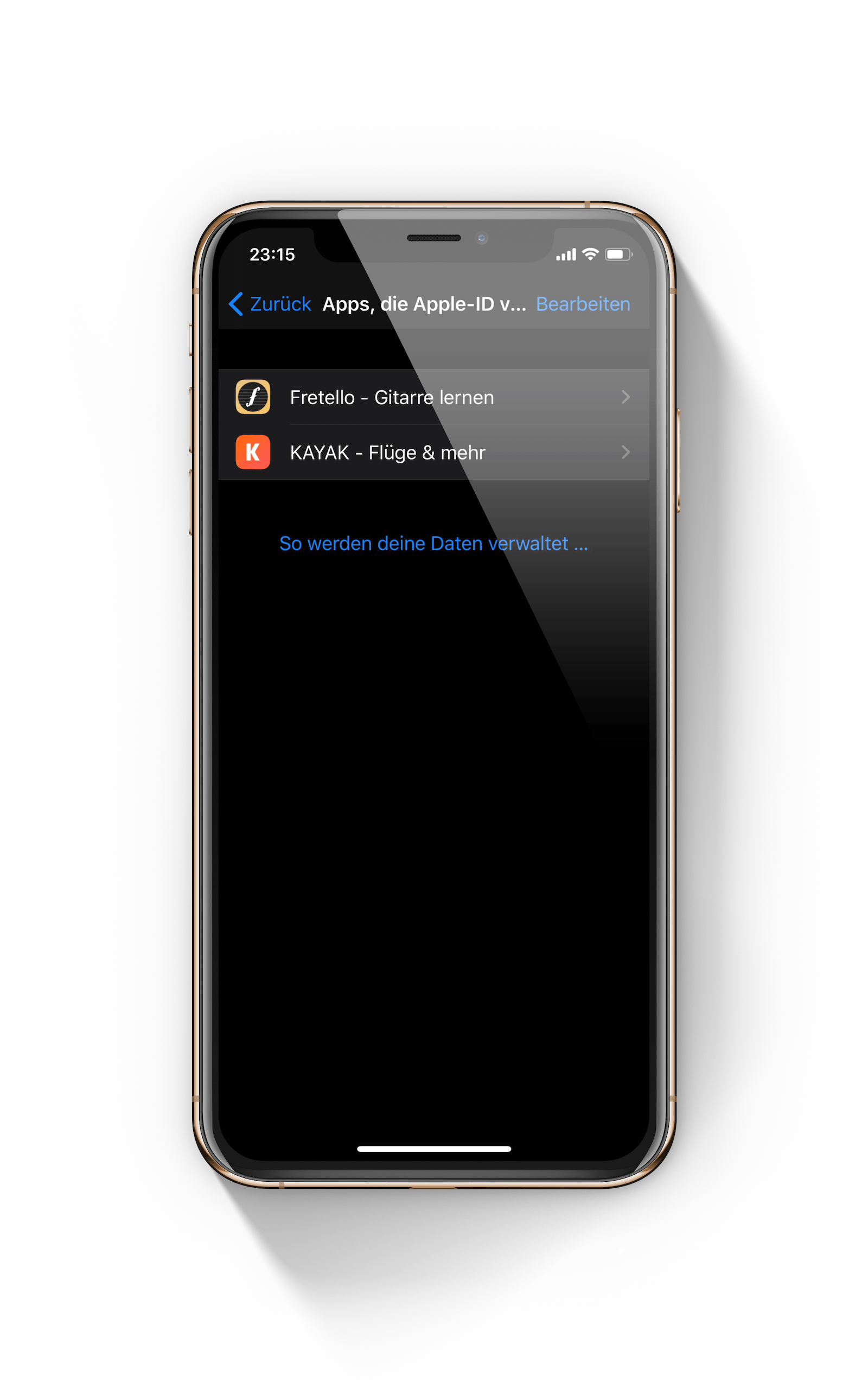
KAYAK app management on iPhone: Sign in with Apple to view shared data and email forwarding.
Fretello app options under Sign in with Apple on iPhone to deactivate Apple ID usage

Which services offer the “Sign in with Apple” feature?

With iOS 13, iPadOS 13 and macOS Catalina, Apple's guidelines for the App Store have been changed. Accordingly, all developers who provide third-party login options are required to integrate Apple's solution as well. This means that every app that currently allows you to log in with Facebook, Google or another service must also include the "Sign in with Apple" option. (Note: Deadline for implementation ends in March 2020)

Of course, there will still be applications that only require a login with a stored email address and your own password. Did you know? You can also use “Sign in with Apple” on the web - you don't need an iPhone, iPad or Mac. This means that Android and Windows users can also benefit from the feature - as long as they have an active Apple ID. Ultimately, Apple wants to offer everyone the opportunity to better protect their privacy - perhaps one day the “Sign in with Apple” option will be available on every platform. (Photo by Denys Prykhodov / Bigstockphoto)


Make Apfelpatient a preferred source One click – and you'll see us more often on Google
Was this article helpful?
YesNo
Tags: iOSiOS 13iPadiPadOSiPhoneMacmacOSmacOS 10.15 Catalina
SendShare26Send
Share

Our Amazon Storefront

A handpicked selection of products for iPhone, Mac and more – sorted by topic and updated regularly.

Shop Now

This post contains affiliate links (including Amazon). We earn a small commission on qualifying purchases – at no extra cost to you. Learn more on our Partner Program page.

Previous Post

Mobile Gaming – Apple Arcade gets four new games

Next Post

iOS & Android – Are there bots in Call of Duty Mobile?

Milan Jovicic

Milan Jovicic

Milan founded Apfelpatient in 2016 and has been responsible for all editorial content since 2018 — news, rumors, guides, and product reviews. Apple devices here are not test units on loan for two weeks but everyday tools: from the iPhone through MacBook Pro, MacBook Air, and iMac to the Apple Vision Pro, at least one device from nearly every product category is in daily use, many of them replaced annually. Every menu path in a guide is verified on the device before it is published.

Symbolic image of Apple's leadership team: Apple Park from the air, illuminated at sunset.

Apple's leadership team is undergoing a transformation: Who's leaving and who's taking their place?

August 12, 2026 - 9:10 PM CEST
Symbolic image for Apple government affairs: the glass entrance cube of the Apple Store on Fifth Avenue in New York at dusk

Apple hires new head of government relations

August 12, 2026 - 8:44 PM CEST
Key art for the Apple TV series Pluribus showing a screaming woman against a yellow background, with Pluribus season 2 about to begin filming

Pluribus: Gilligan plans at least three seasons

August 12, 2026 - 8:27 PM CEST

About APFELPATIENT

APFELPATIENT brings you the latest Apple news, product updates, guides, reviews and tips across the entire Apple ecosystem — from the iPhone to the Mac to the Apple Vision Pro. From the first rumors to confirmed news: researched responsibly.

Follow Apfelpatient

Facebook Instagram YouTube Threads Threads

Company

  • About Apfelpatient
  • Contact
  • Author Profiles

Community

  • Netiquette
  • Push Notifications
  • RSS feed

Legal

  • Legal Notice
  • Privacy Policy
  • Terms of Use
  • Cookie Settings
  • Affiliate Program

Resources

  • Sitemap

© 2026 Apfelpatient. All rights reserved.

No Result
View All Result
  • Home
  • News
  • Rumors
  • Tips & Tricks
  • Reviews
  • Insights

© 2026 Apfelpatient. All rights reserved. Page Directory

Change language to Deutsch