apple patient
  • Home
  • News
  • Rumors
  • Tips & Tricks
  • Reviews
  • Insights
No Result
View All Result
  • iPhone 18
  • iOS 27
  • iPadOS 27
  • macOS
  • MacBook Neo
  • iPhone 17e
  • AirTags
  • iOS 26
  • iPhone 17
  • MacBook Pro
  • iPadOS
  • iMac
  • Mac mini
  • HomePod
  • Apple TV
  • iPad Pro
  • iPhone Air
  • Apple Vision Pro
  • iPhone 16
  • AirPods 4
  • Apple Watch Ultra
  • HomePod Mini
  • MacBook Air
  • iPad
  • AirPods Max
  • AirPods Pro 3
  • Apple Watch Series 3
  • Mac Studio
  • Studio Display
  • iPad Air
  • iPad mini
  • watchOS 27
  • Apple CarPlay
  • Apple Pay
  • watchOS 26
  • Home
  • News
  • Rumors
  • Tips & Tricks
  • Reviews
  • Insights
No Result
View All Result
apple patient
No Result
View All Result

AirPods: How to fix connection problems

No more mono sound - here's how!

Milan Jovicic by Milan Jovicic
January 9, 2020 - 3:49 PM CET
in Apple Tips & Tricks
0
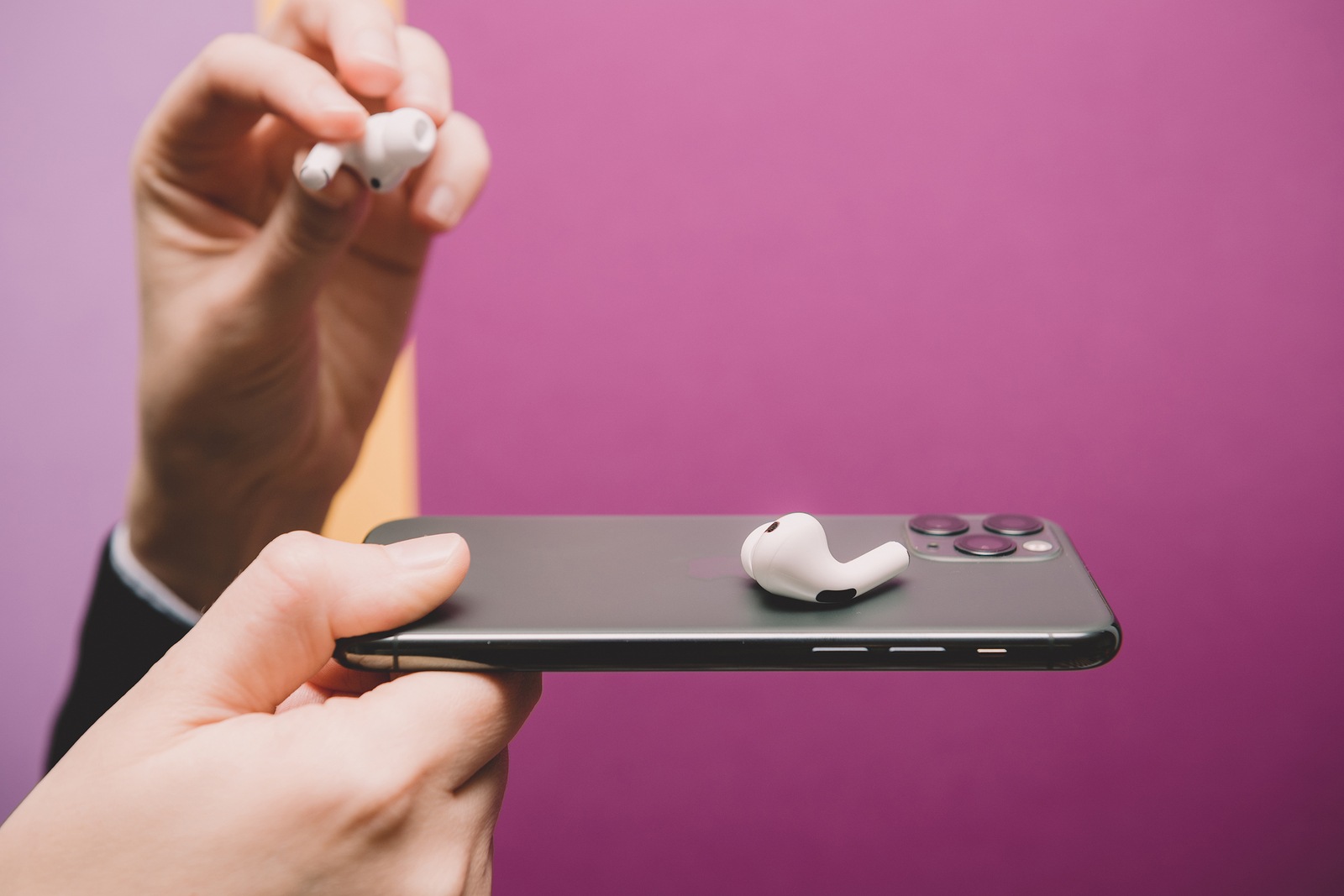
Paris, France - Oct 30, 2019: Woman hands holding new Apple Computers AirPods Pro headphones with Active Noise Cancellation for immersive sound - placed on new iPhone 11 Pro smartphone

Paris, France - Oct 30, 2019: Woman hands holding new Apple Computers AirPods Pro headphones with Active Noise Cancellation for immersive sound - placed on new iPhone 11 Pro smartphone

WhatsAppFacebookEmail
Threads

Almost every AirPods owner knows the problem - whether AirPods 1, AirPods 2 or AirPods Pro. Suddenly either the left or right AirPod won't connect anymore. The result is a mono sound. But there is a solution to fix the connection problems. We'll show you how. 

The connection problems mentioned can occur with any version of the AirPods. The cause is completely unknown. But there is a way to fix the whole thing quickly, because let's be honest - who likes mono sound?! Here's a little hint: Have you watched the process closely? As a rule, the AirPod that is pulled out of its case first fails. At least that's what I've observed so far. The specific cause is unknown - but the culprit could be Bluetooth itself.

How to fix connection problems with AirPods

But now let's get to the solution. If one of the two AirPods suddenly stops working, the user must put both plugs back in the case and close it. After about half a minute, a second attempt can be made - if all goes well, the problem should now be solved. However, this step could be unsuccessful in some cases. At this point, it is a good idea for the user to hold the case next to the respective device and simply open it. After a short time, the display with the AirPods should appear on the iDevice. Now wait a few seconds before pulling them out. This step is also useful in cases where the plugs are to be connected to another device. If that doesn't work, the user must go to the iOS settings and select the AirPods under Bluetooth and manually connect them to the iPhone, iPad, etc. But let's get back to the classic connection problem.

How to re-pair AirPods with an iPhone or iPad 

If you are unsuccessful with the instructions above, the only step left is to delete them. This means you have to completely unpair your AirPods and pair them again. To do this, go to the iOS settings and open the Bluetooth menu. Now tap the small "i" to the right of your AirPods.
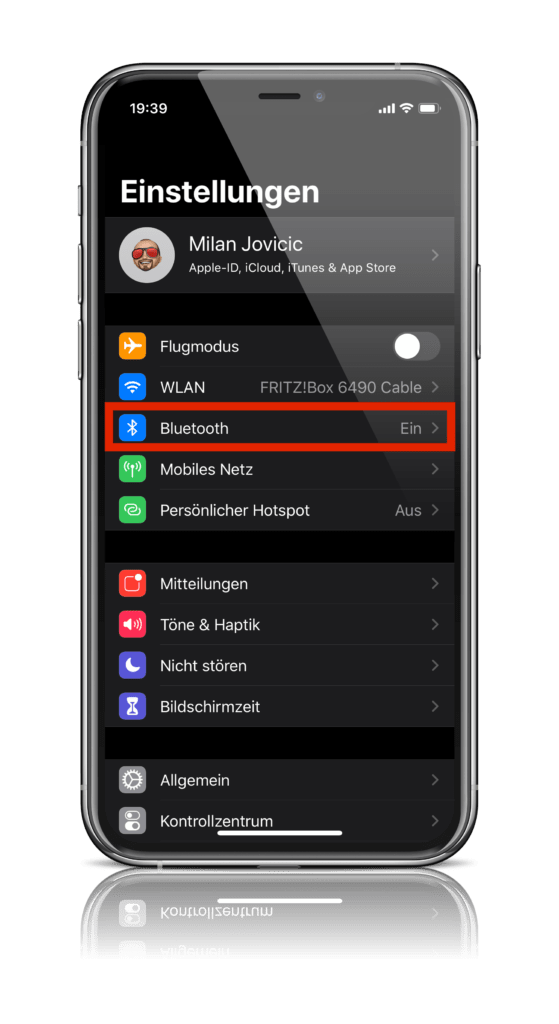
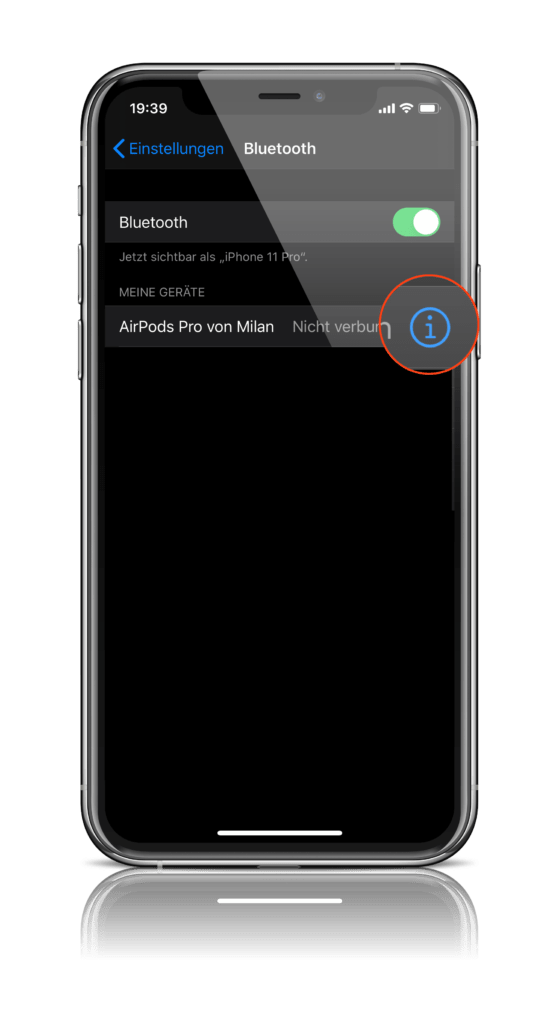
  • Screenshot: Apfelpatient
  • Screenshot: Apfelpatient
  • Screenshot: Apfelpatient
Screenshots: Apfelpatient

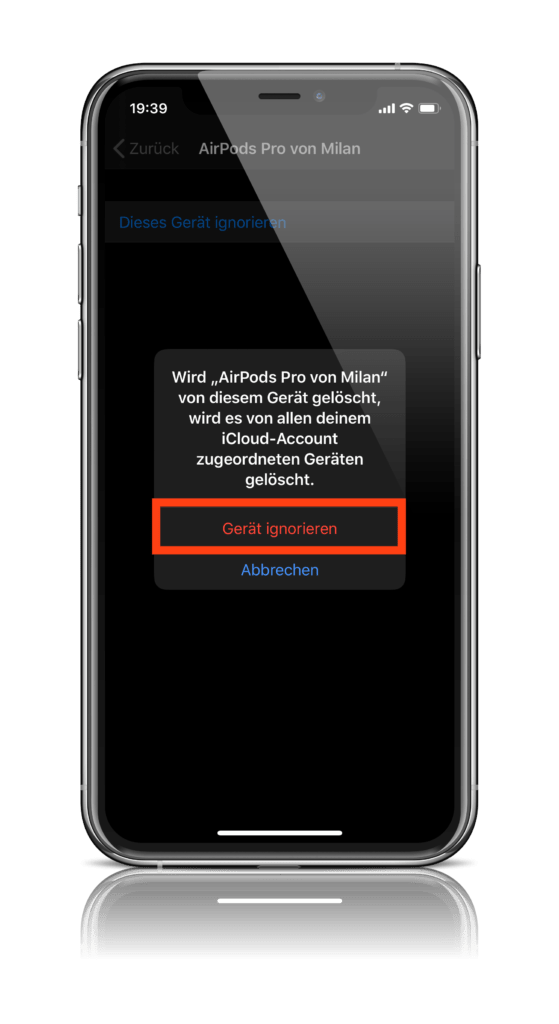
Now select the option “Forget this device”. A warning message will appear here – continue.

  • Screenshot: Apfelpatient
  • Screenshot: Apfelpatient
Screenshots: Apfelpatient

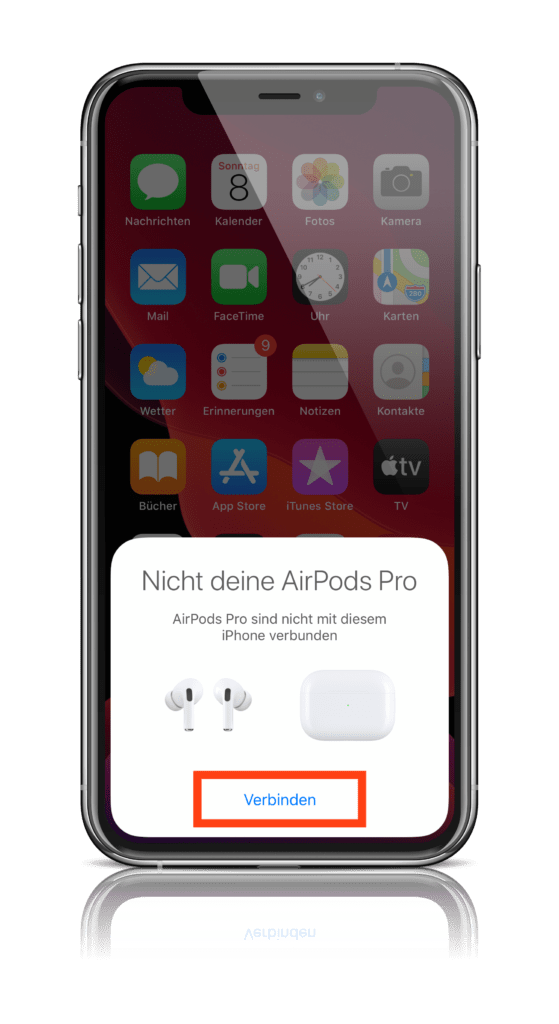
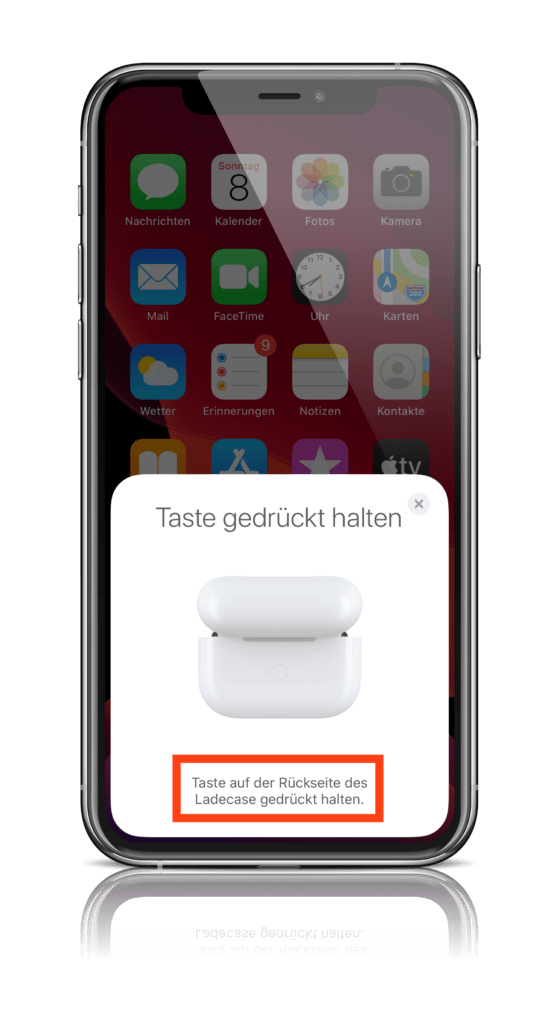
After the separation has been completed, your AirPods and the respective iDevice have to get to know each other again - exciting, right? To do this, hold the case next to your iPhone or iPad and open it. A display with the "Connect" button should now appear. Follow the instructions and wait until the process is complete. Your AirPods should now be paired with the iPhone or iPad and should be working properly again. 

  • Screenshot: Apfelpatient
  • Screenshot: Apfelpatient
Screenshots: Apfelpatient

As mentioned above, the cause of the connection problem is not yet known - Bluetooth is suspected. But with this simple solution, the problem can be quickly resolved. You can find out more about AirPods below. You don't have AirPods yet? Then take a look at our Apfelpatient Amazon Shop over. (Photo by hadrian / Bigstockphoto)

  • AirPods Pro: How to control noise cancellation
Make Apfelpatient a preferred source One click – and you'll see us more often on Google
Was this article helpful?
YesNo
Tags: AirPodsAirPods 2AirPods Pro
SendShare29Send
Share

Our Amazon Storefront

A handpicked selection of products for iPhone, Mac and more – sorted by topic and updated regularly.

Shop Now

This post contains affiliate links (including Amazon). We earn a small commission on qualifying purchases – at no extra cost to you. Learn more on our Partner Program page.

Previous Post

Mozilla Firefox vulnerability: Update urgently recommended

Next Post

Facebook comments on new web design and explains dark mode

Milan Jovicic

Milan Jovicic

Milan founded Apfelpatient in 2016 and has been responsible for all editorial content since 2018 — news, rumors, guides, and product reviews. Apple devices here are not test units on loan for two weeks but everyday tools: from the iPhone through MacBook Pro, MacBook Air, and iMac to the Apple Vision Pro, at least one device from nearly every product category is in daily use, many of them replaced annually. Every menu path in a guide is verified on the device before it is published.

Symbolic image for Apple government affairs: the glass entrance cube of the Apple Store on Fifth Avenue in New York at dusk

Apple hires new head of government relations

August 12, 2026 - 8:44 PM CEST
Key art for the Apple TV series Pluribus showing a screaming woman against a yellow background, with Pluribus season 2 about to begin filming

Pluribus: Gilligan plans at least three seasons

August 12, 2026 - 8:27 PM CEST
The iPhone 17 lineup in five colors seen from the back, whose successor is expected to adopt the smaller iPhone 18 Dynamic Island from the Pro models

iPhone 18: Smaller Dynamic Island already in the base model

August 12, 2026 - 8:13 PM CEST

About APFELPATIENT

APFELPATIENT brings you the latest Apple news, product updates, guides, reviews and tips across the entire Apple ecosystem — from the iPhone to the Mac to the Apple Vision Pro. From the first rumors to confirmed news: researched responsibly.

Follow Apfelpatient

Facebook Instagram YouTube Threads Threads

Company

  • About Apfelpatient
  • Contact
  • Author Profiles

Community

  • Netiquette
  • Push Notifications
  • RSS feed

Legal

  • Legal Notice
  • Privacy Policy
  • Terms of Use
  • Cookie Settings
  • Affiliate Program

Resources

  • Sitemap

© 2026 Apfelpatient. All rights reserved.

No Result
View All Result
  • Home
  • News
  • Rumors
  • Tips & Tricks
  • Reviews
  • Insights

© 2026 Apfelpatient. All rights reserved. Page Directory

Change language to Deutsch