apple patient
  • Home
  • News
  • Rumors
  • Tips & Tricks
  • Reviews
  • Insights
No Result
View All Result
  • iPhone 18
  • iPhone 18 Pro
  • iPhone Duo
  • Apple Watch Series 12
  • Apple Watch Ultra 4
  • AirPods 5
  • iOS 27
  • iPadOS 27
  • macOS
  • MacBook Neo
  • iPhone 17e
  • AirTags
  • iOS 26
  • iPhone 17
  • MacBook Pro
  • iPadOS
  • iMac
  • Mac mini
  • HomePod
  • Apple TV
  • iPad Pro
  • iPhone Air
  • Apple Vision Pro
  • iPhone 16
  • AirPods 4
  • Apple Watch Ultra
  • HomePod Mini
  • MacBook Air
  • iPad
  • AirPods Max
  • AirPods Pro 3
  • Apple Watch Series 3
  • Mac Studio
  • Studio Display
  • iPad Air
  • iPad mini
  • watchOS 27
  • Apple CarPlay
  • Apple Pay
  • watchOS 26
  • Home
  • News
  • Rumors
  • Tips & Tricks
  • Reviews
  • Insights
No Result
View All Result
apple patient
No Result
View All Result
  • iPhone 18
  • iPhone 18 Pro
  • iPhone Duo
  • Apple Watch Series 12
  • Apple Watch Ultra 4
  • AirPods 5
  • iOS 27
  • iPadOS 27
  • macOS
  • MacBook Neo
  • iPhone 17e
  • AirTags
  • iOS 26
  • iPhone 17
  • MacBook Pro
  • iPadOS
  • iMac
  • Mac mini
  • HomePod
  • Apple TV
  • iPad Pro
  • iPhone Air
  • Apple Vision Pro
  • iPhone 16
  • AirPods 4
  • Apple Watch Ultra
  • HomePod Mini
  • MacBook Air
  • iPad
  • AirPods Max
  • AirPods Pro 3
  • Apple Watch Series 3
  • Mac Studio
  • Studio Display
  • iPad Air
  • iPad mini
  • watchOS 27
  • Apple CarPlay
  • Apple Pay
  • watchOS 26
Sponsored by Dr. Buho

BuhoCleaner App: How to make your Mac faster and more efficient

Milan Jovicic by Milan Jovicic
September 12, 2023 - 3:30 p.m. CEST
in Reviews
0
BuhoCleaner App macOS Mac

Image: BuhoCleaner

WhatsAppFacebookEmail
Threads
Advertising: This review was produced in paid cooperation with the manufacturer or vendor; the product was also provided free of charge. Our assessment remains independent. Learn more under Editorial Standards & Transparency.

You're probably familiar with the frustrating feeling of your Mac responding slowly and the infamous "loading snail" spinning too often. The solution to this problem might come in the form of Dr. Buho's BuhoCleaner app—a powerful and user-friendly tool for optimizing your Mac.

Your Mac is known to be a high-performance machine. To keep it running at its best, regular maintenance is essential. That's where BuhoCleaner comes in. This utility allows you to identify and remove unnecessary files to free up valuable storage space and boost your Mac's performance. BuhoCleaner also offers advanced features that make maintaining your Mac truly easy.

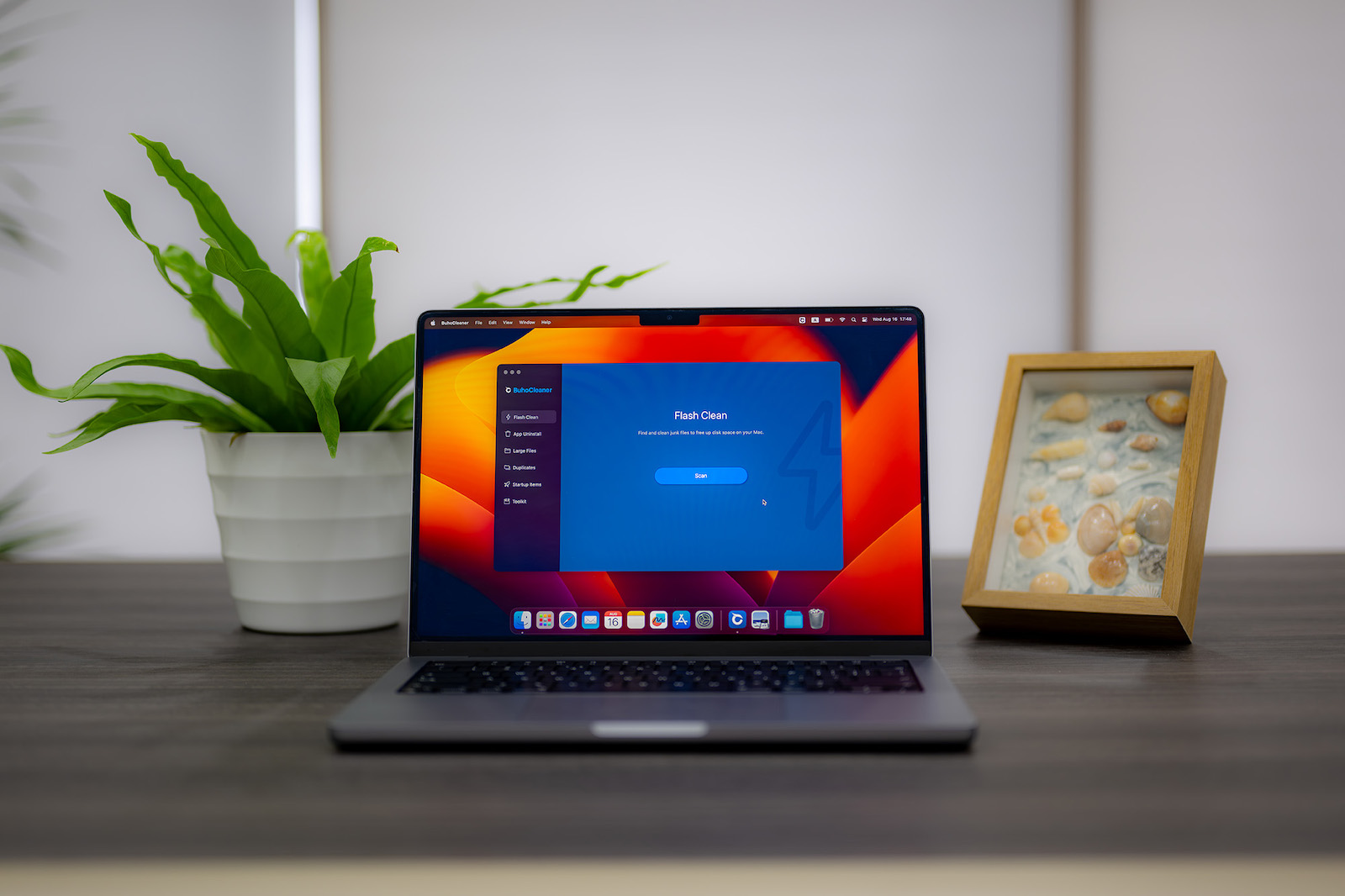
BuhoCleaner App Dashboard with Quick Clean function for Mac optimization
Screenshot: Apfelpatient

Fast and effortless Mac cleaning

Using BuhoCleaner is incredibly easy. After downloading and launching the application, you'll be greeted by a large scan button on the "Quick Clean" page. Clicking it is enough to start the scanning process. The clear navigation menu on the left presents various BuhoCleaner modules, such as Quick Clean, Uninstall App, Large Files, Duplicates, Startup Items, and Toolkit. The labels are self-explanatory, further underscoring the application's user-friendliness.

Effective functions at a glance

BuhoCleaner covers a wide range of cleaning options:

  • Quick Clean: Here you get an overview of junk items that can be removed. The application not only shows what can be deleted but also offers a detailed view to make sure nothing important is lost.
  • Uninstall apps: Not only is uninstalling apps supported, but also the removal of remnants of deleted applications . This creates order and frees up space.
  • Large Files: This module allows you to find large files and remove them if necessary, making room for the things that are important to you.
  • Duplicates: A common problem that can have a significant impact on a computer's storage space is duplicate files. This can happen when you accidentally copy a file instead of moving it, or when you download something multiple times, resulting in multiple copies and taking up storage space. With BuhoCleaner, you can quickly scan your computer for duplicates. Then you can effortlessly remove all unnecessary files.
  • Startup Items: This feature allows you to control and select active applications at system startup. This way, you can keep control over the startup time of your Mac.
  • Toolkit: BuhoCleaner's toolkit provides useful tools to optimize your Mac's performance. It offers options for disk space analysis, secure data destruction, freeing up RAM, reindexing Spotlight, and clearing DNS cache.

BuhoCleaner Duplicate Finder module for finding and deleting duplicate files on Mac
Screenshot: Apfelpatient

The new BuhoCleaner 1.9.7: Even better and more efficient

BuhoCleaner has been upgraded to version 1.9.7. Here is an overview:

  • The app uninstall feature has been redesigned to offer an improved user interface and optimized filtering and selection options.
  • A new feature called “Similar Photos” helps identify and remove identical and similar photos, even in deeply nested folders.
  • The toolkit has been expanded with useful options, including disk space analyzer, secure file shredder, RAM freeing, Spotlight reindexing, and DNS cache flushing.

Attention: Exclusive advantage for Apfelpatient readers

You can download BuhoCleaner from Dr. Buho for free . The standard license fees are €29.99 for the Single Plan (lifetime license for one Mac), €45.99 for the Family Plan (lifetime license for three Macs), and €71.99 for the Business Plan (lifetime license for 10 Macs). Using the exclusive coupon code AP23DE09, our readers receive an exceptional discount of €501, resulting in the following final prices:

  • BuhoCleaner Single Plan: 14.99 Euro (instead of 29.99 Euro)
  • BuhoCleaner Family Plan: 22.49 euros (instead of 45.99 euros)
  • BuhoCleaner Business Plan: 37.49 euros (instead of 71.99 euros)

Optimize the performance of your Mac and experience the effectiveness of BuhoCleaner - the tool that gives your Mac a new lease of life and frees it of unnecessary ballast. (Image: BuhoCleaner)

  • Setting up Center Stage: macOS Sonoma Guide
Make Apfelpatient a preferred source One click – and you'll see us more often on Google
Was this article helpful?
YesNo
Tags: MacmacOS
SendShareSend
Share

Our Amazon Storefront

A handpicked selection of products for iPhone, Mac and more – sorted by topic and updated regularly.

Shop Now

This post contains affiliate links (including Amazon). We earn a small commission on qualifying purchases – at no extra cost to you. Learn more on our Partner Program page.

Previous Post

iOS 17: New features and improvements in the Maps app

Next Post

Apple Watch Series 9: The future on your wrist revealed

Milan Jovicic

Milan Jovicic

Milan founded Apfelpatient in 2016 and has been responsible for all editorial content since 2018 — news, rumors, guides, and product reviews. Apple devices here are not test units on loan for two weeks but everyday tools: from the iPhone through MacBook Pro, MacBook Air, and iMac to the Apple Vision Pro, at least one device from nearly every product category is in daily use, many of them replaced annually. Every menu path in a guide is verified on the device before it is published.

Related posts

Alcantara Set Review: Band and Case from Bavarian BUA

by Milan Jovicic
August 28, 2026 - 2:53 PM CEST
Alcantara set from Bavarian BUA: iPhone in an anthracite case and Apple Watch with a band featuring orange stitching

An Apple Watch band made of Alcantara, handcrafted in Bavaria, plus the matching iPhone case. The Bavarian BUA set in everyday use.

Read moreDetails

Apple polishing cloth comparison: What has changed

by Milan Jovicic
August 26, 2026 - 4:17 PM CEST
Three Apple polishing cloths side by side on a grey surface, the Apple Vision Pro cloth on the left, the 2026 Apple polishing cloth in the middle and the 2021 version on the right

Apple's new polishing cloth costs 10 euros instead of 25 – and is thinner, softer and darker in direct comparison to the 2021 version.

Read moreDetails

Belkin Charging Case Pro for the Nintendo Switch 2 Review: The most elegant solution for on the go

by Milan Jovicic
May 2, 2026 - 12:44 CEST
Belkin Charging Case Pro for Nintendo Switch 2

The Belkin Charging Case Pro offers protection, a 10,000 mAh power bank, and a kickstand for the Nintendo Switch 2. Our review.

Read moreDetails

Hands-On: Pitaka iPhone 17 case as Year of the Horse Edition

by Milan Jovicic
February 15, 2026 - 8:16 PM CET
Pitaka iPhone 17

Pitaka iPhone 17 case as Year of the Horse Edition in a hands-on review: Limited edition aramid fiber case with MagSafe and new design.

Read moreDetails

Nomad Tracking Card Pro review: Tracker in card format

by Milan Jovicic
December 30, 2025 - 2:26 PM CET
Nomad Tracking Card Pro

Nomad Tracking Card Pro in-depth review: design, battery life, Find My feature, and everyday use. Find out if this premium tracker is worth it!

Read moreDetails
Load More

Categories

  • Apple Insights
  • Apple Rumors
  • Apple News
  • Apple Tips & Tricks
  • iPhone news, rumors and tips
  • Mac and MacBook News
  • Reviews

About APFELPATIENT

APFELPATIENT brings you the latest Apple news, product updates, guides, reviews and tips across the entire Apple ecosystem — from the iPhone to the Mac to the Apple Vision Pro. From the first rumors to confirmed news: researched responsibly.

Follow Apfelpatient

Facebook Instagram YouTube Threads Threads

Company

  • About Apfelpatient
  • Contact
  • Author Profiles

Community

  • Netiquette
  • Push Notifications
  • RSS feed

Legal

  • Legal Notice
  • Privacy Policy
  • Terms of Use
  • Cookie Settings
  • Affiliate Program

Resources

  • Sitemap

© 2026 Apfelpatient. All rights reserved.

No Result
View All Result
  • Home
  • News
  • Rumors
  • Tips & Tricks
  • Reviews
  • Insights

© 2026 Apfelpatient. All rights reserved. Page Directory

Change language to Deutsch