


apple patient
  • Home
  • News
  • Rumors
  • Tips & Tricks
  • Reviews
  • Insights
No Result
View All Result
  • iPhone 18
  • iOS 27
  • iPadOS 27
  • macOS
  • MacBook Neo
  • iPhone 17e
  • AirTags
  • iOS 26
  • iPhone 17
  • MacBook Pro
  • iPadOS
  • iMac
  • Mac mini
  • HomePod
  • Apple TV
  • iPad Pro
  • iPhone Air
  • Apple Vision Pro
  • iPhone 16
  • AirPods 4
  • Apple Watch Ultra
  • HomePod Mini
  • MacBook Air
  • iPad
  • AirPods Max
  • AirPods Pro 3
  • Apple Watch Series 3
  • Mac Studio
  • Studio Display
  • iPad Air
  • iPad mini
  • watchOS 27
  • Apple CarPlay
  • Apple Pay
  • watchOS 26
  • Home
  • News
  • Rumors
  • Tips & Tricks
  • Reviews
  • Insights
No Result
View All Result
apple patient
No Result
View All Result

iPhone 15 Pro: The versatile action button in detail

Milan Jovicic by Milan Jovicic
September 13, 2023 - 2:36 p.m. CEST
in Apple News
0
iPhone 15 Pro action button Resident Evil Village

CUPERTINO, CALIFORNIA - September 12, 2023: Apple CEO Tim Cook introduces the new iPhone lineup at Apple Park. (Photo by Brooks Kraft/Apple Inc.)

WhatsAppFacebookEmail
Threads

The launch of the iPhone 15 Pro brought with it an exciting new feature – the Action button. This innovative button replaces the traditional mute button and offers users a variety of options to perform different actions depending on their needs. In this article, we will take a closer look at what this Action button can do and how it extends the functionality of the iPhone 15 Pro.

Apple is always striving to improve its products and add innovative features to introducethat enrich the user experience. The introduction of the Action button on the iPhone 15 Pro and iPhone 15 Pro Max is another example of how the company is making its hardware buttons more versatile. This button allows users to assign specific functions and activate them with simple touches, accompanied by haptic feedback and on-screen information. Below, we'll take a closer look at the different actions that can be performed with this button.

What the Action Button on the iPhone 15 Pro Can Do

The Action button is configured as a mute button by default. A single press of the button mutes the device, while a second press unmutes it. This may seem inconspicuous at first glance, but the Action button offers far more possibilities. During Apple's Wonderlust event, this feature was only briefly explained, but it can be linked to a variety of functions. The keynote showed what actions the user can control via the Action button, including muting, switching to focus mode, launching the camera app, activating voice memos, turning on the flashlight, and more.
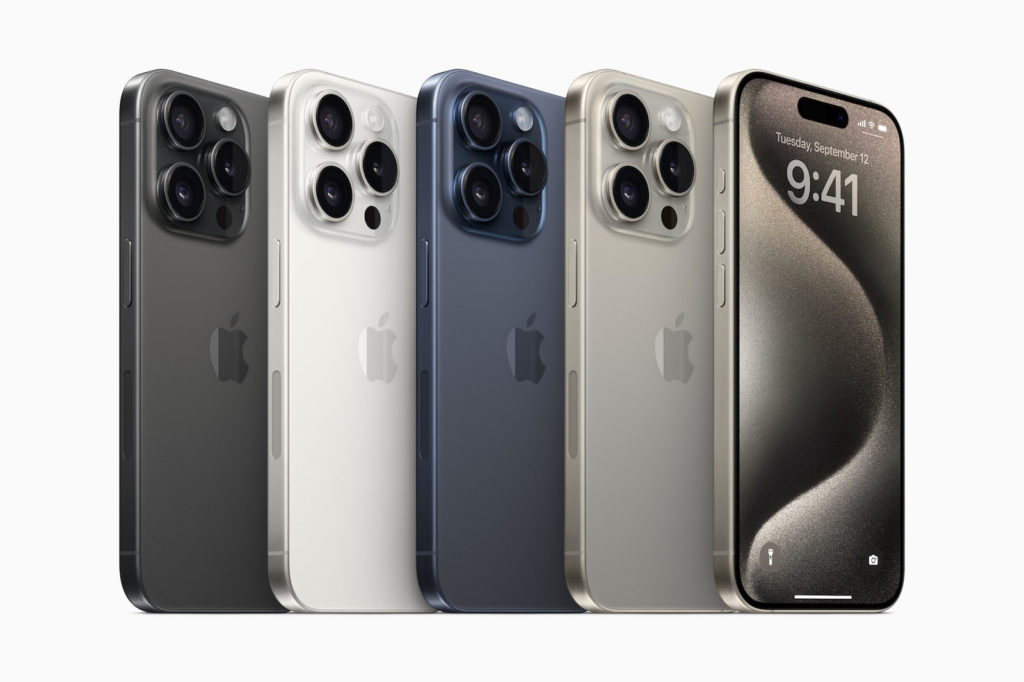
iPhone 15 Pro
Image: Apple

The Shortcut and Accessibility options are particularly interesting. These two offer users the greatest variety of possibilities. By linking shortcuts or accessibility features to the Action button, users can control their iPhone in ways never before possible. Third-party applications do not need to have direct access to the Action button. Instead, users can create simple shortcuts or use special shortcuts provided by apps to jump directly to certain functions.

Conclusion

The introduction of the Action button on the iPhone 15 Pro greatly expands the capabilities and flexibility of this powerful device. It offers users the ability to customize and personalize their daily actions and tasks. Whether it's muting the iPhone, launching the camera app, or using special shortcuts for third-party applications, the Action button offers a new level of control and personalization. The iPhone 15 Pro and iPhone 15 Pro Max are available for pre-order from September 15th and will be available from September 22nd. With the Action button and the numerous features it offers, this generation of iPhones promises an even more impressive user experience. (Image: Apple)

  • Experience the best: iPhone 15 and iPhone 15 Plus in detail
  • iPhone 15 Pro: The masterpiece of titanium and technology
  • BuhoCleaner App: How to make your Mac faster and more efficient

Make Apfelpatient a preferred source One click – and you'll see us more often on Google
Was this article helpful?
YesNo
Tags: iPhoneiPhone 15
SendShareSend
Share

Our Amazon Storefront

A handpicked selection of products for iPhone, Mac and more – sorted by topic and updated regularly.

Shop Now

This post contains affiliate links (including Amazon). We earn a small commission on qualifying purchases – at no extra cost to you. Learn more on our Partner Program page.

Previous Post

iPhone 15: The Lightning connector becomes history

Next Post

iPhone 15: Charge AirPods and Apple Watch directly

Milan Jovicic

Milan Jovicic

Milan founded Apfelpatient in 2016 and has been responsible for all editorial content since 2018 — news, rumors, guides, and product reviews. Apple devices here are not test units on loan for two weeks but everyday tools: from the iPhone through MacBook Pro, MacBook Air, and iMac to the Apple Vision Pro, at least one device from nearly every product category is in daily use, many of them replaced annually. Every menu path in a guide is verified on the device before it is published.

Concept design of the iPhone Ultra in its unfolded state with a large inner display

iPhone Ultra (iPhone Fold): All rumors and facts at a glance

August 12, 2026 - 9:32 PM CEST
Five iPhone models in different colors side by side, one from the front showing the Dynamic Island, which is expected to be smaller on the iPhone 18.

iPhone 18: All the rumors at a glance

August 12, 2026 - 9:24 PM CEST
Symbolic image of Apple's leadership team: Apple Park from the air, illuminated at sunset.

Apple's leadership team is undergoing a transformation: Who's leaving and who's taking their place?

August 12, 2026 - 9:10 PM CEST

About APFELPATIENT

APFELPATIENT brings you the latest Apple news, product updates, guides, reviews and tips across the entire Apple ecosystem — from the iPhone to the Mac to the Apple Vision Pro. From the first rumors to confirmed news: researched responsibly.

Follow Apfelpatient

Facebook Instagram YouTube Threads Threads

Company

  • About Apfelpatient
  • Contact
  • Author Profiles

Community

  • Netiquette
  • Push Notifications
  • RSS feed

Legal

  • Legal Notice
  • Privacy Policy
  • Terms of Use
  • Cookie Settings
  • Affiliate Program

Resources

  • Sitemap

© 2026 Apfelpatient. All rights reserved.

No Result
View All Result
  • Home
  • News
  • Rumors
  • Tips & Tricks
  • Reviews
  • Insights

© 2026 Apfelpatient. All rights reserved. Page Directory

Change language to Deutsch



