

apple patient
  • Home
  • News
  • Rumors
  • Tips & Tricks
  • Reviews
  • Insights
No Result
View All Result
  • iPhone 18
  • iOS 27
  • iPadOS 27
  • macOS
  • MacBook Neo
  • iPhone 17e
  • AirTags
  • iOS 26
  • iPhone 17
  • MacBook Pro
  • iPadOS
  • iMac
  • Mac mini
  • HomePod
  • Apple TV
  • iPad Pro
  • iPhone Air
  • Apple Vision Pro
  • iPhone 16
  • AirPods 4
  • Apple Watch Ultra
  • HomePod Mini
  • MacBook Air
  • iPad
  • AirPods Max
  • AirPods Pro 3
  • Apple Watch Series 3
  • Mac Studio
  • Studio Display
  • iPad Air
  • iPad mini
  • watchOS 27
  • Apple CarPlay
  • Apple Pay
  • watchOS 26
  • Home
  • News
  • Rumors
  • Tips & Tricks
  • Reviews
  • Insights
No Result
View All Result
apple patient
No Result
View All Result

iPadOS 26: Apple explains the late proximity to the Mac

Milan Jovicic by Milan Jovicic
June 12, 2025 - 3:05 PM CEST
in Apple News
0
iPadOS 26 Apple

Image: Apple

WhatsAppFacebookEmail
Threads

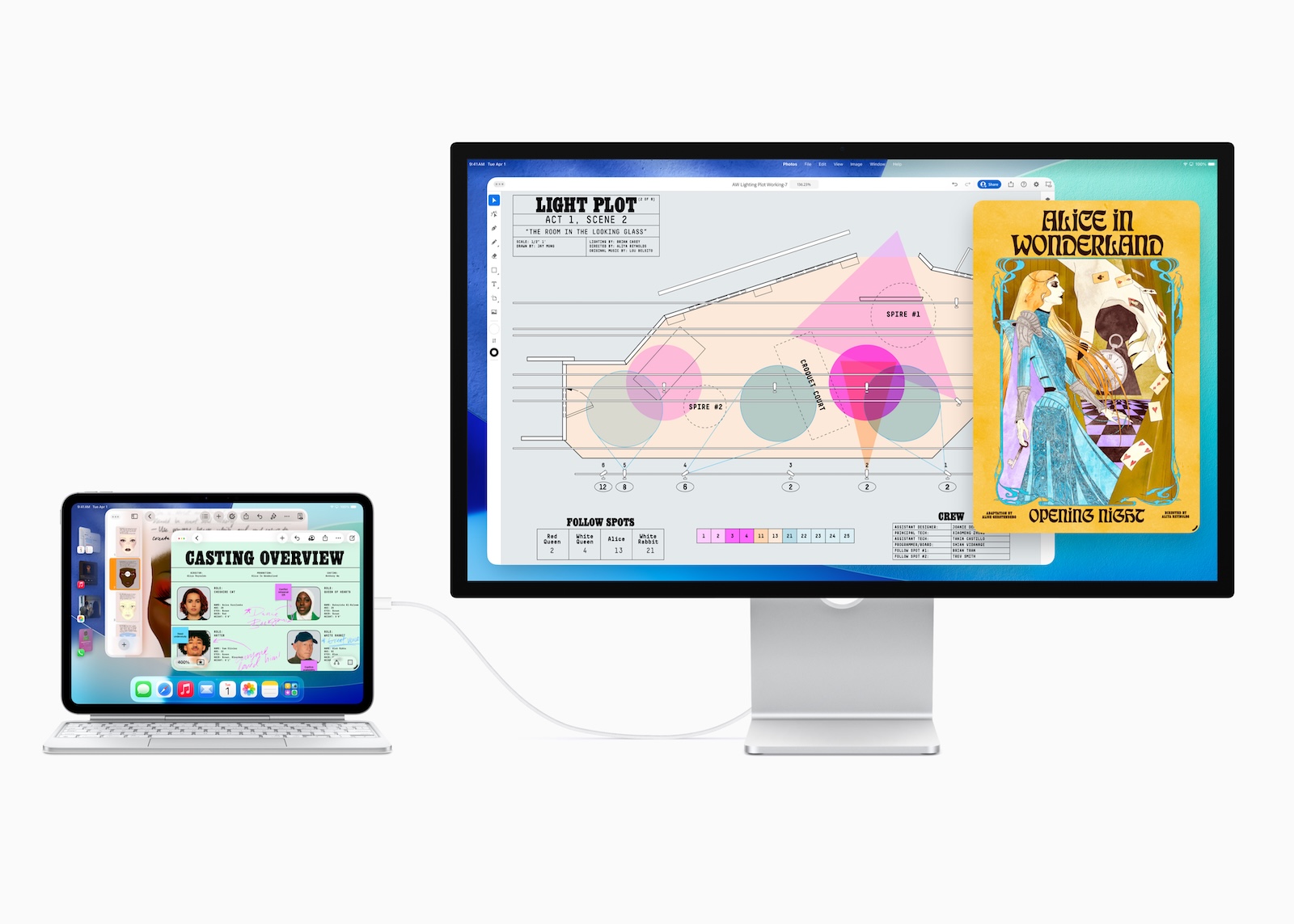
iPadOS 26 is available and brings fundamental changes to the iPad. Apple has fundamentally redesigned the user interface and multitasking system. The goal: to finally make the iPad feel like a real computer—no longer like a large iPhone, but more like a Mac.

The iPad already received the M1 chip, which is also found in Macs, in 2021. So why did it take four years for the operating system to finally take full advantage of the hardware? Craig Federighi, Apple's chief software officer, explains in an interview with ArsTechnica that it was less about performance—that was already there—but rather about the interaction model.

Why the iPad had to wait so long for desktop features

An iPad is operated directly with the finger. This means that every touch must trigger a visible response without delay. As soon as you feel like the device is lagging behind, the user experience suffers massively. With a Mac, it's different – here, users operate with a mouse and keyboard, which makes small latencies more forgivable. In addition, Apple delayed the introduction of features like window management for a long time because the iPad was traditionally designed for simplicity and focus. It wasn't until the increasing use of the keyboard and trackpad on the iPad that Apple saw the time was right to expand the system (via Arstechnica ).

What iPadOS 26 changes

The new operating system brings complete window management to the iPad for the first time. You can now open multiple apps at once, move them freely, adjust their size, and layer them on top of each other – just like you know from the Mac. There is also a menu bar that appears depending on the context and provides direct access to important functions. Before that, there were Split View and Slide Over, and later Stage Manager. But all of these solutions were not as flexible or intuitive as real windows. iPadOS 26 puts an end to compromises and brings the familiar macOS workflow directly to the tablet. A lot has changed under the hood too. Apple has completely redesigned the window system and reworked the management of background processes. The result: Even older iPads that don't support Stage Manager benefit from the new window management. iPadOS 26 uses the hardware more efficiently and distributes system resources more intelligently.

  • Another point: User habits have changed. More and more people are using their iPad in conjunction with a keyboard and trackpad. This is increasing the demand for productivity-oriented features that were previously reserved for the Mac.

iPadOS 26: The iPad is now a real computer – almost

With iPadOS 26, Apple has made the biggest changes to the iPad since its launch. The new window management, menu bar, and redesigned system behavior bring the iPad significantly closer to the Mac. Those looking to work productively now have significantly more options. Nevertheless, the iPad remains a touch device with its own unique requirements. Apple had to master the balancing act between direct usability and complex functionality – and with iPadOS 26, it has truly achieved this for the first time. If you want to use your iPad as a work device, this update is essential. It takes the iPad to a new level and makes it a viable alternative to a laptop. (Image: Apple)

  • tvOS 26 relies on Thread 1.4 for a better Apple Home
  • iPadOS 26: These features turn your iPad almost into a Mac

Make Apfelpatient a preferred source One click – and you'll see us more often on Google
Was this article helpful?
YesNo
Tags: iPadOSiPadOS 26
SendShareSend
Share

Our Amazon Storefront

A handpicked selection of products for iPhone, Mac and more – sorted by topic and updated regularly.

Shop Now

This post contains affiliate links (including Amazon). We earn a small commission on qualifying purchases – at no extra cost to you. Learn more on our Partner Program page.

Previous Post

tvOS 26 relies on Thread 1.4 for a better Apple Home

Next Post

Apple to launch new Siri features in spring 2026

Milan Jovicic

Milan Jovicic

Milan founded Apfelpatient in 2016 and has been responsible for all editorial content since 2018 — news, rumors, guides, and product reviews. Apple devices here are not test units on loan for two weeks but everyday tools: from the iPhone through MacBook Pro, MacBook Air, and iMac to the Apple Vision Pro, at least one device from nearly every product category is in daily use, many of them replaced annually. Every menu path in a guide is verified on the device before it is published.

Symbolic image for Apple government affairs: the glass entrance cube of the Apple Store on Fifth Avenue in New York at dusk

Apple hires new head of government relations

August 12, 2026 - 8:44 PM CEST
Key art for the Apple TV series Pluribus showing a screaming woman against a yellow background, with Pluribus season 2 about to begin filming

Pluribus: Gilligan plans at least three seasons

August 12, 2026 - 8:27 PM CEST
The iPhone 17 lineup in five colors seen from the back, whose successor is expected to adopt the smaller iPhone 18 Dynamic Island from the Pro models

iPhone 18: Smaller Dynamic Island already in the base model

August 12, 2026 - 8:13 PM CEST

About APFELPATIENT

APFELPATIENT brings you the latest Apple news, product updates, guides, reviews and tips across the entire Apple ecosystem — from the iPhone to the Mac to the Apple Vision Pro. From the first rumors to confirmed news: researched responsibly.

Follow Apfelpatient

Facebook Instagram YouTube Threads Threads

Company

  • About Apfelpatient
  • Contact
  • Author Profiles

Community

  • Netiquette
  • Push Notifications
  • RSS feed

Legal

  • Legal Notice
  • Privacy Policy
  • Terms of Use
  • Cookie Settings
  • Affiliate Program

Resources

  • Sitemap

© 2026 Apfelpatient. All rights reserved.

No Result
View All Result
  • Home
  • News
  • Rumors
  • Tips & Tricks
  • Reviews
  • Insights

© 2026 Apfelpatient. All rights reserved. Page Directory

Change language to Deutsch



