apple patient
  • Home
  • News
  • Rumors
  • Tips & Tricks
  • Reviews
  • Insights
No Result
View All Result
  • iPhone 18
  • iPhone 18 Pro
  • iPhone Duo
  • Apple Watch Series 12
  • Apple Watch Ultra 4
  • AirPods 5
  • iOS 27
  • iPadOS 27
  • macOS
  • MacBook Neo
  • iPhone 17e
  • AirTags
  • iOS 26
  • iPhone 17
  • MacBook Pro
  • iPadOS
  • iMac
  • Mac mini
  • HomePod
  • Apple TV
  • iPad Pro
  • iPhone Air
  • Apple Vision Pro
  • iPhone 16
  • AirPods 4
  • Apple Watch Ultra
  • HomePod Mini
  • MacBook Air
  • iPad
  • AirPods Max
  • AirPods Pro 3
  • Apple Watch Series 3
  • Mac Studio
  • Studio Display
  • iPad Air
  • iPad mini
  • watchOS 27
  • Apple CarPlay
  • Apple Pay
  • watchOS 26
  • Home
  • News
  • Rumors
  • Tips & Tricks
  • Reviews
  • Insights
No Result
View All Result
apple patient
No Result
View All Result
  • iPhone 18
  • iPhone 18 Pro
  • iPhone Duo
  • Apple Watch Series 12
  • Apple Watch Ultra 4
  • AirPods 5
  • iOS 27
  • iPadOS 27
  • macOS
  • MacBook Neo
  • iPhone 17e
  • AirTags
  • iOS 26
  • iPhone 17
  • MacBook Pro
  • iPadOS
  • iMac
  • Mac mini
  • HomePod
  • Apple TV
  • iPad Pro
  • iPhone Air
  • Apple Vision Pro
  • iPhone 16
  • AirPods 4
  • Apple Watch Ultra
  • HomePod Mini
  • MacBook Air
  • iPad
  • AirPods Max
  • AirPods Pro 3
  • Apple Watch Series 3
  • Mac Studio
  • Studio Display
  • iPad Air
  • iPad mini
  • watchOS 27
  • Apple CarPlay
  • Apple Pay
  • watchOS 26

Apple releases BSI update for iOS 26.3.1 & Co.

Milan Jovicic by Milan Jovicic
March 17, 2026 - 9:02 PM CET
in Apple News
0
Apple iOS 26.3.1a BSI

Image: Apfelpatient

WhatsAppFacebookEmail
Threads

Apple has introduced a new security update system and released its first "Background Security Improvement" (BSI) update. The updates affect macOS Tahoe 26.3.1, iOS 26.3.1, and iPadOS 26.3.1. There is also a separate version for macOS Tahoe 26.3.2, which is exclusively for the MacBook Neo. The primary focus of these updates is the fix for a security vulnerability in WebKit.

Apple continuously improves its security mechanisms. In the past, it used so-called "Rapid Security Responses," which were quick interim updates for acute security problems. With the new background security enhancements, Apple is replacing this system with an approach that delivers updates in the background and intervenes more selectively between regular software versions.

The new feature was already introduced with iOS 26, iPadOS 26 and macOS Tahoe, and was tested internally in version 26.3 prior to its current release.

What are background security updates on Apple?

Background security improvements are a new update format from Apple. They are designed to fix critical security issues independently of major system updates.

The focus is on providing protective measures more quickly, especially for key components such as:

  • Safari
  • WebKit
  • System libraries

This closes a time gap between regular updates, during which security risks could exist.

Which versions are affected?

The first published BSI update is available for several systems:

  • macOS Tahoe 26.3.1
  • iOS 26.3.1
  • iPadOS 26.3.1

Additionally, another update was released:

  • macOS Tahoe 26.3.2 (exclusive to MacBook Neo)

These updates mark the official launch of the new security model.

Which security vulnerability was fixed?

At the heart of the matter is a vulnerability in WebKit, Apple's browser engine. This flaw allowed specially manipulated web content to circumvent the so-called same-origin policy.

This security policy normally ensures that the content of different websites remains strictly separated. If it is circumvented, potentially sensitive data can be exposed or misused.

Apple closed the vulnerability by improving input validation. This prevents malicious code from being executed via manipulated content.

Installing Apple background security updates

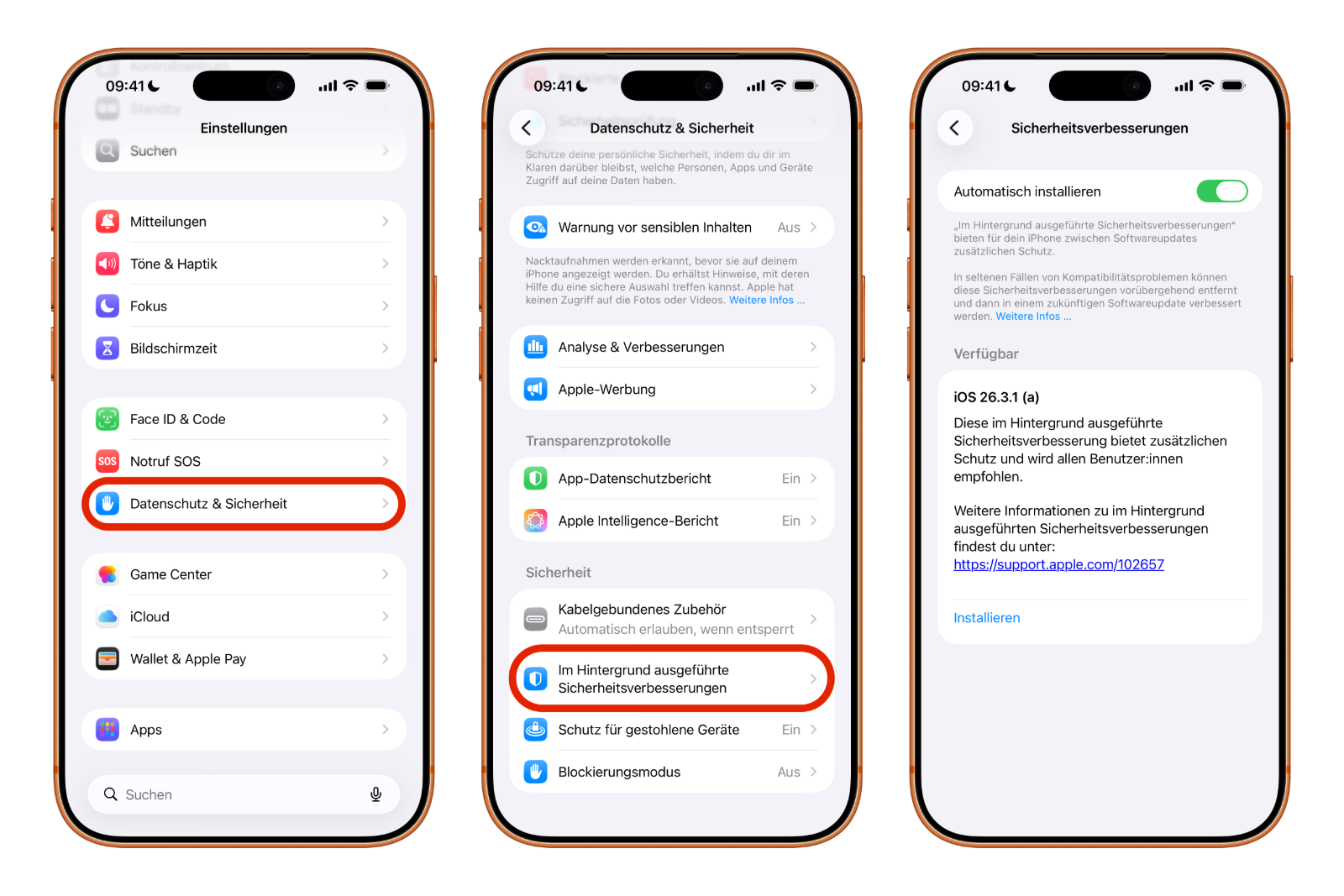
BSI updates can be installed directly via the system settings. The process is clearly defined:

  • Open the settings
  • Navigate to the "Privacy & Security" section.
  • Scroll down
  • Open "Background Security Improvements"
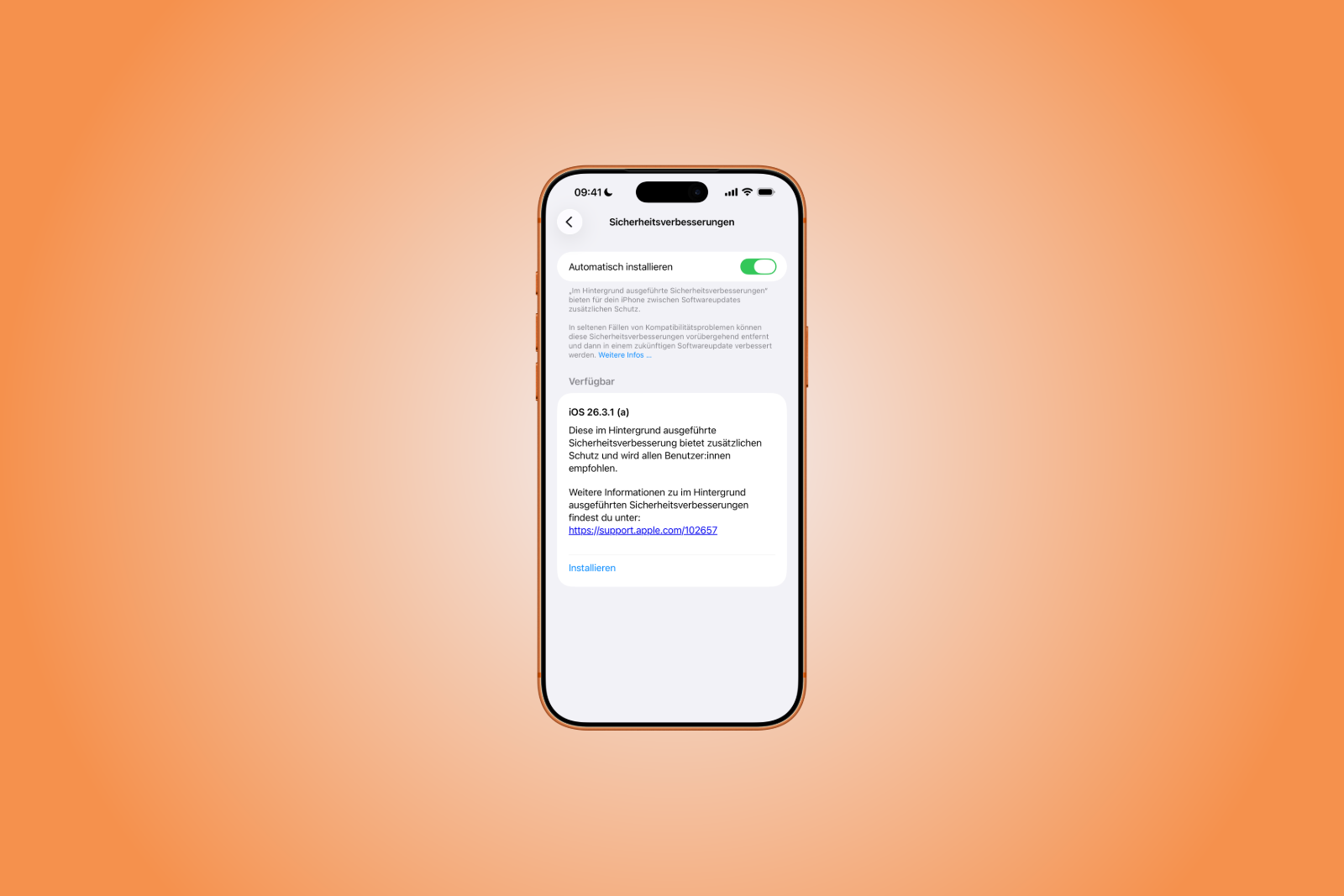
  • Now tap "Install".
Apple iOS 26.3.1a BSI
Image: Apfelpatient

If automatic installation is enabled, updates will be installed automatically in the background as soon as they are available.

Behavior when updates are disabled

Those who choose not to install the background security updates will receive the corresponding security fixes at a later date as part of a regular software update.

Until then, the respective security vulnerability will potentially remain.

Potential compatibility issues

Apple points out that compatibility issues may occur in rare cases. In such situations, the company may respond by:

  • the affected update will be temporarily withdrawn
  • A revised version will be provided in a later update.

This information indicates that while the new background updates are fast, they can also have an impact on existing systems.

Background Security Improvement (BSI) Updates: Apple's answer to modern threats

With the introduction of background security enhancements, Apple is fundamentally changing its update strategy. The new BSI updates make it possible to close security gaps more quickly and precisely, without relying on full system updates.

The first release addresses a critical WebKit vulnerability and demonstrates how Apple is responding to current threats. However, some residual risk remains due to potential compatibility issues. Overall, the new system represents a clear step towards continuous and flexible security updates.

For those who want to delve deeper into Apple's history and philosophy, here are some suitable book recommendations! (Image: Apfelpatient)

  • MacBook Neo: Camera protection without hardware light
  • OpenAI officially introduces GPT-5.4 mini and nano
  • Apple TV shows new trailer for the comedy "Outcome"
  • Apple Anniversary: China is the next big stage
  • Tim Cook speaks plainly about Apple, AI and resignation
  • MacBook Neo: YouTuber upgrades storage to 1 TB
  • Apple AI creates 3D models from just one image
  • WhatsApp is testing guest chats: New feature at a glance
  • Apple TV: Severance Season 3 – Production starts soon
  • Apple officially classifies two iPhones as obsolete
  • Apple acquires MotionVFX: More power for Final Cut Pro
  • Apple introduces AirPods Max 2 with new audio features
  • Apple TV: Racing film "F1" wins Oscar for best sound
  • Apple celebrates 50 years of innovation & creativity worldwide
  • Apple increases iPad sales despite decline in the tablet market
  • MacBook Neo teardown: Surprisingly easy to repair
  • Apple lowers commission for developers in the App Store in China
  • MacBook Neo impresses – former Windows chief becomes thoughtful
  • Apple benefits from India's new production incentives
  • MacBook Neo teardown: Modular, screwed together, repairable
  • Apple turns 50: Tim Cook looks back on history & future
  • Apple closes Coruna vulnerability with updates for older devices

Make Apfelpatient a preferred source One click – and you'll see us more often on Google
Was this article helpful?
YesNo
Tags: Apple ServicesiOSiOS 26.3.1iPadOSiPadOS 26.3.1macOSmacOS 26.3.1Safari
SendShareSend
Share

Our Amazon Storefront

A handpicked selection of products for iPhone, Mac and more – sorted by topic and updated regularly.

Shop Now

This post contains affiliate links (including Amazon). We earn a small commission on qualifying purchases – at no extra cost to you. Learn more on our Partner Program page.

Previous Post

MacBook Neo: Camera protection without hardware light

Next Post

iPhone 17e Teardown: New insights into the inner workings

Milan Jovicic

Milan Jovicic

Milan founded Apfelpatient in 2016 and has been responsible for all editorial content since 2018 — news, rumors, guides, and product reviews. Apple devices here are not test units on loan for two weeks but everyday tools: from the iPhone through MacBook Pro, MacBook Air, and iMac to the Apple Vision Pro, at least one device from nearly every product category is in daily use, many of them replaced annually. Every menu path in a guide is verified on the device before it is published.

Related posts

watchOS 27.2: Code reveals new screenshot preview

by Milan Jovicic
September 24, 2026 - 8:36 p.m. CEST
Apple Watch Ultra with an orange band showing the app view, the device getting the new screenshot preview in watchOS 27.2

watchOS 27.2 includes a new screenshot interface for the Apple Watch: preview, share, and delete, just like on the iPhone. It's currently inactive.

Read moreDetails

Apple TV: Peanuts classics free again for Christmas

by Milan Jovicic
September 24, 2026 - 6:43 p.m. CEST
Charlie Brown holding a small Christmas tree under a starry sky in the snow, a scene from A Charlie Brown Christmas, free again on Apple TV

Three classic Peanuts cartoons are back on Apple TV for the holidays, no subscription required. Plus, there are new specials featuring Snoopy and the Fraggle Rocks.

Read moreDetails

The Wanted Man: Hugh Laurie on Apple TV from January

by Milan Jovicic
September 24, 2026 - 6:19 p.m. CEST
Hugh Laurie as crime boss Felix Carmichael in an evening scene from The Wanted Man on Apple TV

The Wanted Man premieres on January 6, 2027 on Apple TV. Hugh Laurie plays a crime boss who wants to escape – the finale is in February.

Read moreDetails

Apple and Qualcomm extend patent license from 2027

by Milan Jovicic
September 24, 2026 - 6:04 p.m. CEST
Back of an iPhone 18 Pro Max in a burgundy case on a grey surface, covered by the renewed Apple Qualcomm patent license

Apple and Qualcomm are extending their patent license from April 2027. Why this has nothing to do with the modem change and affects Germany.

Read moreDetails

iPhone 18 Pro: Update to prevent Face ID restarts is coming

by Milan Jovicic
September 24, 2026 - 1:13 p.m. CEST
iPhone showing the General settings with Software Update, where the fix for the Face ID reboots on iPhone 18 Pro will arrive

Apple has confirmed an update to fix the restarts after failed Face ID recognition on the iPhone 18 Pro and Pro Max. An exchange is not worthwhile.

Read moreDetails
Load More

Categories

  • Apple Insights
  • Apple Rumors
  • Apple News
  • Apple Tips & Tricks
  • iPhone news, rumors and tips
  • Mac and MacBook News
  • Reviews

About APFELPATIENT

APFELPATIENT brings you the latest Apple news, product updates, guides, reviews and tips across the entire Apple ecosystem — from the iPhone to the Mac to the Apple Vision Pro. From the first rumors to confirmed news: researched responsibly.

Follow Apfelpatient

Facebook Instagram YouTube Threads Threads

Company

  • About Apfelpatient
  • Contact
  • Author Profiles

Community

  • Netiquette
  • Push Notifications
  • RSS feed

Legal

  • Legal Notice
  • Privacy Policy
  • Terms of Use
  • Cookie Settings
  • Affiliate Program

Resources

  • Sitemap

© 2026 Apfelpatient. All rights reserved.

No Result
View All Result
  • Home
  • News
  • Rumors
  • Tips & Tricks
  • Reviews
  • Insights

© 2026 Apfelpatient. All rights reserved. Page Directory

Change language to Deutsch