

apple patient
  • Home
  • News
  • Rumors
  • Tips & Tricks
  • Reviews
  • Insights
No Result
View All Result
  • iPhone 18
  • iOS 27
  • iPadOS 27
  • macOS
  • MacBook Neo
  • iPhone 17e
  • AirTags
  • iOS 26
  • iPhone 17
  • MacBook Pro
  • iPadOS
  • iMac
  • Mac mini
  • HomePod
  • Apple TV
  • iPad Pro
  • iPhone Air
  • Apple Vision Pro
  • iPhone 16
  • AirPods 4
  • Apple Watch Ultra
  • HomePod Mini
  • MacBook Air
  • iPad
  • AirPods Max
  • AirPods Pro 3
  • Apple Watch Series 3
  • Mac Studio
  • Studio Display
  • iPad Air
  • iPad mini
  • watchOS 27
  • Apple CarPlay
  • Apple Pay
  • watchOS 26
  • Home
  • News
  • Rumors
  • Tips & Tricks
  • Reviews
  • Insights
No Result
View All Result
apple patient
No Result
View All Result

iPhone 15 Pro: How to configure the action button

Milan Jovicic by Milan Jovicic
September 22, 2023 - 11:46 p.m. CEST
in Apple Tips & Tricks
0
iPhone 15 Pro action button

Image: Apple

WhatsAppFacebookEmail
Threads

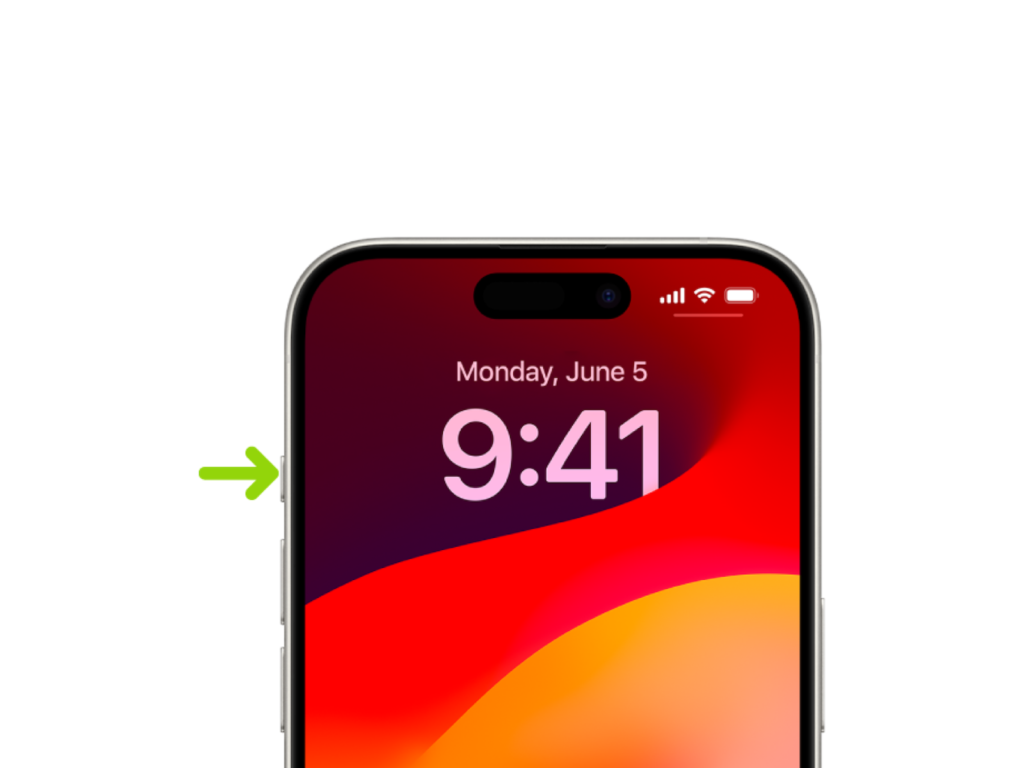
The iPhone 15 Pro and iPhone 15 Pro Max bring a notable innovation - the Action button. This replaces the familiar "Ring/Silent" button and allows you to individually assign a variety of functions. In this article, you will learn how to customize the Action button on your iPhone 15 Pro and iPhone 15 Pro Max to suit your needs.

The Action button on iPhone 15 Pro and iPhone 15 Pro Max opens up a new world of possibilities. Instead of a rigid function, you can now configure it to your liking to perform frequently used actions in a flash. Whether you want to launch the camera, turn on the flashlight, or activate silent mode, the Action button is at your disposal.
iPhone 15 Pro action button
Image: Apple

Customize the Action Button on iPhone 15 Pro and iPhone 15 Pro Max

Customizing the Action button on your iPhone 15 Pro and iPhone 15 Pro Max is very easy. Here are the steps:

  • Go to Settings > Action Key.
  • An overview of the possible actions that you can assign to the action key appears. These symbols represent the different functions.
  • To select an action, simply swipe your finger over the desired icon. The name of the action will appear below the dots.
  • If there are additional options for the selected action, the Menu button will appear below the action. Tap it to see the available options.

These are the currently available promotions:

  • Silent mode: Switch between “mute” and “unmute” for calls and alerts.
  • Focus: Turn on Focus to mute notifications and filter out distractions.
  • Camera: Open the Camera app to capture a moment.
  • Flashlight: Activate additional lighting when needed.
  • Voice Memo: Record personal notes, music ideas, and more.
  • Magnifying Glass: Turn your iPhone into a magnifying glass to enlarge or identify objects around you.
  • Shortcut: Open an app or run your favorite shortcut.
  • Accessibility: Quickly use an accessibility feature.
  • No Action: Sets the action key to “Do nothing”.

Conclusion

By customizing the Action button on your iPhone 15 Pro and iPhone 15 Pro Max, you get a tailored user experience. You can access frequently used functions in a flash and adapt your smartphone to your needs. Discover the versatility of the Action button and optimize the use of your iPhone 15 Pro for an even more efficient experience. Are you looking for new accessories? Then take a look in our Amazon Storefront - there you will find numerous products from leading providers, also for HomeKit and Co.! (Image: Apple)

  • iPhone 15 Pro: How to hide silent mode icon
  • iPhone 15 Pro focal length presets: How to optimize them
  • Charge your iPhone 15 faster: tips and tricks

Make Apfelpatient a preferred source One click – and you'll see us more often on Google
Was this article helpful?
YesNo
Tags: iOSiPhoneiPhone 15
SendShareSend
Share

Our Amazon Storefront

A handpicked selection of products for iPhone, Mac and more – sorted by topic and updated regularly.

Shop Now

This post contains affiliate links (including Amazon). We earn a small commission on qualifying purchases – at no extra cost to you. Learn more on our Partner Program page.

Previous Post

iPhone 15 Setup: Solve problems with iOS 17.0.2

Next Post

iPhone 15 Pro: How to hide silent mode icon

Milan Jovicic

Milan Jovicic

Milan founded Apfelpatient in 2016 and has been responsible for all editorial content since 2018 — news, rumors, guides, and product reviews. Apple devices here are not test units on loan for two weeks but everyday tools: from the iPhone through MacBook Pro, MacBook Air, and iMac to the Apple Vision Pro, at least one device from nearly every product category is in daily use, many of them replaced annually. Every menu path in a guide is verified on the device before it is published.

Symbolic image for Apple government affairs: the glass entrance cube of the Apple Store on Fifth Avenue in New York at dusk

Apple hires new head of government relations

August 12, 2026 - 8:44 PM CEST
Key art for the Apple TV series Pluribus showing a screaming woman against a yellow background, with Pluribus season 2 about to begin filming

Pluribus: Gilligan plans at least three seasons

August 12, 2026 - 8:27 PM CEST
The iPhone 17 lineup in five colors seen from the back, whose successor is expected to adopt the smaller iPhone 18 Dynamic Island from the Pro models

iPhone 18: Smaller Dynamic Island already in the base model

August 12, 2026 - 8:13 PM CEST

About APFELPATIENT

APFELPATIENT brings you the latest Apple news, product updates, guides, reviews and tips across the entire Apple ecosystem — from the iPhone to the Mac to the Apple Vision Pro. From the first rumors to confirmed news: researched responsibly.

Follow Apfelpatient

Facebook Instagram YouTube Threads Threads

Company

  • About Apfelpatient
  • Contact
  • Author Profiles

Community

  • Netiquette
  • Push Notifications
  • RSS feed

Legal

  • Legal Notice
  • Privacy Policy
  • Terms of Use
  • Cookie Settings
  • Affiliate Program

Resources

  • Sitemap

© 2026 Apfelpatient. All rights reserved.

No Result
View All Result
  • Home
  • News
  • Rumors
  • Tips & Tricks
  • Reviews
  • Insights

© 2026 Apfelpatient. All rights reserved. Page Directory

Change language to Deutsch



