apple patient
  • Home
  • News
  • Rumors
  • Tips & Tricks
  • Reviews
  • Insights
No Result
View All Result
  • iPhone 18
  • iOS 27
  • iPadOS 27
  • macOS
  • MacBook Neo
  • iPhone 17e
  • AirTags
  • iOS 26
  • iPhone 17
  • MacBook Pro
  • iPadOS
  • iMac
  • Mac mini
  • HomePod
  • Apple TV
  • iPad Pro
  • iPhone Air
  • Apple Vision Pro
  • iPhone 16
  • AirPods 4
  • Apple Watch Ultra
  • HomePod Mini
  • MacBook Air
  • iPad
  • AirPods Max
  • AirPods Pro 3
  • Apple Watch Series 3
  • Mac Studio
  • Studio Display
  • iPad Air
  • iPad mini
  • watchOS 27
  • Apple CarPlay
  • Apple Pay
  • watchOS 26
  • Home
  • News
  • Rumors
  • Tips & Tricks
  • Reviews
  • Insights
No Result
View All Result
apple patient
No Result
View All Result

iOS 14: How to activate sound detection

Milan Jovicic by Milan Jovicic
June 28, 2020 - 2:48 PM CEST
in Apple Tips & Tricks
0
Galati, Romania - October 26, 2018: Apple launch the new smartphone iPhone XS and iPhone XS Max. iPhone Xs Max on black background.

Galati, Romania - October 26, 2018: Apple launch the new smartphone iPhone XS and iPhone XS Max. iPhone Xs Max on black background.

WhatsAppFacebookEmail
Threads

Apple has implemented numerous useful features in iOS 14. But sound detection is definitely one of the most useful functions. 

As part of the major iOS and iPadOS updates, Apple has implemented a remarkable feature in the area of accessibility. Sound detection is a function that is primarily intended to help people with hearing impairments. The description states:

iOS 14: Twelve different sounds 

The iPhone constantly listens for certain sounds and will use artificial intelligence on the device to try to notify you when sounds are detected.

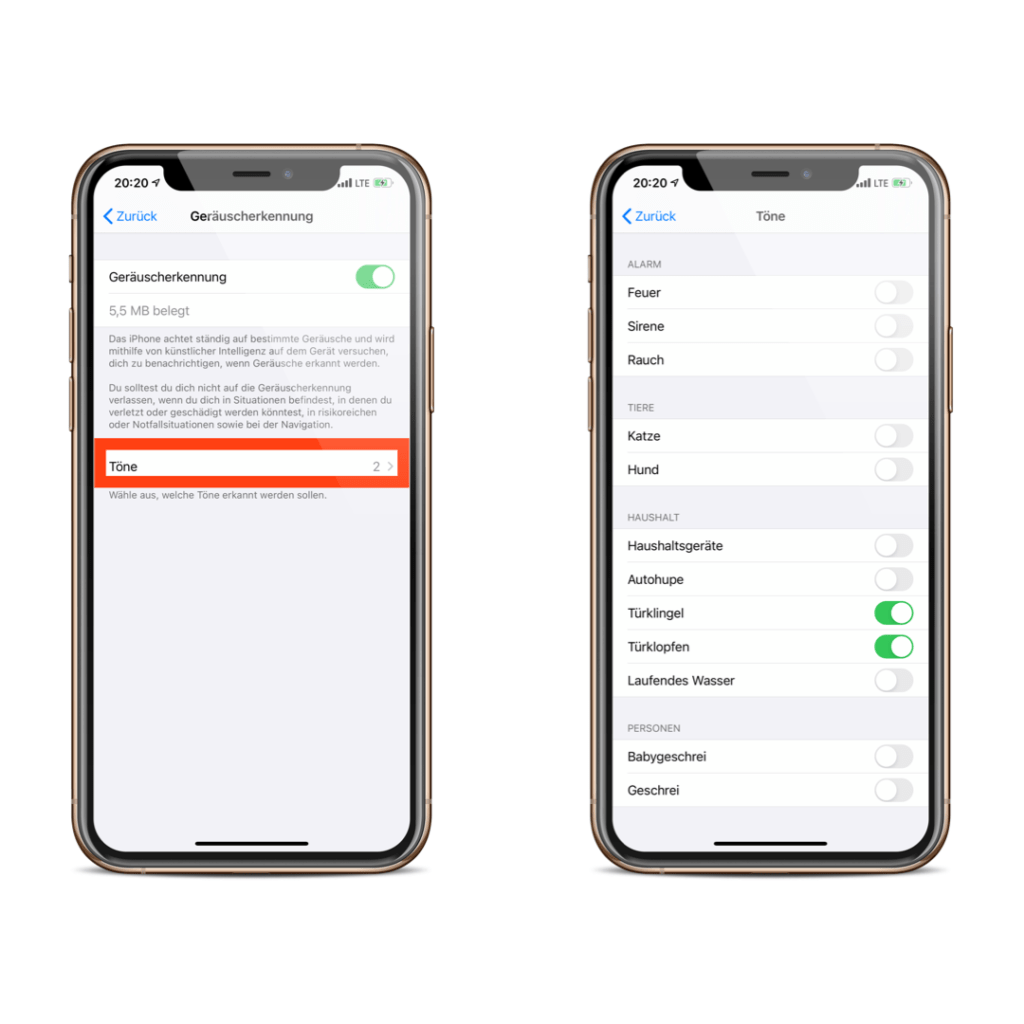
A total of twelve different sounds are available, divided into four categories. 

alarm

  • Fire
  • Siren
  • smoke

Animals

  • Cat
  • Dog

Household

  • household appliances
  • car horn
  • doorbell
  • door knocking
  • Running water

persons

  • baby crying
  • shouting

Although the feature could prove useful, Apple warns against it. The description states:

You should not rely on sound detection when you are in situations where you could be injured or harmed, in high-risk or emergency situations, or when navigating.

So I would like to show you, of course with reservations, how to activate the function. 

How to enable sound detection on your iPhone or iPad

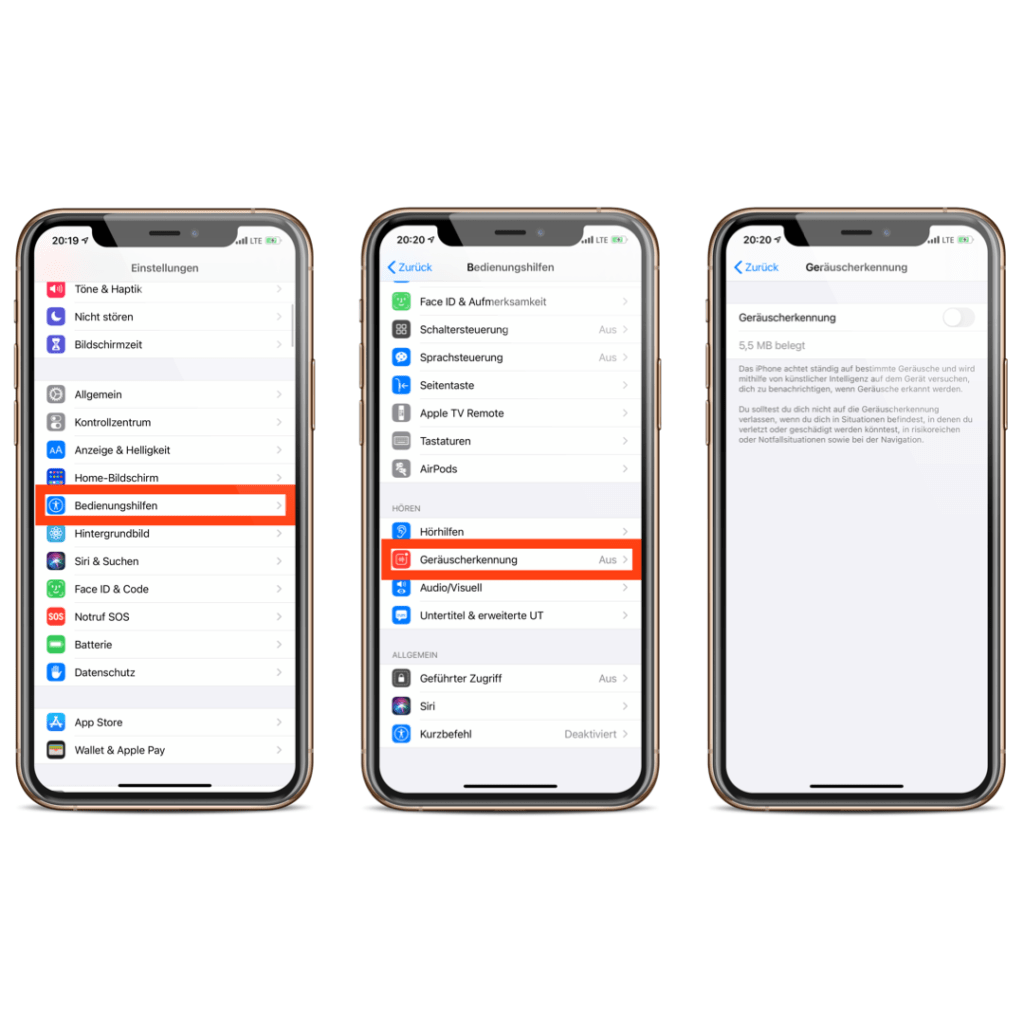
To activate sound detection in iOS 14, you need to open the "Sound Detection" menu item in the "Accessibility" section of the iOS settings. You can now activate the function. 

Screenshot: Apfelpatient

Please note: Activating the option will take up around 5.5 MB of storage space on your device. Now you can choose between the sounds mentioned above under "Sounds". 

Screenshot: Apfelpatient

From now on, your iPhone or iPad will continuously search for the sounds you have selected. As soon as a match is found thanks to the device's internal intelligence, you will receive a notification.

How to add sound detection to your control center

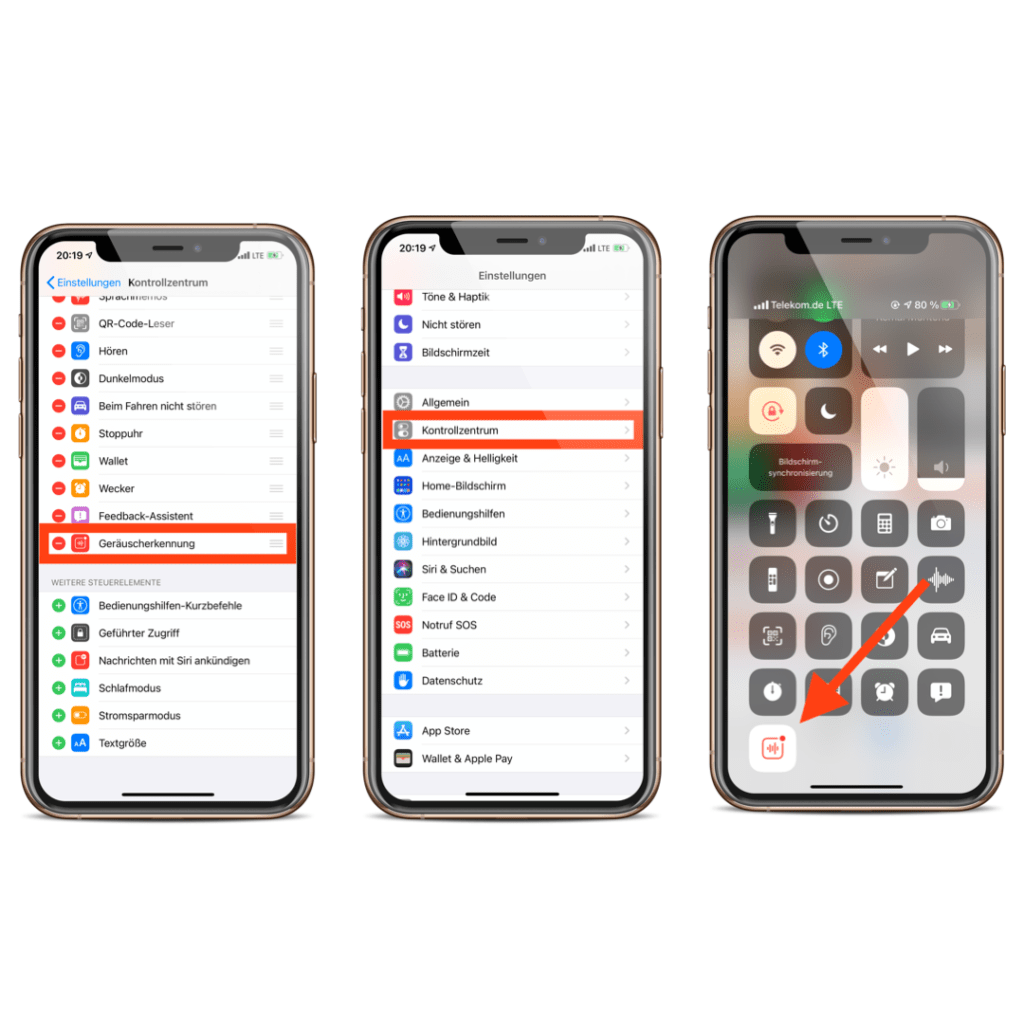
Since most people probably won't use the function all the time, sound detection must be deactivated or reactivated from time to time. The process would be much longer via the iOS settings - Apple knows this too. For this reason, the function can be stored in the control center. The prerequisite for this is that the feature must be activated. So open the iOS settings and navigate to the menu item "Control Center". You can now add the function here. If you now open the control center and click on the item "Sound Detection", you can deactivate or activate it. 

Screenshot: Apfelpatient

If you press and hold, a submenu opens where you can turn the individual sounds on or off. From here you can also access the full settings. (Photo by manae / Bigstockphoto)


  • iOS 14: How to create widgets on the iPhone
  • iOS 14: iPhone back triggers quick actions
Make Apfelpatient a preferred source One click – and you'll see us more often on Google
Was this article helpful?
YesNo
Tags: iOSiOS 14iPadOSiPadOS 14
SendShareSend
Share

Our Amazon Storefront

A handpicked selection of products for iPhone, Mac and more – sorted by topic and updated regularly.

Shop Now

This post contains affiliate links (including Amazon). We earn a small commission on qualifying purchases – at no extra cost to you. Learn more on our Partner Program page.

Previous Post

When will iOS 14 be released for all users?

Next Post

iPhone 12: Bye Bye Charger & Headphones

Milan Jovicic

Milan Jovicic

Milan founded Apfelpatient in 2016 and has been responsible for all editorial content since 2018 — news, rumors, guides, and product reviews. Apple devices here are not test units on loan for two weeks but everyday tools: from the iPhone through MacBook Pro, MacBook Air, and iMac to the Apple Vision Pro, at least one device from nearly every product category is in daily use, many of them replaced annually. Every menu path in a guide is verified on the device before it is published.

Customers crowding an Apple Store as the US smartphone market lost five percent in sales during the second quarter

US smartphone market shrinks, iPhone 18 expected to be more expensive

August 12, 2026 - 23:47 CEST
Ted Lasso standing beside a coach in the empty AFC Richmond stadium while Apple has yet to decide on Ted Lasso season 5

Ted Lasso Season 5: Apple still sees plenty of stories

August 12, 2026 - 10:11 PM CEST
Concept design of the iPhone Ultra in its unfolded state with a large inner display

iPhone Ultra (iPhone Fold): All rumors and facts at a glance

August 12, 2026 - 9:32 PM CEST

About APFELPATIENT

APFELPATIENT brings you the latest Apple news, product updates, guides, reviews and tips across the entire Apple ecosystem — from the iPhone to the Mac to the Apple Vision Pro. From the first rumors to confirmed news: researched responsibly.

Follow Apfelpatient

Facebook Instagram YouTube Threads Threads

Company

  • About Apfelpatient
  • Contact
  • Author Profiles

Community

  • Netiquette
  • Push Notifications
  • RSS feed

Legal

  • Legal Notice
  • Privacy Policy
  • Terms of Use
  • Cookie Settings
  • Affiliate Program

Resources

  • Sitemap

© 2026 Apfelpatient. All rights reserved.

No Result
View All Result
  • Home
  • News
  • Rumors
  • Tips & Tricks
  • Reviews
  • Insights

© 2026 Apfelpatient. All rights reserved. Page Directory

Change language to Deutsch